


 ビデオコンバーター究極
 スクリーンレコーダー
 ビデオ修復
ビデオ修復
 安全なダウンロード
MP4 を WhatsApp ビデオに変換する 2 つの効果的な方法 [2024]
現在、WhatsApp はオンライン インタラクション、特に写真やビデオなどのメディア ファイルの共有にますます人気が高まっています。ただし、このソーシャル メディア プラットフォームでは、ファイル形式とサイズに関してユーザーが従う必要のあるルールが課せられています。このため、ユーザーは多くの場合、MP4 ビデオを変換して WhatsApp の要件を満たすようにする必要があります。
そこで、ファイルサイズの上限やファイル形式の互換性に悩んでいるなら、この記事がその解決策になります。面倒な手順なしでMP4をWhatsApp用動画に簡単に変換する方法を学びましょう。手順も一つひとつ解説し、WhatsAppでスムーズに共有できるよう動画を最適化するところまでご案内します。さあ、始めてみましょう!

パート1: WhatsAppと互換性のあるビデオ形式
他のソーシャル メディア プラットフォームと比較すると、WhatsApp では動画の共有に関して制限があります。このアプリでは、90 秒から 3 分までの短い動画しか共有できません。
さらに、デフォルトのビデオ サイズ制限は最大 64 MB であるため、大きすぎることはできません。解像度に関しては、480p 解像度のビデオ ファイルのみを送信できます。
また、ビデオ形式に関しては、ビデオファイルが MP4、MKV、AVI、3GP、または MOV 形式であることを確認してください。したがって、WhatsApp で MP4 ファイルを送信する場合は、不便や非互換性の問題を回避するために、これらの点に注意してください。
パート 2: MP4 を WhatsApp ビデオにオンラインで変換する方法 [無料 & 簡単]
もし、MP4をWhatsApp用動画に無料かつ簡単に変換したいのであれば、最適なツールはオンラインのFVC Free Video Converterです。WhatsAppにはファイルサイズや形式の制限がありますが、このツールを使えば、MP4ファイルをこのプラットフォームでサポートされている形式に簡単に変換できます。それだけでなく、変換時にMP4ファイルのビデオとオーディオのコーデックや解像度もカスタマイズできます。
これを実行するには、以下の手順に従います。
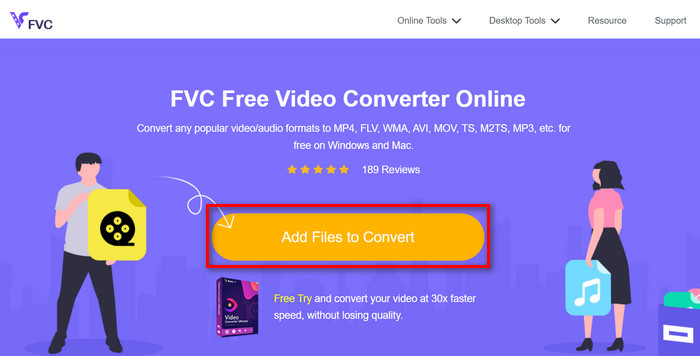
ステップ1.まず、変換したいMP4ファイルをインポートします。そのためには、Add Files to Convertボタンをクリックしてください。
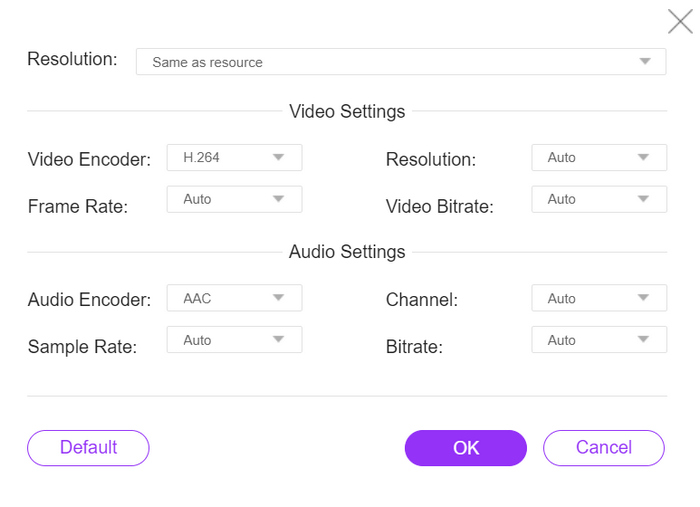
ステップ2.次に、出力したい形式を選択します。WhatsAppでサポートされている形式の中から自由に選べます。一方で、解像度やビデオエンコーダー、ビットレートなどを手動で設定したい場合は、出力形式の横にあるGearアイコンをクリックしてください。設定が完了したら、OKボタンをクリックします。
手順 3.最後に、変換を開始するには、変換ボタンをクリックします。
FVC Free Video Converter Online のシンプルで直感的なインターフェイスを使用すると、MP4 ファイルを WhatsApp でサポートされているファイル形式に変換することが簡単にできます。さらに、ファイル形式とビデオ解像度の幅広いオプションにより、WhatsApp でファイルを共有するための要件を確実に満たすことができます。
パート3:MP4をWhatsAppビデオに変換する最も速い方法
一方、MP4 ファイルを WhatsApp ビデオに変換できるフル機能のツールを探している場合は、これに注目してください。FVC Video Converter Ultimate は、変換目的でさまざまなビデオおよびオーディオ ファイルを処理するように設計された包括的なコンバーター ツールです。したがって、MP4 ファイルを WhatsApp と互換性のある形式に変換したい場合は、このツールを使用すると、迅速かつ簡単に変換できます。
さらに、このツールを使用すると、ビデオのエンコーダーとビデオ解像度を調整できるため、変換プロセスを完全に制御できます。
手順 1.まず、ソフトウェアをダウンロードしてパソコンにインストールします。
無料ダウンロードWindows 7 以降に対応安全なダウンロード
無料ダウンロードMacOS 10.7 以降に対応安全なダウンロード
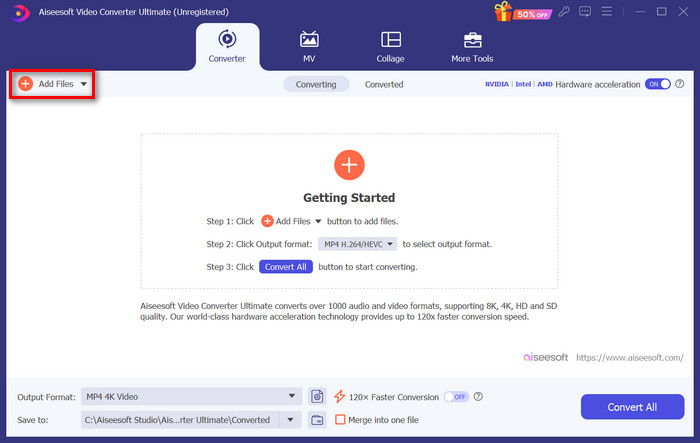
ステップ2.Converterタブで、Add Filesボタンをクリックし、MP4ファイルをインポートします。
ステップ3.MP4ファイルがインポートされたら、Output formatボタンをクリックし、一覧から希望する出力形式を選択します。
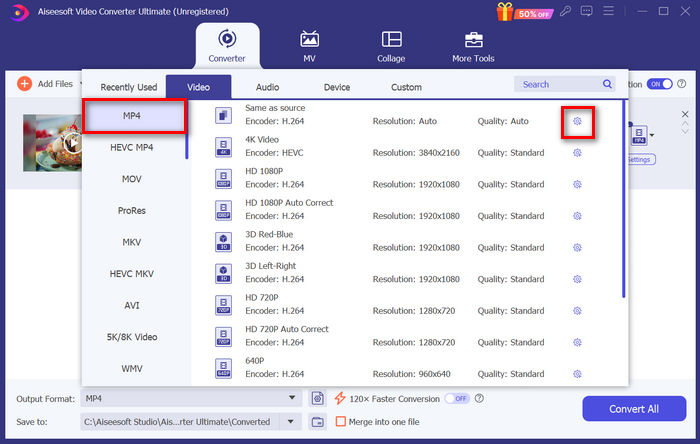
ステップ4.Custom Profileで、Settingsダイアログボックスを開きます。ここでビデオコーデックを変更したり、ビデオ解像度を調整したりできます。設定が完了したら、Create Newボタンをクリックして保存します。
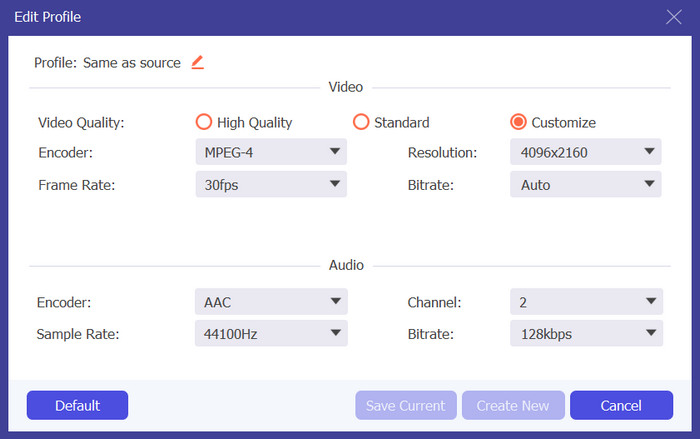
ステップ5.すべての設定が終わったら、Convert Allボタンをクリックします。
変換された MP4 出力と WhatsApp の互換性を確保するために、カスタム プロファイルでビデオ解像度を 480p に調整することを忘れないでください。
また、上限に合わせてWhatsApp動画のサイズを圧縮したい場合は、Toolboxタブに切り替えて、Video Compressor機能を利用できます。
パート4: MP4をWhatsAppビデオに変換する際のよくある質問
WhatsAppからMP4をダウンロードするにはどうすればいいですか?
WhatsApp から MP4 ビデオをダウンロードするには、ビデオが含まれているチャットを開き、ビデオをタップして開き、通常はビデオ プレーヤーの隅にあるダウンロード アイコンをタップします。
WhatsAppでMP4を送信できますか?
はい。WhatsApp で MP4 ビデオを送信できます。ただし、ビデオの送受信で問題が発生しないように、ビデオが WhatsApp のファイル サイズと形式の制限に準拠していることを確認することが重要です。
WhatsApp 用の MP4 ビデオのファイル サイズを縮小するにはどうすればよいですか?
ビデオ圧縮ソフトウェアまたはオンライン ツールを使用して、WhatsApp 用の MP4 ビデオのファイル サイズを変更できます。これらのツールには、適切な品質を維持しながらビデオを圧縮する機能があり、WhatsApp 経由での送信が容易になります。
複数の MP4 ファイルを同時に WhatsApp ビデオに変換できますか?
はい。FVC Video Converter Ultimate のバッチ変換機能を使用して、複数の MP4 ファイルを同時に WhatsApp ビデオに変換できます。この機能を使用すると、一度に多数のファイルをすばやく簡単に変換できるため、時間と労力を節約できます。
結論
まとめると、MP4をWhatsApp用動画に変換するのは、これまでになく簡単になりました。FVC Free Video Converter Online や FVC Video Converter Ultimate のようなツールを使えば、WhatsAppのサイズや形式の要件を満たす動画にスムーズに変換できます。シンプルなオンラインツールを使いたい場合でも、高機能なデスクトップツールを使いたい場合でも、今やWhatsAppで動画を手軽に共有する手段が整っています。
WhatsApp の互換性の問題に別れを告げ、アプリ内での手間のかからない共有を実現しましょう。
-
 デスクトップやオンラインで簡単に MP4 を MPG に変換する方法
 簡単な手順でお気に入りの MP4 を MPG に変換する方法を学びましょう。技術的な問題はなく、メディア ファイルをスムーズに移行できます。
-
 手間をかけずにMP4をMXFに変換する方法ガイド
 MP4 から MXF への変換は簡単になります。手間をかけずにビデオ形式を切り替える方法を学びましょう。スムーズに移行できるよう、段階的なガイダンスを取得します。
-
 使用を検討すべき最高の MP4 から WAV へのコンバーター
 MP4 から WAV への変換が簡単になりました。技術的なストレスを忘れて、プロのようにフォーマットを切り替えましょう。今すぐ試して、新しく見つけた WAV トラックを楽しみましょう!
