


 ビデオコンバーター究極
 スクリーンレコーダー
 ビデオ修復
ビデオ修復
 安全なダウンロード
PDF サイズを縮小するベスト 5 ツール [オンラインとオフライン]
確かに、あなたも同じ理由でここに来ています。PDF ファイルのサイズが大きくなって困っています。これは、画像、グラフィック、複雑なデザイン、さまざまなフォントが多数含まれたドキュメントのファイル形式として PDF を使用するユーザーにとって、よくある問題です。
ただし、この方法の欠点は、PDF ファイルのサイズが大きくなり、特に PDF ファイルを開いたり電子メールで送信したりするときに、ファイルが正常に機能しなくなることが多いことです。
つまり、PDFファイルを圧縮できるPDFサイズ削減ツールをお探しなら、まさにこのページがぴったりです。本記事では、PDFファイルを小さくできる5つのツールを紹介し、それぞれの特徴を押さえることで、自分のニーズや好みに本当に合ったものを選べるようにします。

パート 1: FVC 無料 PDF 圧縮ツール
FVC Free PDF Compressorは、大きなPDFファイルを素早く簡単に小さくしたい人にとって、優れたPDFサイズ削減ツールとして際立った存在です。このオンラインツールなら、高品質な圧縮を行うことができ、さまざまなプラットフォームからスムーズにアクセスできます。さらに、分かりやすいインターフェースのおかげで操作はとても簡単でありながら、品質を高いレベルで保てる点が、他のツールとの差別化につながっています。
FVC Free PDF Compressor を使用すると、妥協することなく大きな PDF を縮小する利便性を体験でき、効率性と信頼性を求めるユーザーにとって究極の選択肢となります。
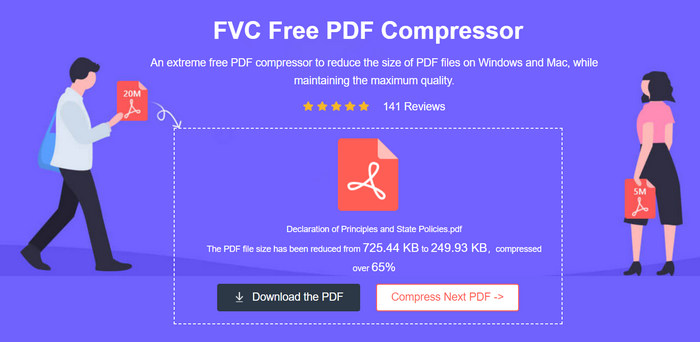
プラットフォーム 主要なほとんどのプラットフォームに対応。
価格:無料
主な機能:
• 圧縮率: ファイルサイズを100 KB未満、または70%まで削減可能。
• 所要時間: 4 MBのPDFファイルを圧縮するのに約5秒。
• 画質: 元ファイルに匹敵する高品質な出力を維持。
FVC Free PDF Compressor は、PDF ファイルのサイズを縮小するための非常に効率的で使いやすいツールです。このツールの最も優れた点は、PDF を簡単かつ迅速に圧縮し、高品質の出力を維持しながらファイル サイズを大幅に縮小できることです。最後に、完全に無料でアカウントも不要なので、この PDF サイズ縮小ツールは、カジュアルにもプロフェッショナルにも使用できる信頼できるオプションとして際立っています。
パート2: AdobeのオンラインPDF
Adobe Acrobat PDF Compressor Online は、現在最も優れた無料オンライン PDF サイズ縮小ツールの 1 つです。このツールは、品質を犠牲にすることなく PDF ファイルを圧縮する便利な方法を提供します。このツールは使いやすく安全であることは事実ですが、有料の Acrobat Pro ソフトウェアと同じレベルの微調整は提供されません。それでも、ほとんどの場合、ファイル サイズを大幅に縮小します。
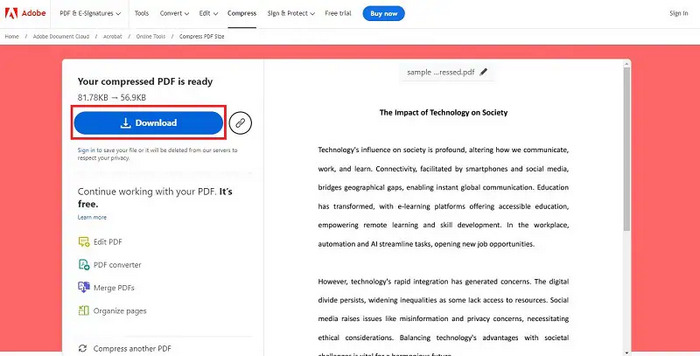
プラットフォーム Web
価格:無料
主な機能:
• 圧縮率: 非常に高い圧縮性能があり、ファイルサイズを最大20%まで削減可能。
• 所要時間: 圧縮処理は高速で、1ファイルあたり数秒程度。
• 画質: 高品質な出力を維持し、テキストや画像の鮮明さと精細さを確保。
Adobe Acrobat PDF Compressor Onlineは、画質を落とさずにPDFを圧縮したい人にとって、効率性と信頼性において非常に優れたPDFサイズ削減ツールです。分かりやすいインターフェースと強力な機能により、ユーザーは品質を損なったり操作で苦労することなく、PDFファイルを非常に簡単に圧縮できます。
パート3: iLovePDF
iLovePDF は、洗練された PDF 圧縮ツールを含む包括的な PDF 操作ツールを提供します。この Web ベースの PDF サイズ削減ツールは、可能な限り最高の品質を維持しながら PDF ファイルのサイズを効果的に縮小します。このツールは無料で使用でき、圧縮制限に制限はありません。iLovePDF を使用すると、ユーザーは PDF を簡単かつ迅速に圧縮できるため、共有または保存用にドキュメントを合理化したい人にとって最適な選択肢となります。
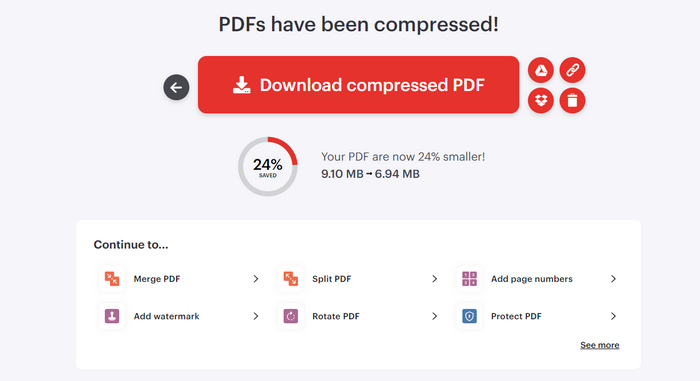
プラットフォーム Webベースで、インターネット接続のあるあらゆるデバイスから利用可能。
価格:無料
主な機能:
• 圧縮率: 画質を保ちながら、大幅にファイルサイズを削減可能。
• 所要時間: 1ファイルあたり数秒ほどで完了する高速な圧縮。
• 画質: テキストや画像の視認性と可読性を損なわない、非常に優れた品質を維持。
iLovePDF は、PDF ファイルを迅速かつ効率的に圧縮したい人にとって、多用途で信頼性の高いツールとして際立っています。Web ベースであるため、どのデバイスからでもアクセスでき、圧縮制限がないため、非常に便利なオプションです。直感的なインターフェイスと高品質の出力を備えたこの PDF サイズ削減ツールは、PDF 圧縮のあらゆるニーズに対応する優れたソリューションです。
パート4: Adobe Acrobat
Adobe Acrobat は、PDF ドキュメントの管理に広く利用されている、有名な PDF サイズ削減ツールです。その多くの機能の中でも、PDF ファイルを圧縮する機能は特に注目に値します。この機能は、PDF のサイズを縮小して共有しやすくしたり、読み込み時間を短縮したり、ストレージを最適化したりする必要があるユーザーにとって非常に重要です。
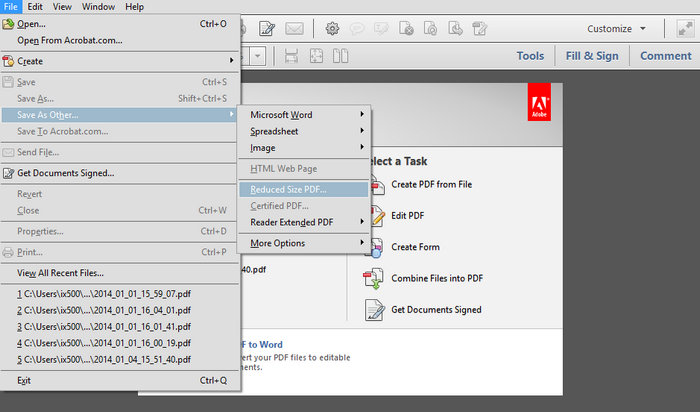
プラットフォーム Windows、MacOS、Android。
価格: 月額$19.99。
主な機能:
• 圧縮率: 非常に高性能で、ファイルサイズを最大40%まで削減可能。
• 所要時間: 圧縮処理は高速で、通常は数秒以内に完了。
• 画質: テキストや画像の鮮明さと精細さを保つ、高品質な出力を維持。
Adobe Acrobatは、PDFサイズ削減ツールとしてトップクラスの存在であり、効率性と信頼性の両面で優れています。品質を損なわずにファイルサイズを圧縮できる点に加え、Adobe製品群とのシームレスな連携性や使いやすいインターフェースにより、個人利用にもビジネス利用にも最適な選択肢となっています。
パート5: プレビュー
プレビューは、PDF を含むさまざまなファイル形式にアクセスし、表示および編集できる macOS 組み込みアプリケーションです。大きな PDF を小さなファイル サイズに圧縮するなど、ファイル ドキュメントに簡単な変更を加えることができる基本的な編集ツールが含まれています。プレビューは、市場に出回っている他の PDF サイズ削減ツールほどの豊富な機能を提供していないかもしれませんが、その使いやすさと即時利用可能性により、PDF を簡単に変更できる便利なツールとなっています。さらに、Mac システムとの統合により、スムーズでシームレスなユーザー エクスペリエンスが保証され、素早い編集と効率的なファイル管理に最適です。
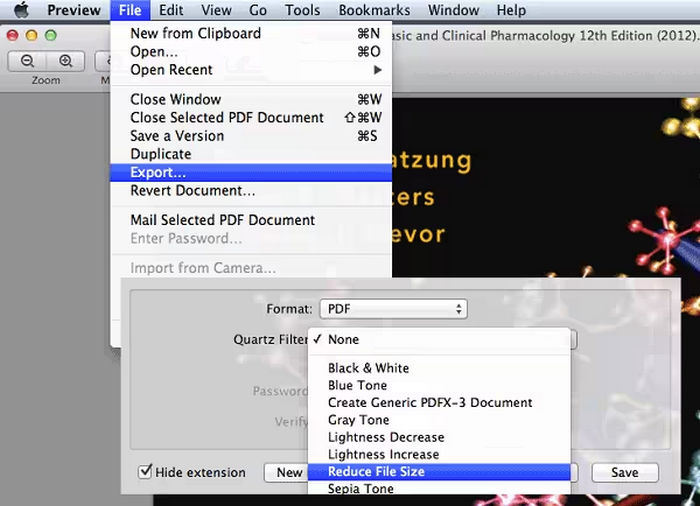
プラットフォーム MacOS。
価格:無料
主な機能:
• 圧縮率: ファイルサイズを最大30%まで効果的に削減。
• 所要時間: 圧縮処理は通常、数秒程度で完了。
• 画質: テキストや画像の品質を保ちつつ、高品質な出力を維持。
プレビューは、PDF サイズを簡単に縮小したい Mac ユーザーにとって理想的なツールです。ただし、高度な機能を提供する他の PDF 圧縮ツールと比較すると、このツールはやや物足りないところがあります。とはいえ、このツールは PDF ファイルのサイズを縮小し、簡単な編集を行うための信頼性が高く簡単なソリューションを提供します。
パート6: PDFサイズ縮小に関するよくある質問
PDF がなぜこんなに大きいのでしょうか?
PDF ファイルは、高解像度の画像、埋め込みフォント、複雑なグラフィック、広範な注釈など、さまざまな要因により大きくなる可能性があります。ドキュメントを PDF に作成またはスキャンすると、これらの要素によってファイル サイズが大幅に増加し、共有や保存が困難になります。
PDF のサイズを大幅に縮小するにはどうすればよいですか?
PDFのサイズを大幅に小さくしたい場合は、FVC Free PDF Compressor、Adobe Acrobat、iLovePDFといったPDFサイズ削減ツールを利用できます。以下のポイントを参考にしてください。
• PDFをオンライン圧縮ツールにアップロードし、自動でサイズを縮小させる。
• PDF内の画像の解像度を下げて圧縮する。
• 不要なページ、注釈、オブジェクトを削除する。
• PDFソフトの[名前を付けて保存]機能を使い、最適化された形式で保存する。
• Adobe Acrobatなどのツールでは、圧縮設定を調整して画質とファイルサイズのバランスを取る。
大きな PDF ファイルとは何ですか?
大きな PDF ファイルは通常 10 MB を超えます。ただし、大きいの定義は、状況やファイル転送方法によって異なります。電子メールの添付ファイルの場合、5 MB を超える PDF は大きいと見なされる場合があります。ストレージや Web での使用の場合、20 MB を超えるファイルはかさばると見なされる場合があります。そのため、多くのユーザーは PDF サイズ削減ツールを使用してこれらのファイルを比較します。
圧縮された PDF は簡単に編集したり印刷したりできますか?
はい。圧縮された PDF は、簡単に編集したり印刷したりできます。ほとんどの PDF サイズ削減ツールはテキストと画像の品質を維持するため、品質を大幅に損なうことなくドキュメントを編集したり印刷したりできます。ただし、共有または印刷する前に、圧縮ファイルをチェックして、必要な詳細がすべてそのままであることを確認することをお勧めします。
結論
大きなPDFファイルを圧縮することは、共有のしやすさ、読み込み速度の向上、ストレージの最適化といった点で、非常に重要な作業です。無料で素早く使えるものから、多機能なプロ向けツールまで、自分に合ったPDFサイズ削減ツールを選べます。FVC Free PDF Compressor、Adobe Acrobat Online、iLovePDF、Adobe Acrobat、そしてPreviewといったツールはいずれも、画質を損なうことなくPDFサイズを効率よく縮小するためのさまざまな機能を提供しています。
-
 ビデオから透かしを簡単に削除する方法に関する3つのベストソリューション
 ビデオの迷惑な透かしを削除したいですか?このブログでは、ビデオの透かしを削除するためのさまざまなアイデアを学ぶことができます。
-
 任意のビデオに透かしをすばやく追加する方法に関する4つの最良の方法
 この記事を読んだら、詳細な手順を使用して、Windows、Mac、オンライン、iOS、およびAndroid上のビデオに透かしを追加する方法を学びましょう。
-
 Adobe Compress PDF: PDF ファイルを簡単に縮小する 3 つの方法
 大きなサイズの PDF ファイルを圧縮するための Adobe Compress PDF についてお考えですか? この記事では、それらを活用して PDF ファイルを簡単に縮小する方法について説明します。
