


 ビデオコンバーター究極
 スクリーンレコーダー
 ビデオ修復
ビデオ修復Android で破損したビデオ ファイルを修復する方法: 4 つの包括的な方法
特にスマートフォンをはじめとするAndroidデバイスの重要性は、もはや否定できません。MP4形式で保存されるAndroidの動画には、さまざまな大切な瞬間や出来事が収められており、Androidスマホに保存されたこれらの動画は、かけがえのない思い出の保存庫となっています。しかし、Androidの動画ファイルに不具合が生じ始めると、こうした貴重な思い出を失うリスクが現実のものとなってしまいます。一方で、さまざまな要因によってお気に入りの動画が破損し、Android上の破損した動画ファイルを修復する処理を行うまで再生不能になってしまうことがあります。
一方、MP4 などのファイル形式に関係なく、破損したビデオ ファイルを修復する優れた方法があります。したがって、この記事では、ビデオ ファイル内の貴重な思い出を解決、復元、または回復するための巧妙な解決策を説明します。

パート 1. ビデオコンバーターを使用して破損した Android ビデオファイルを修復する
破損したAndroidの動画ファイルを別の形式に変換することは、その機能を回復させる一般的な解決策です。この方法は、デバイスが特定の動画形式の再生に問題を抱えている場合に特に有効です。動画を変換できるコンバーターは多数ありますが、Androidの破損動画を修復できる最適なコンバーターを求めているなら、FVC Video Converter Ultimateを使いましょう。この究極のコンバーターは、高度な超高速テクノロジーにより、シームレスな一括変換体験を提供します。さらに、ハードウェアアクセラレーション技術により、従来より最大30倍の変換速度を実現しており、そのスピードにきっと驚かされるでしょう。加えて、豊富なプリセット、ツール、機能が搭載されており、その充実ぶりにもきっと目を見張るはずです。
また、ユーザーフレンドリーなインターフェイスにより、効率的なファイル変換プロセスが保証されます。それにもかかわらず、Android ビデオ編集用のオールインワン ソリューションとして機能し、強化、圧縮、結合、トリミング、切り抜き、透かしの削除などのタスクを網羅します。多機能なだけでなく、コンバーターは 500 を超えるオーディオおよびビデオ形式をサポートし、編集ニーズに柔軟に対応します。
Androidの動画が破損したときの修復方法
手順1. 動画ファイルをパソコンへ転送し、修復の準備をします。以下のダウンロードボタンからインストール後、動画コンバーターを起動します。
無料ダウンロードWindows 7 以降対応安全なダウンロード
無料ダウンロードMacOS 10.7 以降対応安全なダウンロード
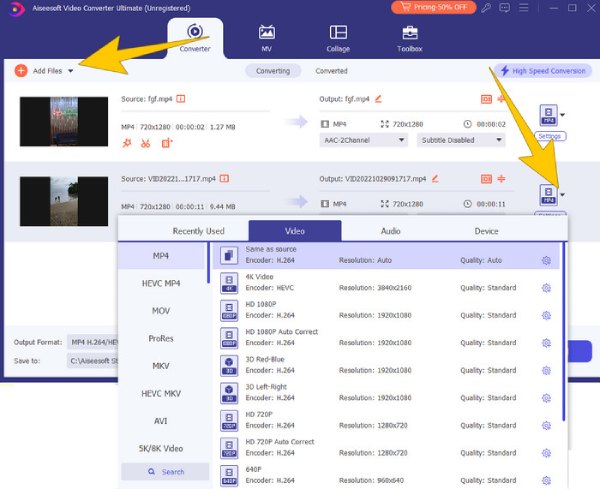
手順2. ファイルを追加ボタンをクリックして、すべての動画ファイルを読み込みます。その後、形式欄の横にあるドロップダウン矢印をクリックし、出力の形式を選択します。
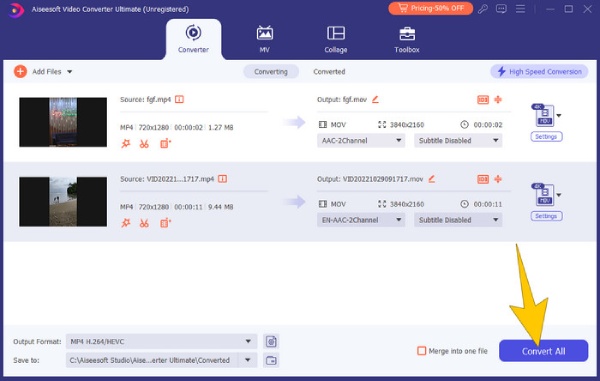
手順3. その後、すべて変換ボタンをクリックして変換を開始します。
パート 2. VLC を使用して Android からビデオを修復する方法
Android動画を別形式に変換するもう一つの方法として、VLCメディアプレーヤーを利用する手段があります。これは、多種多様なファイル形式を再生できる汎用性の高いオープンソースソフトで、豊富なコーデックをサポートしています。当初はシンプルなメディアプレーヤーとして登場しましたが、時間とともに進化してきました。すべてのOSに対応しているため、あらゆるデバイスで入手可能です。さらにVLCメディアプレーヤーには、破損したAndroid動画に対処するために、別形式へ変換して修復を試みる便利な機能が備わっています。
Androidで録画した破損MP4動画ファイルの修復方法
手順1. VLCを起動し、メディア > 変換/保存セクションに移動します。
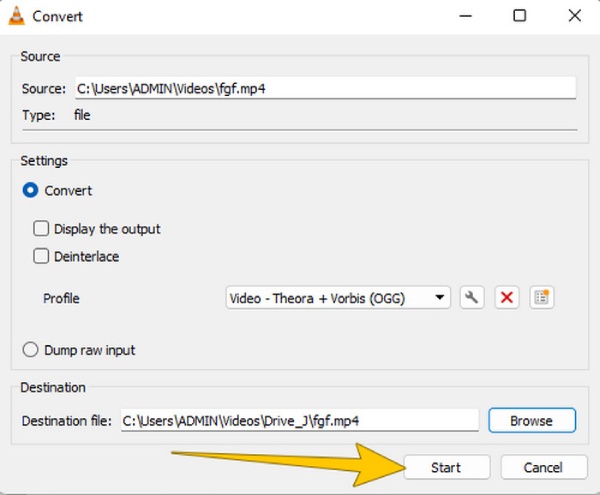
手順2. そこで、追加 > 変換/保存ボタンをクリックして動画を読み込みます。その後、プロファイルをクリックして出力形式を選択します。
手順3. 最後に、参照をクリックして保存先を指定し、開始タブをクリックします。
パート 3. 優れたビデオ修復ツールを使用して破損したビデオを修復する
もし動画が深刻に破損していて復元可能かどうか悩んでいるなら、FVC Video Repairが最適な解決策を提供します。多くのファイル形式に対応しており、複数のMP4動画ファイルの破損問題を同時に手軽に処理できます。Androidの破損動画の修復プロセスは、このソフトを使えばシンプルなインターフェースとわかりやすい操作手順のおかげで、短時間で完了します。さらに、このFVC Video Repairを使えば、編集・変換・復元作業中に破損してしまったファイルであっても復元することが可能です。以下の簡単なステップに従って、Androidから取り出した動画を修復しましょう。
Android動画を素早く修復する方法
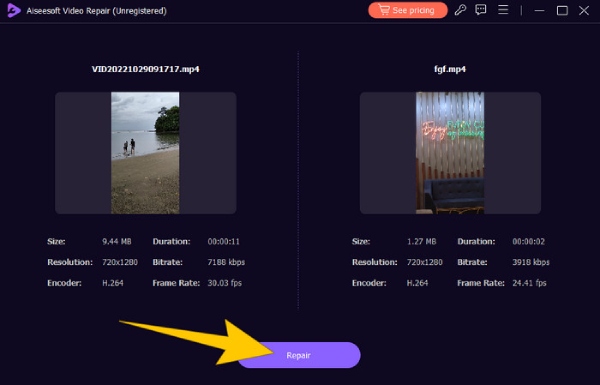
手順1. 下のダウンロードボタンをクリックしてインストールを開始します。インストール後、インターフェース上の2つのプラスボタンをクリックして、破損動画とサンプル動画を読み込みます。
無料ダウンロードWindows 7以降に対応安全なダウンロード
無料ダウンロードMacOS 10.7以降に対応安全なダウンロード
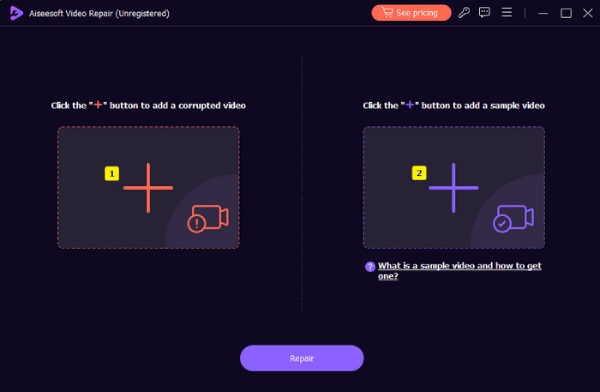
手順2. 取り込みが完了したら、修復ボタンをクリックします。
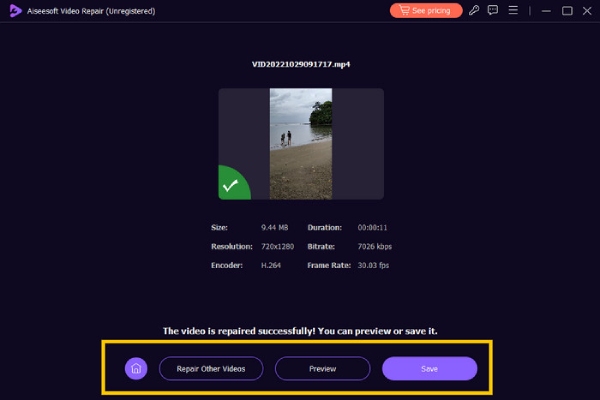
手順3. 短時間の修復処理が完了したら、表示されている各種オプションの中から保存ボタンをクリックします。
パート 4. Hex Editor でビデオを修復する
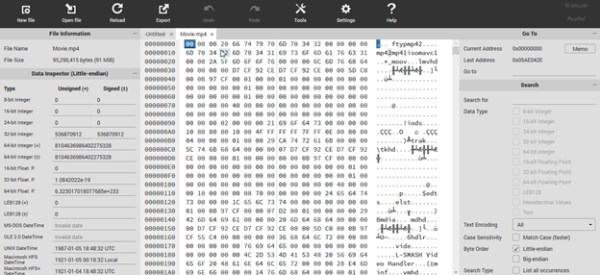
最後に、バイナリの数値で動画ファイルのデータを表示するHexエディターツールを使って、破損したAndroidのMP4を修復する方法もあります。この無料動画修復手段としてのHexエディターでは、破損動画のバイナリデータを比較しながら手動で調整することができます。さらに、Hexは動画が再生できなくなる原因となる破損したファイルヘッダーの問題解消にも有効です。以下にHexの簡略的な使用手順を示します。
手順1. PCでエディターを起動し、破損したAndroid動画を開きます。
手順2. 正常に再生できる別の動画ファイルと比較します。そのうえで、バイナリデータを手動で編集し、2つの動画の構造を一致させます。
手順3. 行った変更を保存します。
パート 5. ボーナス: Android でのビデオ ファイルの破損を防ぐためのヒント
Android でビデオ ファイルの破損を回避するためのヒントは次のとおりです。ビデオ ファイルの整合性を保護するには、特別な予防措置を講じることが重要です。
◆ Android デバイスのバッテリー残量が少ないときは、ビデオの録画を避けてください。
◆ Android のメモリがいっぱいのときは、ビデオの録画を避けてください。
◆ 悪意のあるアプリや安全でないアプリをデバイスにダウンロードすることはないよう注意してください。
◆ ファイル転送中は Android から SD カードを取り出さないでください。
パート 6. Android ビデオに関するよくある質問
Android から iPhone に転送するとビデオがぼやけてしまうのはなぜですか?
ビデオがぼやける最大の要因は、Android と iPhone の圧縮と解像度の違いです。
Android でビデオの見た目が非常に悪いのはなぜですか?
一部の Android デバイスでビデオが鮮明に表示されない原因として、カメラ センサー、ビデオ設定、ディスプレイ解像度の低品質などの要因が考えられます。
Android で高品質のビデオを編集するにはどうすればよいですか?
Android で高品質のビデオを編集するには、信頼できるビデオ編集アプリが必要です。
結論
動画が破損してしまうと本当に厄介なので、その対処法を知っておくことが大切です。幸い、ここで紹介したAndroidの破損動画を修復するための解決策は、プロの動画編集者からも高く評価され、信頼されています。特にFVC Video Repairはその代表格と言えるでしょう。「なぜ解決策がパソコン用のプログラムなのか」と疑問に思うかもしれませんが、専門家はこのようなソフトウェアを使って動画ファイルを編集・修復しているのです。
-
 ビデオを再生できないエラー 5 問題を簡単に修正する方法
 ダウンロードしたビデオの 1 つを再生しようとしましたが、ビデオを再生できないエラー 5 のメッセージが表示されて中断された経験はありませんか?知っておくべきことはすべてここにあります。
-
 ビデオが再生されません。修正するにはどうすればよいですか?
 動画が再生されずに困っていて、それを修正する方法がわかりませんか?あなたは問題を解決する正しい方向に進んでいます。知っておくべきことはすべてここにあります。
-
 ビデオ コーデックがサポートされていない: 内容、理由、および解決方法
 コーデックが見つからない、またはビデオ コーデックがサポートされていないために動揺したことがありますか?コーデック エラーに関するこの投稿を読むことが、解決策を学ぶ最も賢明な方法になります。
