


 ビデオコンバーター究極
 スクリーンレコーダー
 ビデオ修復
ビデオ修復
 安全なダウンロード
FLAC vs. MP3: オーディオ形式の紹介と比較
長年にわたり、ファイル形式のFLAC vs. MP3論争が続いてきました。MP3 は最も古く、かつ最も広く使われている形式の一つですが、FLAC はロスレス圧縮による高音質のため、オーディオマニアの間で人気を集めています。では、どちらが優れているのでしょうか?このガイドでは、音質、ファイルサイズ、互換性など、FLAC と MP3 の違いを詳しく見ていき、音楽コレクションにどちらの形式を選ぶべきか判断する手助けをします。

パート 1. FLAC 対 MP3: オーディオ形式の紹介
MP3 にまつわるエピソード
MP3 は、1990 年代に導入されて以来、広く使用されているデジタル オーディオ ファイルの一般的な形式です。非可逆圧縮の形式を使用して、良好な音質を維持しながらオーディオ ファイルのサイズを縮小します。 MP3 ファイルは、さまざまなデバイスで簡単に共有、ダウンロード、および再生できるため、デジタル音楽愛好家にとって便利な選択肢です。問題は、FLAC が MP3 より優れているかどうかです。 FLACの説明を読んで調べてみましょう。
FLAC にまつわるエピソード
FLAC (Free Lossless Audio Codec) は、ロスレス圧縮を使用して品質を犠牲にすることなく元のオーディオ データを保持する高品質のオーディオ ファイル形式です。これは、FLAC ファイルが MP3 ファイルよりもはるかに大きいことを意味しますが、元のソース素材と同じオーディオ忠実度レベルを維持します。
パート 2. FLAC および MP3 のサポートされているデバイス/プラットフォーム
次に、MP3 と FLAC の比較を見て、サポートするプラットフォームまたはデバイスに関してどのように機能するかを見てみましょう。
MP3 は、次のようなさまざまなプラットフォームで再生できる、広くサポートされているオーディオ ファイル形式です。
◆ Windows、macOS、および Linux オペレーティング システムを実行しているコンピュータ。
◆ iPod をはじめとするポータブルメディアプレーヤーや、その他のMP3 プレーヤー。
◆ iOS、Android、およびその他のモバイル オペレーティング システムを実行するスマートフォンおよびタブレット。
◆ USB または補助入力を備えたカーステレオ。
◆ USB またはネットワーク接続を備えたホーム シアター システムおよびステレオ レシーバー。
◆ Spotify や Apple Music などの音楽ストリーミング サービスは、多くの場合、音楽のストリーミングとダウンロードのデフォルト形式として MP3 を使用します。
FLAC は MP3 ほど広くサポートされていませんが、次のようなさまざまなプラットフォームで再生できます。
◆ Windows、macOS、および Linux オペレーティング システムを実行しているコンピュータ。
◆ Astell&Kern AK Jr や PonoPlayer などの一部のポータブル メディア プレーヤー。
◆ Android およびその他のモバイル オペレーティング システムを実行する一部のスマートフォンおよびタブレット。
◆ USB またはネットワーク接続を備えた一部のカー ステレオおよびホーム シアター システム。
◆ 忠実度の高い FLAC ストリーミングおよびダウンロード オプションを提供する Tidal などの一部のストリーミング音楽サービス。
パート 3. FLAC は MP3 より優れていますか?
今回は、これらのオーディオ形式を総合的に比較して、FLAC と MP3 の違いを挙げてみましょう。
以下は、さまざまな要因に基づく FLAC と MP3 の包括的な比較です。
音質: FLAC はソース音源の音声データをすべて保持するロスレス形式であるため、MP3 よりも優れた音質を提供します。一方、MP3 は圧縮時に一部の音声データを削除する「非可逆圧縮(ロッシー)」形式であり、その結果、音質が劣化する場合があります。
ファイルサイズ: MP3 ファイルは FLAC ファイルよりもはるかに小さく、MP3 は非可逆圧縮を用いてファイルサイズを削減します。これにより、ストレージ容量が限られている場合や、インターネット経由で音楽ファイルを素早く共有・ダウンロードしたい場合には、MP3 の方が実用的な選択肢となります。
互換性: MP3 はデスクトップ/ノートパソコン、ポータブルメディアプレーヤー、スマートフォン、カーステレオ、音楽ストリーミングサービスなど、さまざまなデバイスやソフトウェアで広くサポートされています。一方 FLAC は、ファイルサイズが大きくロスレス圧縮であることなどから、一部のデバイスやソフトウェアでは対応していない場合があります。
ビットレート: MP3 ファイルは、ファイルサイズをさらに小さくするために低いビットレートでエンコードできますが、その分音質も低下します。それに対して FLAC ファイルは、常に元のソース音源と同等のビットレート(情報量)を維持します。
編集: FLAC は音声編集においてより適した選択肢であり、高い音質を保てるうえ、追加の圧縮ノイズやアーティファクトを生じさせません。一方 MP3 ファイルは、非可逆圧縮の特性上、編集を重ねるとさらなる圧縮アーティファクトが発生する可能性があります。
価格: FLAC も MP3 もどちらも無料で利用できるオープンな形式であり、使用にあたってコストは発生しません。
パート 4. FLAC を MP3 に、または MP3 を FLAC に変換する
FLAC を MP3 と比較するプロセスが完了したので、MP3 を FLAC に、またはその逆に変換するプロセスに移りましょう。
Video Converter Ultimate は、音声・動画ファイルを別の形式へ簡単に変換できる高機能なソフトウェアです。FVC Video Converter Ultimate がサポートしている多くの形式の一つに、オーディオマニアや音楽愛好家によく用いられる高音質なロスレス音声形式である FLAC があります。FLAC ファイルをすばやく簡単に MP3 に変換できるため、デバイスの容量節約や、音楽ファイルの共有のしやすさ向上に役立ちます。Video Converter Ultimate は使いやすいインターフェースと豊富なカスタマイズオプションを備えており、音声・動画ファイルの変換が必要なあらゆるユーザーにとって便利で有用なツールです。
このツールを使用して FLAC と MP3 形式の間でオーディオ ファイルを変換するには、いくつかの簡単な手順に従う必要があります。
ステップ 1. まず、画面上の無料ダウンロードボタンのいずれかをクリックしてプログラムをダウンロードし、セットアップウィザードに従ってインストールします。完了したら、プログラムを起動して、使いやすいインターフェースを表示させます。
無料ダウンロードWindows 7 以降対応安全なダウンロード
無料ダウンロードMacOS 10.7 以降に対応安全なダウンロード
ステップ 2. 次に、メイン画面のプラスアイコンボタンをクリックして、変換したい音声ファイルを追加します。追加が完了すると、インターフェース上に各ファイルのサムネイルが表示されます。
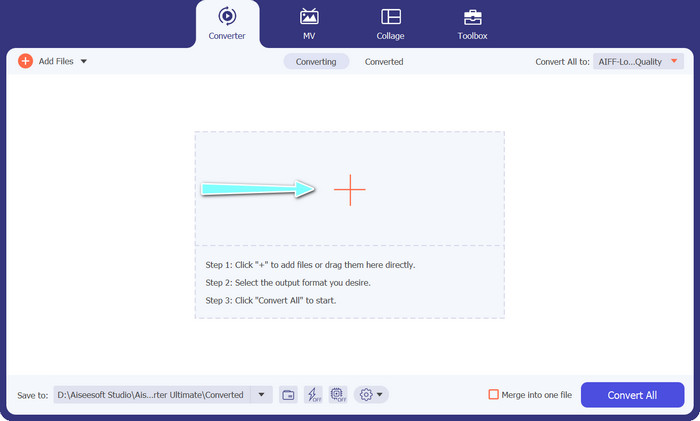
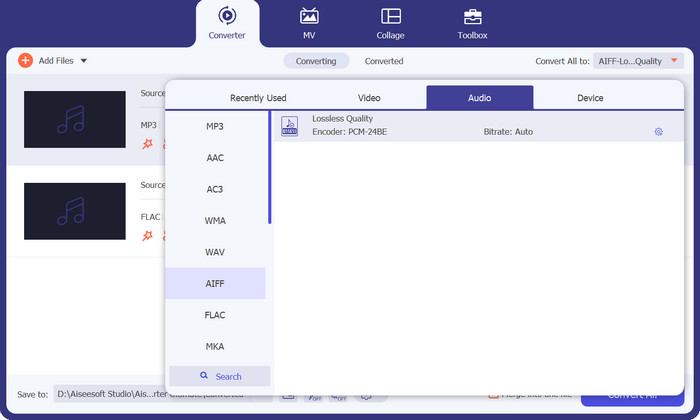
ステップ 3. ツール右上にあるプロフィール(Profile)メニューからオーディオタブを選択して、出力形式を指定します。変換方向に応じて、MP3 か FLAC のいずれかを選びます。
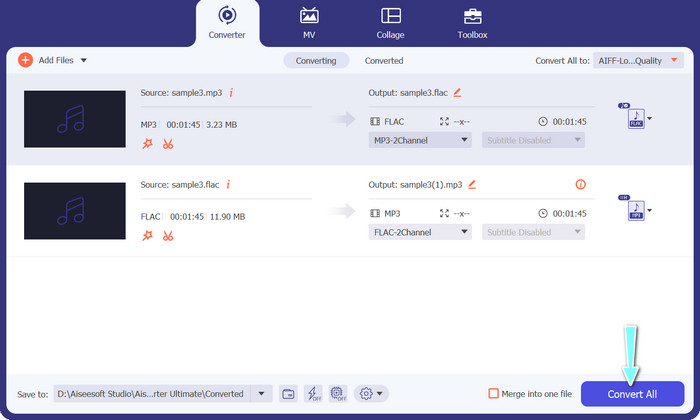
ステップ 4. インターフェース下部で保存先フォルダーを指定し、変換後のファイルを保存したい場所を選択します。最後に、すべて変換(Convert All)ボタンをクリックして変換を開始します。
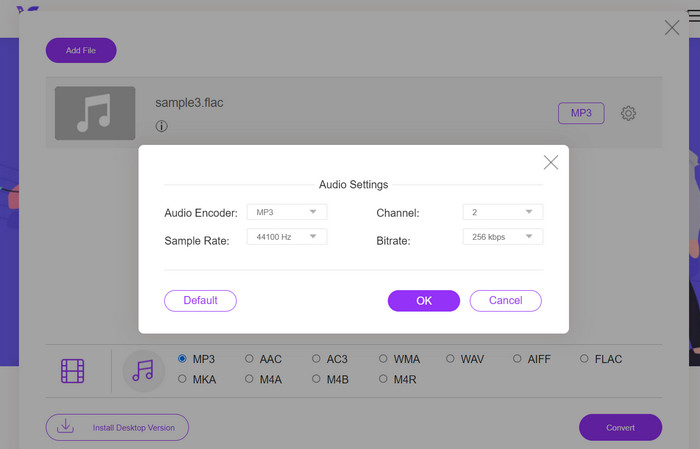
FLAC を MP3 に変換できる無料のオンラインツールをお探しなら、Free Video Converter Online が最適です。この便利なプログラムを使えば、動画や音声ファイルを無料で変換できるうえ、出力設定を好みに合わせてカスタマイズすることも可能です。インターネット接続さえあれば、変換スピードも安定しています。利用を開始するには、次の手順に従ってください。
ステップ 1. お好みのウェブブラウザを起動し、Free Video Converter Online の公式サイトにアクセスします。
ステップ 2. Add Files to Convert ボタンをクリックし、MP3 に変換したい FLAC ファイルをアップロードします。
ステップ 3. オーディオ形式メニューの一覧から、出力形式として MP3 を選択します。また、MP3 ファイルのビットレートや出力品質もお好みに合わせて設定できます。
ステップ 4. Convert ボタンをクリックして、変換処理を開始します。
パート 5. FLAC と MP3 に関するよくある質問
16 ビット FLAC と 320Kbps MP3 では、どちらが優れていますか?
16 ビット FLAC と 320kbps MP3 のどちらを選択するかは、個人の好みとオーディオ ファイルの使用目的によって決まります。オーディオ品質を優先し、十分なストレージ容量がある場合は、16 ビット FLAC の方が適している可能性があります。音質をあまり犠牲にせずにファイル サイズを小さくする必要がある場合は、320kbps MP3 が適しています。
FLAC ファイルは MP3 ファイルよりも大きいですか?
はい、FLAC ファイルは通常、損失がないため、MP3 ファイルよりもサイズが大きくなります。
すべてのメディア プレーヤーは FLAC をサポートしていますか?
いいえ、すべてのメディア プレーヤーが FLAC をサポートしているわけではありません。ただし、VLC、Foobar2000、Winamp など、最新のメディア プレーヤーやソフトウェアの多くは FLAC 再生をサポートしています。
結論
MP3 と FLAC のどちらを選ぶかは、個人の好みや利用目的によって異なります。そのため、意思決定の際にはFLAC vs. MP3の比較が欠かせません。最終的には、音質、ファイルサイズ、互換性のどれを重視するかによって、使用する形式を決めることになります。
-
 WindowsとMacでMOVをMP3に簡単に変換する4つの最良の方法
 MOVファイルからMP3オーディオファイルを抽出したい場合は、記事から目的のファイルを取得するための4つの最も効率的なMOVからMP3へのコンバーターについて詳しく知ることができます。
-
 オーディオファイルをMP3に簡単に変換するための最高のMP3コンバーター
 ユーザーフレンドリーなオンラインおよびオフライン MP3 コンバーターを使用して、あらゆるオーディオ形式を簡単に MP3 に変換します。数回クリックするだけで高品質の結果が得られます。
-
 Mac と Windows のトップ 3 FLAC メタデータ エディター [2023 年更新]
 FLACメタデータを変更しますか?この場合、使用できる最新のFLACメタデータエディタに関する十分な知識を提供しているため、この記事を読む必要があります。
