


 ビデオコンバーター究極
 スクリーンレコーダー
 ビデオ修復
ビデオ修復
 安全なダウンロード
3Dまたは3次元とは何かについてすべてを学ぶ
3Dとは何か知りたいですか? 3D または 3 次元の映画や画像の人気が高まっています。私たちは現代にいるので、さまざまなツールを使用して 3D 映画を簡単に作成できます。しかし、まず、3D についてすべてを理解する必要があります。背景、定義、3D ビデオの作成方法です。
この記事では、3Dとその各種パラメーターについて掘り下げて解説します。もし「3Dとは何か」を知りたいなら、この記事を読んでください。

パート 1. 3D とは
3D または 3 次元オブジェクトは、幅、高さ、奥行きを示します。私たちの物理的環境はそれ自体が 3 次元であるため、日常的に 3D オブジェクトを見ています。人間が持っている 3D 知覚により、奥行き知覚とも呼ばれる 3D オブジェクトを知覚できます。周りを見回すと、私たちの目の網膜は 2 次元の画像を形成し、脳は 2 つの画像を 3D ビジュアルとして処理します。しかし、知っていましたか?私たち人間は、奥行きを知覚するために使用するツールを持っていますか?
奥行きの認識に使用する人間のツールは次のとおりです。
ステレオ視(Stereoscopic vision)- ステレオ視とは、両眼によって知覚される奥行き感のことです。脳が3Dの形状や映像を認識する能力の一つです。この視覚では、近くにある物体は遠くの物体よりも離れて見えます。
視差(Parallax)- このタイプの視覚は、2本の線の間の角度によって測定されます。頭を左右に動かすと、近くの物体のほうが遠くの物体より大きく動いて見えます。
大きさの慣れ(Size Familiarity)- ある物体の大きさを知っていれば、それが遠くにあっても、おおよそどのくらいの大きさに見えるはずかを判断できます。同様に、2つの物体が実際には同じ大きさでも、片方が大きく見える場合、その大きく見えるほうがより近くにあると判断されます。
調節(Accommodation)- 近くの物体にピントを合わせるとき、人の目のレンズは物理的に形を変えます。その変化によって、その物体との距離を知ることができます。またこれは、目が対象物にピントを合わせ続けるための仕組みでもあります。
大気遠近法(Aerial Perspective)- 大気遠近法では、視点から遠くなるほど物体は小さく見えます。遠方の物体は、コントラストや色の彩度も低く見えるのが特徴です。
私たちの物理的な世界にもさまざまな種類の 3D があります。 3D は、コンピューター ゲーム、グラフィックス、仮想現実、および映画で一般的に使用される、さまざまな距離の奥行きの錯覚を与える画像としても説明されます。
さまざまな種類の 3D:
3Dコンピューターグラフィックス(3D Computer Graphics)- 3Dコンピューターグラフィックスは、ディスプレイスクリーン、つまり二次元空間上に3Dオブジェクトを生成できます。2Dグラフィックスのピクセルには、位置・色・輝度といったさまざまな属性があります。3Dでは、これらのピクセルがZ軸上に配置されます。ピクセルに奥行き情報を組み合わせることで、テクスチャとも呼ばれる3Dの表面が生成されます。
3D映画(3D Films)- 3D映画とは、映像に奥行き(3Dの深度)が付与された映画のことです。3Dメガネを使用することで、3D映画を鑑賞できます。この種の映画を制作する際には、ステレオ視技術が用いられます。これは、右目用と左目用の2つの映像を同時に表示する方式です。
3Dプリンティング(3D Printing)- 3Dプリンティングは、積層造形(アディティブ・マニュファクチャリング)とも呼ばれます。デジタルファイルから立体(3D)の実体物を作り出すプロセスです。コンピュータ支援設計(CAD)を用いれば、デジタルモデルから3Dオブジェクトを造形して出力できます。
パート 2. 3D 映画の再生方法
3D の意味がわかったので、使用できる最も優れたソフトウェア アプリケーションを使用して 3D 映画を再生する方法を教えてください。
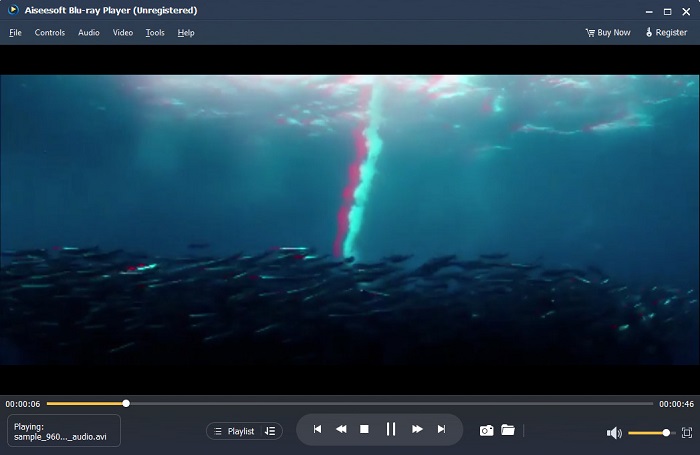
Blu-ray Player は、あらゆる種類のビデオを再生できるデスクトップ アプリケーションです。このツールを使用すると、プラグインを使用せずに 3D ムービーを再生することもできます。さらに、シンプルでクリーンなユーザー インターフェイスのため、多くの人がこのメディア プレーヤーを推奨しています。さらに、この強力なメディア プレーヤーは、他のメディア プレーヤーがサポートしていない Blu-ray ディスク、Blu-ray フォルダー、DVD/フォルダー/ISO ファイルを再生できます。また、100% ロスレス オーディオとドラマチックな HD サラウンド サウンドで HD ビデオを楽しむこともできます。さらに驚くべきことは、必要なビデオやオーディオを分離するのに苦労しないように、プレイリストを作成できることです。
Blu-ray Player で 3D 映画を再生する方法:
ステップ1.デバイスにBlu-ray Playerをダウンロードします。インストール手順に従ってインストールし、その後アプリを起動します。
ステップ2.ソフトウェアのメインインターフェースで「Open File」ボタンをクリックします。デバイス内のファイルが表示されるので、その中から再生したい3D映画を選択します。
ステップ3.すると、動画の読み込みが始まります。あとは専用の3Dメガネをかけて、3D映画をお楽しみください。
パート 3. 3D TV と 3D メガネとは
3D テレビには、アクティブ シャッター 3D、アクティブ 3D、パッシブ 3D の 2 種類があります。この部分では、それらの違いを区別し、アクティブ シャッターまたはパッシブ 3D TV を見るときに使用する 3D メガネの種類を決定します。
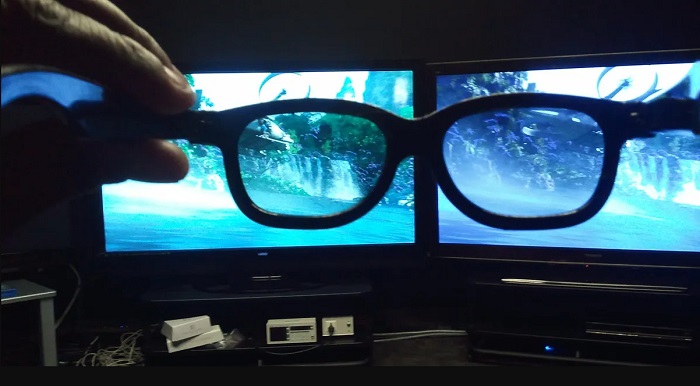
アクティブシャッター方式、あるいはアクティブ3Dは、高品質な3D映像を画面上に交互に表示するタイプの3Dテレビです。アクティブ3Dテレビは、右目用と左目用の映像を交互に画面に表示します。3Dメガネ側では、左右のレンズを交互に黒くシャッターさせることで、テレビ画面に3D効果を生み出します。これにより、それぞれの目が自分用に作られた映像だけを見ることになります。アクティブシャッター3Dで視聴する際に使用する3Dメガネは「3Dアクティブグラス」です。このタイプの3Dメガネは、レンズの遮光とシャッター動作を電子的に行うため、バッテリーが必要です。これらのメガネにはLCDレンズが組み込まれており、テレビ側の交互表示フレームと同期して動作します。
対照的に、パッシブ3Dテレビは、映画館で使われている3D技術に近い方式です。このタイプの3Dテレビは、画面側に特殊なフィルターを用い、メガネの偏光レンズを通して3D映像を見せます。さらにパッシブ3Dテレビでは、左右の目用のフレームを1つに融合し、水平ラインを交互に左目用・右目用として割り当てます。これらのテレビで使用されるメガネは「パッシブ3Dグラス」で、左右のレンズに異なる偏光が施されています。一方の目には奇数ラインのみが、もう一方の目には偶数ラインのみが見えることで、立体映像が生成されます。パッシブ3Dグラスは動作にバッテリーを必要としません。
パート 4. 2D と 3D
2D と 3D は、コンピューター ワークスペースでの実際の寸法です。 2D または 2 次元は、水平方向と垂直方向の寸法 (X 軸と Y 軸) を使用する平面オブジェクトです。 2D は 2 次元しかないため、横に向けると線だけが見えます。高さと幅があるだけで奥行きがありません。一方、3Dまたは立体には、高さ、幅、奥行きが含まれます。 3 次元のイメージには、3 次元の知覚者を見るために 2 つの目が連携して機能する効果が必要です。 2D が X 軸と Y 軸を使用する場合、3D は Z 軸を追加して、オブジェクトの奥行きを確認できるようにします。
2D と 3D のどちらが使いやすいかと問われれば、答えは両方です。 2D と 3D には、異なる長所と短所があります。たとえば、特別な 3D メガネを着用しなくても、あらゆるデバイスでどこでも 2D ビデオや映画を見ることができます。しかし、3D 映画が生み出す 3D 効果は驚くべきものであり、2D よりも見ていて楽しいものです。
パート 5. 2D フィルムを 3D に変換する方法
自宅で 3D メガネなしで素晴らしい 3D 映画やクリップを見たい場合は、究極のビデオ コンバーターを使用して 2D フィルムを 3D に変換できます。したがって、2D フィルムを 3D フィルムに変換したい場合は、この素晴らしいソフトウェア アプリケーションを使用してください。
FVC Video Converter Ultimateは、動画変換でよく知られているアプリケーションです。このソフトウェアは単にファイル形式を変換できるだけでなく、アナグリフ3Dやスプリットスクリーン3Dなど、2D動画を3D動画に変換することも可能です。FVC Video Converter Ultimateは、MP4、MKV、AVI、FLV、WEBM、MOV、DIVXなど、ほぼすべてのファイル形式と1000種類以上に対応しているため、多くのユーザーに支持されています。さらに、3Dメーカー、GIFメーカー、動画ウォーターマーク除去ツールなど、豊富な高度編集機能も備えています。
FVC Video Converter Ultimate を使用して 2D 映画を 3D 映画に変換する方法:
ステップ1.まず、下の「Download」ボタンをクリックしてFVC Video Converter Ultimateをダウンロードします。
無料ダウンロードWindows 7 以降に対応安全なダウンロード
無料ダウンロードMacOS 10.7 以降に対応安全なダウンロード
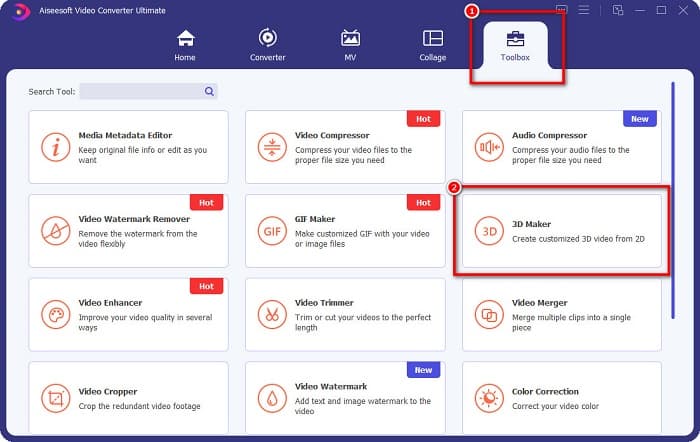
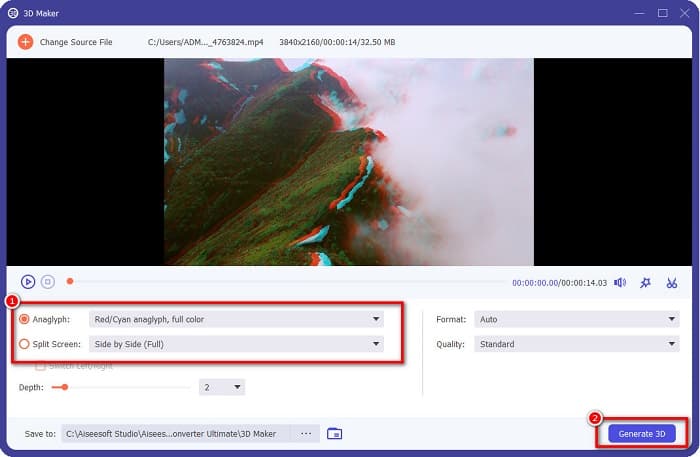
ステップ2.アプリを開き、「Toolbox」パネルに移動して「3D Maker」を選択します。
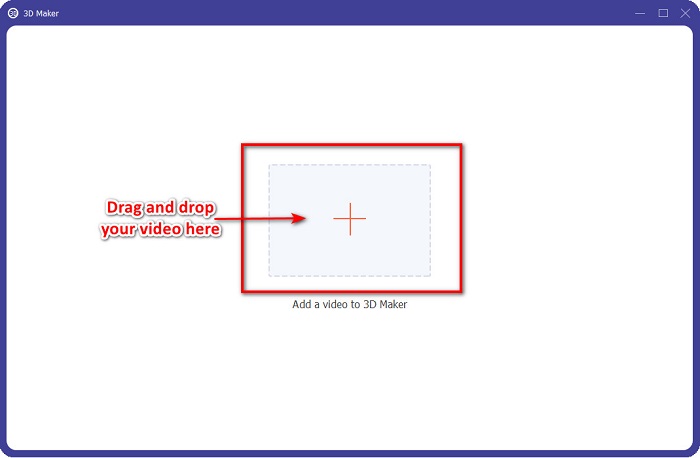
ステップ3.次の画面で「+」ボタンをクリックするか、「ドラッグ&ドロップ」で2D動画をボックス内に追加します。
ステップ4.「Anaglyph 3D」または「Split Screen 3D」のどちらかを選択します。その後、「Generate 3D」ボタンをクリックします。
関連:
AVIをWMVに変換する最速の方法[おすすめコンバーター]
これらの優秀なコンバーターを使ってMOVをWMVに簡単変換
パート 6. 3D とは何かに関する FAQ
VLC Media Player で 3D ビデオを視聴できますか?
はい。 VLC Media Player はすべてのファイル形式をサポートしています。 VLC メディア プレーヤーで 3D ムービーを再生することもできます。
3D 動画を 2D に変換できますか?
FVC Video Converter Ultimate は、3D ビデオを 2D に変換できます。このコンバーターを使用して、ビデオのファイル形式を変更することもできます。
2D と 3D では、どちらがよく使われますか?
今日の映画業界では、3D 映画が 2D 映画よりも優勢です。興味深いグラフィックとリアルなアニメーションのため、3D 映画は 2D 映画よりも人気があります。
結論
3D(スリーディー)、あるいは三次元は、映画業界、そして特にコンピューター分野で広く知られています。ここまでで「3Dとは何か」がわかったので、3Dをどのように作るかについての基本的な知識は身についたはずです。手軽に3D動画を作成したい場合は、FVC Video Converter Ultimateを利用してみてください。
-
 WindowsおよびMacでMPGを3GPに変換する3つの方法[無料]
 MPGを3GPに変換する方法をお探しの場合は、この記事を読んで、WindowsおよびMacでMPGを3GPに変換するための最良の方法を確認してください。
-
 WindowsおよびMac用のトップ5の無料MPEGからDivXへのコンバーター
 最高のMPEGからDivXへのコンバーターを使用して、MPEGファイルをDivXファイルに簡単に変換します。それらについての詳細を知るためにこの記事を読んでください。
-
 MacとWindows用のコンバーターを使用するためのDivXへの最高のMOV
 あなたがMOVからDivXへの無料のコンバーターを探しているなら、私たちはあなたのための解決策を持っています。この記事では、MacおよびWindows用の上位のMOVからDivXへのコンバーターを紹介します。
