


 ビデオコンバーター究極
 スクリーンレコーダー
 ビデオ修復
ビデオ修復
 安全なダウンロード
FPSとは何か、そしてあなたが知る必要のあるすべての情報を知る
FPSという略語を聞くと、とても専門的に聞こえるかもしれません。そして、この言葉は主に、自分のPCについて話しているゲーマーのあいだでよく使われます。もしあなたがFPSの意味を知らない一人なら、ここでその意味と、知っておくべき情報をすべて分かりやすく解説します。それでは早速、FPSとは何かについて、詳しく見ていきましょう。

パート1。FPSとはどういう意味ですか?
FPSはFramesPerSecondの略で、FPSの略である場合にコンピューターグラフィックスで使用される技術用語です。ただし、コンピュータグラフィックスだけでなく、モーションキャプチャシステムにも適用されます。なぜ映画が美しく滑らかなグラフィックスを持っているのか疑問に思うなら、それは1秒あたりのフレーム数によるものです。 FPSは、「バーストレート」および「アップデートレート」と呼ばれることもあります。それに加えて、FPSは連続する一連の画像のフレーム数です。そして、あなたは知っていましたか?私たちが見ているビデオは動いていません。これは、高速フェーズで再生される一連の画像にすぎません。
ビデオまたはムービークリップのFPSが高い場合、ビデオはよりスムーズになります。対照的に、ビデオのfpsが低い場合、ビデオグラフィックは粗くなります。また、プロゲーマーの場合は、お気に入りのオンラインゲームをプレイしながらスムーズなグラフィックを作成したいと思うでしょう。また、FPSまたは1秒あたりのフレーム数が重要な役割を果たします。
FPSの意味についてのご質問にお答えいただければ幸いです。 FPSの詳細については、さらにお読みください。
パート2。さまざまな状況でのFPS
1秒あたりの標準フレームレートは24です。ただし、ビデオフィールドが異なれば、FPS標準も異なります。この部分は、あらゆる状況で発生するさまざまなFPSを認識します。
YoutubeビデオのFPS
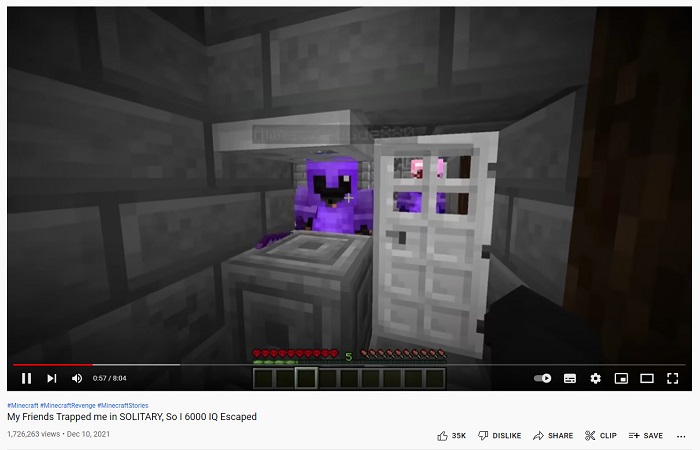
Youtubeは24〜60fpsをサポートできます。ただし、YouTube動画の推奨FPSは24FPSです。しかし、この部分では、Youtubeビデオで最も共有されているコンテンツのさまざまな好みを知ることができます。
◆ ビデオポッドキャスト - ビデオポッドキャストやテレビのトーク番組は、通常30fpsで制作されています。YouTubeでこのようなコンテンツを見ると、主な動きは手振りなどのジェスチャーで、大きく激しい動きはあまりないことに気づくでしょう。
◆ メイクアップチュートリアル - メイクアップチュートリアルは、通常60fpsで作られます。このタイプのコンテンツでは、メイクの手順を細部までしっかり見せるために、映像がくっきり滑らかであることが重要だからです。
◆ 学習用動画教材 - この種のコンテンツは、通常24〜30fpsです。適度なアニメーションはありますが、激しい動きが多くないため、このフレームレートで十分だからです。
◆ ゲームハイライト - ゲームプレイ動画やゲームハイライトの場合、推奨されるフレームレートは60fpsです。60fpsであれば、映像がカクカクしたり粗く見えたりせず、スムーズなプレイ映像を表現できます。
ゲームのFPS
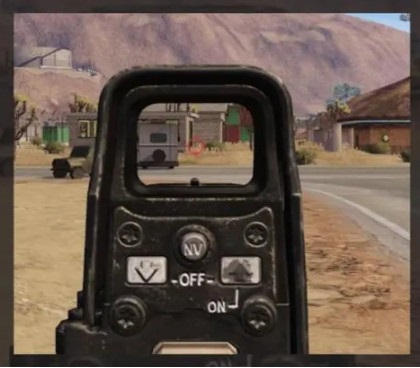
ゲームでは、高いfpsが必要です。ただし、グラフィックカードの容量とデバイスのシステム全体によって異なります。一人称シューティングゲームをプレイしている場合は、スムーズに狙うことができるため、fpsが高いという利点があります。ゲームは通常60〜240fpsです。ただし、144Hzのモニターは144fps以下しか表示できません。それでも、144Hzのモニターで240fpsを再生できますが、表示されるのは144 fpsしかないため、96fpsは無駄になります。したがって、システムのデバイスとゲームのグラフィックカードの容量によって異なります。
映画館のFPS

映画館で上映される映画館や映画は、通常24fpsです。射撃アクションに関する映画を見て、弾丸が敵に当たろうとしている特定の部分にスローモーション効果がある場合、それはfpsの作業です。その場合、通常はfpsが低下し、ムービーの他の部分では、ムービーの通常の速度になります。
パート3。あなたのビデオの速度を編集したいですか?
FPSは、ゲームプレイやビデオのスムーズさにおいて大きな役割を果たします。ただし、特定の要素は、ビデオの速度であるスムーズなトランジションビデオを作成する上でも大きな役割を果たします。また、ビデオの速度を調整したい場合は、最高のビデオ速度チェンジャーツールとして推奨されるこのツールを使用できます。
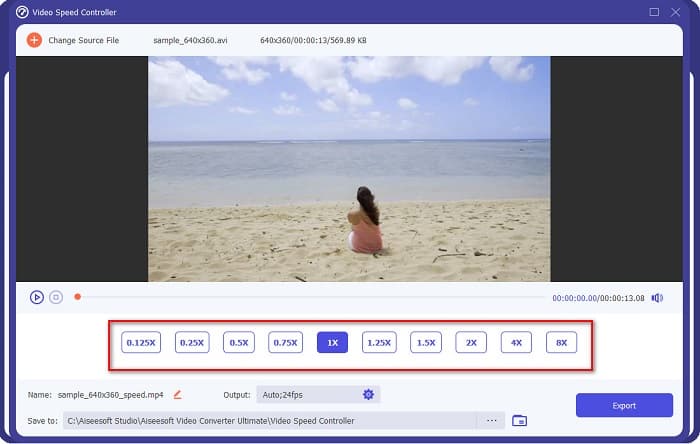
FVC Video Converter Ultimateは、動画の再生速度を変更できる人気のソフトウェアです。処理画面のインターフェースが分かりやすく、初心者でも使いやすいツールです。動画の速度は、0.125倍、0.25倍、0.5倍、0.75倍、1.25倍、1.5倍、2倍、4倍、8倍といったプリセットから変更できます。さらに、この究極ツールを使えば、出力動画のfpsも変更できます。このソフトを使うと、動画ファイルのfpsを12fpsから60fpsまで自由に変えることができます。
さらに、FVC Video Converter Ultimateは、色補正、ビデオリバーサー、ビデオローテーターなどのすばらしい編集機能を提供します。また、MP4、WMV、FLV、MPEG、WebM、MKV、M4V、その他1000以上のフォーマットを含む多数のファイルフォーマットをサポートします。 。したがって、このツールを使用してビデオの速度を変更し、ビデオのfpsを変更する場合は、以下の手順に従ってください。
ステップ1.WindowsまたはMac用のダウンロードボタンをクリックして、FVC Video Converter Ultimateをダウンロードします。インストール手順に従ってセットアップし、完了したらアプリを起動します。
無料ダウンロードWindows 7 以降に対応安全なダウンロード
無料ダウンロードMacOS 10.7 以降に対応安全なダウンロード
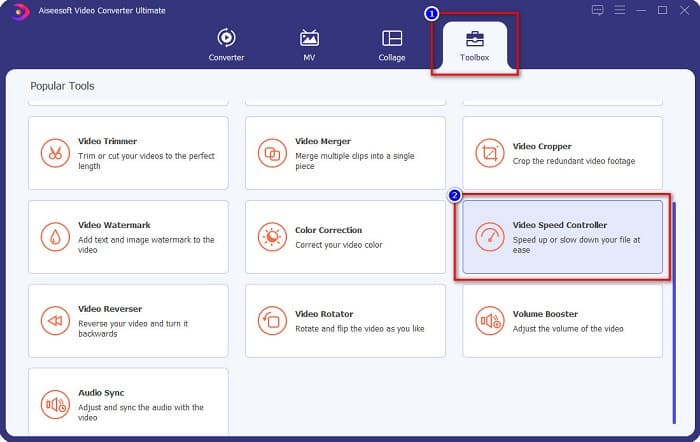
ステップ2.ソフトのメイン画面でツールボックスオプションを選択し、次に動画速度コントローラーをクリックします。
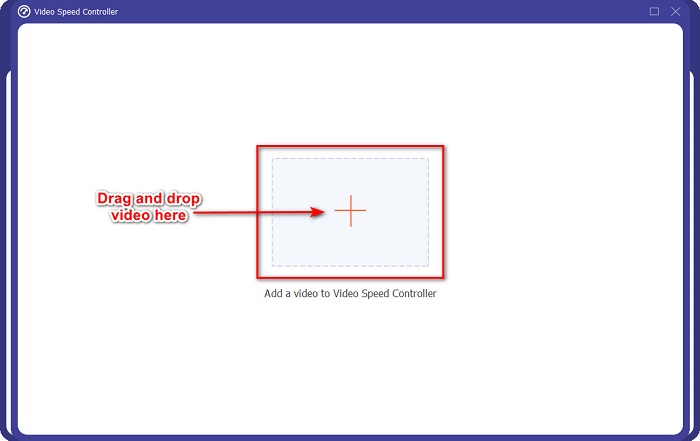
ステップ3.次に、+ボタンをクリックするか、動画ファイルをドラッグ&ドロップで「+」の部分に追加します。
ステップ4.その後、動画に適用したい再生速度のプリセットを選択します。プリセットの上部には、動画のプレビューも表示されます。
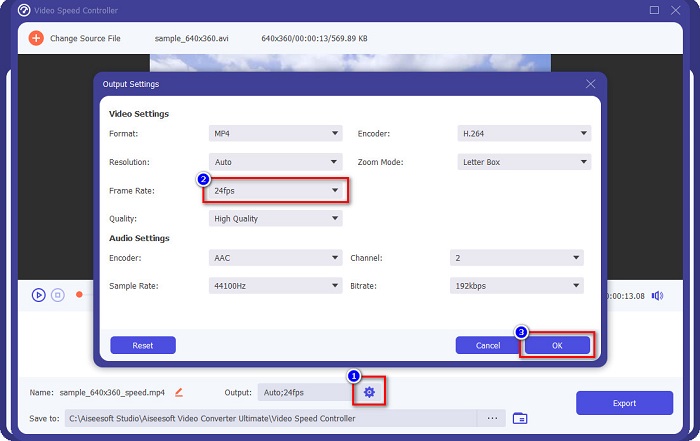
動画の出力fpsを変更するには、出力の横にある歯車ボタンをクリックし、フレームレートの横にあるドロップダウンボタンをクリックして、希望するfpsを選択します。設定できたらOKをクリックして変更を保存します。
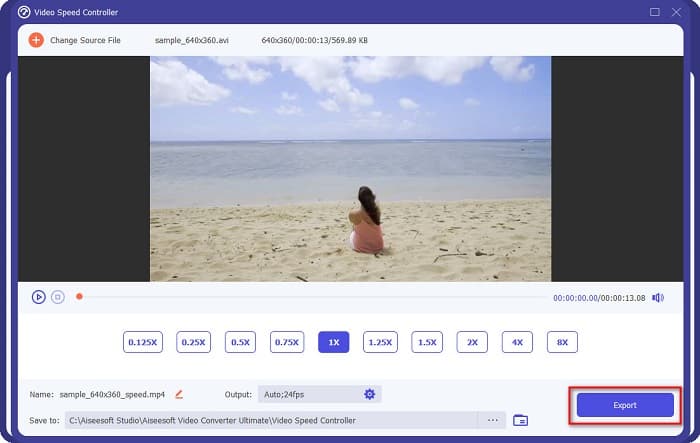
ステップ5.最後に、エクスポートボタンをクリックして、動画への変更を反映させます。数秒待てば、編集後の動画が自動的にパソコン内に保存されます。
簡単ですよね?上記の簡単な手順に従うことで、ビデオの速度とfpsを簡単に変更できます。
関連記事:
パート4。FPSとは何かに関するFAQ
人間の目はどのfpsを見ることができますか?
専門家によると、人間の目は30fpsから60fpsの間で見ることができます。また、人間の目は60fpsを超えて知覚できないと言う人もいます。
60 FPSでスムーズなゲーム録画を撮影できますか?
はい。ゲームを記録するための標準のfpsは30fpsから60fpsであるためです。したがって、スムーズなゲームレコーディングが必要な場合は、60fpsにすることをお勧めします。
ビデオのfpsを変更すると、品質に影響しますか?
動画のfpsを変更しても、それ自体が必ずしも画質を劣化させるわけではありません。しかし、多くのfps変更ツールは、変更後の画質を損なってしまいがちです。画質を落とさずにfpsを変更できるツールを探しているなら、FVC Video Converter Ultimateを使ってください。
結論
FPSとは何か、というあなたの疑問には、これでお答えできたはずです。ここまで説明してきた内容は、事実に基づいて調査された情報です。また、動画の速度やfpsを変更したい場合は、多くのユーザーが動画のfps変更に利用しているFVC Video Converter Ultimateをぜひ活用してみてください。
-
 Windowsムービーメーカーでスローモーションビデオを作成する簡単な方法
 ビデオに劇的な効果を与えて、スローモーションでクリップを強調したり、少なくとも他のクリップから目立たせたりしたいのですが、その方法がわかりませんか?詳細については、この記事を読み続けてください。
-
 FinalCutProを使用してスローモーションを作成する方法[解決済み]
 Final Cut Proを使用してスローモーションビデオを作成しますが、開始方法がわかりませんか? Final Cut Proの詳細については、この記事をお読みください。
-
 QuickTimeスローモーションについて知っておくべき重要な事実
 QuickTime Media Playerを使用してスローモーションでビデオを再生してみましたか?このメディアプレーヤーの優れたサービスについて詳しくは、この記事をお読みください。
