


 ビデオコンバーター究極
 スクリーンレコーダー
 ビデオ修復
ビデオ修復オンラインおよびオフラインで 3GP を AVI に変換するために使用できる最高のコンバーターのベスト
3GP形式は、GSMを使用して音声および動画ストリームを第3世代携帯電話へ転送するための柔軟な形式です。3G回線に対応しているため、ファイルをより高速に送信できます。この形式は多目的に使え、転送も素早く行えることから、古い携帯電話で最も一般的に利用されていました。しかし現在では、この形式の構造を新しいメディアプレーヤーが理解できないため、ローカルのメディアプレーヤーで3GPファイルを再生できないことが多くなっています。したがって、スマートフォンやデスクトップで3GPファイルをすべて視聴する最善の方法は、別の形式に変換することです。そこで、どのコンバーターが良いのかをネットで探し回る代わりに、ここでは選んで使える4つのコンバーターをまとめました。以下で紹介するツールはどれも優れており、画質を落とさずに3GPをAVIに変換できます。

パート 1. Ultimate Converter を使用して 3GP を AVI オフラインに変換する
FVCビデオコンバーターアルティメット
3GPファイルの変換にあまり手間をかけたくない場合は、FVC Video Converter Ultimateの利用を強くおすすめします。このソフトは変換用ツールの中でもトップクラスで、数秒以内にファイルを非常に高速で変換できます。さらに、このソフトを使った多くのユーザーも同じ感想を共有しています。まとめると、このツールのおかげで変換の悩みが一瞬で解決した、とはっきり述べています。
さらに説明すると、このツールはファイルの変換に最適なだけではありません。また、試用したい最も高度な機能も備えています。例としては、エディター、GIF メーカー、ボリューム ブースター、オーディオとビデオの同期、リバースなどがあります。このツールを購入すると、前述のすべてのツールを以前に入手でき、さらに多くのツールが登場します。それでは、ステップバイステップに従って、品質を損なうことなく Mac および PC で 3GP を AVI に変換してみましょう。
ステップ1. ダウンロードボタンをクリックし、自分がPCユーザーかMacユーザーかを選択してから、インストールします。
無料ダウンロードWindows 7 以降に対応安全なダウンロード
無料ダウンロードMacOS 10.7 以降に対応安全なダウンロード
ステップ2. ツールを起動し、インターフェース中央の+ボタンをクリックして、フォルダー内の.3gpファイルを選択し、Openをクリックします。複数のファイルを一括変換したい場合は、Add Filesをクリックしてファイルを追加することもできます。
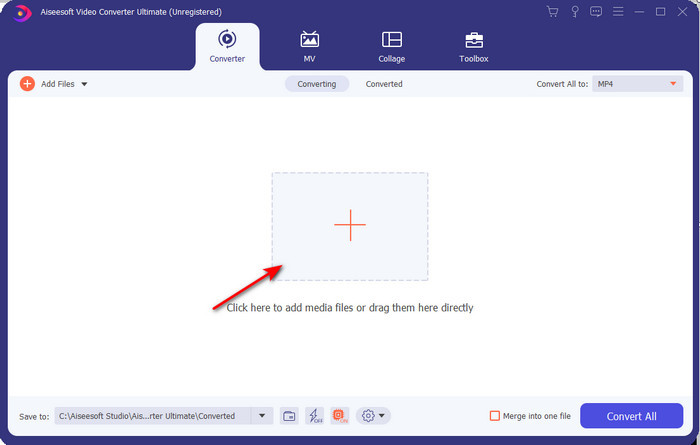
ステップ3. 3GPを別形式に変更するには、Convert Allオプションをクリックし、Videoカテゴリの中からAVI形式を選択します。
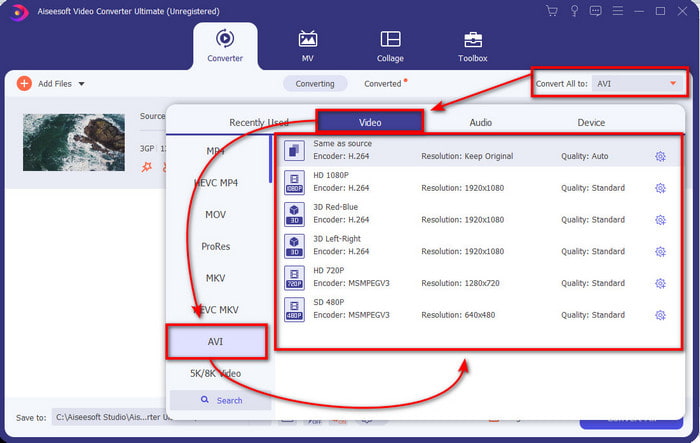
ステップ4. 変換プロセスを開始するには、Convert Allをクリックします。これで3GPファイルの変換が開始されます。

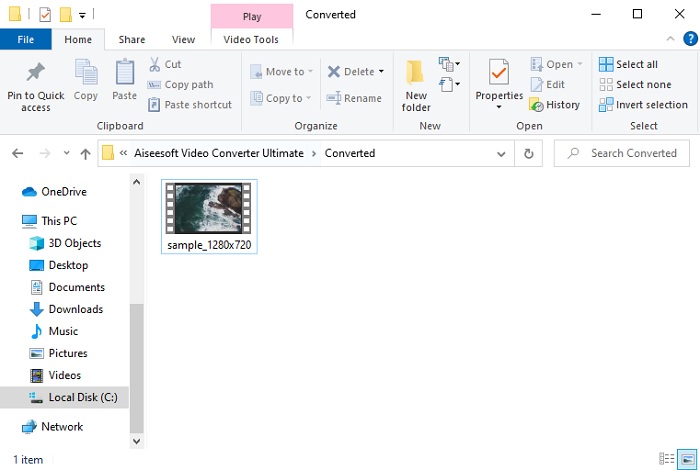
ステップ5. 変換が完了すると、変換済みの3GPファイルが入ったフォルダーが画面に表示されます。新しく変換されたAVIファイルをクリックして再生し、必要であれば後から編集することもできます。
パート 2. 3GP を AVI に変換する 3 つの利用可能なオンライン コンバーター
1.FVC無料ビデオコンバーターオンライン

このリストで紹介するツールの中で、オンラインで使える最高の3GPからAVIへのコンバーターが、FVC Free Video Converter Onlineです。オンラインコンバーターに求められる機能はひと通りそろっています。さまざまな点から見て、これ以上ないオンラインコンバーターと言えるでしょう。たとえば、高効率なオンライン変換、安全な変換プロセス、そして広告なしの環境を求めているなら、このWebツールが最適です。見た目も良く、動作も非常に安定していますが、対応している形式は中程度の数にとどまります。また、FVC Video Converter Ultimateで使えるような高度な機能はここでは利用できません。しかしソフト版と比べたときの利点は、完全に無料で使えるという点です。それでは早速、ファイルを新しい形式に変換する手順に進みましょう。
ステップ1. このリンクをクリックしてWebサイトにアクセスします。
ステップ2. Add Files to Convertを押してオンラインツールを起動するとフォルダーが表示されるので、.3gpファイルを探します。初めてこのツールを使う場合は、Add Files to Convertをクリックしてランチャーをダウンロードし、その後もう一度クリックしてツールを起動する必要があります。
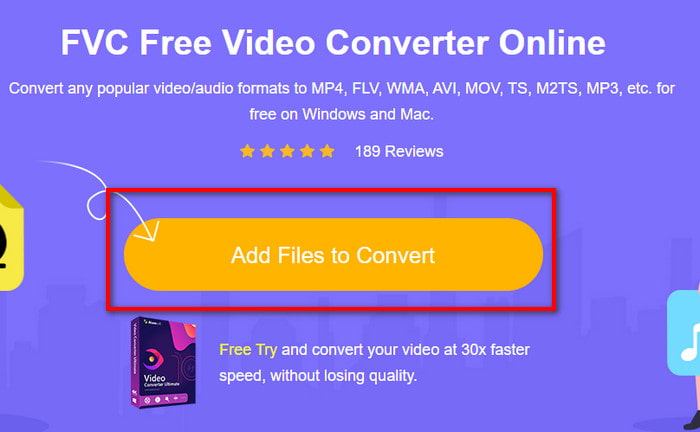
ステップ3. ファイルの選択が終わったら、下部のセクションでAVI形式を選択します。
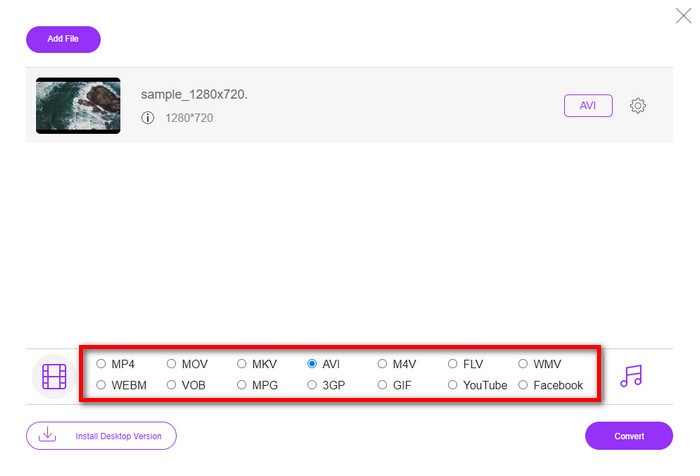
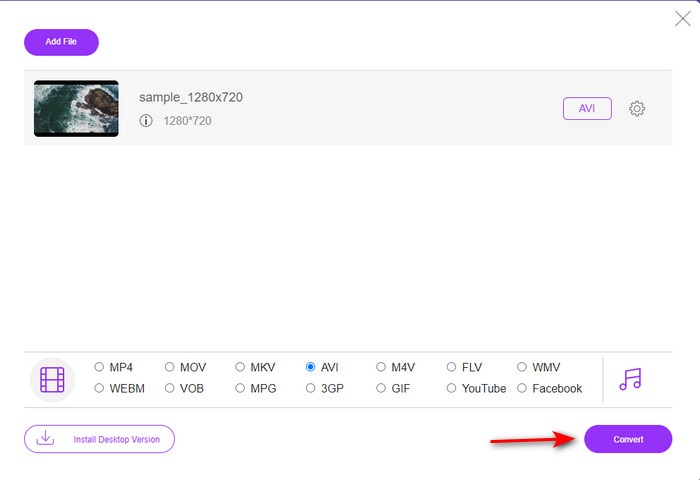
ステップ4. 変換の準備ができたら、Convertをクリックします。
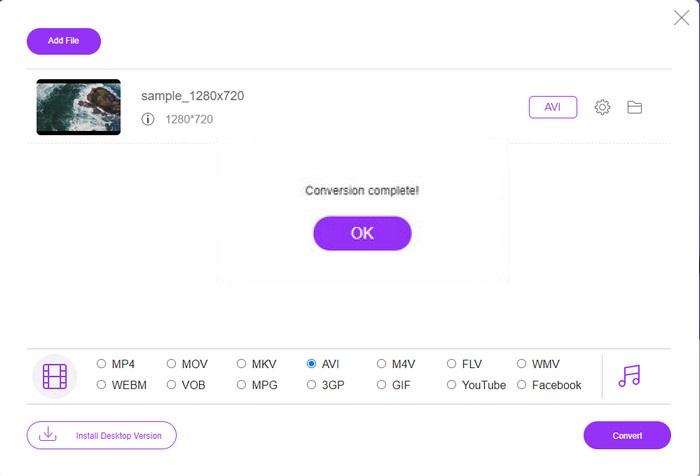
ステップ5. 変換後、再びフォルダーが表示され、そこに先ほど変換したファイルが入っています。
2.Fconvert.com
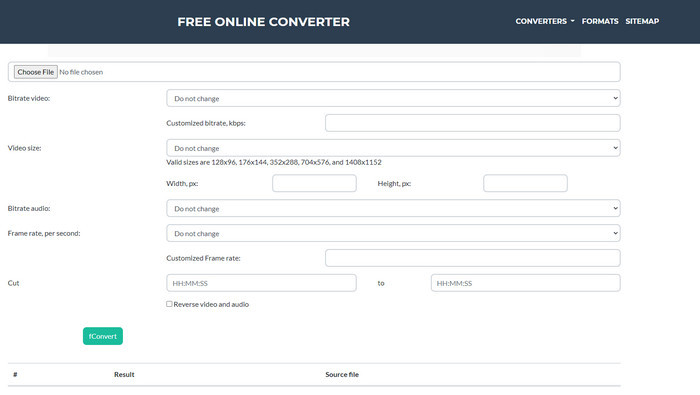
ファイル変換ツールの中で、Fconvert.comも必ず候補に入れておきたいWebツールです。このツールは無料で利用できる優秀なコンバーターの1つで、よく知られているほとんどの形式(おそらくあなたのファイル形式も含む)を変換できます。ただし、このツールには1つ問題があり、それは広告の多さです。サイト上の何かをクリックするたびに、目的の操作に進む前に広告が表示されます。広告は煩わしいものの、サイト自体はすっきりしていて、形式変換の性能も非常に優れています。このツールの実力を体験したい場合は、以下の手順に従って、無料で3GPをAVIに変換する方法を学びましょう。
ステップ1. ブラウザーでこのツールの公式サイトを検索します。
ステップ2. videoの下にあるAVIをクリックし、Choose Fileをクリックして.3gpファイルを指定します。その後、画面をスクロールダウンしてfConvertをクリックします。
ステップ3. 画面を下にスクロールするとResultが表示されるので、そのファイルをクリックしてダウンロードします。
3.エニコン
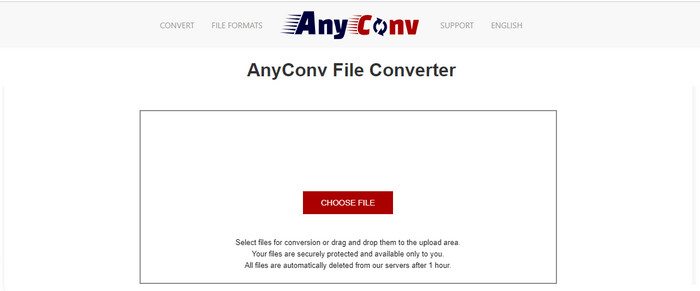
形式変換に特化した別のツールがAnyconvです。このWebツールはFconvert.comとはかなり異なり、より高性能かつ高速です。また、前述のツールと比べて広告も少なめです。広告の数自体は少ないものの、1つ1つの広告はFconvert.comよりも大きい傾向がありますが、性能面ではこのツールのほうが優れていると言えます。それでは、3GPを無料でAVIに変換できるかどうか、実際に試してみましょう。
ステップ1. 検索エンジンを開き、AnyconvのWebサイトを探します。
ステップ2. Choose Fileを押すとフォルダーが表示されるので、Webツールに.3gpファイルを読み込んで続行します。形式を変更するには、drop-downボタンをクリックしてAVIを選びます。変換を開始するには、Convertをクリックします。
ステップ3. 処理が完了するまで待ち、Download AVIをクリックして変換後のファイルをダウンロードします。
パート 3. どのフォーマットが最適か; 3GP または AVI
第 3 世代の携帯電話を使用していて、高品質のビデオを保存したい場合、第 3 世代の携帯電話で高速に転送するには、3GP が適しています。ただし、AVI 形式を第 3 世代の携帯電話に送信しようとすると、この形式はサポートされていないため、ファイルは開きません。しかし、今日の場合、AVI の方がはるかに優れています。 3GP と比較して、すべてのメディア プレーヤーとエディターからすでに多くの支持を得ています。現在は AVI 形式が最適ですが、ファイル サイズは 3GP に比べて膨大であり、携帯電話に保存しようとすると多くの容量を消費します。さらに、どちらの形式も優れていますが、目的と用途が異なります。
パート 4. 3GP と AVI に関する FAQ
FFmpeg を使用して 3GP を AVI に変換できますか?
3GPファイルの変換にはFFmpegも利用できます。ただし操作はやや難しいものの、時間をかけて行えば十分扱えます。まず1つ目の手順として、FFmpegのzipファイルをPCにダウンロードし、解凍します。2つ目の手順では、ツールとやり取りするためにCDM(コマンドプロンプト)を開きます。続いて、コマンドプロンプト上でファイルの場所に移動し、ffmpeg -i input.3gp -vn -ar 44100 -ac 2 -b:a 192k output.aviというコードをコピーしてCDMに貼り付け、Enterキーを押して変換プロセスを開始します。
3GP は第 4 世代の携帯電話でプレイできますか?
この形式は第3世代(3G)携帯電話向けに使われており、一部の第4世代(4G)端末でも3GP形式の動画を再生できますが、すべての機種で再生できるわけではありません。先ほども述べたように、3GPは本来3G向けであり、一部の4G端末には対応していないためです。あるいは、専門的な3GPプレーヤーを利用して動画を楽しむこともできます。
3GP と MP4 のどちらの形式が優れていますか?
画質と対応形式の多さという点では、MP4のほうが優れています。しかし、3GPはファイルサイズが小さく、3Gネットワーク上での転送速度という点ではより有利です。MP4を3GPに変換、あるいはその逆を行いたい場合は、こちらをクリックして詳しい情報を確認してください。
結論
すべての旅は終わりを迎える必要があり、上記のツールを使用して 3GP を AVI に簡単に変換できるようになりました。さらに、上記のすべてのツール (FFmpeg を含めましょう) はうまく機能します。それでも、最良の選択は常に FVC Video Converter Ultimate になります。このツールは、オンライン コンバーターが変換やその他の多くの面で実行できるすべての機能を上回ります。ソフトウェアを入手したい場合は、ダウンロードボタンをクリックして、すばやく変換してください。
-
 [オンライン & 無料] MP4 を 3GP に簡単に変換する 3 つの方法
 MP4を3GPにすばやく簡単に変換したいですか?ここでは、3つのMP4から3GPへのコンバーターを共有して、さまざまな携帯電話で再生できるようにMP4を3GPに変更します。
-
 Windows / MacでFLVを3GPに変換する3つの無料の方法
 スマートフォンやタブレットで FLV ファイルを開くことができませんか?心配しないで!ここでは、モバイルで再生するための品質を損なうことなく FLV を 3GP に変換する 3 つの方法を紹介します。
-
 MKVをAVI形式に変換するための優れた選択肢
 あなただけのために提供された簡単なステップでMKVビデオを変換する方法をマスターしてください。方法を知りたいですか?次に、このリンクをクリックして詳細を確認してください。
