


 ビデオコンバーター究極
 スクリーンレコーダー
 ビデオ修復
ビデオ修復Professional&Free-Wayツールを使用して3GPファイルをDivXに変換する方法
3GP files are the most common mobile device format used for ages. It serves a great purpose in transferring 3GP files to another 3rd generation phone or even the internet. But now, this format is not the best choice for sharing data because we are currently using 4G or 5G phones. Because of that, you will need to convert the format to DivX files or any other media format. Want to know how? In that case, let's read how to convert 3GP files to DivX format with the converters available on the web and desktop.

パート1.3GPをオンラインおよびオフラインでDivXに変換するための2つの最も重要な方法
最初の方法。プロフェッショナルビデオコンバーター-バッチ変換に最適なオプション
FVC Video Converter Ultimate is user-friendly and reliable for all users. This converter provides various formats you can upload or download on your drive. Not only that, suppose you want to combine two or more 3GP files, you can do it here. But also, you can convert multiple 3GP files simultaneously at one go. Furthermore, the following details will help you know the other features.

FVCビデオコンバーターアルティメット
4,258,369以上のダウンロード- 3GPファイルをDivX、XviD、AVI、MOV、MP4、およびその他の利用可能な200以上の形式に変換します。
- ハードウェアアクセラレーションと高速変換により、変換プロセスをさらに高速化します。
- すべてのWindowsおよびMacプログラムで利用可能で、幅広いユーザーをダウンロードして支援します。
- トリミング、マージ、カット、エフェクトの追加などの高度な編集機能は、こちらから入手できます。
- ファイルの変換についての考えの有無にかかわらず誰でも使用するプロのコンバーター。
無料ダウンロードWindows 7 以降に対応安全なダウンロード
無料ダウンロードMacOS 10.7 以降に対応安全なダウンロード
印象的ではないですか?もしそうなら、3GPをDivXに変換する方法を知るために以下の詳細なステップ全体を読んでみましょう。
Step 1. Download the software to your computer drive by clicking the download button presented below. After that, install it and do the quick set-up, then open the tools.
無料ダウンロードWindows 7 以降に対応安全なダウンロード
無料ダウンロードMacOS 10.7 以降に対応安全なダウンロード
Step 2. After opening, it is now the right time to upload the file by clicking the Add file at the upper left corner of the interface.
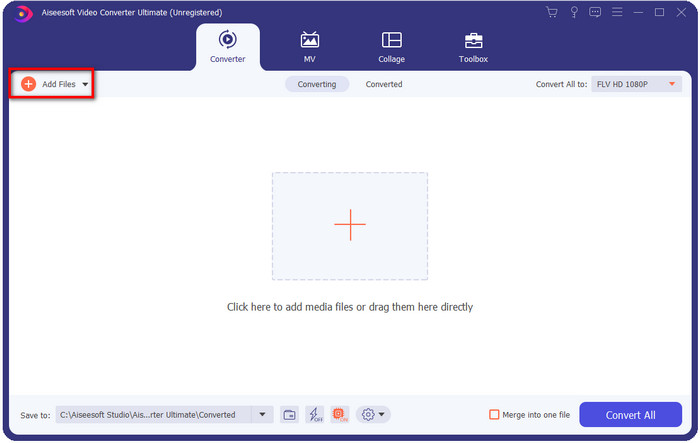
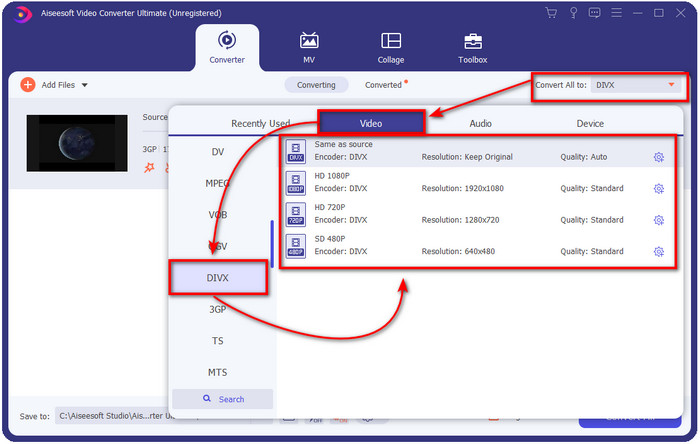
Step 3. To change the format, click the Convert All to located at the interface's upper right corner.
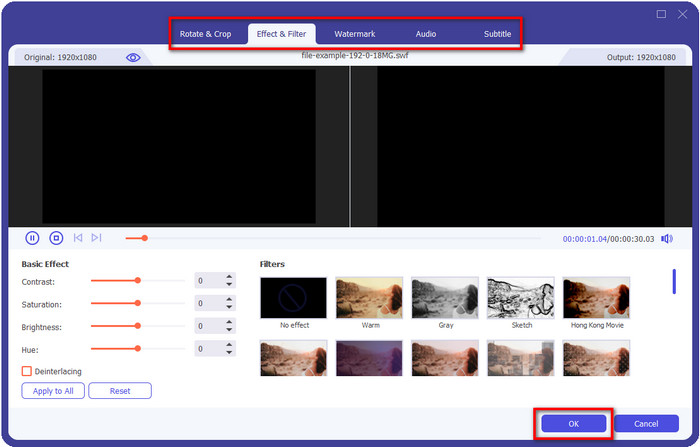
Want to add some razzle-dazzle on your video? In that case, click the wand button to do it. After clicking it, a new interface will show where you can add the effects or edit all you want. To save the editing you've made, click OK.
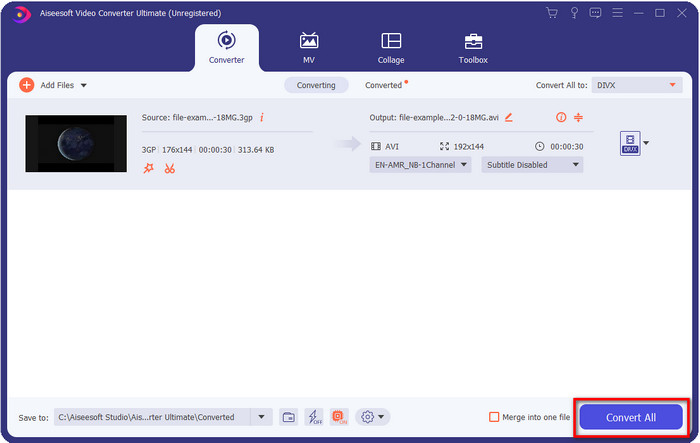
Step 4. Start the converting process by clicking Convert All, and after that, a folder with the converted file will show on your display.
2番目の方法。 Free-WayVideoConverter-オンラインでのビデオ変換を提供
FVC Free Video Converter Online is the perfect 3GP to DivX converter online that you can use. This web converter is far different from the other converters you encounter on the web. Why is it? First, this tool doesn't have pesky ads to annoy you while converting. Second, this tool supports a much more format compared to the other web-converters you can use. And one of the highlights of this converter is that you can change the specification for video and audio at the settings. Want to know how to use this converter? Then the steps below will guide you.
Step 1. If you click this link, a new browser will open, locating the main web converter.
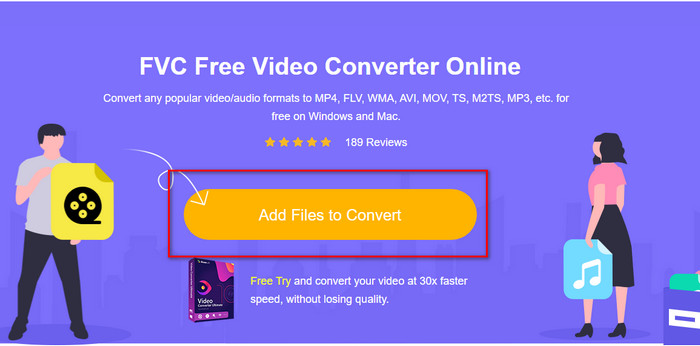
Step 2. Press the Add Files to Convert button on the interface to open your computer folders, find the .3gp files you want to convert, and press Open.
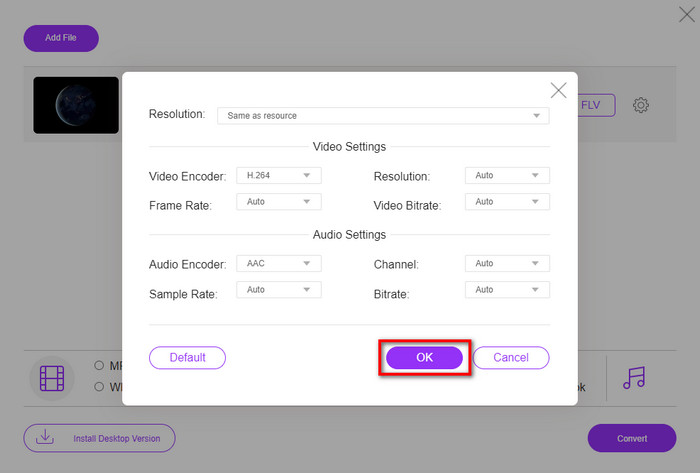
仕様を変更するには、ギアボタンをクリックします。ここでは、ビデオまたはオーディオの設定を手動で無料で変更します。
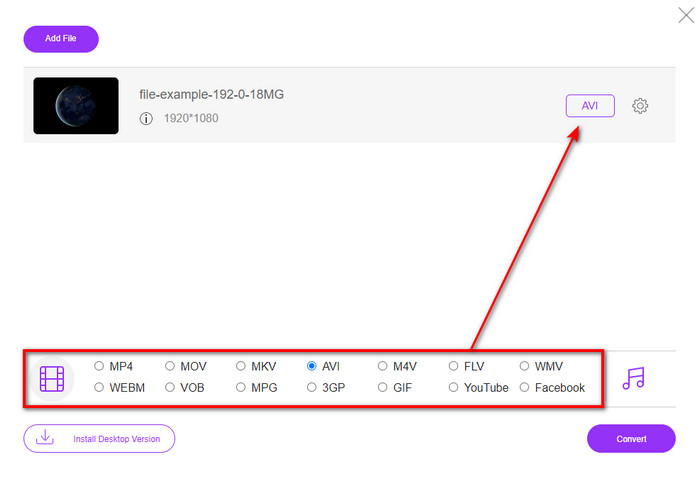
Step 3. Click the desired format available you want below.
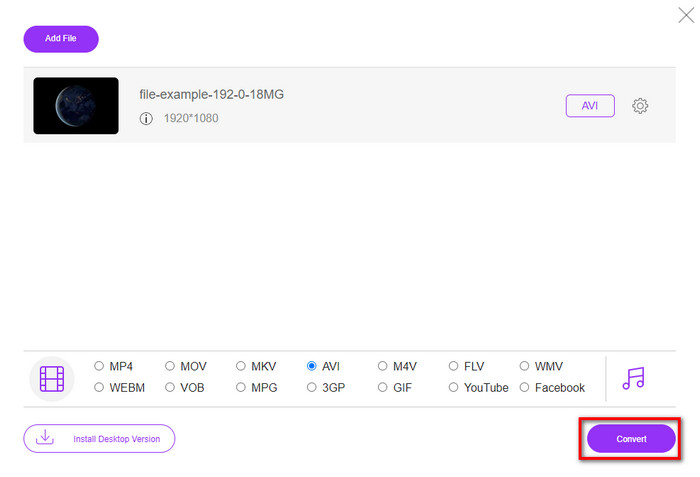
Step 4. Then press Convert to begin converting your format.
長所
- 無料で、誰でもアクセスできます。
- ここでのコンバージョン体験を素晴らしいものにするために、インターフェースに邪魔な広告はありません。
- ほぼすべての形式を新しい形式に変換するための最良の選択。
短所
- インターネットに接続していない場合はアクセスできません。
- 高度な機能はここでは利用できません。
パート2。3GPとDivXについての深い理解
3GPは、3G電話でビデオとオーディオをキャプチャする標準化されたマルチメディア形式です。この形式は、3G携帯電話やインターネットで効率的にビデオを転送するのに最適です。さらに説明すると、ファイルサイズが小さくなるように開発されており、データの送信に帯域幅とデータ使用量をあまり使用しません。このフォーマットは現在も機能していますが、新しいフォーマットはこのフォーマットよりも優れた構造を示しているため、その有効性の優先順位は低くなります。
DivXは、ビデオの品質に影響を与えることなく、主にファイルをより小さなファイルに圧縮するために使用されるコンプレッサーの一種です。このコーデックは、レンタルDVDを自宅に持ち込む方法を変更しようとしましたが、失敗しました。そして今、このコーデックは、DVDの交換を試みる代わりに、ほとんどのフォーマットを圧縮してインターネット経由でさらに高速に送信するのに役立ちます。
DivXは、メディアプレーヤーでアップロードして再生したり、エディターで編集したりするのにそれほど人気はありませんが、それでも3GPよりも優れています。この2つを区別できる側面はたくさんありますが、主な理由の1つは、3GPの互換性と品質がDivXファイルよりも低いことです。
パート3。3GPからDivXへの変換に関するFAQ
.3gpを開くには特別なアプリが必要ですか?
プラグインプレイやエンコーダーについて話しているなら、答えはノーです。この形式は、プラグインやエンコーダーをダウンロードしなくても、ほとんどのデスクトップメディアプレーヤーで再生できます。ただし、これをモバイルデバイスで再生する場合は、開かないため、これ以上何も期待しません。 .3gpファイルをモバイルデバイスに保存することはできますが、それでも再生の目的は不可能です。ファイルを削除する代わりに、MP4、AVI、MOV、およびより互換性のある形式に変換して、デバイスで再生してみませんか。
どの世代の電話が3GPをサポートしていますか?
形式は3Gデバイス用ですが、このファイルはほとんどの2Gおよび一部の4Gで使用できますが、すべてではありません。
VLCは3GPをサポートしていますか?
VLCは、ビデオの再生に関してデバイスにダウンロードできる最良の多目的メディアプレーヤーの1つです。はい、できます。このメディアプレーヤーは、追加のエンコーダーやプラグインをダウンロードせずにビデオを簡単に再生できるように、さまざまなフォーマットとエンコーダーをサポートしています。
結論
And now that we have ideas on converting 3GP to DivX, we must convert files if you want to make it compatible. These two said converter performs at best especially converting your .3gp files. Although both tools can do a perfect job, some standards still set them apart. For example, FVC Free Video Converter Online is the best online converter you can use for free. Even though it is not as professional as the ultimate tool, it is still considered a professional web-based tool. While FVC Video Converter Ultimate is a one-of-a-kind converter, you can download it on your desktop. This converter is the best choice for converting and editing, speed-up or slow-down video, reversing, making GIFs, and more. If you want to achieve a phenomenal output, you must download the ultimate tool right now.
-
 3GP を AVI 形式に変換する最も効果的な方法トップ 4 [2025]
 3GPファイルをAVIに変換できますか? 3GPからAVIへの変換の問題に対して考えられるすべての解決策を集めたので、これらのツールを試してみると、簡単に変換できます。
-
 さまざまな方法で 3GP を MOV に変換する方法 [2025]
 一部のビデオプレーヤーがこの種のビデオ形式を再生するのに3GP形式が不便だと感じましたか?それをMOVに変換してみてください。この記事ではそれについて多くのことを説明しているので、読み続けてください。
-
 3GP を FLV に変換するのに最適な 3GP から FLV へのコンバーター [2025]
 3GPをFLVに変換しようとしたことがありますが、どの種類のコンバーターを使用するかわかりませんか?この記事を読んで、3GPからFLVへの変換に関するすべての詳細を確認してください。
