


 ビデオコンバーター究極
 スクリーンレコーダー
 ビデオ修復
ビデオ修復
 安全なダウンロード
FLAC と WAV を変換する最も簡単な方法 (オフライン/オンライン)
Free Lossless Audio Codec, commonly known as FLAC, is an audio file format with a remarkable resemblance to MP3. It provides users an excellent audio quality while occupying a relatively small size on your disc space. Besides that, this type of format is lossless, which says that a large portion of your audio data is retained despite the compression process. On another note, there are cases when you need to convert FLAC files to another format like WAV if you want to make your listening experience to its optimum and superior quality. Should you choose between the two? Find out below how you can get both using the best FLAC to WAV conversion tools out there.

パート 1. FLAC と WAV をオフラインで変換する
Video Converter Ultimate is a top-notch tool for transforming files to any audio format, including WAV and FLAC. This program offers a batch conversion feature that allows you to convert a collection of audio files in one sitting. Moreover, you can maximize the quality of every song you wish to work on since the program allows users to adjust output technicalities such as the sample rate and bitrate. If you wish to batch convert WAV to FLAC or vice versa, read the quick guide we prepare beneath.
Step 1. Launch the program on your device by selecting the appropriate Free Download button below. In the next step, follow the on-screen instructions to launch the program. You can get a hand with its interface once installed.
無料ダウンロードWindows 7 以降に対応安全なダウンロード
無料ダウンロードMacOS 10.7 以降に対応安全なダウンロード
Step 2. Hit the Add icon on the main screen and import the audio file you want to work on. Afterward, you will be directed to a preview of the imported file. You can upload a folder if you wish to convert in bulk. Choose from your directory the folder that contains all the audio files you need.
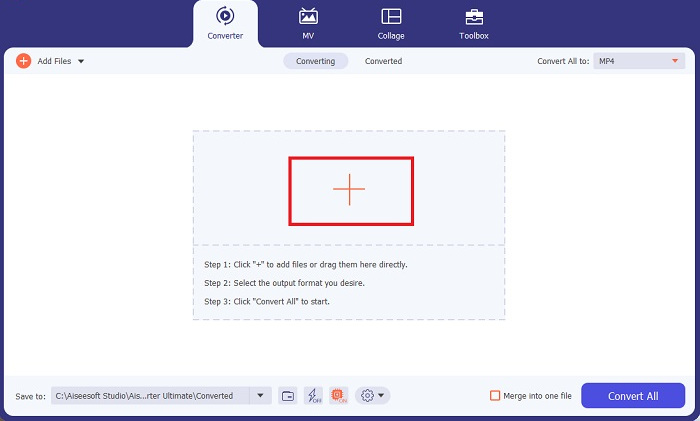
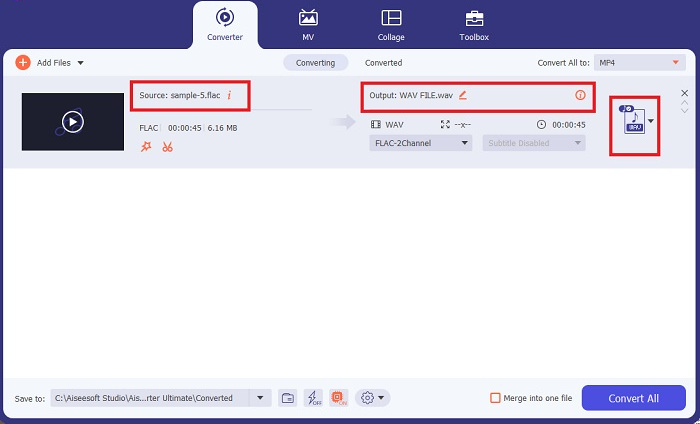
Step 3. Now, you can change the output format by clicking the Converter button above the program’s screen. From there, choose WAV from the Audio Output selection tab. Meanwhile, you can adjust the sample rate and bitrate of your output file to match your preferred quality.
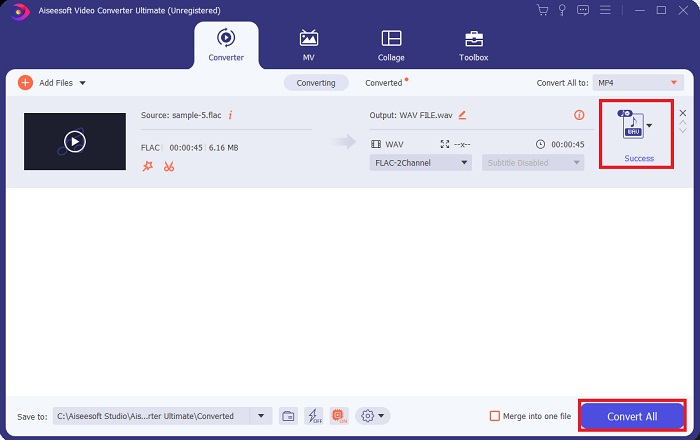
Step 4. For the final step, initialize the conversion process by clicking the Convert All button below. Afterward, the program will automatically open the output folder for you to check on your file’s new format.
長所
- FLAC を WAV オーディオ ファイル形式に一括変換できます。
- このプログラムは Windows と Mac OS の両方でうまく動作します。
- 変換速度が速いです。
短所
- 無料トライアル後は有料のサブスクリプション料金が必要です。
- このプログラムは Linux OS デバイスでは動作しません。
パート 2. オンラインで FLAC を WAV に、または WAV から FLAC に変換します
While your search engine may show you a plethora of FLAC to WAV or WAV to FLAC online converters, here is what we could do to ease your struggle. Free Audio Converter Online is an excellent option to exempt yourself from installing a desktop program. This online converter works seamlessly, providing safety and security for your personal data while accomplishing the conversion. Moreover, you can take advantage of the software's bulk conversion feature just as f you are using a desktop program.
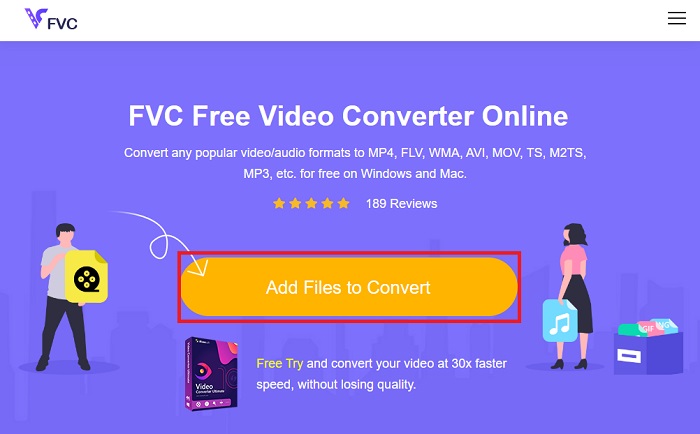
Step 1. Click the link above to land on the Free Online Video Converter main website. Select the Add Files to Convert on the main screen and upload your audio file.
Step 2. The preview of your original file will show on the screen. From the same panel, turn below and choose your desired output format.
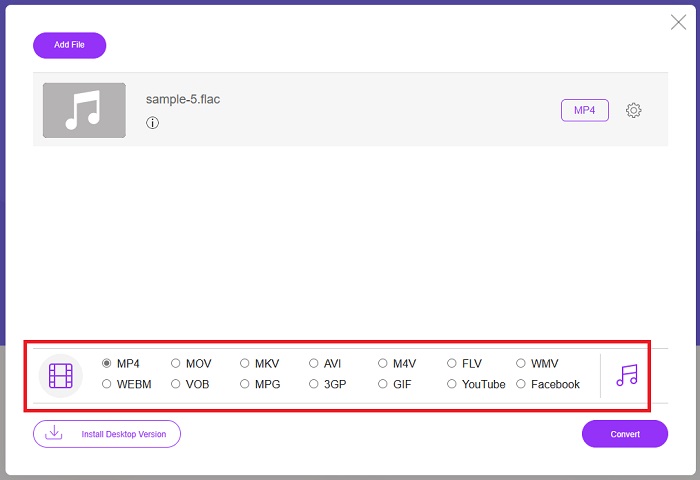
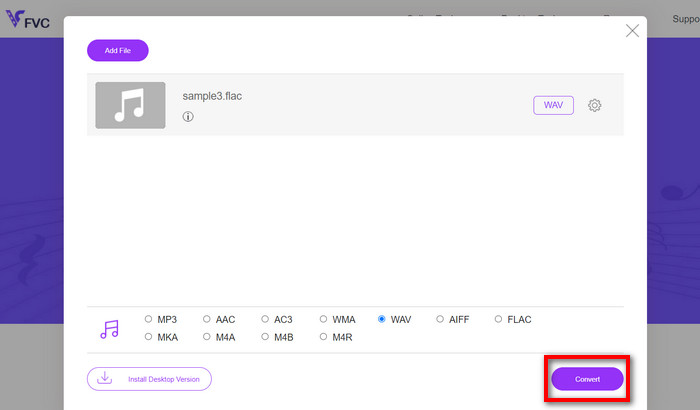
Step 3. Hit the Convert button to change FLAC to WAV format. If you wish to convert another file, repeat this guide from the start.
長所
- Google Chrome、Safari、Firefox などのあらゆる検索エンジンで動作します。
- MP3、AAC、WMA などのさまざまな一般的なオーディオ ファイル形式を提供します。
- ユーザーは 1 日に無制限に変換を楽しむことができます。
短所
- 変換速度はインターネット接続の強度に依存します。
さらに詳しく読む:
Convert FLAC to MP3 Conversion to Preserve Audio Quality
最適な音声サイズのために WAV を OGG に変換する簡単ステップ
パート 3. FLAC と WAV 変換に関する FAQ
ファイルを FLAC から WAV に変換すると品質は低下しますか?
オーディオ ファイルを FLAC から WAV に変換しても、解像度は非圧縮であるため、品質は低下しません。ただし、ファイルを WAV から FLAC に変換するとします。その場合、特に細部までこだわる耳を持つ人は、わずかな変化に気づくかもしれません。どれを保持するかを決定する際に支援が必要な場合は、次の視点を参照してください。 FLAC オーディオ形式は大量の曲を保存するのに適しています。一方、WAV ファイルのサイズは大きくなりますが、オーディオ編集に適しています。
WAV は最高解像度のオーディオ形式ですか?
WAV は、IBM と Microsoft によって開発された Waveform Audio File Format の略称です。このフォーマットには、生の妥協のないオーディオ周波数が含まれているため、デジタル音楽業界で最高解像度のフォーマットとみなされます。
最高のオンライン FLAC から WAV コンバーターは何ですか?
間違いなく、FVC Free Online Video Converter はオンラインで最高の無料 FLAC から WAV コンバーターです。ソフトウェアを使用してビデオ ファイルやオーディオ ファイルを変換するのに技術的な能力を習得する必要はありません。ユーザーフレンドリーで比類のない変換速度を備えているため、仕事を効率的に行うことができます。さらに、このオンライン プログラムは、すべてではないにしても、私たちが知っている一般的なオーディオ形式のほとんどを提供します。
結論
Conversion can happen either way from FLAC to WAV and WAV to FLAC. Since both file formats are prevalent in digital music today, picking which one to choose may depend on the task you will use them for. With the tools mentioned above, you can switch back and forth between formats anytime. Follow the steps mentioned above to change FLAC to WAV or WAV to FLAC, and you should face zero difficulties.
-
 MP3をWAV形式に変換する方法をご覧ください
 MP3をWAVに変換する方法を知りたいですか?どのツールがあなたが得ることができる最高品質の変換を生み出すかを決定します。
-
 WAVプレーヤー– Android、iPhone、PC、Mac向けのトップ5WAVプレーヤーアプリ
 Android携帯でWAVファイルを再生する方法は?どのプレーヤーがWAVを再生できますか?この投稿では、Android、iPhone、Mac、PC向けの5つの最高の無料WAVプレーヤーを共有しています。
-
 Mac と Windows のトップ 3 FLAC メタデータ エディター [2023 年更新]
 FLACメタデータを変更しますか?この場合、使用できる最新のFLACメタデータエディタに関する十分な知識を提供しているため、この記事を読む必要があります。
