


 ビデオコンバーター究極
 スクリーンレコーダー
 ビデオ修復
ビデオ修復
 安全なダウンロード
最も効果的な手順で DIVX を 3GP に変換
お使いのデバイスでDIVX動画がサポートされておらず再生できないことがあります。この問題に直面している人は多くいます。しかし幸運なことに、ここでは最も効果的で簡単なDIVXを3GPに変換する方法について解説します。この機会を逃さず、これから紹介する信頼性が高く実績のあるさまざまなアプリケーションを使って、異なるファイルを変換する方法を学びましょう。

パート 1: DIVX を 3GP に変換するための最適なソフトウェア
WindowsやMacなどのデバイスでDIVXを3GPに変換したいですか?それなら、すでに問題は解決しています。DIVXファイルを変換するには、Video Converter Ultimateを利用できます。名前のとおり、このツールはDIVX、3GP、MP4、MOV、MTS、WEBMなど、1000種類以上の動画ファイル形式に対応した究極の変換アプリケーションです。さらに、このツールはバッチ変換に対応しているため、2つ以上のファイルを同時に変換できます。また、Video Converter Ultimateは変換速度が速いため、多数のファイル形式を変換したい場合にも最適です。
さらに、DIVX ファイルを変換する前に編集することに関心がある場合は、このオフライン アプリケーションを引き続き使用できます。ビデオの色を補正したい場合は、ツールボックス パネルに進み、色補正ツールを選択して、ビデオの明るさ、コントラスト、彩度を調整します。さらに、変換する前に DIVX ビデオ ファイルのオーディオを同期したいとします。そんな時はAudio Sync機能があるので、簡単に映像と音声を同期させることができます。
主な機能:
◆ MP4、M4V、FLV、AVI などのビデオ ファイル形式を変換します。
◆ さまざまなテーマのミュージック ビデオを作成できます。
◆ ツールボックスには、ビデオ エンハンサー、ウォーターマーク リムーバー、コンプレッサーなどが含まれています。
◆コラージュが作れます。
長所
- MP4、AVI、FLV、MOV、MTS、DIVX、3GPなど、さまざまなファイル形式をサポートしています。
- 初心者に適したフレンドリーなユーザーインターフェイスを備えています。
- 変換プロセスが 30 倍高速
- Windows と Mac の両方でアクセスできます。
- 一度に複数のビデオを変換できます。
短所
- Video Converter Ultimate を購入して、よりユニークな機能をお楽しみください。
DIVX を 3GP に簡単に変換するには、以下の簡単なガイドに従う必要があります。
ステップ1: まず、WindowsまたはMacなどのデバイスにVideo Converter Ultimateをダウンロードします。その後、インストールを行い、アプリケーションを起動します。
無料ダウンロードWindows 7 以降に対応安全なダウンロード
無料ダウンロードMacOS 10.7 以降に対応安全なダウンロード
ステップ2: Video Converter Ultimateを起動したら、変換パネルを選択します。次に、+アイコンをクリックしてDIVX動画ファイルを追加します。
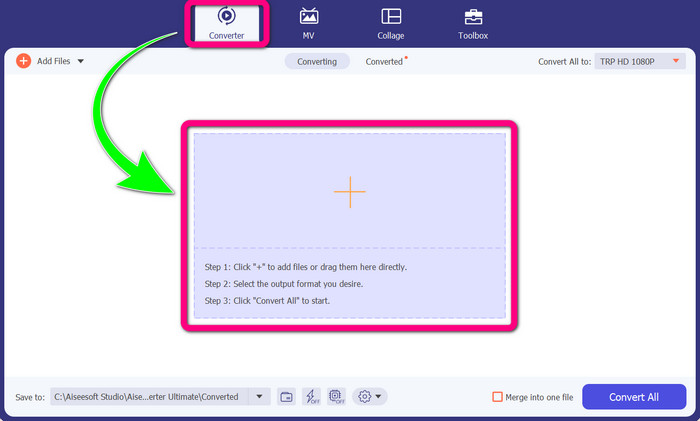
ステップ3: 動画ファイルを追加したら、すべて変換の項目をクリックし、3GPファイル形式を探して選択します。
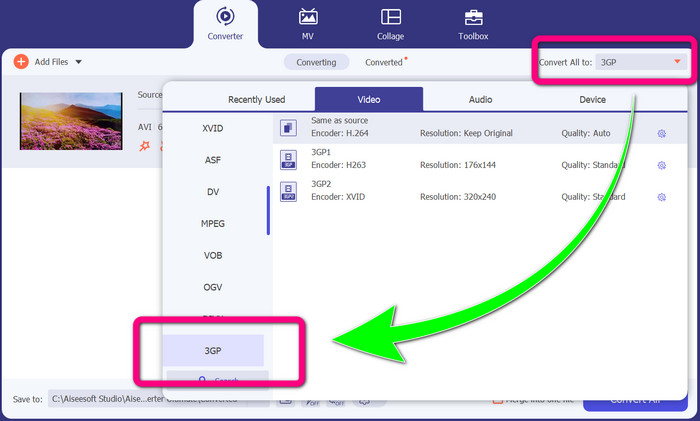
ステップ4: 3GPファイル形式の選択が完了したら、すべて変換ボタンをクリックします。変換が完了するまで待ち、出力された動画をデバイスに保存します。
![[すべて変換] ボタンをクリックします](/images/2022/10/click-convert-all_button.jpg)
パート 2: DIVX を 3GP に変換する優れたオンライン コンバーター
FVC Free Video Converterをオンラインで使用する
DIVXを3GPに変換するためのオンラインツールの中でも優れているもののひとつが、FVC Free Video Converter Onlineです。このツールを使えば、数回のクリックでさまざまなファイル形式を変換できます。MP4、MOV、MKV、FLV、VOB、MP3、AACなど、ほとんどの主流の動画および音声形式をサポートしています。FVC Free Video Converter Onlineはシンプルで操作が簡単なので、初心者でも問題なく使えます。また、このツールはWindowsとMacの両方に対応しているため、どちらのユーザーでも利用可能です。以下の簡単な手順に従って、DIVXを3GPに変換しましょう。
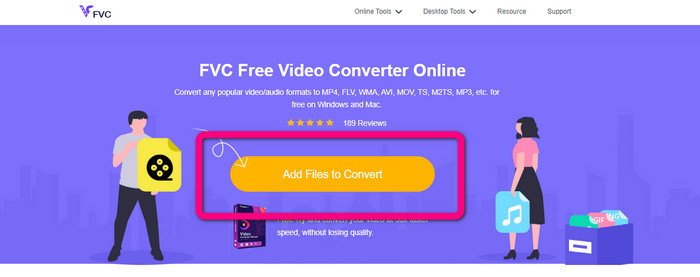
ステップ1: FVC Free Video Converter Onlineにアクセスします。次に、Add Files to Convertボタンを選択して、変換したいDIVXファイルをインポートします。
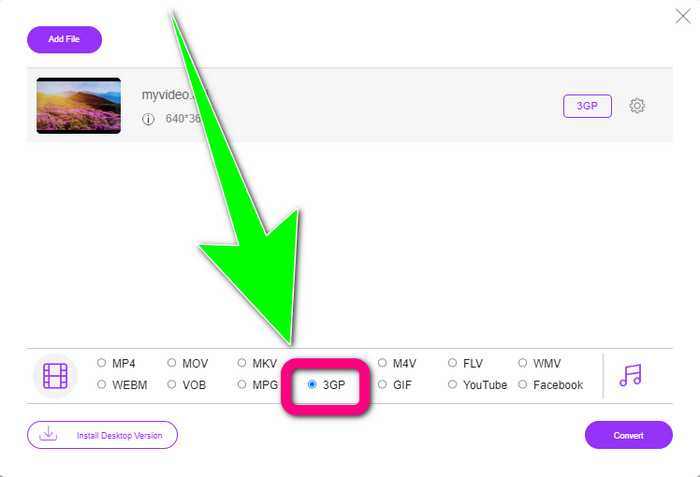
ステップ2: DIVXファイルを追加したら、下部の形式オプションから3GPファイル形式をクリックします。
ステップ3: 続いてConvertボタンをクリックします。変換が完了するまで待ち、変換後の動画を保存します。
![[変換]ボタンをクリックします](/images/2022/10/click-convert-button.jpg)
Convertio の使用
オンラインでDIVXを3GPに変換したい場合、Convertioは利用できるツールのひとつです。3GP、DIVX、XVID、AVID、MP4、M4V、ASF、HEVCなど、多くの形式をサポートしています。動画ファイルの変換だけでなく、画像、音声、ドキュメント、アーカイブなど、その他のファイルも変換できます。Convertioは数ステップで変換できるシンプルなツールなので、DIVXファイルを3GPファイルに変換する際に手間がかかりません。ただし、他のオンラインツール同様、インターネットに接続していなければ利用できません。また、オンラインツールの特性上、動作が不安定な場合もあります。Convertioの無料版には制限があり、最大100MBまでのファイルしか変換できません。より大きなファイルサイズに対応し、快適なパフォーマンスを得るには、有料版を購入する必要があります。以下の手順に従って、DIVXファイルを3GP形式に変換してください。
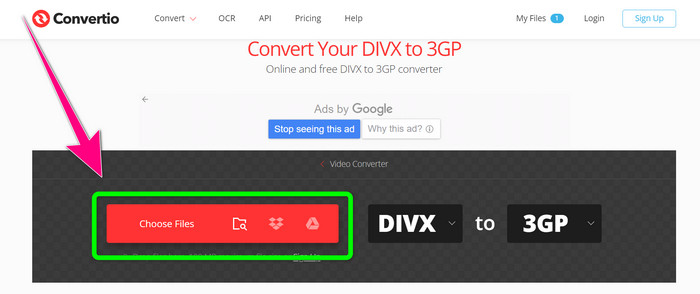
ステップ1: Convertioの公式サイトにアクセスします。Choose Filesボタンをクリックして、DIVX形式の動画ファイルを追加します。
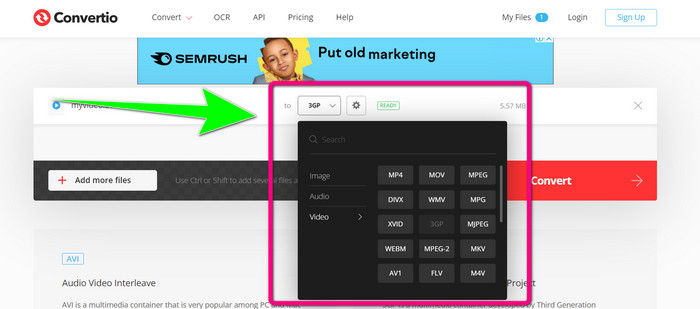
ステップ2: 動画を追加したら、形式オプションに進み、3GPファイル形式を選択します。
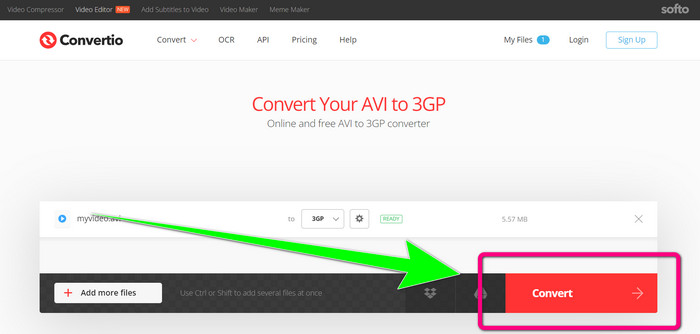
ステップ3: 3GPファイル形式を選択したら、Convertボタンをクリックし、変換が完了するまで待ってから、3GP動画ファイルを保存します。
パート 3: DIVX および 3GP ファイル形式の概要
DIVX
DIVXは、元の動画の最大12分の1まで圧縮できる動画圧縮ソフトウェアでありながら、画質の低下を最小限に抑えられるのが特徴です。この動画形式は、Disney、DreamWorks SKG、Universal、Paramountといった大手映画会社で広く利用されています。
3GP
3GPはマルチメディアコンテナ形式です。第3世代パートナーシッププロジェクト(3GPP)によって1998年に、GSM(Global System for Mobile Communications)携帯電話向けに開発されました。3GPコンテナは、必要なストレージ容量やデータ使用量、帯域幅が少なくて済むため、携帯電話での利用に最適です。
関連記事
パート 4: DIVX から 3GP への変換に関する FAQ
DIVXコンバーターとは?
これは、さまざまなファイルタイプを多種多様な形式に変換できる優秀なツールです。AVI、MP4、MPEG、MOV、FLVなどが含まれます。変換が完了したら、それぞれの形式に対応した任意のメディアプレーヤーで動画を再生できます。FVC Free Video Converter Onlineは、その中でも特におすすめのコンバーターのひとつです。
DIVX ファイル形式は AVI と同じですか?
DIVX ファイル形式は AVI コンテナに基づいていますが、章や字幕などの優れた機能を含めることができます。さらに、DIVX 認定デバイスでは、AVI と DIVX の両方のファイル形式を再生できます。
品質を落とさずに DIVX ファイルを 3GP に変換できますか?
もちろん可能です。Video Converter Ultimateを使用すれば、画質の変化を心配することなくDIVXファイルを3GPに変換できます。この優れたコンバーターは、動画の品質を維持したままさまざまなファイルを変換できます。
結論
ご覧のとおり、オンラインツールとオフラインツールの両方を使ってDIVXを3GPに変換するための、さまざまな効果的な方法があります。しかし、インターネット回線が不安定な場合など、オンラインツールが不便になることもあります。そうしたときは、ダウンロード型のアプリケーションを利用するとよいでしょう。もし優れたオフラインツールをお探しなら、Video Converter Ultimateを試してみてください。
-
 WindowsおよびMac用の最高のMKVから3GPへのコンバーターの4つ
 使いやすいMKVから3GPへのコンバーターをお探しの場合は、幸運です。私たちはあなたが試さなければならない最高の無料のMKVから3GPへのコンバーターを見つけました。
-
 見逃してはならない5つの最高の究極のMOVから3GPへのコンバーター
 最高のオンラインおよびオフラインのMOVから3GPへのコンバーターを探しているなら、あなたは正しい方向に進んでいます。この記事を読んで、MOVを3GPファイルに変換してください。
-
 WindowsおよびMacでMPGを3GPに変換する3つの方法[無料]
 MPGを3GPに変換する方法をお探しの場合は、この記事を読んで、WindowsおよびMacでMPGを3GPに変換するための最良の方法を確認してください。
