


 ビデオコンバーター究極
 スクリーンレコーダー
 ビデオ修復
ビデオ修復
 安全なダウンロード
無料でM4VをDivXに変換する簡単な方法
Since M4V players are DRM-protected files, Blu-ray players and DVD players cannot read this file format. So if you want to play your M4V files on a DVD or Blu-ray player, you need to convert them to a DivX file format. Fortunately, we tested the most known online, offline, and freeware converters and chose the best to use among them. So, read this article until the end to know the simple ways to convert M4V to DivX for free, using the best converters.

パート 1. デスクトップ プログラムを使用して M4V ファイルを DivX に変換する方法
If you are looking for the best offline converter known in the market, FVC Video Converter Ultimate is the answer for you. This offline converter lets you convert your M4V file to a DivX file because it supports over 1000+ file formats. It is also available on all known media platforms, including Mac and Windows. Moreover, it has a feature to create a GIF and 3D Video. So, if you are interested in using this converter to convert M4V to DivX on Mac, follow these simples steps below.
Step 1. Download FVC Video Converter Ultimate on Mac by clicking the Download button below. Follow the installation process, and then open the application.
無料ダウンロードWindows 7 以降に対応安全なダウンロード
無料ダウンロードMacOS 10.7 以降に対応安全なダウンロード
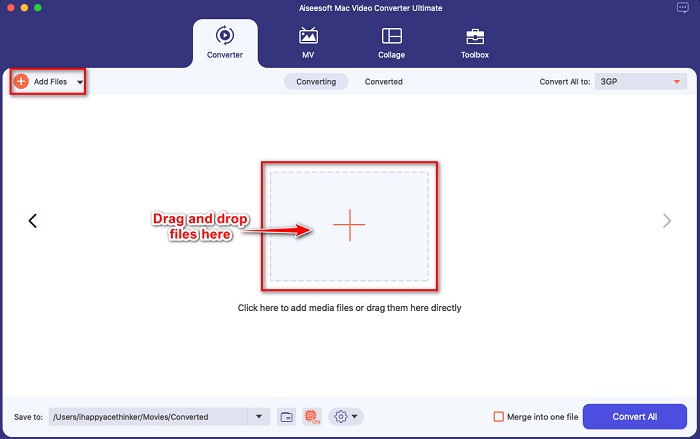
Step 2. After opening the app, upload your M4V file by clicking the Add Files button, or drag and drop your file to the + sign button. Then your file will be uploaded on the software’s interface.
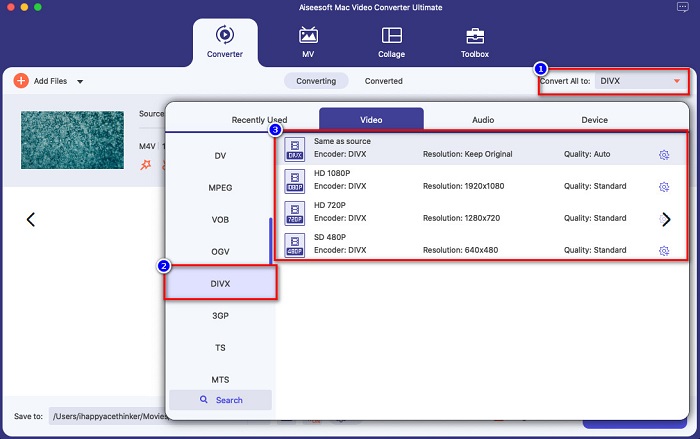
Step 3. Next, choose the output format you want by clicking the Convert All to button. Then click the DivX file format. You can also select the video quality that you want.
Step 4. Click the Convert All button to convert your M4V file to DivX file format for the last step. Then wait for a few seconds to finish the conversion process.
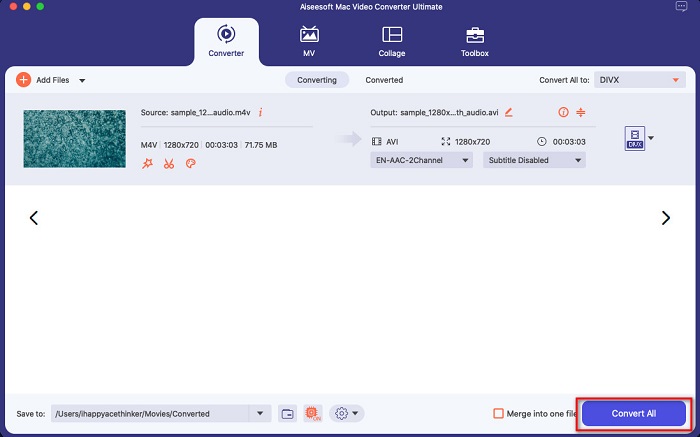
以上です! M4V を DivX に変換するには、上記の簡単な手順に従ってください。
長所
- M4V、DivX、WMV、AVI、FLV、MOV、MP4、および 1000 以上を含む多くのファイル形式をサポートします。
- 複数のファイル形式を 1 つにマージできます。
- ファイルを圧縮できる機能があります。
- Mac や Windows など、すべてのクロスメディア プラットフォームで利用できます。
短所
- アプリケーションを利用して、その特別な機能を使用してください。
パート 2. オンライン コンバーターを使用して M4V を DivX に変換する方法
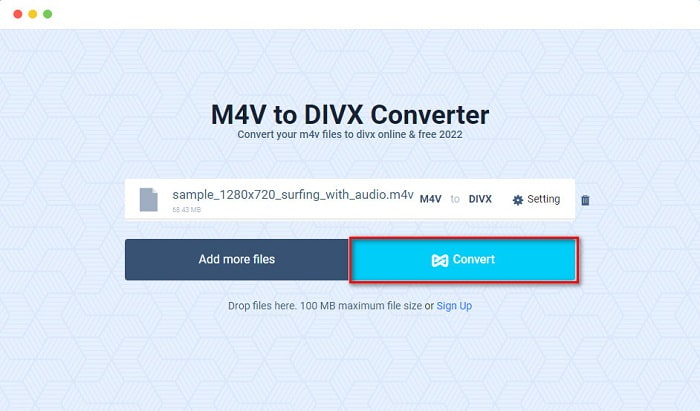
One of the reasons people choose to convert files online is that it is more convenient. Therefore, we present you with an online tool that can meet your standard for the best online tool, which is Evano. This online converter is easy-to-use and does not contain ads. However, since it is web-based, you may experience having a slow conversion process. In addition, it can only support a few file formats like M4V, DivX, XviD, WebM, FLV, and others. Nonetheless, it is still an effective way to convert M4V to DivX.
Here are the steps to convert M4V to DivX using Evano:
Step 1. On your browser, search Evano. Then on the software’s main interface, click the Choose Files button. Your computer folders will appear, then select your M4V file.

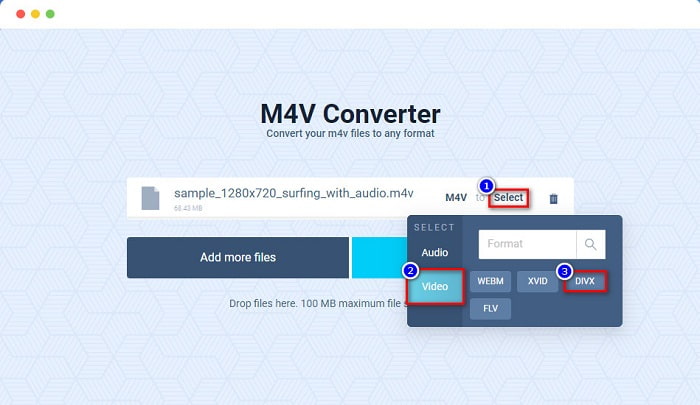
Step 2. After, click the word Select to choose the output format you want. Click the DivX file format.
Step 3. To finish, click the Convert button to convert your M4V file to DivX file format.
パート 3. フリーウェア ツールを使用して M4V を DivX に変換する方法
Another way to convert your M4V to DivX is by using a freeware converter. One of the known freeware converters is Prism. This freeware converter supports various file formats like M4V, DivX, AVI, MP4, MOV, SWF, VOB, and more, and you can download it for free. However, you might have difficulty learning the software’s interface because it has a hard-to-understand GUI.
Steps in using Prism to convert your M4V file to DivX file format:
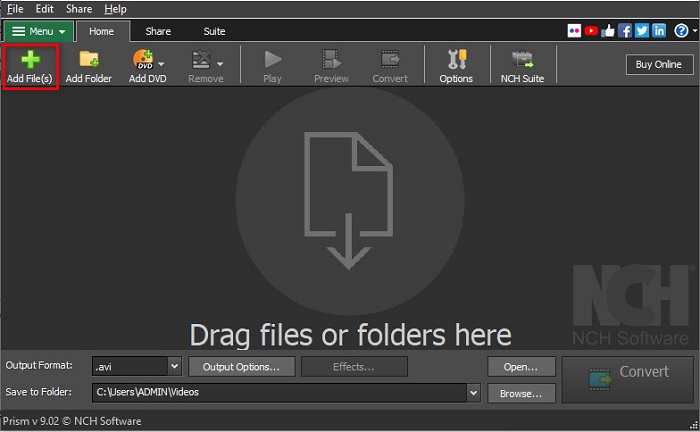
Step 1. Download the Prism file converter by searching it on your browser. And then, follow the installation process, then open the app. On the software’s first interface, click the Add Files option. Your computer files will appear where you will upload your M4V file.
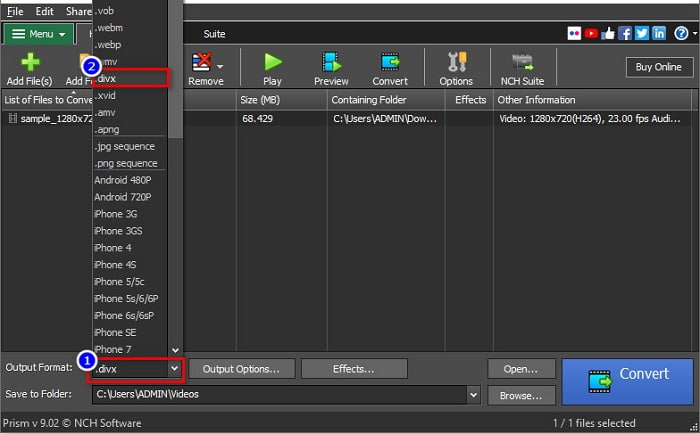
Step 2. Then, on the drop-down button beside Output Format, choose .divx file format.
Step 3. Lastly, click the Convert button at the bottom right corner of the software’s interface. Then your M4V to DivX will start to convert.
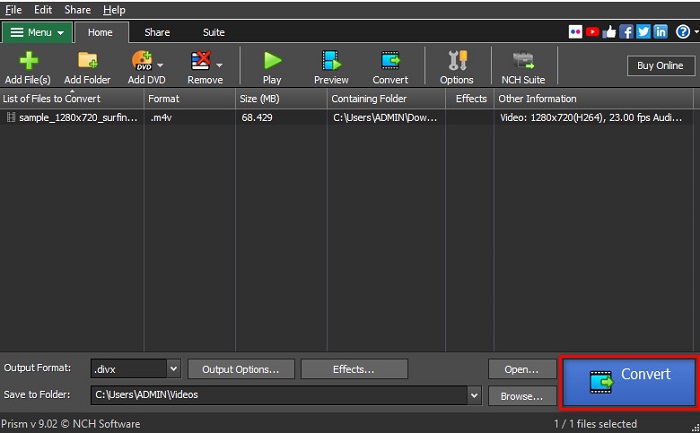
これが、フリーウェアのコンバーターを使用して M4V を DivX に変換する方法です。
パート 4. M4V 対 DivX
M4V ファイルを DivX ファイル形式に変換したい場合、混乱していますか?このセクションでは、M4V ファイル形式と DivX ファイル形式の違いについて説明します。
M4V ファイルは、iTunes ビデオ ファイルとも呼ばれるファイル コンテナー形式です。 Apple がこのファイル形式を開発しています。したがって、macOS デバイスで再生できるようにします。このタイプのファイルを作成する主な目的は、Apple の Fair Play DRM 保護を iTunes ストアのあらゆるものに適用して、Apple が製造していないデバイスにこのタイプのファイルをコピーできないようにすることでした。
一方、DivXは、品質を損なうことなく、ファイルを元のファイルサイズの12分の1に圧縮するファイル形式です。さらに、高品質のファイルで、デバイスのスペースをあまり占有しません。
| M4V | VS | DivX |
| 非圧縮 | 圧縮 | 圧縮 |
| 林檎 | 開発者 | DivX、Inc. |
| ◆ VideoLAN VLC メディアプレーヤー ◆MediaPlayerClassic ◆KM選手 | サポートされているプログラム | ◆ VideoLAN VLC メディアプレーヤー ◆DivX ◆AppleQuickTime Player ◆ RealNetworks RealTimes ビデオ メーカー |
パート 5. M4V から DivX への変換に関する FAQ
Windows Media Player で M4V ファイルを再生できますか?
はい。 Windows Media Player は、Mac の QuickTime メディア プレーヤーと同様に、M4V ファイルをネイティブに開くことができます。
M4V を DivX に変換する際に Handbrake を使用できますか?
Unfortunately, no. Handbrake does not DivX file format because it can only support limited file formats. Clik here to learn more available M4V players.
M4V と MP4 のどちらが優れていますか?
M4V と MP4 のビデオ品質はほぼ同じですが、ファイル拡張子が異なります。ただし、M4V は、字幕用により多くのデータを保存し、データのプライバシーを保護するために DRM 保護を行います。さらに、より多くのデバイスが MP4 形式よりも M4V を広くサポートしています。
M4V を DivX に変更すると、ファイル サイズに影響はありますか?
はい。 M4V ファイルを DivX ファイル形式に変換すると、ファイル サイズが小さくなります。
結論
Web 上には、オンラインおよびオフラインのファイル コンバーターが数多くあります。しかし、ファイルを最大限に活用できるのはごくわずかです。多くのコンバーターにはビデオ ファイルを改善する機能がなく、多くのファイル形式をサポートしていないコンバーターもあります。したがって、M4V を DivX に変換する究極のコンバーターを探している場合は、FVC Video Converter Ultimate を使用することをお勧めします。これは、ファイル形式の変換を支援する必要があるすべてのユーザーにとって最初の選択肢であることは間違いありません。何を求めている?今すぐこのアプリをダウンロードして、提供する優れた機能を体験してください。
-
 2 M4V を FLV に変換する承認済みの M4V から FLV へのコンバーター [2022]
 M4VをFLVに変換する方法の秘密を知りたいですか?メディアプレーヤーでファイルを再生するには?次に、この記事を読み進めて、その方法について十分なアイデアを提供します。
-
 品質を損なうことなくM4VをWMVに高速に変換する方法
 M4VビデオをWMVに変換する簡単な方法をお探しですか?この記事では、iTunesからダウンロードしたM4Vビデオを他のデバイスで楽しめるように変更する方法を学びます。
-
 MacおよびWindowsでiTunes M4VをMKVに変更する方法[最も簡単な方法]
 MacでM4VをMKVに変換する必要がある場合は、この記事を読む必要があります。変換プロセスに役立つコンバーターに関する事実を提供します。
