


 ビデオコンバーター究極
 スクリーンレコーダー
 ビデオ修復
ビデオ修復


M4VをWMVに簡単かつ損失なく変換する2つの簡単な方法
一部の企業はビデオ圧縮形式を持っています。 AppleとMicrosoftは、メディアプレーヤー専用のビデオファイルを開発しました。したがって、Apple iTunes StoreからM4Vファイルをダウンロードまたは購入し、それらをPCを使用して友人や家族と共有したい場合は、M4VをWMVに変換するのが最善の方法かもしれません。したがって、この作業を迅速、効率的、かつ非常に手間をかけずに実行できる、他に類を見ないコンバーターを提供します。

パート1。Macとウィンドウで簡単にM4VをWMVに変換する方法
Free Video Converter Ultimate は、FVC Studio が提供するシンプルかつ高機能な動画変換ソフトです。Windows または Mac コンピューターで動画や音声ファイルを変換できます。さらに、この動画変換ソフトが対応している動画形式は多岐にわたり、最も広く利用されている形式も含まれています。人気の MP4、FLV、M4V、WMV、TS、M2TS、iPhone/Android 用ファイルなどをサポートしています。本ソフトは HEVC 技術を採用しているため、高品質な変換でも画質の心配はいりません。画質と言えば、4K UHD にも対応しています。使い方は次のとおり非常に簡単です。
ステップ 1: 下の 無料ダウンロード ボタンをクリックして、お使いの OS(Windows または Mac)に合わせて .exe ファイルをダウンロードします。ダウンロードが完了したら、そのファイルを開いてソフトをインストールします。インストール後、ソフトを起動します。
無料ダウンロードWindows 7 以降に対応安全なダウンロード
無料ダウンロードMacOS 10.7 以降に対応安全なダウンロード
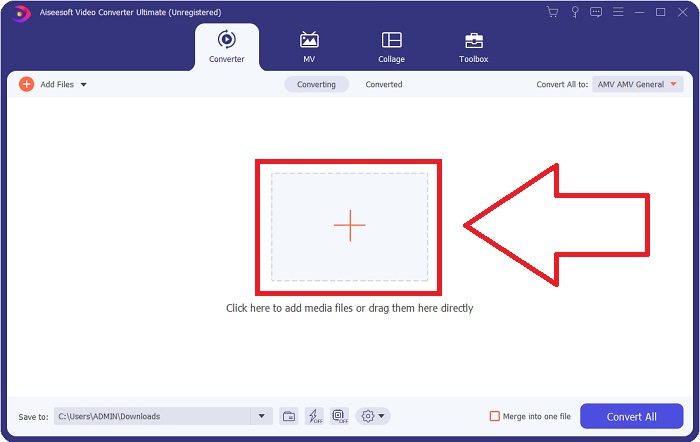
ステップ 2: ウィンドウが開くと、中央に+ボタンのあるインターフェースが表示されます。変換したい動画ファイルを取り込むには、このボタンをクリックします。または、ファイルをドラッグ&ドロップして簡単に追加することもできます。
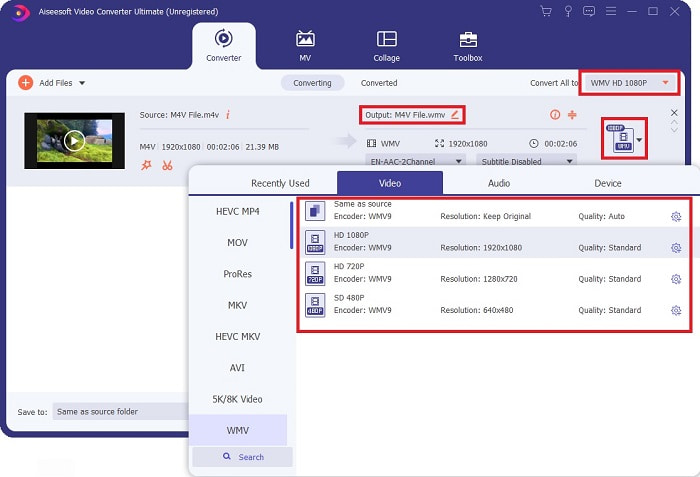
ステップ 3: 取り込んだファイルがインターフェース上に表示されます。その右側には現在の動画の形式が表示されます。そこをクリックすると、選択可能なすべての形式が表示されます。この場合は、スクロールして WMV を探すか、検索バーに入力して素早く見つけてください。さらに、タブの右側では、選べる動画品質がすべて表示されます。お好みのものを選択できます。
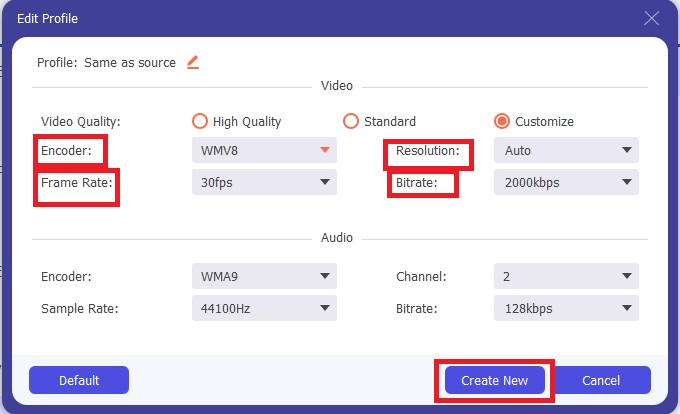
ステップ 4: 上記の画質選択に加え、選んだ動画品質の右側にある歯車アイコンをクリックすることで、出力動画をさらに細かく編集できます。フレームレート、解像度、ビットレート、サンプルレート、エンコーダーなど、あらゆる調整項目が表示されます。変更内容を保存するには、新規作成 ボタンをクリックしてください。
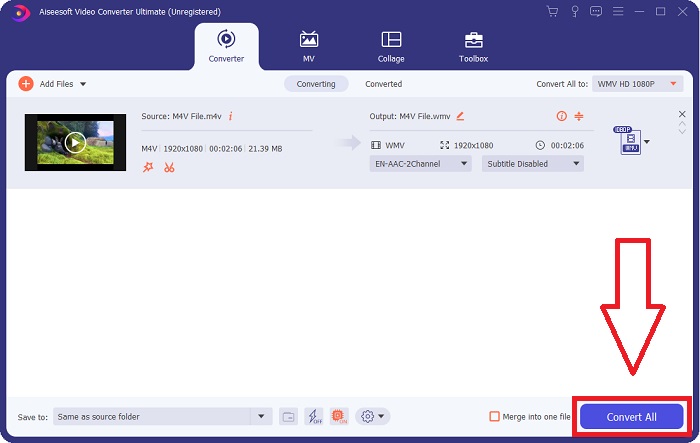
ステップ 5: 変換プロセスを完了するには、タブ右下にある すべて変換 ボタンをクリックし、処理が終わるのを待ちます。完了後、変換されたファイルを取得できます。
パート2。ハンドブレーキを使用してM4VをWMVに変換する方法
Handbrakeは、Windows、Mac、およびLinuxプラットフォームで実行される人気のある無料の変換プログラムです。ユーザーは、DVDおよびBlu-rayソースからこのオープンソーストランスコーダーに任意の形式でビデオをアップロードして、WMVに変換できます。ユーザーフレンドリーなインターフェースのおかげで、変換手順は迅速かつ簡単です。ハンドブレーキを使用してM4VをWMVに変換するには、次の簡単な手順に従ってください。
ステップ 1: パソコンで Handbrake アプリケーションを起動します。メイン画面の Open Source ボタンをクリックして、変換済みの WMV ファイルを参照して追加します。動画をインターフェースにドラッグ&ドロップして追加することもできます。
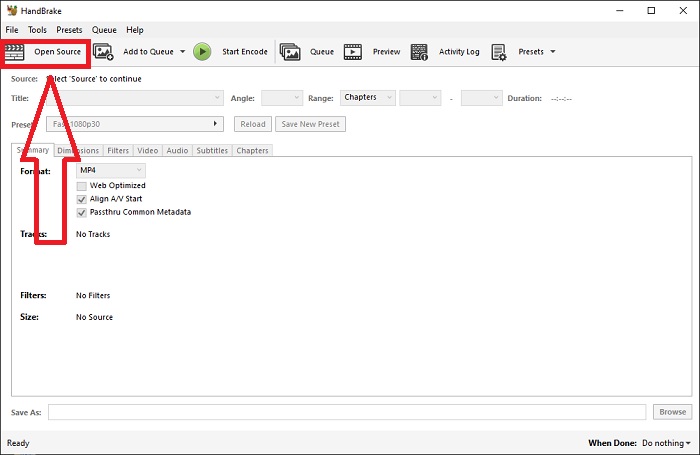
ステップ 2: 新たに追加したファイルは Source エリアに表示されます。その後、[Summary]タブの Format ドロップダウンから、目的の出力形式として WMV を選択します。必要に応じて、フィルター、動画コーデック、その他のファイルプロパティも調整できます。
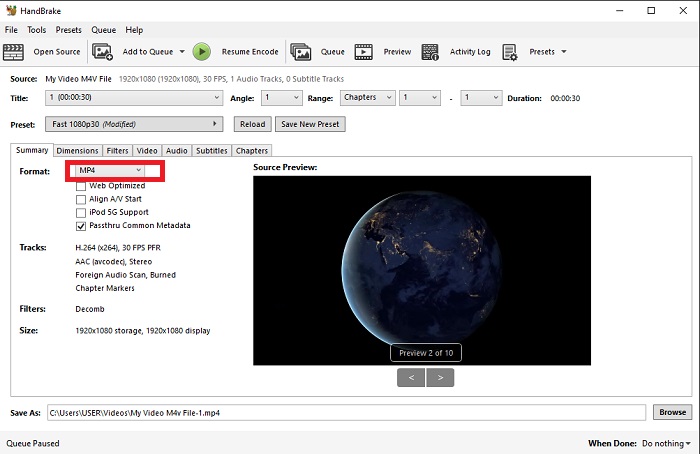
ステップ 3: [Destination]セクションで、出力ファイル名と保存先フォルダーを指定します。最後に、Start Encode ボタンをクリックして、M4V ファイルを WMV に変換します。
![[エンコードの開始]をクリックします](/images/2021/12/click-start-encode.jpg)
パート3。M4VをWMVオンラインに変換するためのもう1つの便利なツール
無料のインターネットツールとして、FVC FreeVideoConverterは便利です。サポートされているタイプには、MP4、MOV、MKV、AVI、M4V、FLV、WMV、WEBM、VOB、MPG、3GP、GIF、およびYouTubeとFacebookで承認されているビデオ形式があります。さらに、この無料のオンラインビデオコンバーターはオーディオファイルを変換することもでき、ビデオや音楽をMP3、AAC、AC3、WMA、WAF、FLAC、およびその他の形式に変換できます。 FVC Free Video Converterでは、変換を開始する前にファイルを指定することもできます。ビデオの解像度、フレームレート、ビデオビットレート、およびオーディオのチャネル、サンプルレート、ビットレートを変更できます。
ステップ 1: この リンク をクリックしてオンラインツールのページへ移動します。最初に、ランチャーを簡単にダウンロードする必要があります。ページ中央にある Add Files to Convert ボタンをクリックすると、ランチャーをダウンロードできます。この手順により、ファイルをインポートできるようになります。
ステップ 2: 同じボタンをもう一度クリックして、動画をアップロードします。インターフェース上に利用可能な形式がすべて表示されれば、アップロード成功です。その中から WMV を選択します。
ステップ 3: 追加オプション用の歯車アイコンが右側にあります。これをクリックすると、解像度やフレームレートなど、動画および音声設定を変更できます。設定が完了したら OK をクリックし、続いて Convert ボタンを押して変換プロセスを完了します。
関連記事:
パート4。M4VとWMVに関する拡張知識
2つの形式について必要になる可能性のある追加情報については、以下で提供されている内容をお読みください。
M4Vは、Appleが作成したファイル形式です。 M4VファイルがAppleのFairplayDRM保護を備えている可能性があることを除けば、MP4ファイル形式と非常によく似ています。 M4V形式は、iTunesストアから入手したビデオ素材で見つけることができます。 M4VファイルでDRMが有効になっている場合、ファイルの購入に使用したiTunesアカウントは、ファイルを再生するマシンで認証されている必要があります。
一方、WMVファイルは、Microsoftが作成したビデオファイルであり、通常はオーディオが含まれています。 MacプラットフォームとPCプラットフォームの両方で、ユーザーはこれらのファイルを複数のビデオプレーヤーで再生できます。特定のWMVファイルにはデジタル著作権管理(DRM)保護が含まれている場合があり、ユーザーがオンライン小売業者から購入したファイルの違法コピーを作成するのを防ぎます。
| M4V | WMV | |
| ファイル拡張子 | .m4v | .wmv |
| 開発者 | アップル社。 | マイクロソフト |
| 支援プログラム | ◆MediaPlayerClassic ◆VLCメディアプレーヤー ◆KMPlayer ◆ズームプレーヤー | ◆VLCメディアプレーヤー ◆MPlayer ◆MediaPlayerClassic ◆WindowsMediaPlayer |
パート5。M4VとWMVの変換に関するFAQ
M4VはMP4よりも高品質ですか?
M4V MP4を並べて比較した後、MP4とM4Vの間に基本的な違いがないことがわかりました。 M4VビデオファイルからDRM保護を削除した後、MP4とM4Vビデオファイルは同一になります。
HandbrakeはDRMを削除しますか?
これは、コンテンツスクランブルシステム(CSS)で暗号化されたDVDを表示するためのライブラリです。これは、保護されたディスクを復号化するために無料のプレーヤーソフトウェアで広く利用されている方法です。 Windows、macOS、Linux、およびさまざまなオペレーティングシステムと互換性があります。 HandBrakeは、DVDからDRMを効果的に削除し、リッピングすることができます。
WMVの最適な使用法は何ですか?
Microsoftは、Windowsメディアプレーヤーで広く使用されているWMVビデオ形式を作成しました。 WMVファイルは、MP4ファイルよりも小さく、圧縮されています。そのため、インターネットビデオのストリーミングで人気があります。
結論
M4VをWMVに変換する方法は間違いなくたくさんありますが、いくつかの仕様をさらに調整しながら変換できる方法はごくわずかです。コンバーターが必要なときはいつでもそばにあるので、VideoConverterUltimateをお勧めします。時間が許せない場合は、オンライン版をいつでも使用できます。だから、FVC Video Converter Ultimateを使用して、最高のビデオ編集体験を提供するのを手伝ってください。
-
 無料|品質を損なうことなくMP4をWMVに変換するための3つの最良の方法
 この投稿では、MacまたはWindowsでMP4ビデオをWMV形式に変換する方法を共有しています。また、デスクトップソフトウェアとWebベースのオンラインコンバーターの両方を含む、いくつかのオプションを提供します。最高のMP4からWMVへの変換ツールを知る準備はできましたか?
-
 WindowsとMacでFLVをWMVに変換するトップ3の方法
 PCまたはMacで品質を損なうことなくFLVをWMVに変換する最良の方法をお探しですか?ここでは仕事を簡単に行うための3つの方法を共有しているので、あなたは幸運です。
-
 Windows / MacでGIFをWMVに変換する方法に関する簡単なガイド
 GIFをWMV形式に変換する方法を知りたいですか?次に、この記事に従って、選択できるさまざまなソリューションを紹介します。

