


 ビデオコンバーター究極
 スクリーンレコーダー
 ビデオ修復
ビデオ修復
 安全なダウンロード
MKVをDivXオンラインおよびオフラインに無料で簡単に変換するためのクイックガイド
MKV file format is a file container that stores audio, video, and subtitle tracks. It is a multi-purpose file format because it can also store HD videos. However, since it can keep a lot of data into one file, it takes too much space in a device. So, if you want to make your MKV file smaller in file size, you must convert it to a DivX file format. Keep on track because we will tackle the best ways to convert MKV to DivX Online and Offline for Free.

パート 1. MKV と DivX に関する情報
オンラインおよびオフラインの MKV および DivX コンバーターに取り組む前に、まず MKV と DivX ファイル形式の類似点と相違点を知る必要があります。このパートでは、これら 2 つのファイル形式に関する実際のデータと情報について説明します。
MKVまたはMatroskaファイルは、異なる言語で複数の字幕ストリームとオーディオトラックを処理できるファイルコンテナであるため、映画愛好家に有名なファイル形式です.さらに、このファイルは将来的にも有効であるため、将来的に古くなることはありません。
MKV ファイルとは異なり、DivX は元のファイル サイズの 12 分の 1 までの大量のファイル サイズを圧縮できるファイル形式です。そうは言っても、MKVファイルを圧縮したい場合は、これが最良の選択です.
MKVファイルとDivXファイルが何であるかがわかったので、MKVファイルをDivXファイル形式に変換する方法を学びます。
パート 2. 5 MKV を DivX 形式に簡単に変換するツール
DivX ファイル形式をサポートできるコンバーターはほとんどないため、MKV から DivX へのコンバーターを見つけるのは困難です。しかし、MKV を DivX ファイルに簡単に変換するための最良の MKV から DivX へのコンバーターを紹介します。
FVCビデオコンバーターアルティメット
FVC Video Converter Ultimate is a suitable tool if you are looking for the ultimate converter to convert MKV to DivX. This offline converter supports 1000+ file-formats, including MKV, DivX, XviD, MOV, AVI, MP4, M4V, FLV, and more. It also has the best features like adding effects to your video file and enhancing it. Moreover, it supports batch conversion, where you can merge multiple file formats into one. And if you want to know the edge of this tool against other converters, read the advantages below.

FVC Video Converter Ultimate の利点:
5,689,200以上のダウンロード- MKV、DivX、MP4、MPG、AVI、FLV、WMV、および 1000 以上のファイル形式を含む多くのファイル形式をサポートしています。
- GIFメーカー、3Dメーカーなどの高度な機能を備えています.
- 超高速変換プロセスを備えています。
- Windows や Mac など、すべてのクロスメディア プラットフォームでアクセスできます。
無料ダウンロードWindows 7 以降に対応安全なダウンロード
無料ダウンロードMacOS 10.7 以降に対応安全なダウンロード
Here are the steps on how to convert MKV to DivX format using FVC Video Converter Ultimate:
Step 1. Download FVC Video Converter Ultimate by clicking the Download button below. And then follow the installation process, then open the app.
無料ダウンロードWindows 7 以降に対応安全なダウンロード
無料ダウンロードMacOS 10.7 以降に対応安全なダウンロード
Step 2. On the software’s main interface, click the Converter option.
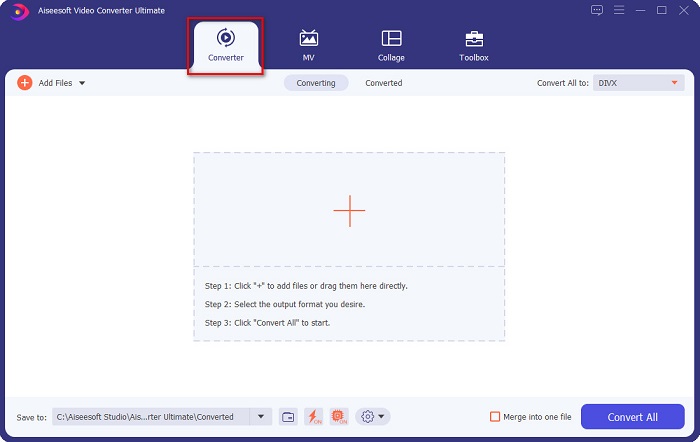
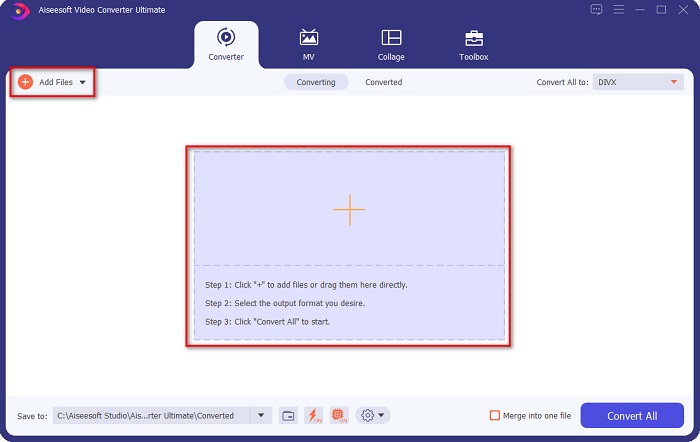
Step 3. Click the Add Files button or the + sign button on the same interface. Your computer files will appear, then select your MKV file to upload it.
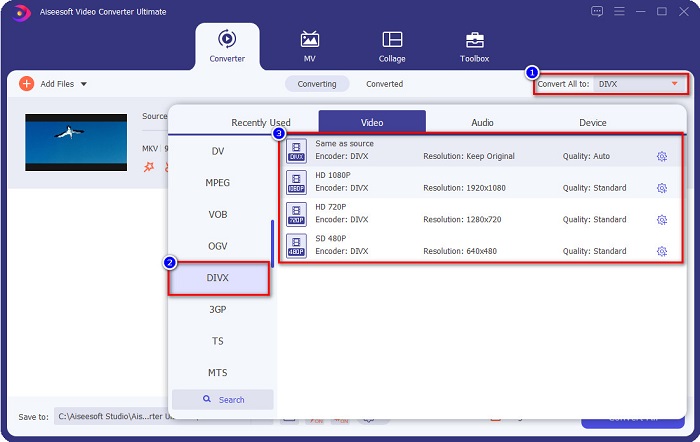
Step 4. After uploading your MKV file, click the Convert All to button to select the file output format that you want; click the DivX file format.
Step 5. Lastly, click the Convert All button to convert your MKV file to DivX file format.
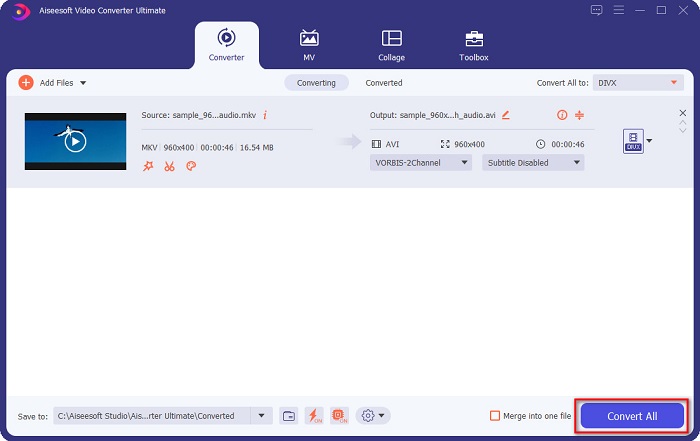
その後、数秒待ってください。 MKV ファイルが DivX ファイル形式になりました。
AnyMP4 動画変換
AnyMP4 Video Converter is a free MKV to DivX video converter that supports various file formats. It has a simple software interface, making it a user-friendly tool. You can also use a lot of features that this converter has. However, you cannot access its special features if you will not avail of the app.
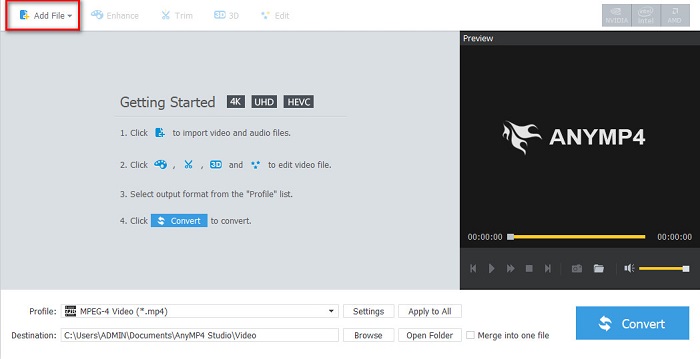
Step 1. In your browser, search AnyMP4 Video Converter, then download the app. Then on the main software interface, click the Add File button to upload your MKV file.
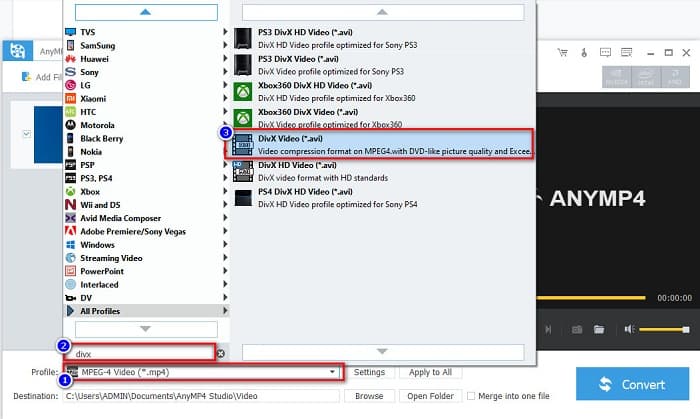
Step 2. Then on the Profile option below the software interface, search the DivX file format, then click it.
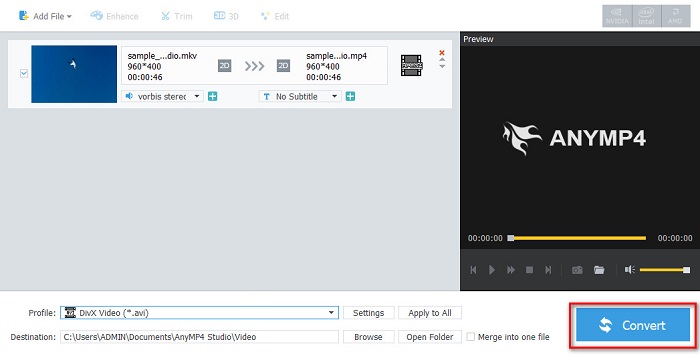
Step 3. For the last step, click the Convert button at the bottom right part corner of the interface. And then, just wait for your conversion process to finish. And it’s all done!
Media.io
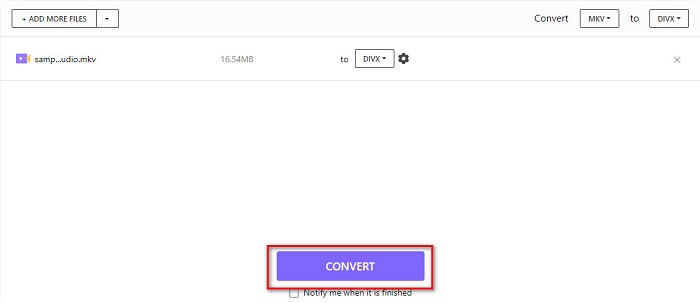
Media.io is a free converter that can convert MKV to DivX online. This online converter has a simple user interface. Moreover, it does not contain any ads which other online converters have. However, you may experience having a slow conversion process because it is a web-based application.
Step 1. In your trusted browser, search Media.io. Then on the software’s main interface, click the Choose Files button.

Step 2. Then, click the drop-down button to select the DivX output format.
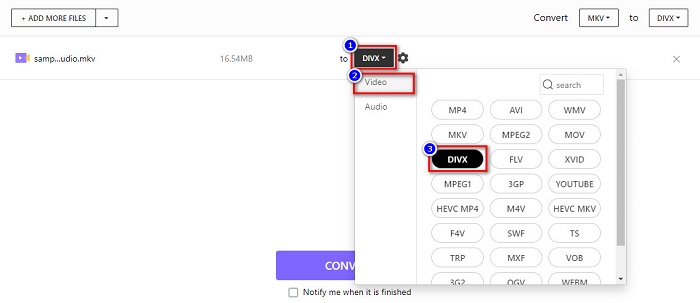
Step 3. And then, click the Convert button below to start converting your MKV file to DivX file format.
MiConv
Another way to convert MKV to DivX online for free is MiConv. This online converter is one of the know online converters you can find on the web. It is a web-based app; therefore, you do not need to download anything. Moreover, it is a beginner-friendly tool because of its easy-to-use GUI. Thus, it contains pesky ads that might be disturbing for you. Nonetheless, many people still use this online converter.
Step 1. Search MiConv on your browser to go to their webpage. And then, click the Choose files button. Your computer folders will appear, where you will select your MKV file.
![[ファイルの選択] をクリックします。](/images/2022/03/click-the-choose-files.jpg)
Step 2. Then, click the drop-down button on the bottom part of the software interface to select your output format.
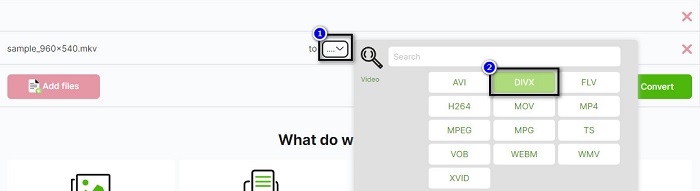
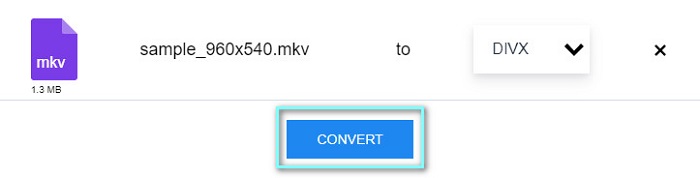
Step 3. Finally, click the Convert button to transcode your MKV file to DivX.

AnyConv
The last converter that we will talk about is AnyConv online converter. This free MKV to DivX video converter is one of the most used online converters on the internet. Like the other online tools presented above, it also has an easy-to-use interface. Furthermore, it supports almost all standard video file formats. However, it contains disturbing ads and is internet-dependent, which means it depends on how fast your conversion process will be.
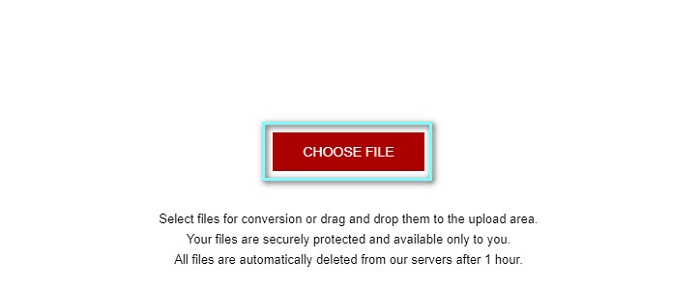
Step 1. Go to AnyConv website by searching AnyConv online converter on your browser. And then, click the Choose File button.
Step 2. Next, choose the DivX file format as your output format on the drop-down button.
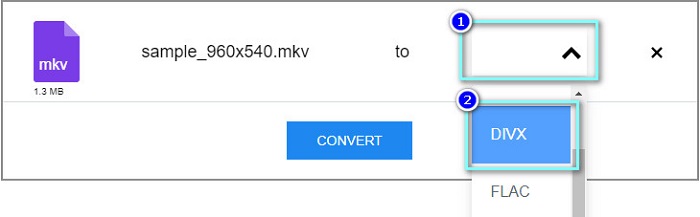
Step 3. Then, to start the conversion process, click the Convert button.
パート 3. MKV から DivX への変換に関する FAQ
Windows Media Player で MKV ファイルを再生できますか?
Windows Media Player does not natively support MKV file formats. Playing the MKV file on Windows Media Player may only show the audio. Therefore, if you want to play your MKV file on Windows Media Player, you can convert MKV to AVI file format.
MKV と DivX では、どちらがより高品質ですか?
MKV は DivX ファイルよりも高品質です。ただし、MKV ファイルは圧縮されていないため、ファイル サイズが大きくなります。対照的に、DivX は圧縮ファイル形式です。
macOS で DivX ファイルを再生できますか?
残念ながら、Mac の内蔵メディア プレーヤーである QuickTime は DivX ファイル形式をサポートしていません。
結論
ふぅ!それは私たちが経験した素晴らしい冒険でした。今日持っているすべての知識と情報は、最適な MKV から DivX へのコンバーターを選択するのに役立ちます。そのため、多くの優れた機能を備えたコンバーターを使用したい場合、多くの人が最初に選択する製品として FVC Video Converter Ultimate を使用しています。
-
 MKVからMOVへ–MKVをMOVに変換する方法
 MacでMKVをMOVに変換するにはどうすればよいですか? iMovieはMKVを読み取ることができますか? MOV形式とはどういう意味ですか?この投稿では、無料のオンラインおよびプロのビデオコンバーターを使用してMKVをMOVに変換するのに役立つ2つの簡単な方法を説明しています。
-
 Photoshop / FFmpegを使用せずにMKVビデオをアニメーションGIFに変換する方法
 コンピューターにMKVムービーをダウンロードして視聴した後、友人やインターネットでGIFとして素晴らしい瞬間を共有したい場合があります。この記事では、MKVをGIFに変換する2つの最も簡単な方法について学ぶことができます。
-
 MKVファイルをMP3に変換する方法に関するヒントとコツ[2021]
 MKVからMP3への適切なコンバーターの選択に問題がありますか?次に、1つの問題についてさまざまな解決策を提示したので、この投稿を読み続けてください。
