


 ビデオコンバーター究極
 スクリーンレコーダー
 ビデオ修復
ビデオ修復ファイルをすばやく変換できる最高の無料MKVからWMVへのコンバーター
MKV (Matroska) is a standard container with extensive audio and video files. Although it is a common file format, you still need to convert it to a file format that is a widely supported video format like WMV. So if you are looking for a free MKV to WMV converter, this is the article for you.

パート 1. MKV を WMV に変換する必要がある理由
MKV (Matroska) holds a vast amount of audiovisuals and multimedia files because it is a free standard container. Despite being a common file format, it is not an industry standard. Therefore, some media players might not support this type of file. In contrast, WMV or Windows Media Video is a file format widely supported by many media players available on any device. Moreover, it is a codec that compresses file size, making it one of the most common and suitable file formats in many media players.
パート 2. 超高速コンバーターを使用して MKV を WMV に変換する
MKV を WMV ファイルに変換する場合、FVC Video Converter Ultimate が最適なツールであることは間違いありません。この無料の超高速コンバーターを使用すると、品質を損なうことなく MKV を WMV に変換できます。このコンバーターには、複数のファイルを編集、強化、さらには 1 つにマージできる優れた機能もあります。さらに、MKV などのさまざまなファイル形式を WMV、MP4、M4V、AVI、MOV などに変換できます。

FVCビデオコンバーターアルティメット
5,689,200以上のダウンロード- 複数のファイルを同時に変換するバッチ変換をサポートします。
- MKVファイルを超高速に変換できる機能があります。
- MKV、WMV、MP4、AVI、MPG、MOV、VOB など 200 以上をサポートします。
- Windows や Mac など、さまざまなプラットフォームで利用できます。
無料ダウンロードWindows 7 以降に対応安全なダウンロード
無料ダウンロードMacOS 10.7 以降に対応安全なダウンロード
How to convert your files using FVC Video Converter Ultimate
Step 1. To install FVC Video Converter Ultimate, click the Download button below. Then follow the installation process, and open the app.
無料ダウンロードWindows 7 以降に対応安全なダウンロード
無料ダウンロードMacOS 10.7 以降に対応安全なダウンロード
Step 2. After opening the application, click Add Files or the + button to upload files in the queue so that you may begin the process to convert.
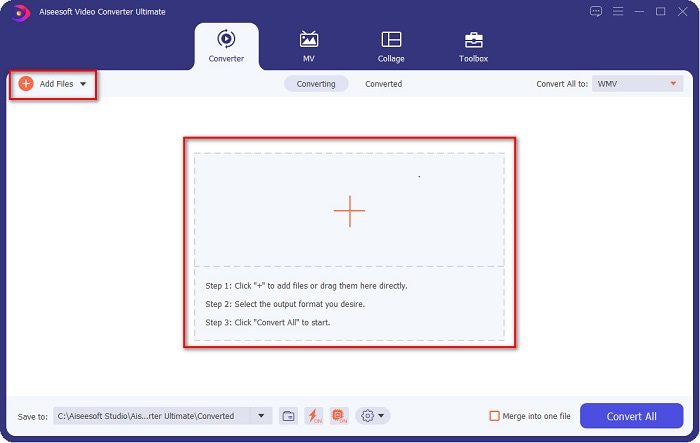
Step 3. Next is, click the Convert All to button, located at the upper right corner of the software's interface. A list of file formats will appear, then select WMV file.
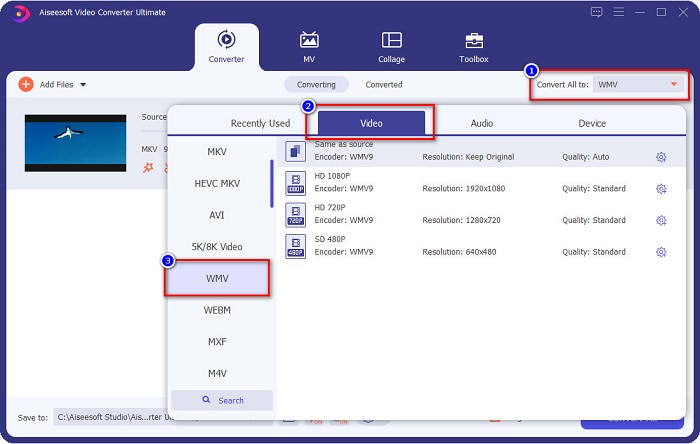
Step 4. After choosing the file format you want, click the Convert All button to convert your MKV file to WMV file format. And then wait for a few seconds, then your WMV file is ready!
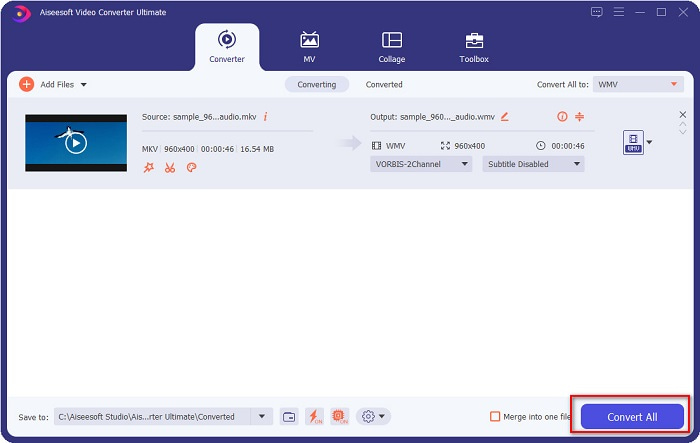
FVC Video Converter Ultimate を使用してこれらの簡単な手順に従うことで、この MKV を WMV コンバーターにすばやく変換できます。
パート 3. VLC Media Player Converter を使用して MKV を WMV に変換する
MKV ファイルを WMV ファイルに変換するもう 1 つの方法は、フリーウェア コンバーターを使用することです。 VLC Media Player は単なるビデオ プレーヤーではありません。また、MKV のようなファイルを WMV、WebM、MP4 などに変換することもできます。ただし、そのインターフェイスは少しわかりにくいです。それにもかかわらず、このコンバーターは多くのユーザーによって使用されています。
VLC Media Player Converter の使用方法に関するクイックガイド:
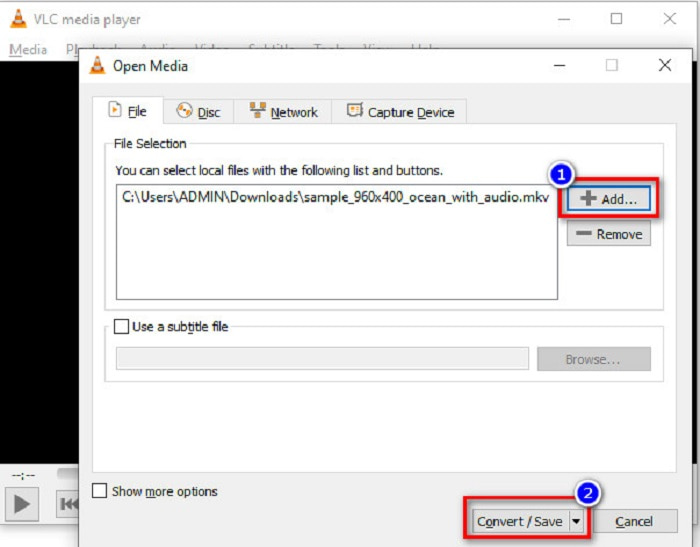
Step 1. Open VLC Media Player, or if it is not yet downloaded to your computer, search VLC Media Player, then follow the installation process. Then, located at the upper left corner of your screen, click the Media options, and click Convert/Save button.
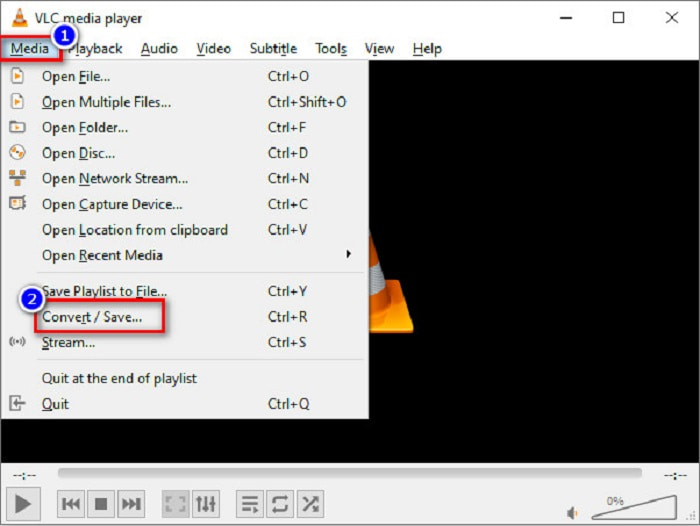
Step 2. After clicking the Convert/Save button, a new interface will appear where you can see the list of local files you uploaded. To upload, click the + Add button to upload your MKV file. Press the Convert/Save button below to proceed to the next step.
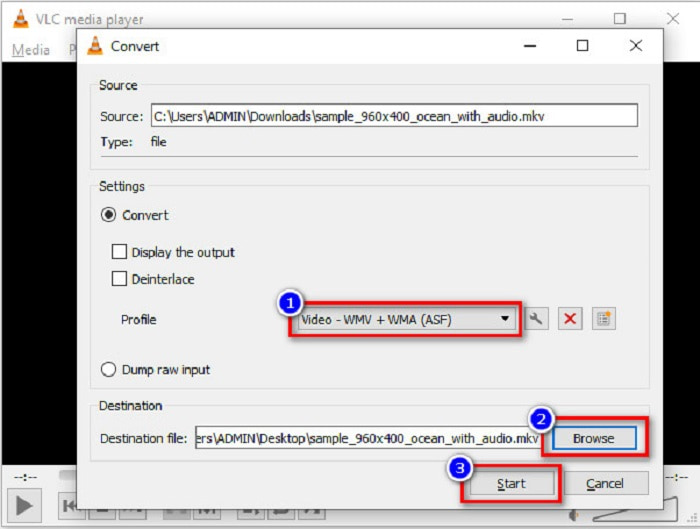
Step 3. Lastly, select the WMV file as your file format. Click the Browse button to choose the destination of your file when the conversion is finished. And finally, tick the Start button to start converting your MKV file to a WMV file.
パート 4. 無料のオンライン コンバーターを使用して MKV を WMV に変換する
FVC Free Video Converter Online is an MKV to WMV converter online free that allows you to convert numerous audio and video file formats, including MKV to WMV, AVI, MPG, MOV, MP4, MP3, and more. This converter also has a feature where you can edit the video bitrate, frame rate, and even the resolution of your file. Despite that it is a fantastic online converter, you may encounter a slow conversion due to your internet connection because it is an internet-reliant converter. Nonetheless, it still imposes excellent performance and is considered one of the best by many.
Here are the steps on how to convert your MKV file to WMV using FVC Free Video Converter Online
Step 1. On your browser, search FVC Free Video Converter Online to their website.
Step 2. After going to their website, click the Add Files to Convert button and launch it. Your computer files will appear, where you will select your MKV file.
ファイルを一括変換するには、デスクトップ版をダウンロードしてください。
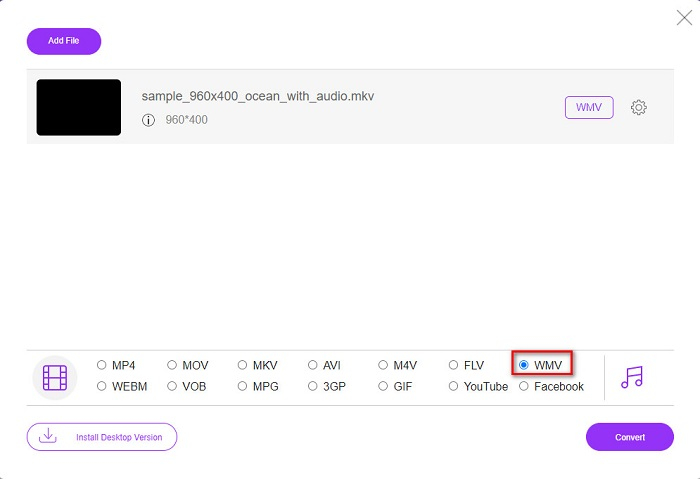
Step 3. You will see the list of file formats on the software's second interface below. Tick the circle beside the WMV file.
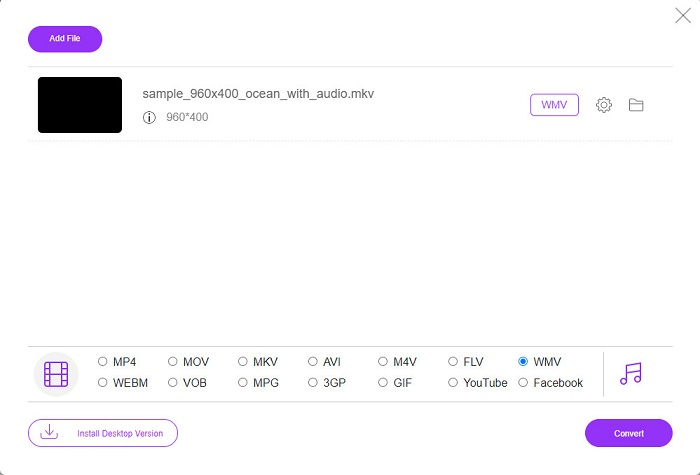
Step 4. For the last step, click the Convert button located at the bottom right corner of the software’s interface. Then your MKV file will start converting.
MKVとWMV
2002年にリリースされたMatroskaマルチメディアコンテナ形式は、多数のビデオ、オーディオ、画像、および字幕トラックを含めることができるオープンソース形式です。そのため、短いビデオクリップ、テレビ番組、および映画を簡単に保存するために使用できます。アニメファンサブで大人気。
Microsoftによって作成されたWMVは、2000年代に最も一般的なビデオ形式の1つでした。 Webで表示したり、Windowsのさまざまなメディアプレーヤーで再生したりできます。また、WindowsMediaPlayerのデフォルトのビデオファイル形式でもあります。しかし、最近は他のフォーマットに引き継がれています。
パート 5. MKV から WMV への変換に関する FAQ
ファイルの品質を損なうことなく MKV を WMV に変換できますか?
絶対。 FVC Video Converter Ultimate を使用すると、ファイルの品質を損なうことなく MKV ファイルを WMV に変換できます。
MKVファイルを変換するのに最適なファイル形式は何ですか?
As stated above, some media players do not support this file format. Therefore, you must convert it to a file format which many media players widely support. One is the MP4 format. To know more about this topic, read this article [Online & Free] How Can I Convert MKV to MP4 on Windows/Mac.
Windows Media Player は MKV ファイルを再生できますか?
Windows Media Player does not support MKV file formats. So when you try to play an MKV file in Windows Media Player, it only plays its audio. Read on Best MKV Player to find your desired one.
結論
MKV ファイルを WMV に変換する方法はたくさんあります。上記のコンバーターには、それぞれを区別する明確な機能があります。
And among the best MKV to WMV converters listed, we recommend using the FVC Video Converter Ultimate because this converter is more efficient and easy to use. In addition, it also has unique features which can help you improve your file. Still unsure about it? Download it now to experience this ultra-fast converter.
-
 MKVからMOVへ–MKVをMOVに変換する方法
 MacでMKVをMOVに変換するにはどうすればよいですか? iMovieはMKVを読み取ることができますか? MOV形式とはどういう意味ですか?この投稿では、無料のオンラインおよびプロのビデオコンバーターを使用してMKVをMOVに変換するのに役立つ2つの簡単な方法を説明しています。
-
 Photoshop / FFmpegを使用せずにMKVビデオをアニメーションGIFに変換する方法
 コンピューターにMKVムービーをダウンロードして視聴した後、友人やインターネットでGIFとして素晴らしい瞬間を共有したい場合があります。この記事では、MKVをGIFに変換する2つの最も簡単な方法について学ぶことができます。
-
 MKVファイルをMP3に変換する方法に関するヒントとコツ[2021]
 MKVからMP3への適切なコンバーターの選択に問題がありますか?次に、1つの問題についてさまざまな解決策を提示したので、この投稿を読み続けてください。

