


 ビデオコンバーター究極
 スクリーンレコーダー
 ビデオ修復
ビデオ修復
 安全なダウンロード
MOV を OGG に変換する方法: 5 つの超効率的な方法
Playing a MOV container file on their devices poses no problems for many Apple users. Since the MOV file is made initially for QuickTime Player and other Mac video editing software like Final Cut Pro, you may need to convert MOV to OGG occasionally to surpass incompatibility issues with other Android devices and Windows OS media players. In this brief walkthrough, we will give you the Top 5 solutions for converting MOV files to OGG.

パート 1. MOV を OGG に変換する 5 つの方法
1.ビデオコンバーターアルティメット
If you are looking for a one-stop solution to convert MOV to OGG seamlessly, go for Video Converter Ultimate. This software utilizes a GPU hardware encoding process, making any conversion activities fast up to 50x speed. Moreover, it allows users to control the output quality of a file to meet their preferences and needs. On top of that, Video Converter Ultimate makes the batch-conversion possible. In other words, you can convert a collection of MOV audio files to OGG in just one click. If you want to see how this unique tool works, follow the guide we created beneath.
Step 1. Launch the Best MOV to OGG Converter
無料ダウンロードWindows 7 以降対応安全なダウンロード
無料ダウンロードMacOS 10.7 以降に対応安全なダウンロード
Step 2. Upload the MOV audio file
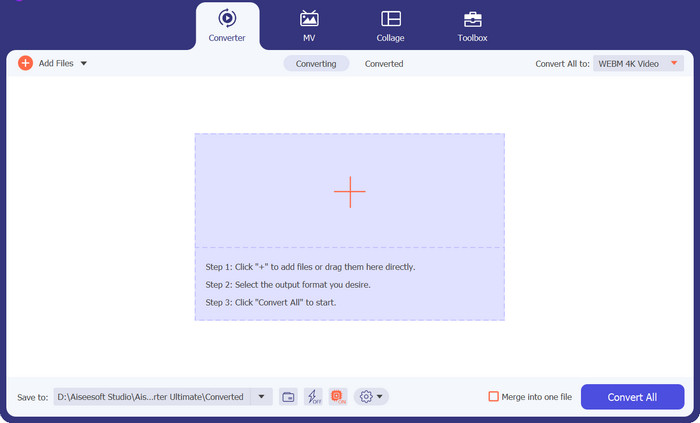
Once the program loads on your screen, click the Plus button on the center of the program's interface. From there, your computer directory will appear, and select the MOV file you wish to transform to OGG.
Step 3. Select OGG as the Output Format
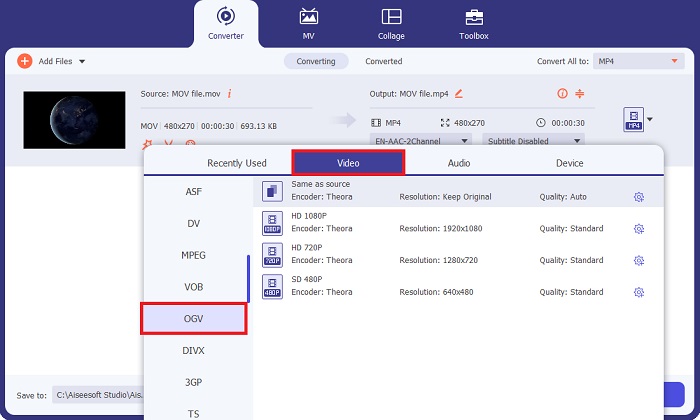
Once the file loads on the screen, head to the Output tab. From there, go to the Audio panel, and select the OGV file. Moreover, you can control your output quality by adjusting the sample rate.
Step 4. Convert the File
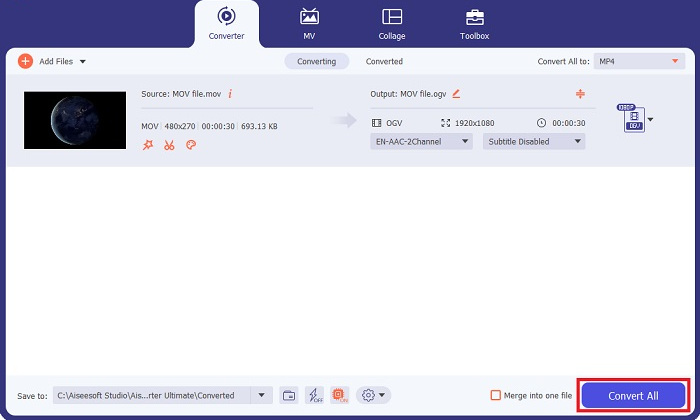
Finally, when all your output requirements are set, hit the Convert All button below. The conversion process may take a while, depending on the size of your audio file. You can click on the output file and listen to it when the process is done.
長所
- このプログラムは、エンハンサー、ビデオ マージャー、ファイル コンプレッサーなどのオーディオおよびビデオ編集ツールを含む貴重なツールボックスを提供します。
- Video Converter Ultimate は 1000 以上のオーディオおよびビデオ形式を提供します。
- Video Converter Ultimate は、月額わずか $23.20 から生涯あたり $49.96 までの範囲の柔軟なサブスクリプション プランを提供します。
短所
- このプログラムは Linux ソフトウェアと互換性がありません。
2. 無料オンライン動画変換ソフト
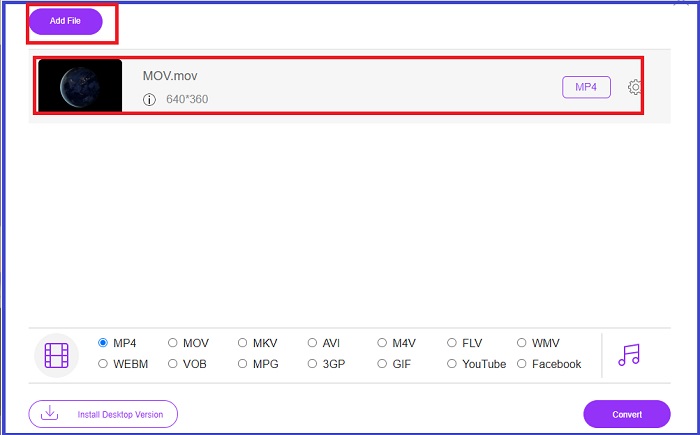
Some users love to prevent themselves from software installation. If you are one of them, here is Free Video Converter Online, which also supports MOV to OGG conversion. This tool does not only have an aesthetically pleasing interface, but it is way more impressive because it is user-friendly. Here is a breakdown of the conversion process of MOV to OGG using the online converter.
Step 1. Begin by landing on the program's main website. Afterward, hit the Add Files to Convert button and upload your target file.
Step 2. Once the MOV file is uploaded, change the output from Video to Audio button and select OGG.
Step 3. Tick the Convert button to initiate the conversion.
長所
- このプログラムは、ユーザーに対して完全なセキュリティとプライバシー侵害防止を保証します。
- バッチ変換機能をサポートしています。
短所
- ビデオエディターのような包括的なツールは提供されていません。
3. Convertio
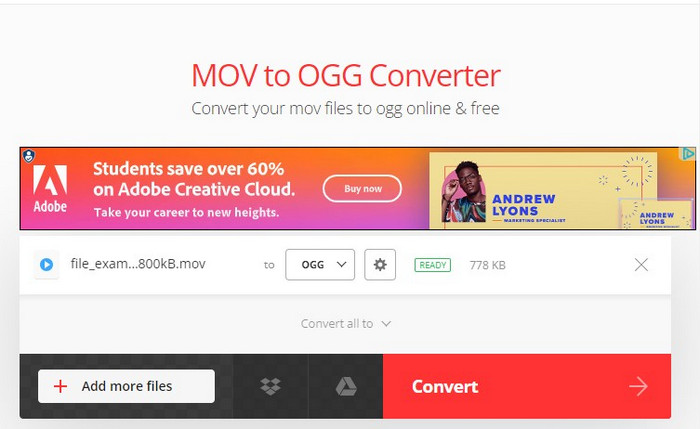
OGG から MOV または MOV から OGG に変換するもう 1 つの信頼できるツールは、Convertio です。このオンライン プログラムは無料で使用でき、インターフェイスは簡単です。とはいえ、初心者やテクノロジーに詳しくない人にとっても、コンバージョン活動が苦痛なく行えることは間違いありません。さらに、モバイルデバイスでも動作するため、より便利になります。以下のガイドに従って MOV を OGG に変換します。
Step 1. On the program's main page, hit the Choose Files button at the center.
Step 2. Next, upload the MOV file from your computer directory. If you wish to adjust the output quality, hit the Settings button and adjust the details according to your desire.
Step 3. Hit the Convert button. To do a bulk conversion, click Add more files.
長所
- コーデック、品質、オーディオ チャネルなどの出力設定は手動で変更できます。
- Convertio は、100% で保護された MOV から OGG へのオンライン変換ソフトウェアです。
短所
- ユーザーは大きな MOV ファイルをアップロードするのが難しい場合があります。
- ビデオやオーディオのエディターはありません。
- 不要で迷惑な広告が含まれています。
4.ビデオコンバーターファクトリー
Video Converter Factory は、変換ニーズを簡素化するもう 1 つのツールです。このオフライン ソフトウェアは、Windows と Mac の両方のオペレーティング システムで動作します。それに加えて、OGG、M4A、FLAC、WAV などの複数の出力形式があります。もっと有望なものは何でしょうか? Video Converter Factory は、お気に入りの曲、アルバム、オーディオブックを保存できる内蔵の音楽ダウンローダーを提供します。
Step 1. First, open the file on your device and click the Add Files button. Then import the MOV file into the program. Alternatively, you can have the drag-and-drop function.
Step 2. Navigate the output panel and select OGG as your output format. You can also modify some of the audio parameters on Settings.
Step 3. Finally, select the folder destination for your file and then hit the Convert button.
長所
- Video Converter Factory は、ライブ ストリームを記録するためのスクリーン レコーダーをユーザーに提供します。
- このプログラムは、ビデオをオーディオに変換するときに着信音を作成できます。
短所
- このプログラムは Mac オペレーティング システムには適していません。
5.FreeFileConvert
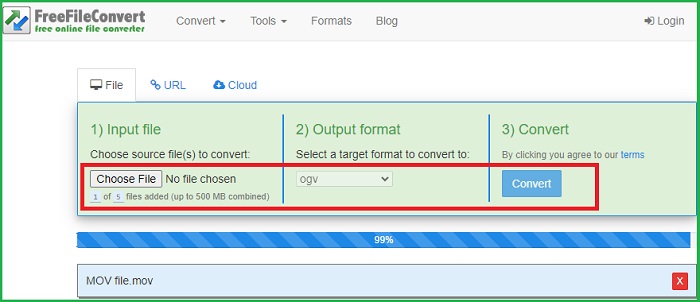
名前が示すように、FreeFileConvert はユーザーからの支払いをゼロにするオンライン ソフトウェアです。 MOV などのビデオ ファイルを OGG に変換するだけでなく、オーディオ コンバーターや PDF ファイル圧縮ツールとしても機能します。 MOV を OGG に変換する場合は、ここの手順に従ってください。
Step 1. Go to the Input File tab on the screen and upload your MOV video file.
Step 2. When the file is uploaded, go to the Output Format panel and select OGG.
Step 3. Before converting, click Yes to the Terms of the Agreement and then hit the Convert button to start the process.
長所
- FreeFileConvert は、あらゆるビデオおよびオーディオ ファイル形式をサポートします。
- 使いやすいインターフェースを備えています。
短所
- プログラムは最大 300 MB のファイル サイズまでしか対応できません。
さらに詳しく読む:
Top 5 MOV to WAV Converters of 2023: A Comprehensive Review
[Free & Online] 3 Quick Solutions to Convert MP4 to OGG
パート 2: OGG から MOV への変換に関する FAQ
OGG ファイルは MP3 よりも優れていますか?
比較すると、両方のファイルのファイル サイズは似ています。ただし、品質の点では、OGG は MP3 よりわずかに優れています。
MOVとは何ですか?
MOV は、Apple が開発したビデオ ファイル拡張子です。このタイプのファイルは通常、QuickTime プレーヤーで再生されます。
MOV をオーディオに変換するにはどうすればよいですか?
MOVをオーディオファイルに変換する際には、その作業を行うソフトウェアが必要になります。これにより、オンライン プログラムまたは Video Converter Ultimate などのオフライン ソフトウェアを使用できるようになります。
VLCはMOVオーディオを抽出できますか?
はい。 VLC は、さまざまなファイル形式からオーディオ入力を抽出できます。ただし、このプロセスは初心者にとっては多大な作業が必要になる場合があります。
オフライン MOV から OGG へのコンバーターを使用する利点は何ですか?
MOV ファイルを OGG に変換する場合、オンライン プラットフォームは非常に優れたオプションですが、Video Converter Ultimate のようなオフライン ソフトウェアを使用すると、出力の品質を拡張できます。友達のパラメータをカスタマイズしたり、内蔵エディタを使用して映像自体を編集したりできます。
結論
While MOV files are suitable for video playback, OGG files will save massive storage on your device when you only need MOV formats in an audio form. With the abovementioned software, you can change MOV to OGG without sweat.
-
 WindowsとMacでMOVをMP3に簡単に変換する4つの最良の方法
 MOVファイルからMP3オーディオファイルを抽出したい場合は、記事から目的のファイルを取得するための4つの最も効率的なMOVからMP3へのコンバーターについて詳しく知ることができます。
-
 MOV を GIF に変換し、アニメーション コンテンツのパワーを解き放つ
 MOV ビデオをアニメーション GIF に変換して、オンライン コンテンツ ゲームをレベルアップしましょう!当社の使いやすい MOV から GIF へのコンバーターは、人目を引くグラフィックの作成に役立ちます。
-
 あなたが無料で試すべきOGGメタデータを編集する2つの最良の方法
 OGGメタデータを編集する必要がありますか?そうですね、正しいソフトウェアを使用することで、タグの編集を簡単に処理できます。読んでいない場合は、この記事を読む必要があります。
