


 ビデオコンバーター究極
 スクリーンレコーダー
 ビデオ修復
ビデオ修復
 安全なダウンロード
MTV を MKV に変換する最も効果的なオンラインおよびオフラインの方法
MTVファイル形式が使用しているデバイスやプログラムと互換性がない場合があります。その場合の最良の解決策は、動画ファイルの形式を変更することです。幸いなことに、本記事では最適な方法をご紹介します。本稿では、MTVをすぐにMKVに変換できる複数のアプリケーションを紹介します。最適なMTVからMKVへのコンバーターを見つけるために、この記事を最後までお読みください。

パート 1: MTV と MKV に関する詳細情報
MTVとは?
MTVは Music Television の略です。MTVは1981年8月1日にアメリカのケーブルチャンネルとして開局しました。このファイル形式は、中国製の安価な携帯型MP4プレーヤーに、ライセンス料によってプレーヤーの価格を上げることなく動画再生機能を持たせるために作られました。MTVプレーヤーは中国で製造され、動画、テキストファイル、画像を表示できます。最後に、その仕組みとしては、MP3オーディオを再生しながら、非圧縮の生のrgb565/555画像フレームを連続表示することで動作します。
MKVとは何ですか?
MKVは Matroska Video(マトロスカ・ビデオ)の略です。MOVやAVI形式と同様のマルチメディアコンテナ形式です。ただし、同一ファイル内でより多くの字幕トラックやオーディオトラックをサポートできます。このMatroskaマルチメディアコンテナは動画用として使用されます。また、Extensible Binary Meta Language(EBML)に基づいています。MKV形式と他の動画形式との違いは、他の形式はコーデックであるのに対し、MKVはコンテナ形式であるという点です。
パート 2: MTV をロスレスで MKV に変換する方法
MTVを無損失でMKVに変換するのは、Video Converter Ultimateを使えば簡単です。このアプリケーションは、MOV、MTS、XVID、FLV、AVI、MP4など、さまざまなファイルを変換できます。処理速度に関しては、他のコンバーターとは比べものにならない30倍高速変換が可能です。また、一括変換機能を備えているため、複数ファイルを同時に変換することもできます。さらに、動画を強化してより魅力的にしたい場合にも、このツールが役立ちます。解像度のアップスケール、ノイズ除去、明るさとコントラストの最適化、手ブレ補正など、動画の編集・強化に使用できる多くのツールを備えています。これらの機能により、動画の仕上がりにより一層満足できるでしょう。加えて、動画にウォーターマーク(透かし)を追加したい場合も、このツールで対応可能です。以上が本ツールの主な機能ですが、さらに多くの優れた機能を体験したい場合は、ぜひVideo Converter Ultimateを実際にお試しください。
主な機能:
◆コラージュ作成が可能。
◆ Enhancer、Watermark Remover、Compressor などのビデオ編集ツールを提供します。
◆ ミュージック ビデオを作成できます。
◆ 多数のビデオ ファイル形式を変換します。
長所
- 変換プロセスが 30 倍高速です。
- 専門家ではないユーザーに最適です。
- MP4、MOV、MTV、MKV などの複数のファイル形式を変換できます。
- 透かしは適用されません。
- Windows と Mac にアクセス可能。
短所
- より優れた機能を体験するには、アプリケーションを購入する必要があります。
これらの詳細なガイドに従って、MTV を MKV に即座に変換してください。
ステップ1: 下のダウンロードボタンをクリックして、WindowsまたはMacのパソコンにVideo Converter Ultimateをダウンロードします。次に、ソフトをデバイスにインストールし、アプリケーションを起動します。
無料ダウンロードWindows 7 以降に対応安全なダウンロード
無料ダウンロードMacOS 10.7 以降に対応安全なダウンロード
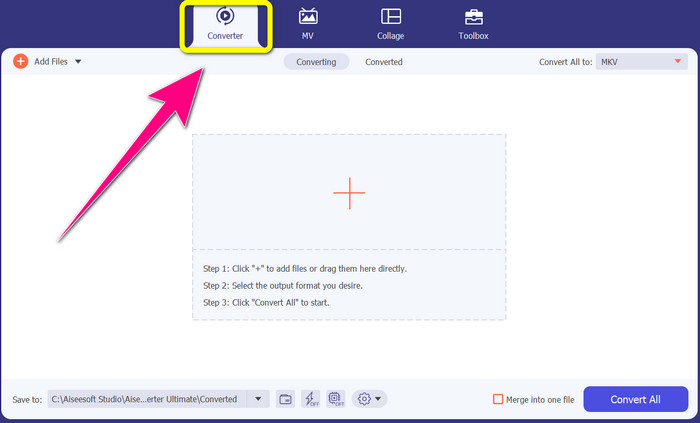
ステップ2: 画面上部に「Converter(変換)」「MV」「Collage(コラージュ)」「Toolbox(ツールボックス)」の4つのオプションが表示されます。その中からConverterパネルを選択します。
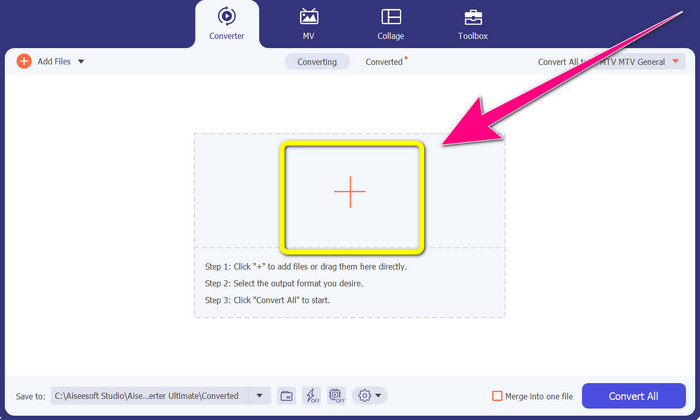
ステップ3: 次に、+アイコンをクリックして、変換したいMTV動画ファイルを追加します。
ステップ4: 動画を追加したら、すべて変換の項目をクリックします。その後、形式一覧からMKVファイル形式を探してクリックします。
![[すべての MKV に変換] をクリックします](/images/2022/10/click-convert-to-all-mkv.jpg)
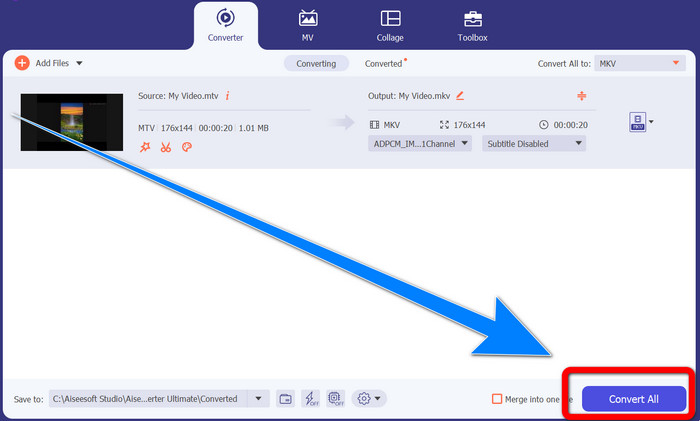
ステップ5: MKVファイル形式を選択したら、すべて変換ボタンをクリックして、動画を変換・保存します。
パート 3: MTV を MKV に変換するオンライン ソフトウェア
Converthelper の使用
これで、WindowsおよびMacでMTVをMKVに変換する方法を学びました。次は、オンラインでファイルを変換する手順を紹介します。利用できる便利なコンバーターの1つがConverthelperです。このオンラインツールは無料で利用でき、MTV、MKV、DDAT、AVE、PS GFP、WMFなど、さまざまなファイル形式を変換できます。さらに、変換手順が少ないため、初心者にも扱いやすいのが特徴です。また、Converthelperを使えば、ファイル数の制限なく変換が可能です。ただし、この無料オンラインコンバーターは変換速度が遅く、変換の完了まで時間がかかる場合があります。また、ツールのパフォーマンスはインターネット接続の状態に左右されます。そのため、Converthelperでファイルを変換するには、安定したインターネット環境が必要です。以下の手順に従って、MTVをMKVにオンライン変換してください。
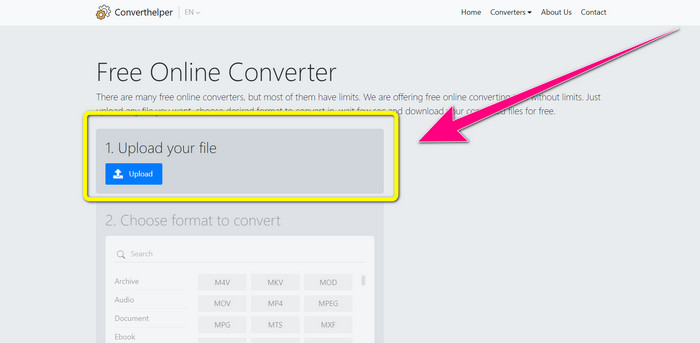
ステップ1: ブラウザーでConverthelperのウェブサイトにアクセスします。次に、「アップロード」ボタンをクリックし、MTVファイル形式の動画を追加します。
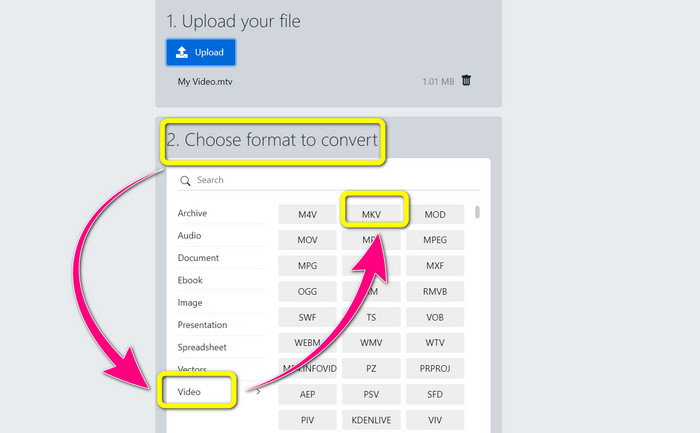
ステップ2: ファイルをアップロードしたら、ステップ2に進みます。形式オプションを選択します。Videoボタンをクリックし、MKVファイルを探してクリックします。
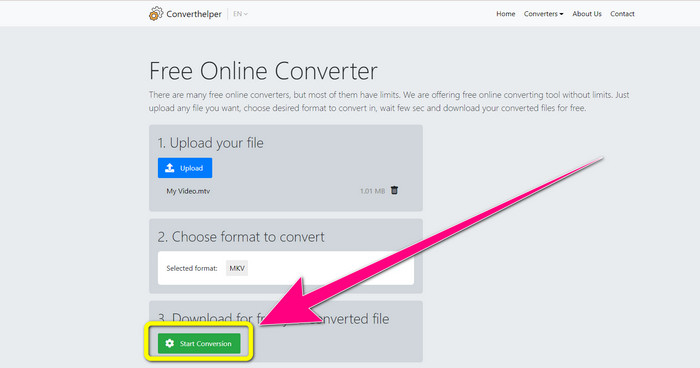
ステップ3: 最後に、Start Conversionボタンをクリックして、MTVファイルをMKV形式に変換します。変換が完了するまで待ち、その後、MKVファイル形式の最終動画をダウンロードします。
オンライン変換の使用
MTV を MKV に変換するために使用できる別のオンライン ツールは、オンライン変換です。 MTV および MKV 形式の他に、MP4、AVI、GIF、FLAC、FLV、VOB、DIVX、MOV、WMV など、より多くの形式をサポートしています。ビデオファイルの変換で信頼できるだけではありません。画像、ドキュメント、オーディオ、およびその他の形式を変換することもできます。このオンライン ツールは、使いやすく、さまざまなファイルを変換するためのいくつかの手順しかないため、新しいユーザーにも適しています。ただし、このオンライン ツールにはファイル サイズの制限があり、最大 3Mb です。また、他の Web ベースのツールと同様に、インターネットに接続していないと使用できません。このソフトウェアがうまく機能しない場合があります。 MTV ファイルを MKV ファイル形式に変換するには、以下の手順を使用します。
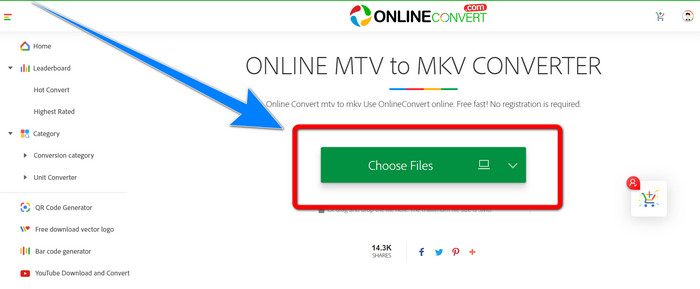
ステップ1: Online Convert のウェブサイトにアクセスします。Choose Filesボタンをクリックして、MTVファイル形式の動画をインポートします。
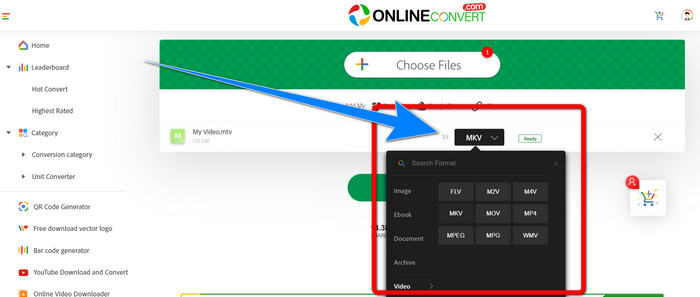
ステップ2: MTVファイル形式の動画をアップロードしたら、形式オプションに進み、MKV形式を選択します。
ステップ3: 最後に、Convertボタンをクリックして、MTV形式の動画をMKVファイル形式に変換します。変換処理が完了するのを待ち、変換後の動画を保存します。
さらに詳しく読む:
【オンライン&無料】Windows/MacでMKVをMP4に変換する方法
パート 4: MTV から MKV への変換に関する FAQ
MKV 形式は MP4 と同じですか?
いいえ、そうではありません。 MKF には複数の字幕やオーディオ トラックなどの追加機能があるため、MKV のファイル サイズは MP4 形式よりも大きくなります。また、MKV は圧縮率の高い高度なコーデックを備えているため、MP4 よりも解像度が高くなります。
MKV を別の形式に変換することはできますか?
もちろん可能です。Video Converter UltimateのようにMKV形式に対応したソフトウェアを使えば、MKVを他の形式に変換できます。WindowsまたはMacにアプリをダウンロードして、ファイル変換をお楽しみください。
MKVフォーマットは素晴らしいですか?
はい、そうです。ライセンス要件はありません。複数のトラックや字幕などの優れた機能をサポートしています。
結論
以上が、優れたコンバーターを使ってMTVをMKVに変換するための最良の方法です。複数のファイルを簡単かつ無損失で変換したい場合は、Video Converter Ultimateを利用してください。
-
 無料のMP4からMKVへのコンバーター–MP4をMKVに簡単に変換する方法
 MP4をMKVに無料で変換したい場合は、さまざまなシナリオでMP4ファイルをMKVビデオに変換する4つの最も効率的な方法について詳しく知ることができます。
-
 MKVをオンラインおよびオフラインで無料でDivXに変換する方法
 MKV を DivX 形式に無料で変換する最良の方法をお探しですか。 MKVからDivXへの最高のオンラインおよびオフラインコンバーターを知るために読み続けてください
-
 WindowsおよびMac用の最高のMKVから3GPへのコンバーターの4つ
 使いやすい MKV から 3GP へのコンバーターを探しているなら、あなたは幸運です!試してみる必要がある最高の無料のMKVから3GPへのコンバーターを見つけました
