


 ビデオコンバーター究極
 スクリーンレコーダー
 ビデオ修復
ビデオ修復詳細な手順でMTVファイルをWMV形式に変換するための簡略化されたガイド
Many users ask how to convert their MTV into a playable format on Windows like the WMV format. So today is your lucky day because here we are presenting two of the best converters we can find. Furthermore, all of the detailed information stated here are facts you can use. Without any more delays, let's proceed and read the details below to have more ideas on how to convert MTV to WMV.

パート1。ビデオコンバーターアルティメットでMTVをWMVに変換する
FVC Video Converter Ultimate provides an efficient converting process and a professional output if you convert MTV to WMV or other formats. This converter offers an unparallel approach in transforming that no converter can contend. Moreover, it also has editing features that you would love and will help you on many occasions. Want to know more about some of its parts? If so, read the details below.

FVCビデオコンバーターアルティメット
3,222,440以上のダウンロード- MTVをWMV、AVI、MKV、MOV、FLV、またはサポートされている200以上の形式に変換します。
- ハードウェアアクセラレーションと超高速変換をサポートし、迅速で効率的な変換プロセスを実現します。
- 変換における初心者の最良の選択は、面倒なことなくプロの出力を提供します。
- トリミング、切り取り、マージなどの高度な編集機能を使用できます。
- WindowsやmacOSなどのすべてのオペレーティングシステムにダウンロードできます。
無料ダウンロードWindows 7 以降に対応安全なダウンロード
無料ダウンロードMacOS 10.7 以降に対応安全なダウンロード
独自の機能がわかったので、次の手順に従って、この究極のツールを使用してMTVファイルを変換します。
Step 1. First and foremost, you must download the software first on your desktop drive by clicking the download button available below. After the download process, you must follow the installation promptly and run the software.
無料ダウンロードWindows 7 以降に対応安全なダウンロード
無料ダウンロードMacOS 10.7 以降に対応安全なダウンロード
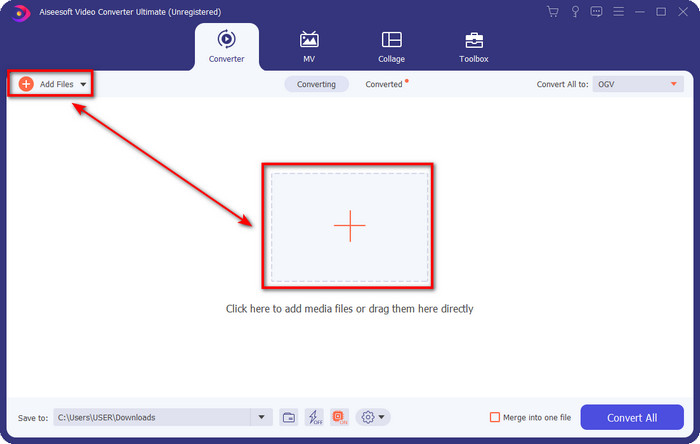
Step 2. Upload the MTV file by dragging it and dropping it on the interface. Or you can click Add Files, then locate the file on the folder that will show on your screen, and press Open.
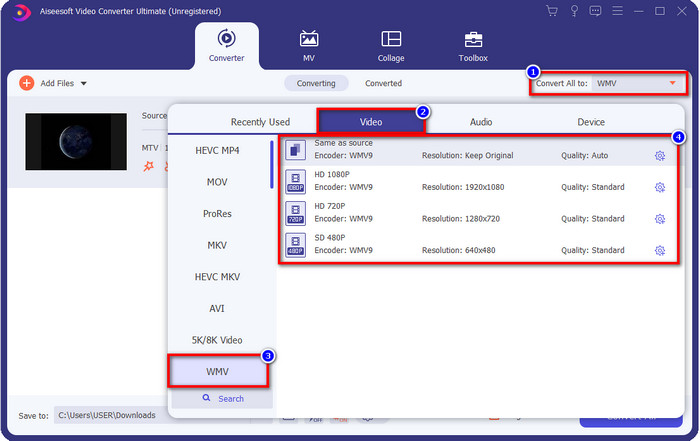
Step 3. Once you add the MTV file, you must click the Convert All to button choose the WMV format or whatever format you want available on the list.
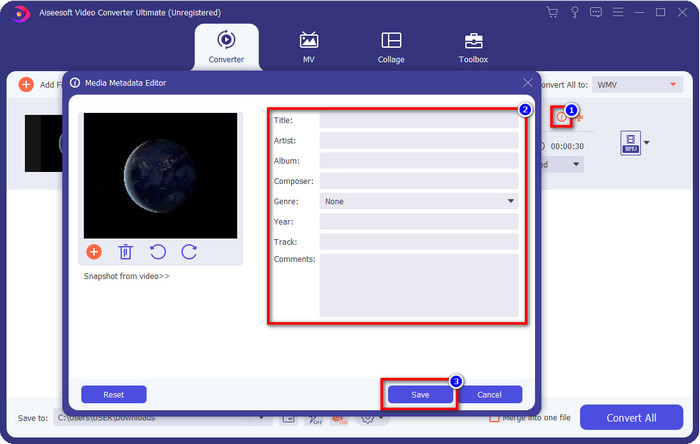
Optional. Do you need to edit the metadata? If so, click the metadata button and add the data you want to insert. For example, fill up the Title, Artist, Composer, Album, Genre, and more to save the metadata click Save.
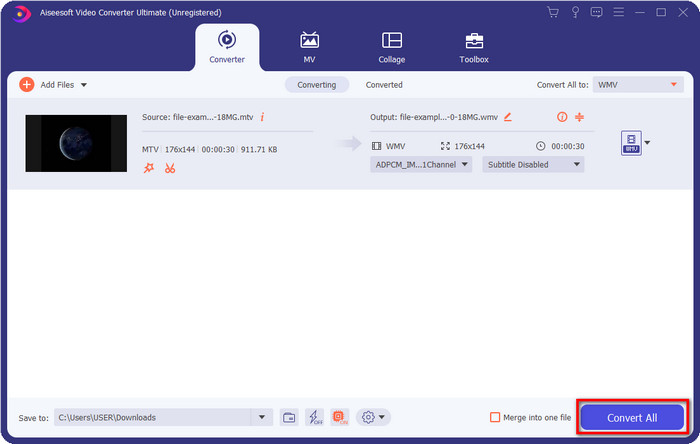
Step 4. By clicking the Convert All button, the process will begin. Once complete, a new computer folder will show on your screen with the WMV file.
パート2。MTVをWMVオンラインに変換する
FVC Free Video Converter Online offers proper functions as a converter that anyone can access with an internet connection. This web converter is available in all browsers and is easy to use. Unlike the converter mentioned first, this tool is now downloadable, but you will need to download the installer before using it. Even though the tool can save some space on your drive, it is not as good as the ultimate tool. So now, let's proceed to the steps and learn to convert MTV to WMV online with the help of this web converter.
Step 1. Click this link, and the main web converter will show on a new tab.
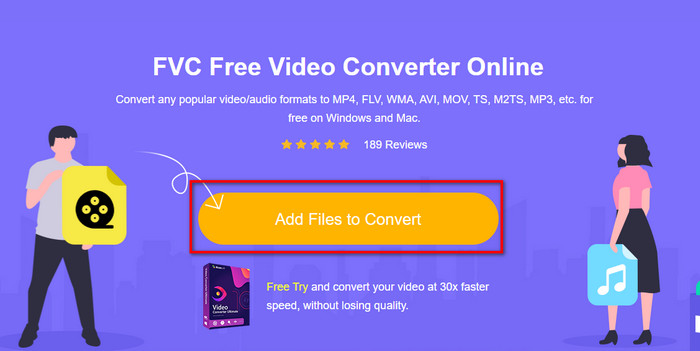
Step 2. Click the Add Files to Convert button to download the installer. Click it again; a folder from your computer will open; this time, you will need to browse the MTV file, click it and press Open.
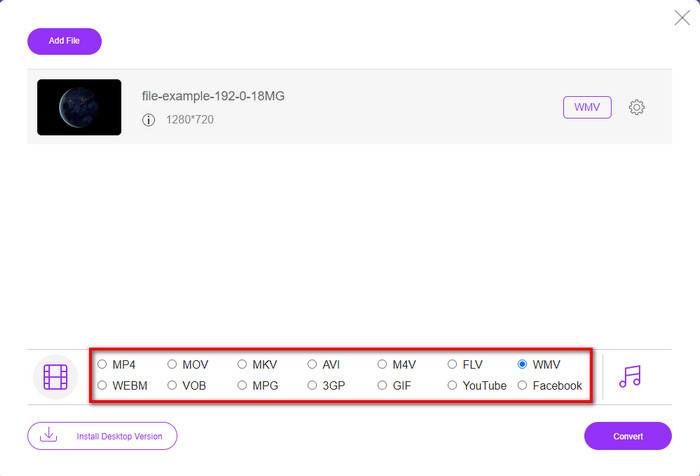
Step 3. After uploading the MTV file, click the WMV format below or any format you want to convert it into.
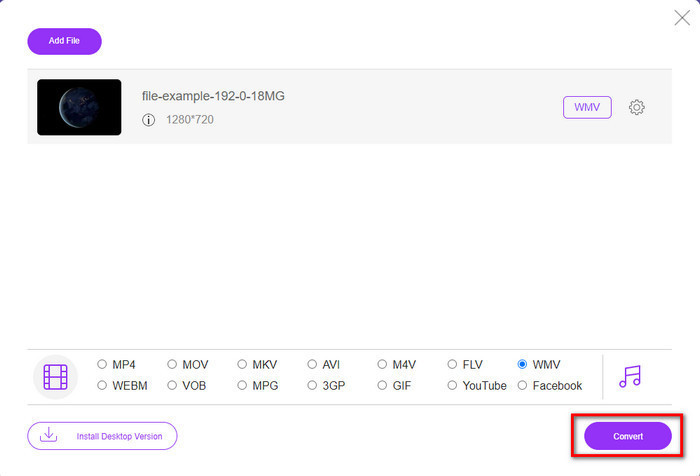
Step 4. If you are ready to convert, click the Convert button, and the process will begin.
パート3。MTVとWMVの違いは何ですか
MTVとWMVは、どちらもビデオコンテンツとオーディオコンテンツのコンテナです。ただし、他の人がコピーできない独自の機能があります。 MTVとWMVについてもっと知りたいですか?次に、以下の詳細情報を読み始めましょう。
それどころか、WMVはMTVと比較してはるかに高い解像度を提供します。解像度は高くなりますが、コンプレッサーを使用してファイルサイズを小さくしますが、品質を低下させることはありません。また、この形式は、MTVよりもすべてのWindowsで再生できる互換性があります。したがって、MTVファイルを再生する場合は、それをWMVに変換し、WindowsOSで再生する方法を知っている必要があります。
最後に、WMVが提供する品質と互換性の理由から、MTVをWMVに変換する必要があります。したがって、MTVファイルを変換する場合は、FVC製品を使用して、多くのプロセスを経ることなく素晴らしい出力を実現する必要があります。
パート4。MTVからWMVへの変換に関するFAQ
MTVビデオの解像度が低いのはなぜですか?
メディアファイルがこの形式の場合は、低解像度を期待してください。ファイルを圧縮すると、ビデオの品質が犠牲になり、サイズが小さくなるためです。また、この形式では、一連の画像を接続詞を使用して465/555でのみ再生でき、音声はMP3です。
.mtvファイルを再生するためにどのビデオプレーヤーを使用できますか?
You can use the VLC media player to play this media format because it supports different encoders and the format you want to play it on. So now, if you're going to watch your MTV files, you must download the VLC on your device to make it work. But if you want a much better media player than VLC, you must use the Blu-ray player instead because it provides an almost cinematic vibe while watching the MTV files.
QuicktimeはMTVフォーマットをサポートしていますか?
Unfortunately, the MTV format is not playable on Quicktime because of its encoder. But we found out that you can convert the file into MOV format instead. Want to know more about how to convert MTV to MOV? If so, you must spend 5 minutes reading this article to be knowledgeable.
結論
Finally, we found the two best ways to convert MTV to WMV and make it compatible with Windows even better and do more that you can't do on the format of MTV. So now that we figure out what are possible converters you can use, it is now the time to choose one. Either of the two, you will surely guarantee success on your conversion. But if you want to have a professional and phenomenal output, you must use the FVC Video Converter Ultimate. Want to know more about the ultimate converter? Then you must download it now and try it yourself.
-
 [オンライン&無料]MTVをAVIに変換する3つの方法手間のかからない
 MTVのようなビデオフォーマットについて聞いたことがありますか?この形式についてすべてを知っているわけではなく、MTVビデオをAVIに変換したいので、この問題の詳細については、この記事を注意深く読んでください。
-
 WindowsとMacでFLVをWMVに変換するトップ3の方法
 PCまたはMacで品質を損なうことなくFLVをWMVに変換する最良の方法をお探しですか?ここでは仕事を簡単に行うための3つの方法を共有しているので、あなたは幸運です。
-
 Windows / MacでGIFをWMVに変換する方法に関する簡単なガイド
 GIFをWMV形式に変換する方法を知りたいですか?次に、この記事に従って、選択できるさまざまなソリューションを紹介します。
