


 ビデオコンバーター究極
 スクリーンレコーダー
 ビデオ修復
ビデオ修復
 安全なダウンロード
MacおよびWindowsでOGVをM4Vに変換するための2つの注目すべき方法
OGV を M4V に変換する方法が思いつかないでしょうか?それなら、このガイドを読んでみてください。必要となるその他の重要な情報も見つかるはずです。この記事では、Mac と Windows で OGV を M4V に変換するための、手間のかからない手順をご紹介します。これらの方法を学ぶ準備はできましたか?それでは、この記事を最後までお読みください。

パート 1: OGV と M4V の紹介
| 名前 | OGV | M4V |
| ファイル名 | OGG Vorbis ビデオ ファイル | PEG-4 ビデオ |
| ファイル拡張子 | .ogv | .m4v |
| によって開発された | Xiph.org | アップル社。 |
| 説明 | Microsoft Media Player は主に OGV ファイルを担当します。 OGG ビデオ ファイルのファイル名拡張子は「OGV」です。メディアの再生中、OGV ファイルには、ビデオ、オーディオ、テキスト、プレゼンテーション テキスト データ、およびメタデータの複数のストリームが含まれる場合があります。 Theora は、OGV ファイルとして保存されるビデオのエンコードによく使用されます。 Theora コーデックのおかげで、高品質のビデオを低ビットレートで保存できます。これは、オープンソースの非可逆ビデオ圧縮方式です。 OGV ファイルでは、Daala、Tarkin、および Dirac ビデオ コーデックを統合することもできます。OGV のオーディオ ストリームは、FLAC、Opus、Vorbis、または Speex でエンコードできます。 OGV ファイルは、VLC などのビデオ プレーヤーで表示および再生できます。 | Apple は M4V ビデオ形式を開発しました。動画を保持するための方式で、MP4 形式に似ています。ただし、今回は DRM コピー防止が M4V ファイルに適用される可能性があるため、違いが生じます。 Apple は、iTunes Store で M4V エンコーディング標準を使用しています。 Apple の FairPlay コピー保護は、不要な M4V ファイルのコピーを防ぐのに役立ちます。 QuickTime では、FairPlay DRM を使用した M4V ビデオを「AVC0 メディア」と呼んでいます。 |
| 技術的な詳細 | 下位互換性のあるスーパーセットにより、Theora ビデオ圧縮形式は VP3 ビデオ圧縮形式と基本的に互換性があります。 Theora は VP3 のスーパーセットであるため、VP3 と Theora は再圧縮せずに組み合わせることができます。 | M4V ファイルは、Apple の FairPlay コピー保護を使用して保護し、不正な複製を防ぐことができます。 FairPlay で保護された M4V ファイルを再生できるのは、ビデオの購入に使用したアカウントで (iTunes を通じて) 承認されたコンピューターのみです。 |
| 関連プログラム | FFmpeg MPlayer VLCメディアプレーヤー | アップル アイチューンズ Apple QuickTime プレーヤー VLCメディアプレーヤー ズームプレーヤー メディア プレーヤー クラシック K-マルチメディアプレーヤー リアルプレーヤー |
| MIME タイプ | ビデオ/ogg | ビデオ/x-m4v |
パート 2: オンライン ツールを使用して OGV を M4V に変換する方法
OGV を M4V 形式に簡単に変換するには、信頼できるコンバーターがあれば十分です。そこでこのパートでは、FVC Free Video Converter Online を使って OGV を M4V に変換する方法をご紹介します。このツールを利用すれば、MP4、MOV、VOB、MOV、AVI、FLV など、さまざまなファイルを変換できます。バッチ変換にも対応しているため、複数ファイルを無劣化で一括変換することも可能です。さらに、インターフェースが直感的なので、数回クリックするだけでファイルを変換できます。これらの基本操作からも分かるように、このビデオコンバーターは初心者にも適しています。また、解像度は 1920x1080 まで調整可能です。ビットレートも最大 20000 kbps まで変更できます。最後に、フレームレートは最大 60fps まで変更できます。さらに、オーディオ設定に進めば、音声の編集も可能です。音声のビットレートやサンプルレートを調整できます。FLAC、MP3、AC3、AAC などの音声形式にも対応しています。
機能
◆ OGV、M4V、MP4、AVI、FLV、MKV などのさまざまなビデオ フォーマットを変換します。
◆ バッチ変換を提供します。
◆ ビデオのビットレート、フレーム レート、および解像度を編集します。
◆ MP3、AC3、AAC、FLAC、WAV などのオーディオ形式をサポートしています。
◆ オーディオのビットレートとサンプルレートを編集します。
FVC Free Video Converter Online を使用して、OGV ファイルを M4V 形式に変換します。以下の簡単な手順に従ってください。
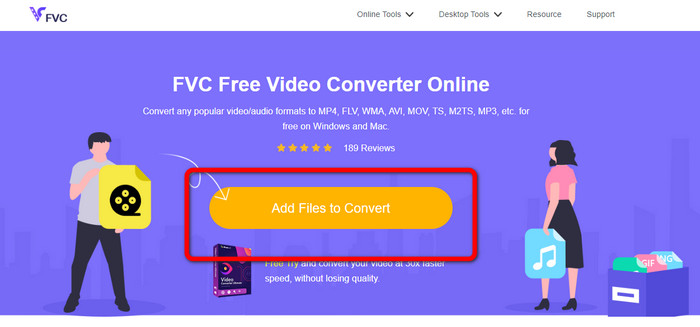
ステップ 1: FVC Free Video Converter Online の公式サイトにアクセスします。その後、OGV 動画ファイルをアップロードするために、ファイルを追加して変換 ボタンをクリックします。画面にフォルダーが表示されるので、変換したい動画を選択します。
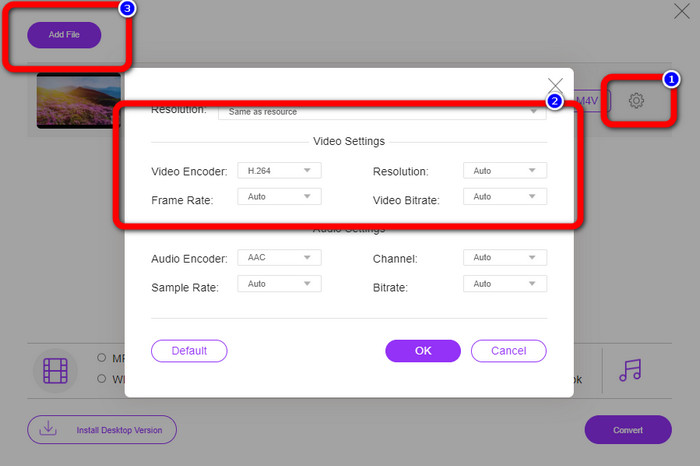
ステップ 2: OGV 動画ファイルをアップロードしたら、設定 アイコンをクリックして、ビットレート、フレームレート、解像度を変更できます。完了したら OK をクリックします。さらに、ファイルを追加したい場合は、インターフェース左上にある ファイルを追加 ボタンを押します。
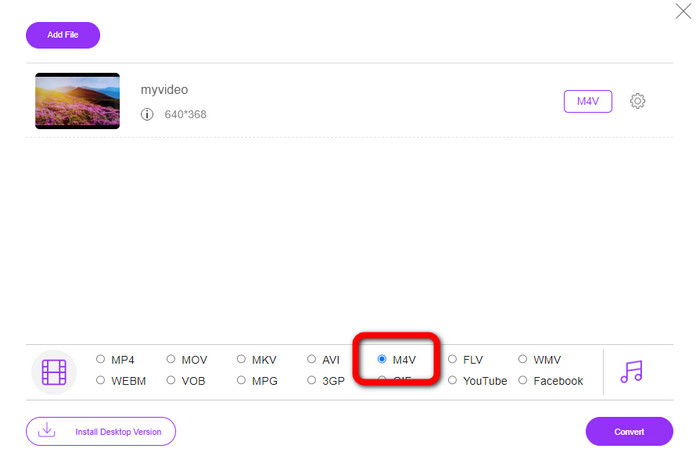
ステップ 3: OGV 動画ファイルに各種設定を行ったら、インターフェース下部のフォーマットオプションから M4V 形式を選択します。その後、保存先フォルダーを指定して動画を保存します。
パート 3: オフラインで OGV を M4V に変換するための簡単なガイド
オフライン アプリケーションに関しては、Video Converter Ultimate を使用して、Mac および Windows で OGV を M4V に変換できます。このツールは、一流のダウンロード可能なコンバーターです。ユーザーがバッチ変換を実行できるため、複数のファイルを簡単に変換できます。また、他のコンバーターよりも 30 倍高速な超高速変換プロセスを備えています。このようにして、多くのビデオを単独で変換できます。さらに、ビデオを変換している場合でも、ビデオ編集ツールを使用してカスタマイズまたは編集できます。フィルターを追加したり、ビデオをカットしたり、ビデオを強化したりできます。
さらに、Video Converter Ultimate には、体験できる機能がほかにも多数あります。オーディオ同期機能を搭載しているため、音声と動画のズレを補正できます。また、動画の音量を上げたい場合にも対応しており、ボリュームブースター機能によって 200% まで音量を強化できます。こうした機能以外にも多くの特長がありますので、このビデオコンバーターを実際に使って、さらに多くの機能を発見してください。
機能
◆ M4V、OGV、SWF、MP4、AVI、FLV、MOV、VOB、MKV、WMV などのビデオ ファイルを変換します。
◆魅力的なコラージュを作成できます。
◆ ビデオ エンハンサー、色補正、トリマー、ウォーターマーク リムーバーなど、ビデオを改善するためのビデオ編集ツールを提供します。
◆ミュージックビデオの作成が可能です。
◆ ビデオの速度を調整します。
◆ビデオとオーディオのコンプレッサーを提供
◆ 2Dから3Dビデオをカスタマイズ
ステップ 1: Video Converter Ultimate をダウンロードしたい場合は、下の ダウンロード ボタンをクリックします。その後、インストールが完了したらアプリケーションを起動します。
無料ダウンロードWindows 7 以降に対応安全なダウンロード
無料ダウンロードMacOS 10.7 以降に対応安全なダウンロード
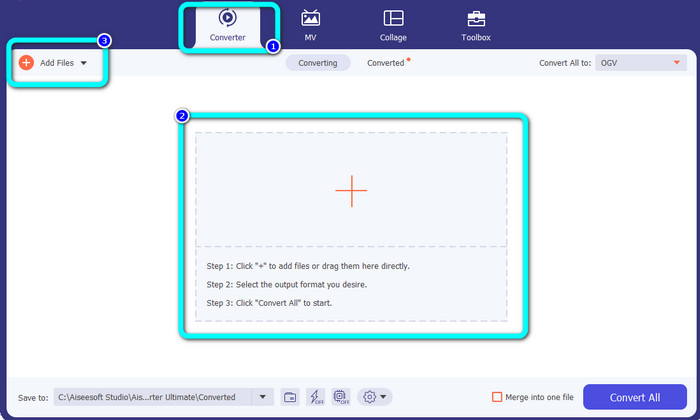
ステップ 2: 変換 パネルを選択し、プラス アイコンをクリックして OGV 動画ファイルを追加します。ファイルを追加 ボタンをクリックするか、ファイルをボックス内に直接ドラッグ&ドロップして追加することもできます。
ステップ 3: OGV 動画を編集したい場合は、最初のサムネイルボックスに表示される各アイコンをクリックします。これにより、動画のトリミングや回転、フィルターやウォーターマークの追加などが行えます。編集が完了したら OK を選択します。
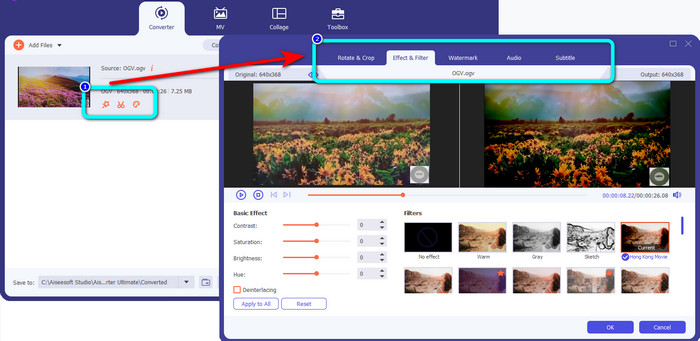
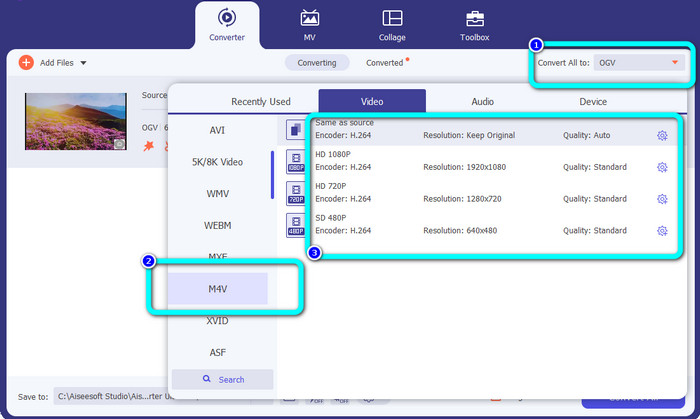
ステップ 4: その後、OGV を M4V に変換するために、すべてを次の形式に変換 ボタンをクリックしてフォーマットオプションを表示します。M4V 形式を選択し、希望する解像度を指定します。
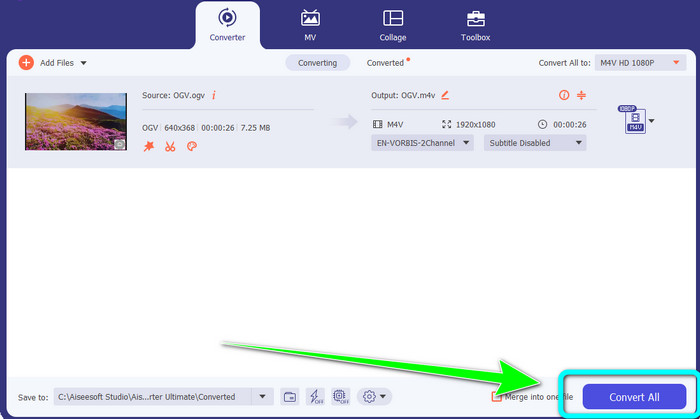
ステップ 5: 最後に、すべて変換 ボタンをクリックして OGV ファイルを M4V 形式に変換し、動画をデバイスに保存します。
さらに詳しく読む:
MXF を M4V に変換するベストな方法を学んで発見しましょう
パート 4: OGV から M4V への変換に関する FAQ
OGV はロッシーですか?
はい。 OGV 形式は、ファイル拡張子 .ogv として知られるオープンソースのビデオ圧縮標準と組み合わされ、主に Xiph.org によって作成されました。これは OGG Vorbis と密接に関連しており、非可逆ストレージまたはオンライン ストリーミングに使用できます。
OGVをMP4に変換するのにどれくらい時間がかかりますか?
使用しているコンバーターによって異なります。高速な変換処理ができるコンバーターをお探しなら、Video Converter Ultimate を利用してください。最大 30 倍の高速変換に対応しています。
すべてのデバイスで M4V ファイルを開くことはできますか?
残念ながら違います。 M4V ファイルには、Apple 認定のコンピューターからのみアクセスできます。ビデオをすべてのデバイスで再生したい場合は、ビデオを MP4 ファイルに変換できます。
結論
実用的なアプリケーションさえ把握していれば、Mac と Windows で OGV を M4V に変換するのは簡単です。この記事では、OGV を M4V に素早く簡単に変換できる 2 つの優れたアプリケーションを紹介しました。オンラインコンバーターとしては、FVC Free Video Converter Online を利用できます。一方、オフラインで変換したい場合は、Video Converter Ultimate を使用できます。
-
 あなたが見逃してはならない素晴らしいOGVからFLVへのコンバーター[証明済み]
 OGVをFLVファイルにすばやく変換する方法がわからない場合は、この記事で、これまでに必要となる唯一のコンバーターを紹介します。
-
 OGVファイルを変換するための5つの有益なOGVからWMVへのコンバーター
 OGVファイルの変換に使用できる5つの異なるOGVからWMVへのコンバーターがあります。この記事は、利用可能な5つのogvコンバーターについての強力な事実を提供します。
-
 OGV を MKV に効率的かつ簡単に変換する驚くべき方法
 このガイドポストでは、OGV をロスレスで MKV に変換する手間のかからない手順を説明します。これらの最も信頼性の高いコンバーターを試して、その優れた機能を体験してください。
