


 ビデオコンバーター究極
 スクリーンレコーダー
 ビデオ修復
ビデオ修復
 安全なダウンロード
SWF を M4V に便利に変換する方法を学ぶ
Shockwave Flash プレーヤー用に、アドビは従来の SWF ファイル形式を開発しました。速度とセキュリティの問題により、多くのブラウザーは Flash をサポートしなくなり、iOS デバイスは Flash をサポートしなくなり、SWF ファイル形式は現在ほとんど使用されていません。最善の解決策は、SWF ファイルを M4V などの他の形式に変換することです。その場合、SWF を M4V に変換する最良の方法を紹介します。また、オンラインとオフラインで使用できるいくつかのアプリケーションを紹介するので、好みのコンバーターを選択できます。追加の知識については、このガイドポストを読んでください。

パート 1: Mac および Windows で SWF を M4V に変換する最良の方法
Windows および Mac ユーザーの場合、FVC Video Converter Ultimate を使用して SWF を M4V に変換できます。このダウンロード可能なツールは、FLV、MOV、WMV、MP4、AVI、MTS、MPEG、VOB など、さまざまなファイル形式を簡単に変換できます。さらに、このコンバーターを使用すると、1 つのプロセスで複数のファイルを変換できます。これは、特に多くのファイルを変換する場合に最適です。また、このツールの変換プロセスは、他のコンバーターとは比較になりません。平均速度の最大 30 倍の速度でファイルを変換できます。さらに、Video Converter Ultimate は、ユーザーが楽しめるさまざまな機能を提供します。 SWF ビデオ ファイルを所有していて、透かしを入れたい場合は、このアプリケーションを使用できます。このアプリケーションは、SWF ビデオに透かしを追加するビデオ透かし機能を提供します。
機能
◆ M4V、MP4、SWF、MTS、MOV、VOB、FLV、AVI、WMV など、100 以上のビデオ ファイル形式を変換します。
◆ すぐに使える無料のテンプレートとフィルターでコラージュを作成..
◆ M4V、MP4、SWF、MTS、MOV、VOB、FLV、AVI、WMV など、100 以上のビデオ ファイル形式を変換します。
◆ ミュージック ビデオ メーカーを提供します。
◆ ビデオ エンハンサー、色補正、トリマーなどの編集ツールを提供します。
◆ JPG、PNG、WEBP などの画像ファイル形式を変換します。
◆ ビデオおよびオーディオ コンプレッサーを提供します。
以下の簡単な方法を使用して、FVC Video Converter Ultimate を Mac バージョンで使用して SWF を M4V に変換できます。
Step 1: Download the FVC Video Converter Ultimate on your Mac by clicking the Download button. Then launch the application.
無料ダウンロードWindows 7 以降に対応安全なダウンロード
無料ダウンロードMacOS 10.7 以降に対応安全なダウンロード
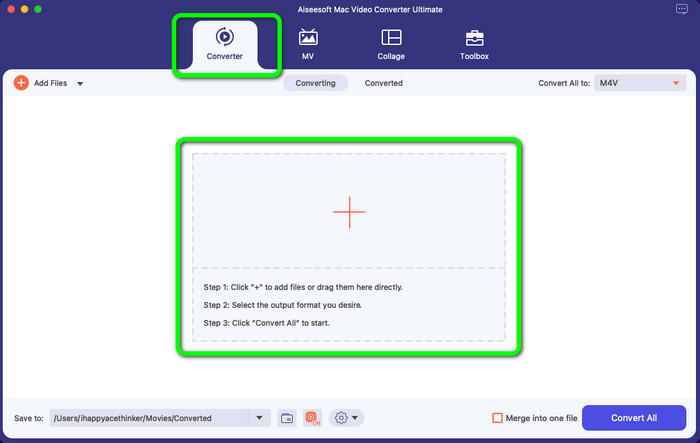
Step 2: Select the Converter option on the interface and click the + icon to app the SWF video file you want to convert. You can also directly drop the video file into the box.
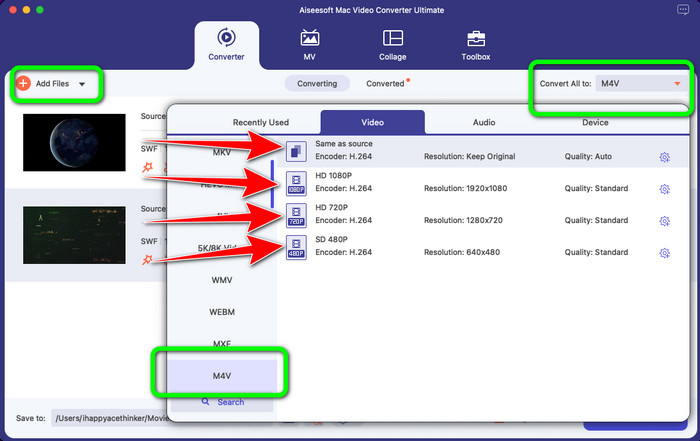
Step 3: You can still add more files if you want to convert more by clicking the Add File button on the upper left part of the interface. Then, click the Convert All to button to show the format options, and select the M4V file format. You can also select your preferred quality.
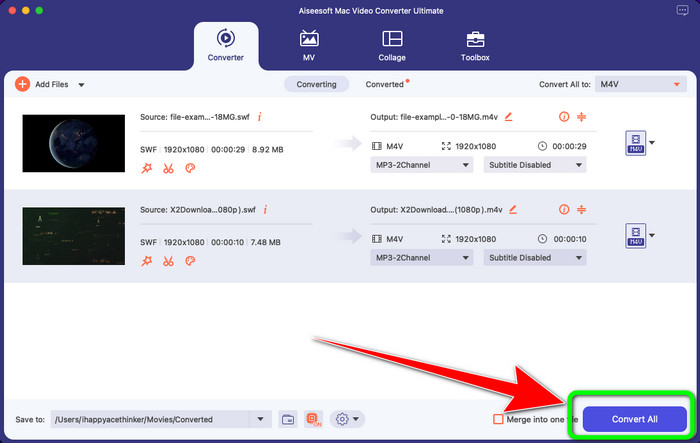
Step 4: If you are done changing the output format of all the files, click the Convert button. Wait for the fast conversion process and save your video in your desired location.
色の調整など、ビデオを編集したい場合は、簡単な手順を提供します。
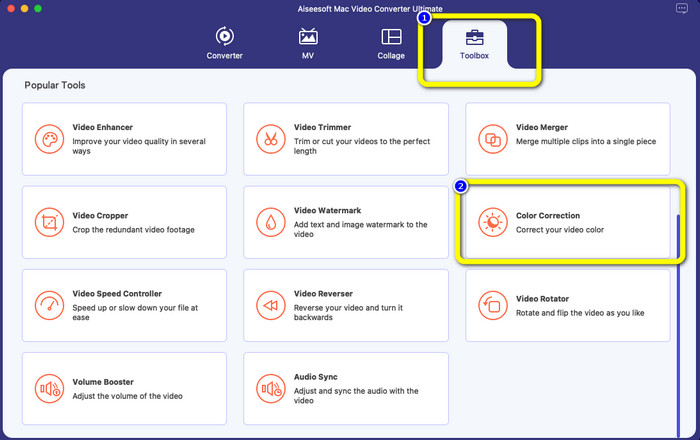
Step 1: Select the Toolbox option and click the Color Correction tool.
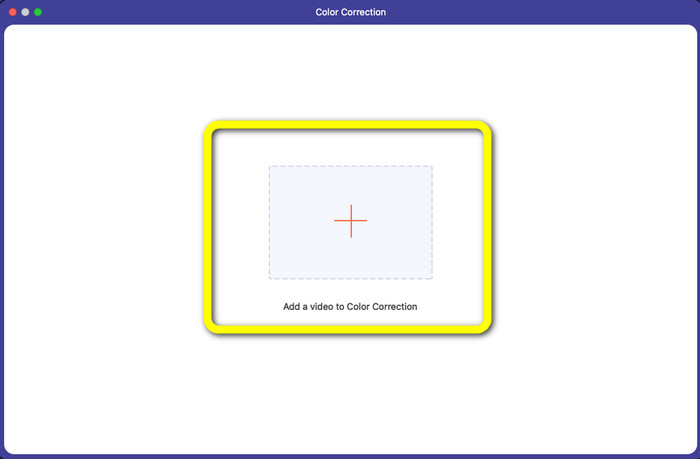
Step 2: After clicking the Color Correction Tool, click the Plus symbol and add the video file you want to edit.
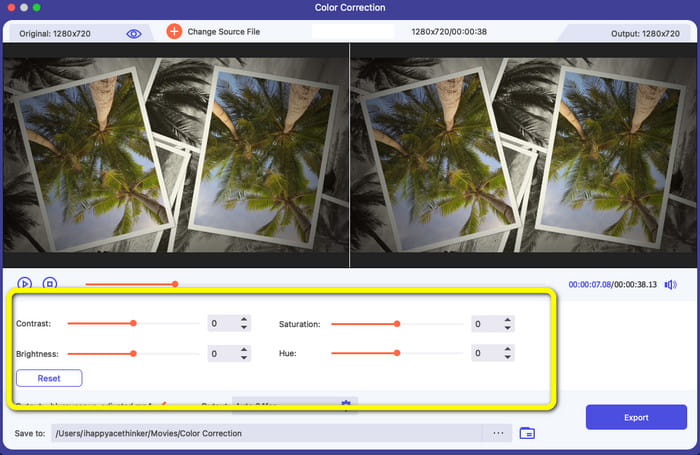
Step 3: You can already adjust the brightness, Saturation, Contrast, and Hue of your video. Change the colors based on your preference.
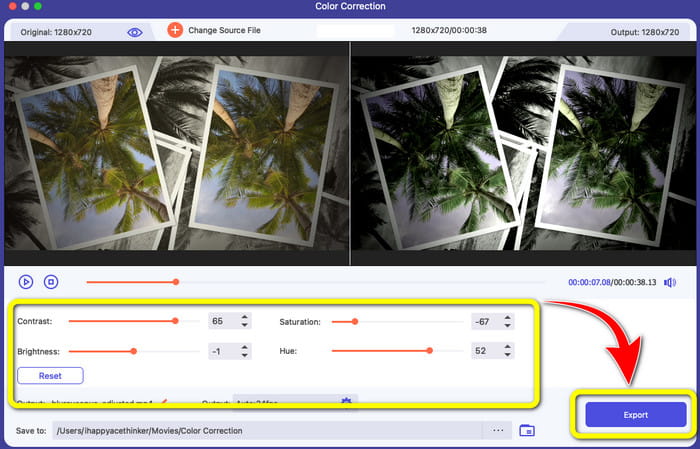
Step 4: Finally, if you are done changing the colors of the video, click the Export button to save your edited video.
パート 2: オンラインで SWF を M4V に変換する優れたプロセス
FVC Free Video Converter Online is the tool you can use to convert SWF to M4V online. Most popular audio and video file formats, including MP4, FLV, MKV, MOV, M4V, MTS, TS, M2TS, WMV, ASF, VOB, MP3, AAC, and more, are supported for conversion. Your HD videos can be converted to well-liked formats like MP4 and FLV in a matter of seconds without losing their quality. With its support for batch conversion, you can losslessly convert many video or audio files. The best part of this tool is that you can edit the video bitrate, frame rate, sample, and resolution according to your want.
機能
◆ FLV、AVI、MP4、M4V、SWF、TS などの多数のビデオ ファイル形式を変換します。
◆ ビデオのフレーム レート、ビット レート、および解像度を編集します。
◆ バッチ変換プロセスを提供します。
◆ MP3、M4A、AAC、WMA、WAV などのオーディオ形式を変換します。
FVC Free Video Converter Online を使用して SWF を M4V に変換する簡単な手順は次のとおりです。
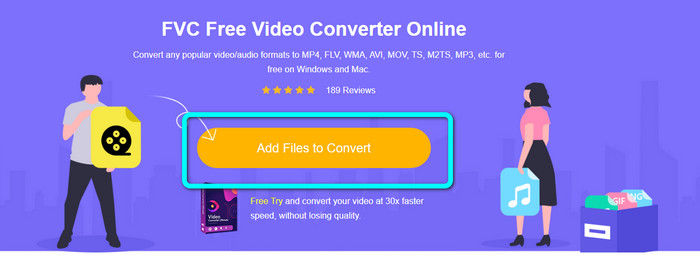
Step 1: Go to the FVC Free Video Converter Online website and click the Add Files to Convert button to upload your SWF video file.
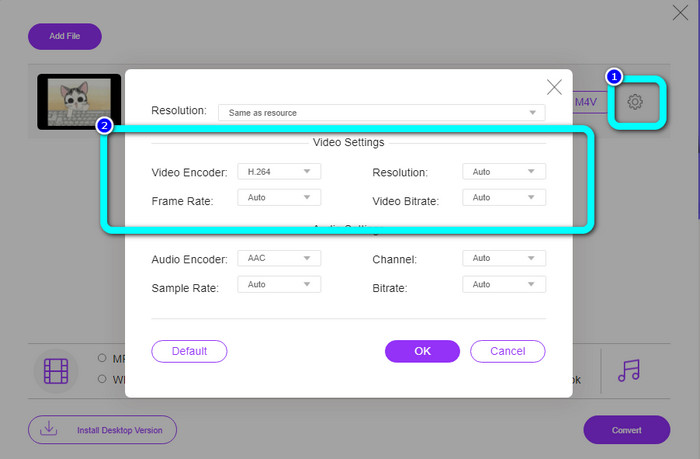
Step 2: Click the Settings icon on the right of the interface if you want to change the video's bit rate, frame rate, and resolution, then click OK.
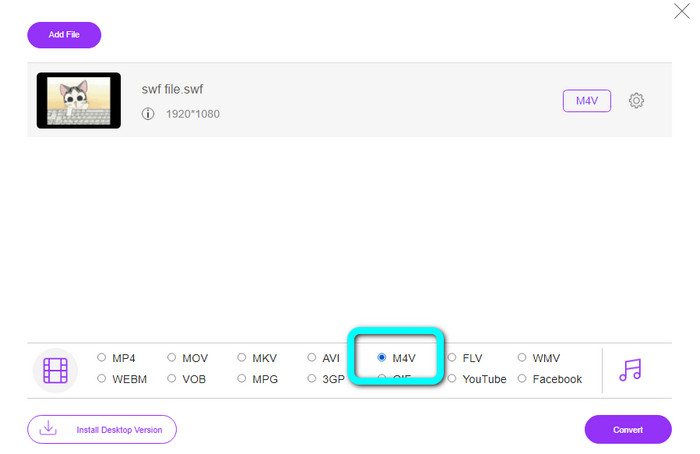
Step 3: After that, you can already select the M4V file format on the format options on the lower part of the interface.
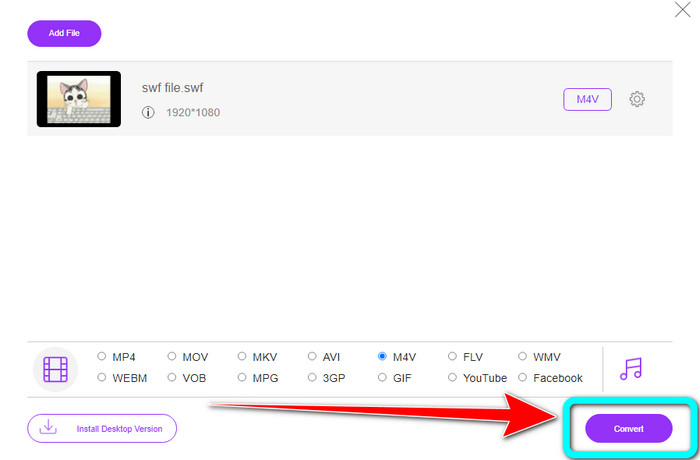
Step 4: Click the Convert button. The folder will show up on your screen, and choose a location where you want to save your video. Then click OK.
関連記事
Top 8 SWF File Player to Play Flash Video Files on Windows and Mac
5 Best Free SWF to AVI Converters [Web & Desktop Based]
パート 3: SWF と M4V の比較
| SWF | M4V | |
| ファイル拡張子 | SWF | .M4V |
| 説明 | SWF (Small Web Format/ShockWave Format) と呼ばれるデジタル Adobe Flash ファイル タイプは、ベクターベースのアニメーション、オーディオ ファイル、およびビデオを保持するために使用されます。通常、インターネット メディアのブロードキャストに使用されます。ビデオ ゲームは通常、ブラウザでプレイします。残念ながら、アドビは、パフォーマンスの低下やセキュリティの欠如などの欠陥により、2020 年末までに Flash 形式のサポートを停止すると宣言しました。 | Apple Inc は、M4V デジタル ビデオ コンテナ フォーマットを開発しました。その形式は、よく知られている MP4 の形式と非常によく似ています。ただし、M4V ファイルには DRM が含まれている可能性があります。最近では、多数のオーディオおよびビデオ データの多重化を可能にする M4V が、iTunes Store で入手できるビデオの主要なビデオ フォーマットになっています。 |
| によって開発された | Adobe Systems Incorporated | アップル社。 |
| 関連プログラム | アドビ フラッシュ プロフェッショナル CC アドビフラッシュプレーヤー アドビ ドリームウィーバー CC GOM Player | ズームプレーヤー メディア プレーヤー クラシック KMPlayer VLCメディアプレーヤー |
| MIME タイプ | application/vnd.adobe.flash-movie | ビデオ/x-m4v |
パート 4: SWF から M4V への変換に関する FAQ
1. SWF ファイルは何に使用されますか?
ビデオとベクターベースのアニメーションは、Adobe Flash ファイル タイプである SWF ファイルで見つけることができます。 Small Web Format は SWF の完全な頭字語ですが、ShockWave Format としても知られています。
2. FLA と SWF の違いは何ですか?
これら2つの違いは、それらが使用されるものです。作成中の Flash ファイルの拡張子は FLA です。これには、完成したフラッシュ ファイルに必要なデータ (画像、オーディオ、およびその他のコンポーネント) が含まれます。対照的に、SWF (Small Web Format) は公開用に準備された完成ファイルです。
3. SWF ファイルにはオーディオがありますか?
はい。 SWF 形式は、ベクター グラフィックスとアニメーションを保持するように作られていますが、テキスト、ビデオ、サウンドなどの他の種類のデータも保持できます。このファイルは、Web サイトでアニメーションを作成したり、ゲームをしたり、ビデオやオーディオを再生したりするためによく使用されます。
結論
These are the highly recommended applications you can use to convert SWF to M4V. FVC Video Converter Ultimate and FVC Free Video Converter Online are incomparable to other converters. It offers more features you can enjoy and use to improve your video.
-
 M4Vファイルをより小さなサイズに圧縮する方法(無料およびオンライン)
 M4V ファイルのサイズを小さくする簡単な方法を探している場合は、この記事を読んでください。ここでは、M4V ファイルを圧縮する最も簡単な方法を紹介します。
-
 無料でSWFをMKVファイルに変換する方法[解決済み]
 SWF を MKV ファイルに変換する方法をお探しですか?この記事で提供する、すばやく変換できる究極のコンバーターに取り組みます
-
 MPEG を M4V に即座に変換する便利な手順
 MPEG を M4V に変換する 2 つの優れたアプリケーションを挙げました。基本的な手順でそれらを参照してください。次に、MPEG を M4V に変換するための手順を選択します。
