


 ビデオコンバーター究極
 スクリーンレコーダー
 ビデオ修復
ビデオ修復VOBを3GPに簡単に変換する優れた方法[最高のコンバーター]
第3世代のデバイスでVOBファイルを再生したいのにできなくてお困りですか? その場合、最適な解決策はVOBファイルを3GPファイルに変換することです。3GPファイルは3G対応デバイスでサポートされている形式です。したがって、VOBファイルを3GPにデコードする最良の方法を探しているなら、本記事が役に立つかもしれません。ここでは、最も簡単かつ効果的なVOBを3GPに変換する方法をご紹介します。

パート1。FVCビデオコンバーターアルティメットを使用して変換する方法
FVC Video Converter Ultimateは、ウェブ上で入手できる最高クラスのコンバーターの1つです。この無料オフラインコンバーターは、VOB、3GP、MP4、MKV、MOV、AVI、FLVなど、1000種類以上のファイル形式の変換に対応しています。また、このコンバーターでは動画の長さをトリミングしたり、映像効果を追加して品質を向上させることも可能です。さらに、複数ファイルを結合したい場合は、一括変換機能も用意されています。VOBを3GPに手間なく変換したい方は、以下の詳細を読み進めて、無料でダウンロードしてみてください。

FVCビデオコンバーターアルティメット
5,689,200以上のダウンロード- Web上で利用可能な1000以上のファイル形式に変換できます。
- 複数のファイル形式をバッチ変換できます。
- 超高速の変換プロセスとハードウェアアクセラレーションを備えています。
- 高度な編集機能を備えており、ファイルを切り取ったり、字幕を追加したり、透かしを追加したりできます。
- WindowsやMacなどのすべてのメディアプラットフォームで利用できます。
無料ダウンロードWindows 7 以降に対応安全なダウンロード
無料ダウンロードMacOS 10.7 以降に対応安全なダウンロード
FVC VideoConverterUltimateを使用してVOBを3GPに変換する方法の手順は次のとおりです。
ステップ1. まず、WindowsまたはMac用のダウンロードボタンをクリックしてアプリをダウンロードします。その後、インストール手順に従い、アプリを起動します。
無料ダウンロードWindows 7 以降に対応安全なダウンロード
無料ダウンロードMacOS 10.7 以降に対応安全なダウンロード
ステップ2. ファイルを追加ボタン、または+ボタンをクリックします。パソコン内のファイルが表示されるので、キューに追加したいVOBファイルを選択します。
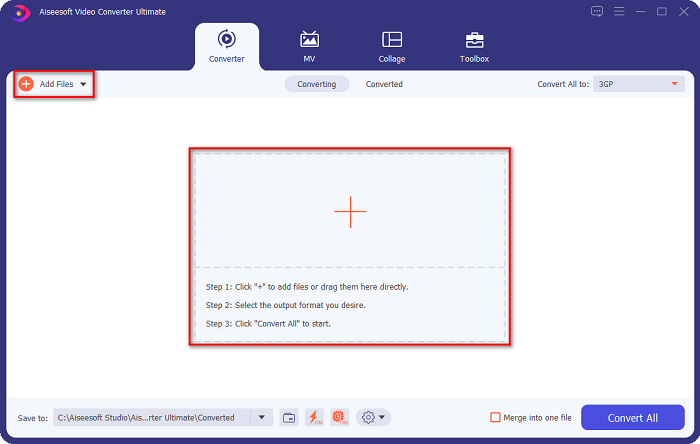
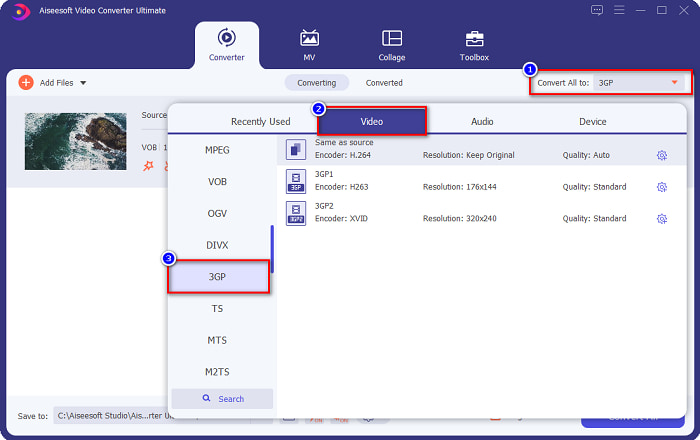
ステップ3. 3つ目のステップとして、変換形式を一括指定ボタンをクリックし、出力したい形式を選びます。3GPをクリックして、次のステップへ進みます。
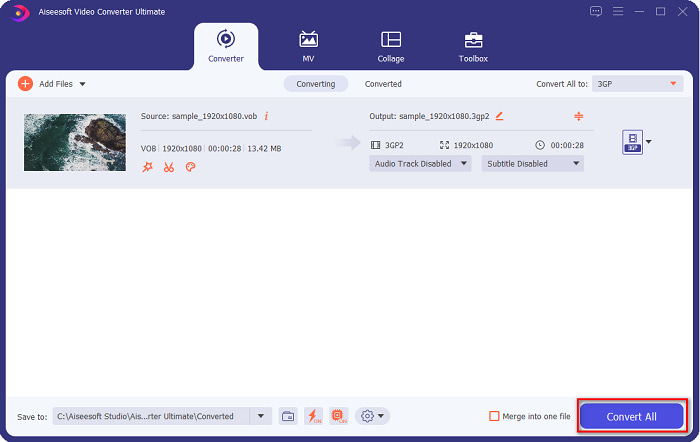
ステップ4. 希望する出力形式を選択したら、すべて変換ボタンをクリックして変換を開始します。数秒待つだけで完了です。以上の簡単な手順で、VOBファイルを3GPに簡単に変換できます。
パート2。無料オンラインでVOBを3GPに変換する方法
ダウンロードせずにVOBファイルを3GPファイルに変換する場合は、Webで入手可能なオンラインコンバーターを使用できます。オンラインコンバーターを使用することの便利さと効率は間違いなく良いです。そのため、VOBファイルを3GPファイル形式に変換する2つの方法を提供しました。
FileProInfo
FileProInfoは、直感的に操作できるGUIを備えたオンラインコンバーターで、初心者にも扱いやすいツールです。インターネット上で一般的に使われているほとんどの標準ファイル形式に対応しています。ただし、この種のオンラインコンバーターには、気になる広告が多く表示されることがあります。それでもなお、多くのユーザーがこのコンバーターを利用しています。
ステップ1. ブラウザでFileProInfoを検索し、公式ページへアクセスします。ソフトのメイン画面でSelect VOB fileボタンをクリックし、アップロードするVOBファイルを選択します。

ステップ2. 次に、「to」という文字の横にあるボックスで、希望する出力ファイル形式を選択します。

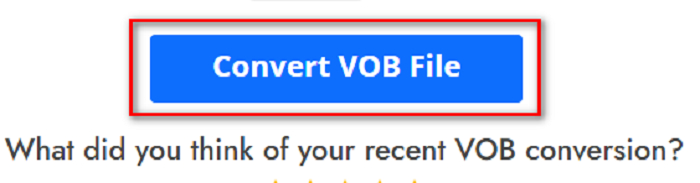
ステップ3. 最後に、ソフト画面下部にあるConvert VOB Fileボタンをクリックします。その後、変換が完了するまで待ちます。
そしてそれだけです!汗をかくことなく、VOBファイルを3GPに変換できます。
Convert365
Convert365は、VOBから3GPへの変換に対応したオンラインコンバーターで、VOB、3GP、AVI、MOV、MP4、MPEGなど、ほとんどの標準形式を変換できます。また、オンラインコンバーターの中でも音量の正規化(ノーマライズ)機能を備えているのが特徴です。ただし、オンラインツールであるため、インターネット環境に依存して変換が遅くなる場合があります。以下の手順に従って、Convert365を使ってVOBファイルを3GPに変換してみましょう。
ステップ1. ブラウザでConvert365と検索し、Add Filesボタンをクリックします。パソコン内のファイルが表示されたら、VOBファイルを選択します。

ステップ2. 続いて、Convert toの横にあるドロップダウンボタンから出力形式を選択します。3GP形式をクリックします。
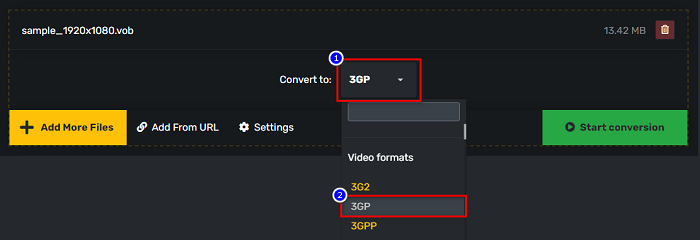
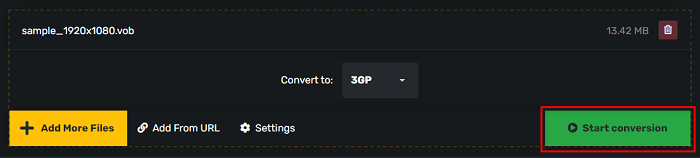
ステップ3. 最後に、Start conversionボタンをクリックします。 ボタンをクリックして、VOBを3GPファイルに変換します。
パート3.どのVOBから3GPへのコンバーターを使用する必要があるか
VOBを3GPに変換するのに最適なコンバーターを選択するときは、速度、サポートするファイル、およびコンバーターの機能の独自性を常に考慮する必要があります。上記の最高のオンラインおよびオフラインコンバーターの中で、オフラインツールFVC VideoConverterUltimateを使用することをお勧めします。このコンバーターは、GIFクリエーター3Dメーカー、透かし除去機能など、他のコンバーターにはない多くの異なる機能を提供します。
また、プロ並みの出力が得られるだけでなく、使い勝手の良いインターフェースを備えているため、苦労することはありません。
パート4。VOBと3GPの詳細
VOBまたはビデオオブジェクトは、DVDが使用するファイルコンテナ形式です。ビデオ、オーディオ、字幕、メニューのコンテンツが含まれています。このタイプのファイルには、直接コピーされないように保護するための制限とコピー制限があります。対照的に、3GPファイルは、第3世代のモバイルデバイスでのみ再生できるファイル形式です。これらのファイル形式は、第3世代パートナーシッププロジェクト(3GPP)によって開発されています。さらに、このタイプのファイルは、3Gデバイスと共有するために作成されているため、VOBファイルと比較して小さいファイルサイズしか含まれていません。 3GPは、3G電話で一般的に使用されるビデオおよびオーディオファイルを保存できます。
パート5。VOBから3GPへの変換に関するFAQ
macOSで3GPをプレイできますか?
3GPファイルは、特に新しいバージョンのQuickTimeでは、macOS上で再生することができません。しかし、3GPファイルをmacOSでサポートされているMOV形式に変換すれば再生可能です。3GPファイルをMOVに変換する方法について詳しく知りたい場合は、このリンクをクリックしてください。
VOBを3GPに変換すると、ファイルの品質に影響しますか?
もちろん。 VOBを3GPに変換すると、ファイルサイズが影響を受けます。 3GPにはビデオファイルとオーディオファイルのみが含まれ、ファイルサイズが小さいため、VOBファイルのファイルサイズは小さくなります。
3GPファイル形式は一般的なファイルですか?
残念ながら、最近では3G電話の数が少なくなっているため、3GPファイル形式はそれほど一般的ではありません。最近のモバイルユーザーにとって最も一般的なファイルは、MP4ファイル形式です。
結論
WindowsとMacでVOBをMOVに変換するための最も使いやすいコンバーターを紹介しているので、FVC Video Converter Ultimateは、提示されているオンラインおよびオフラインのコンバーターツールの中で最高であると結論付けています。独自の機能を試すだけでなく、高速変換も可能です。このコンバーターについてまだ疑問がある場合は、今すぐダウンロードして、最高のVOBから3GPへのコンバーターを試してください。
-
 VOBをFLVに変換する最良の方法[無料およびオンラインで含まれる]
 VOBファイルをFLVファイルに変換したいですか?デスクトップまたはオンラインコンバーターを使用して、タスクを簡単に完了することができます。このガイドを読み、VOBをFLVに簡単かつ迅速に変換する方法を学びます。
-
 VOBファイルをAVI形式に変更するために利用できる3つの便利なコンバーター[2021]
 VOBファイルの再生がサポートされていないため、問題がありますか?次に、各コンバーターの詳細な手順とともに、以下に示す3つの方法で変換してみましょう。
-
 VOBをMOVに変換する際に使用する優れた方法
 オンラインビデオダウンロードは便利ですが、ビデオがVOB形式であり、プレーヤーがそれをサポートしていない場合はどうなりますか?この投稿では、VOBをMOVに変換する方法を説明します。
