


 ビデオコンバーター究極
 スクリーンレコーダー
 ビデオ修復
ビデオ修復
 安全なダウンロード
WMA から WAV への変換に関する究極のガイド、最高のオーディオ コンバーターを紹介
もしあなたがオーディオ体験をワンランク引き上げて、音楽ファイルの真のポテンシャルを引き出したいとお考えなら、ここはまさにうってつけの場所です。本ガイドでは、WMA を WAV に変換するスムーズな手順を解説し、より高音質で没入感のあるリスニング体験の世界へとご案内します。
あなたがオーディオファン、音楽プロデューサー、または単にハイファイオーディオを好む人であっても、当社の包括的な手順と専門的なヒントは、トランスコーディングの技術を習得し、オーディオ コレクションの素晴らしさを最大限に引き出すのに役立ちます。サウンドスケープを変革し、卓越したオーディオへの旅に乗り出す準備をしましょう。早速入ってみましょう!

パート 1. WMA を WAV に変換する最良の 5 つの方法
1.ビデオコンバーターアルティメット
Video Converter Ultimate は、WMA から WAV への変換に優れた高機能なデスクトップソフトです。直感的なインターフェースと高度な機能により、高速かつ高音質を保ったまま変換を行えます。バッチ処理に対応しているため、複数の WMA ファイルを同時に WAV に変換することも可能です。さらに、出力設定のカスタマイズ機能も備えており、ユーザーはオーディオ変換プロセスを思い通りにコントロールできます。
ステップ 1. まず、下にあるいずれかの無料ダウンロードボタンをクリックして、プログラムのインストーラーを入手します。その後、ツールを起動します。
無料ダウンロードWindows 7 以降対応安全なダウンロード
無料ダウンロードMacOS 10.7 以降対応安全なダウンロード
ステップ 2. メインインターフェースのプラスボタンをクリックして、変換したいファイルを追加します。続いて、[プロファイル]メニューから出力形式として WAV を選択します。
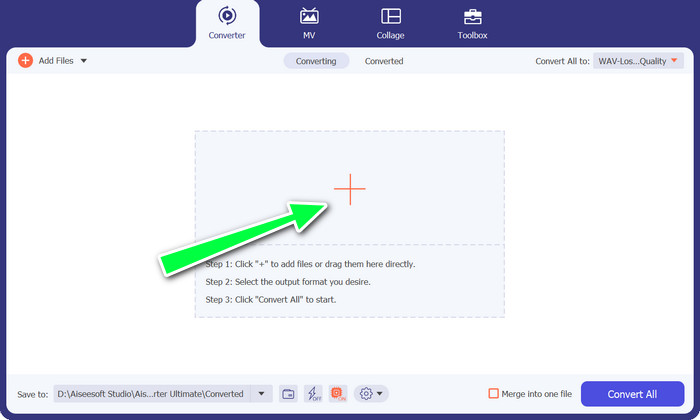
ステップ 3. 最後に、インターフェース下部にあるすべて変換ボタンをクリックして、変換処理を開始します。
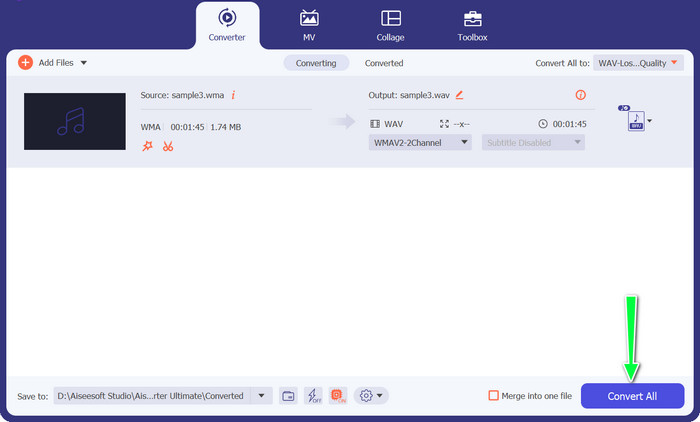
ライターの総評:
著者は、Video Converter が WMA ファイルを WAV 形式に変換するための信頼できるツールであると考えていました。このソフトウェアは単純なユーザー インターフェイスを提供し、ナビゲーションと利用が容易になりました。さらに、このソフトウェアはさまざまな出力構成を提供し、WAV 変換を特定の要件に合わせて調整することができました。変換率は満足のいくもので、結果の WAV ファイルは賞賛に値するオーディオ忠実度を示しました。一般に、FVC Video Converter は、WMA ファイルを WAV 形式に変換するための実行可能なオプションとして信頼性があることが実証されました。
2. 無料オンライン動画変換ソフト
Free Video Converter Online は、WMA から WAV への変換に対応した便利なウェブベースのツールです。わかりやすいインターフェースを通じて、ソフトをインストールすることなく WMA ファイルをアップロードし、WAV 形式に変換できます。変換速度や音質の面で制限がある場合もありますが、外出先などでも手軽に素早くファイル変換できるという利便性とアクセスのしやすさが魅力です。この WMA から WAV へのコンバーターの使い方を、以下で分かりやすく解説します。
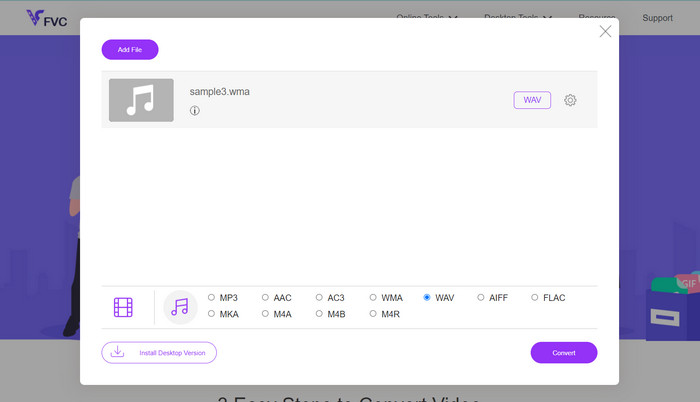
ステップ 1. まず、プログラムの公式サイトにアクセスし、ファイルを追加して変換ボタンをクリックして WMA ファイルをアップロードします。
ステップ 2. 次に、「オーディオ形式」メニューの中から出力形式として WAV を選択します。最後に、変換ボタンをクリックして変換処理を行います。
ライターの総評:
著者はインターネットベースの変換ツールの実用性に魅了され、WMA ファイルを WAV 形式に変換する目的で Free Video Converter Online を試してみることにしました。このデジタル変換ツールは、シンプルなインターフェイスと明確な指示を特徴とする、ユーザーフレンドリーなデザインを示しました。
3.VLC
メディア プレーヤーとしての多用途性で知られる VLC は、WMA から WAV へのオーディオ変換機能も提供します。 VLC は、使い慣れたインターフェイスと幅広い互換性により、変換プロセスを効果的に処理できます。さらに、専用のオーディオ変換ソフトウェアにある高度な機能やカスタマイズ オプションの一部が欠けている場合があります。
ステップ 1. パソコンで VLC メディアプレーヤーを開きます。画面上部のメニューバーからメディアをクリックし、ドロップダウンメニューから変換/保存を選択します。
ステップ 2. ファイルタブで追加をクリックし、変換したい WMA ファイルを選びます。次に、画面下部の変換/保存ボタンをクリックします。
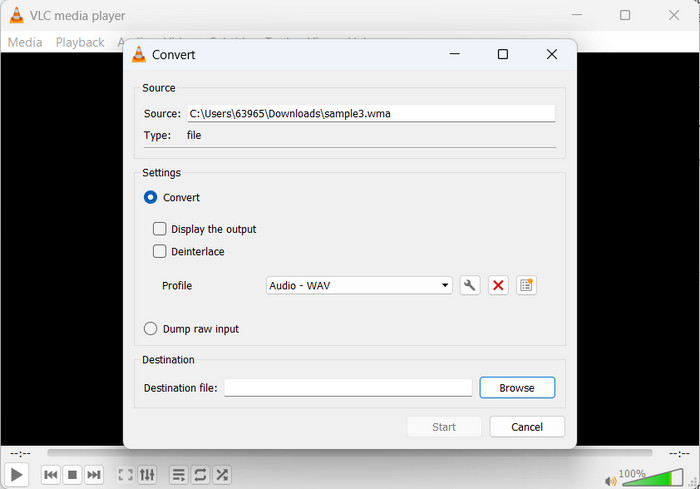
ステップ 3. 出力形式として、プロファイル欄のドロップダウンメニューからAudio - WAVを選択します。
ステップ 4. 開始ボタンをクリックして変換処理をスタートします。完了すると、WMA ファイルは WAV ファイルに変換されています。
ライターの総評:
VLC Media Player は一般にメディア プレーヤーとして認識されていますが、変換機能も提供します。変換プロセスは複雑ではないと思われ、ソフトウェアは WMA から WAV への変換を効率的に処理しました。特殊なオーディオ変換ソフトウェアとは対照的に、VLC のユーザー インターフェイスは、初心者ユーザーにとってより急な学習曲線を示す可能性があります。
4.Freemakeオーディオコンバータ
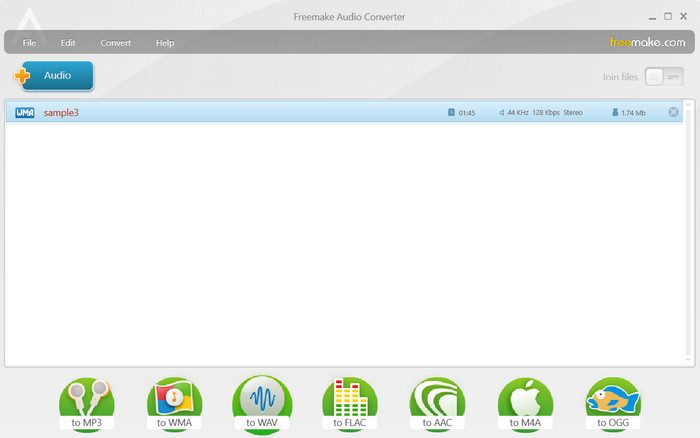
Freemake Audio Converter は、オーディオ変換機能を備えた包括的なマルチメディア ツールです。 WMA から WAV への変換をサポートし、幅広い出力カスタマイズ オプションを備えた使いやすいインターフェイスを提供します。このツールはそのスピードと効率性で有名で、迅速かつ信頼性の高い変換を必要とするユーザーの間で人気があります。
ステップ 1. パソコンで Freemake Audio Converter を起動し、+Audioボタンをクリックするか、ソフト内に WMA ファイルをドラッグ&ドロップします。
ステップ 2. 画面下部のバーにあるWAVをクリックして、出力ファイル形式を WAV に設定します。必要に応じて音量レベルなどのオーディオ設定を選択します。
ステップ 3. 変換ボタンをクリックして、変換処理を開始します。
ライターの総評:
Freemake Audio Converter は、WMA ファイルを WAV 形式に変換するための優れたオプションであることが証明されました。システムのインターフェースは簡単にナビゲートできるように設計されており、プロセスが合理化され、変換率が著しく効率的になりました。実装されたソフトウェアにより、複数のファイルの同時変換が容易になり、時間を大幅に節約できました。
5. フォーマットファクトリー
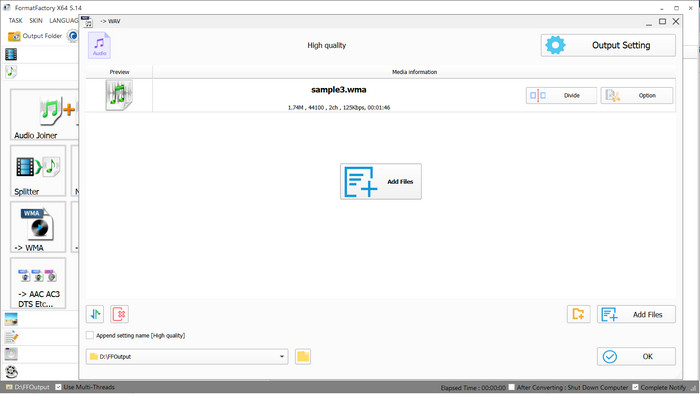
Format Factory は、WMA から WAV への変換を含む、さまざまな形式をサポートする多用途のマルチメディア コンバーターです。出力設定のカスタマイズ オプションを提供し、ユーザーがオーディオ変換プロセスをニーズに合わせて調整できるようにします。
ステップ 1. パソコンの電源を入れ、Format Factory を起動します。左側のカテゴリ一覧からオーディオを選択します。
ステップ 2. ファイルを追加をクリックして、変換したい WMA ファイルを選択します。その後、出力設定欄で出力形式としてWAVを選びます。
ステップ 3. 変換後の WAV ファイルを保存したい場所を指定します。最後に、開始ボタンをクリックして変換処理をスタートします。
ライターの総評:
Format Factory として知られるソフトウェア アプリケーションは、互換性のあるファイル形式の広範な配列とバッチ変換を実行できる機能により、私の賞賛を集めました。このソフトウェアは、WMA ファイルを WAV 形式に変換するスムーズで中断のないプロセスを促進し、作成者は出力構成を調整するオプションが非常に価値があることに気づきました。このソフトウェアは、優れたオーディオ忠実度を示す WAV ファイルを生成することにより、満足のいく結果をもたらしました。最初は気の遠くなるようなインターフェースにもかかわらず、Format Factory は、慣れると信頼性が高く、機能が豊富な代替手段であることがわかります。
さらに詳しく読む:
WMA を MP3 に変換する方法(Mac/Windows/オンライン)
FLAC と WAV の違い:どちらのオーディオ形式が自分に合っているか
パート 2. WMA から WAV への変換に関する FAQ
WMA と WAV ではどちらのファイルの方が高品質のオーディオを持っていますか?
音質に関しては、WMA よりも WAV の方が優れています。 WMA は不可逆圧縮システムです。つまり、ファイルを圧縮すると一部のオーディオ データが失われます。このため、WMA ファイルのサウンドは元のソースほど良くない可能性があります。一方、WAV は元のオーディオ データをすべて保持し、何も失われない非圧縮ファイルです。これにより、オーディオ品質にとって最適な形式になります。したがって、可能な限り最高の音質を確保することが重要な場合は、WMA よりも WAV の方が優れています。
WAV変換後にWMAをWAVに変換することはできますか?
必要に応じて、WMA ファイルを WAV に変換できます。 WMA は非可逆形式です。したがって、WAV に変換し直しても、元のオーディオ品質は復元されません。 WAV ファイルは WMA オーディオ品質を維持します。したがって、オーディオ品質が重要な場合は、WAV ファイルを WMA に変換する前にバックアップすることをお勧めします。
WAV を WMA に変換する際に考慮すべき点はありますか?
WAV から WMA への変換には、いくつかの要素があります。まず、WMA は圧縮されます。そのため、音質はWAVより若干劣る場合があります。損失を減らすには、より高いビット レートと品質設定で変換します。最良の結果を得るには、信頼できる変換ツールを選択してください。変換された WMA ファイルと元の WAV を比較すると、オーディオ品質を評価するのに役立つ場合があります。
結論
WMA から WAVへの変換によって、用途に応じて圧縮音源と非圧縮音源を切り替えることができます。WMA はファイルサイズが小さい一方で、WAV は最高レベルの音質を維持できる形式です。
-
 MP3をWAV形式に変換する方法をご覧ください
 MP3をWAVに変換する方法を知りたいですか?どのツールがあなたが得ることができる最高品質の変換を生み出すかを決定します。
-
 見逃せない WMA メタデータ エディターのトップ ピック [2023]
 WMA タグを編集できないのはなぜですか?この問題は、ユーザーによく見られます'クエリ。しかし本日は、2023 年に使用できる WMA メタ エディターを紹介します。
-
 最適なオーディオ サイズを実現するために WAV を OGG に変換する簡単な手順
 最適なオーディオ ファイルのサイズと品質を得るために、WAV を OGG に変換する方法を学びます。当社のステップバイステップガイドでは、わかりやすい手順と役立つ主要なツールを提供します。
