


 ビデオコンバーター究極
 スクリーンレコーダー
 ビデオ修復
ビデオ修復
 安全なダウンロード
Instagramのビデオを組み合わせる2つの効率的な方法
「Instagramの動画を組み合わせるにはどうすればよいですか?私は忘れられない誕生日パーティーを開き、その間にたくさんのビデオを撮りました。今度はビデオクリップを1つにまとめて、Instagramに投稿したいと思います。その方法を教えてください…」多くのビデオクリップが1つにマージされるのを待っていることがよくあります。このようなニーズを満たすために、この記事では、Instagramのビデオに参加するための2つの効率的な方法について説明します。

パート1:品質を損なうことなくInstagramのビデオを組み合わせる
まずは、Instagram 用に動画を結合するアプリが必要です。この簡単な作業のために、Adobe Premiere Pro や Final Cut Pro のような複雑な動画編集ソフトを使う必要はありません。Video Converter Ultimateだけで十分です。
Instagramの複数の動画を簡単にマージするのに役立ちます。処理速度と画質はどちらも完璧です。フォーマットに関係なく、このアプリを使用して、Instagramのビデオに制限なく参加できます。
主な機能:
- •フォーマットや解像度に関係なく、Instagramのビデオを組み合わせる
- •ハードウェアアクセラレーションテクノロジーにより、70倍のプロセス速度が保証されます
- •透かしを残さずにInstagramのビデオを編集して参加する
- •トリミングと ビデオをマージする それらをシームレスにするために異なる解像度で
- •トリミング機能を使用してビデオを結合し、不要なセグメントを削除します
- •初心者とプロの両方のためのスムーズで直感的なユーザーインターフェイス
無料ダウンロードWindows 7 以降に対応安全なダウンロード
無料ダウンロードMacOS 10.7 以降に対応安全なダウンロード
画質を落とさずにInstagram用動画を結合する手順
ステップ1. Video Converter Ultimate を無料ダウンロード・インストールして起動します。ファイルを追加ボタンをクリックし、Instagram 用に結合したい動画を追加します。

ステップ2. メイン画面で、読み込んだ動画をドラッグして、順番を自由に変更できます。動画が別々に変換されないように、1つのファイルに結合にチェックを入れてください。
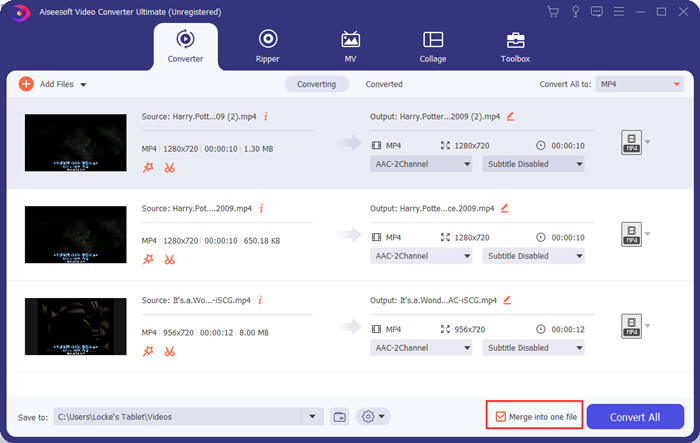
ステップ3. プロフィールメニューを開くには、出力形式一括変換枠をクリックします。そこで、目的のフォーマット、解像度、エンコーダーを選択できます。Instagram 用に動画を結合する場合は、MP4 形式が適しています。カスタムプロフィールボタンのいずれかをクリックして、設定を細かく調整することも可能です。
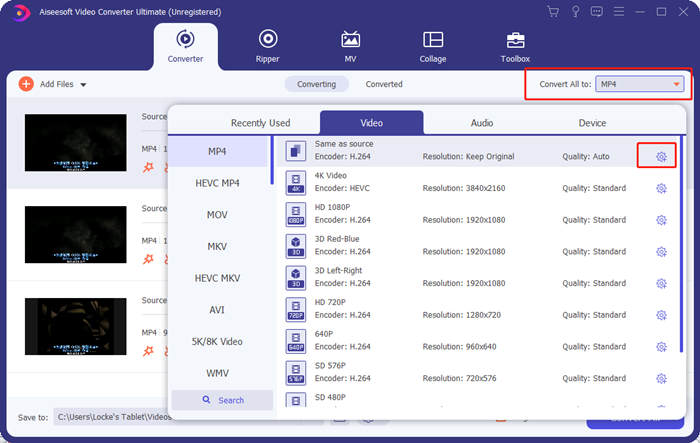
プロファイル編集ウィンドウでは、エンコーダー、解像度、フレームレート、ビットレート、および音声パラメーターをカスタマイズできます。

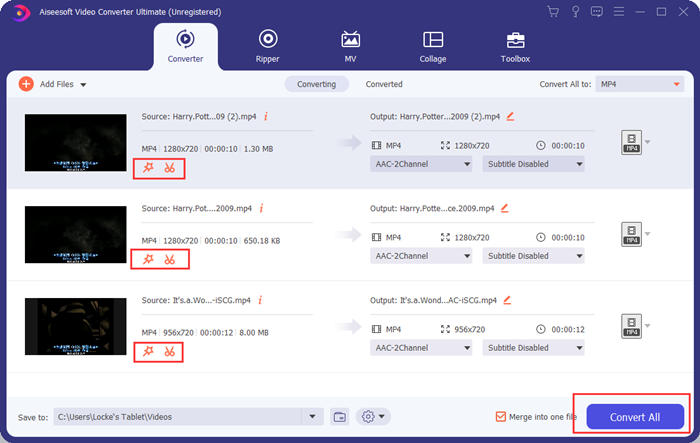
ステップ4. メイン画面に戻ったら、一括変換ボタンをクリックして、Instagram 用に動画の結合を開始します。その前に、カットボタンや編集ボタンを使って、トリミング、クロップ、回転などを行い、動画をより見栄え良く仕上げることもできます。
Video Converter Ultimateは便利で強力ですが、巨大なプログラムのダウンロードを待つのが好きな人は誰もいません。私たちもそうしません。それで、プログラムをダウンロードせずにInstagramのビデオをマージすることは可能ですか?はい、読んでください!
パート2:InstagramOnlineと無料のビデオをマージする
もう一つ便利なツールとして、Instagram 用に動画を結合できる素晴らしいウェブツール、FVC Free Online Video Mergerがあります。このツールは一瞬で読み込まれ、続いて動画もすぐにアップロードできます。あとは設定を少し調整するだけで、残りはプログラムが自動的に行ってくれます。さらに重要なのは、このツールは完全に無料で使えるという点です。
Instagram 用の動画をオンラインかつ無料で結合する手順
ステップ1. FVC Free Online Video Mergerをクリックして開きます。ツールのページ中央にある結合する動画をアップロードボタンをクリックします。するとファイルエクスプローラーウィンドウが表示されるので、結合したい動画を選択してアップロードしてください。

ステップ2. 動画の読み込みが完了したら、その順番を調整できます。誤った位置にある動画は一度削除し、正しい位置にあらためて挿入することで並び替えられます。

ステップ3. このオンライン動画結合ツールでは、Instagram 用に結合した動画の解像度と形式を指定できます。元の解像度を維持したい場合は自動を選択するか、ほかの5つの解像度オプションから選ぶこともできます。
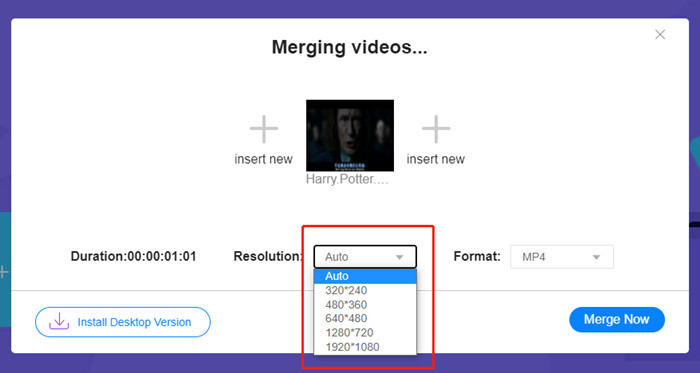
オンラインビデオ合併は現在、あなたが選択できる9つの出力フォーマットを提供しています。 Instagramの投稿にはMP4が最適かもしれません。
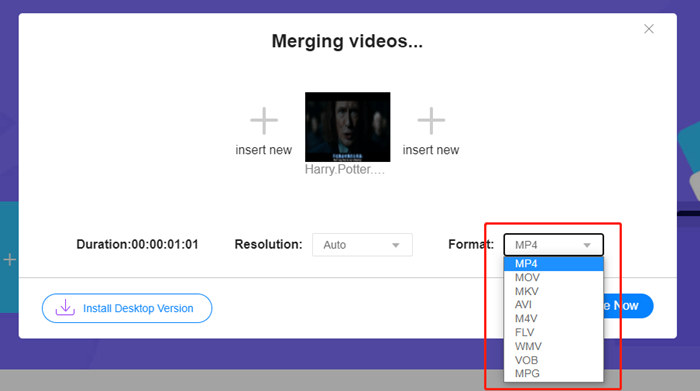
ステップ4. 今すぐ結合ボタンをクリックし、結合に成功しましたという表示が出るまで待ちます。
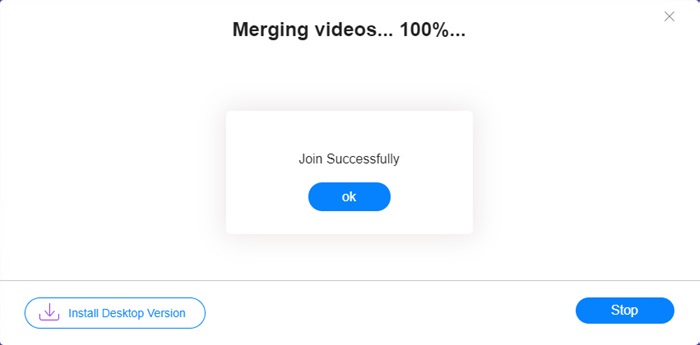
このオンラインツールは便利ですが、Video ConverterUltimateほど完璧ではありません。オンラインツールでは、ビデオの順序を簡単に調整したり、エンコーダーやフレームレートを変更したり、ビデオを編集したりすることはできません。さらに、Video Converter Ultimateは、解像度とフォーマットの選択肢を増やし、ビデオをはるかに高速に処理します。
パート3:Instagramのビデオの組み合わせに関するFAQ
Instagramのビデオに適した仕様は何ですか?
9:16のアスペクト比が最適です。より正確には、可能であれば1080 * 1920を使用してください。最適なビデオ形式はMP4ですが、他の一般的な形式も受け入れられます。
結合したビデオがInstagramに対して大きすぎる場合はどうすればよいですか?
Video Converter Ultimateのメイン画面上部にはツールボックスがあり、その中に動画圧縮ツールがあります。これを使って、動画を任意のサイズに圧縮できます。Instagram 用にする場合は、4GB を超えないようにしてください。
Instagram用にマージしたビデオの長さはどれくらいですか?
動画を投稿する場所によって異なります。フィード動画の制限は3秒から1分で、ストーリーの制限は15秒より短いです。 IGTVビデオは60分保持できますが、これはあなたのニーズを満たす可能性が最も高いです。
結論
本記事では、Instagram 用に動画を結合する2つの効率的な方法を紹介しました。Video Converter Ultimate を使えば、画質を一切落とさずにInstagram 用の動画を結合できるうえ、動画にさまざまな調整や編集を加えることもできます。もう一つのツールである FVC Free Online Video Merger は、より素早く結合できる反面、解像度や形式の選択肢は少なく、エンコーダーやフレームレートを変更することもできません。最後に、Instagram 用の動画結合でお困りの点があれば、コメント欄からお気軽にお知らせください。
-
 iMovieの有無にかかわらずiPhoneでビデオをマージする方法
 iPhoneでビデオをマージする4つの簡単な方法を読んで入手してください。すべてのiPhoneモデルとiOSバージョンがサポートされています。 iPhoneの2つ以上のビデオをすばやく新しいビデオに組み合わせることができます。
-
 MKVファイルに参加して映画を絶え間なく視聴する2つの最良の方法
 MKVファイルを分けてお気に入りの映画をダウンロードし、MKVファイルを結合して絶え間なく視聴したい場合は、この記事からMKVファイルを結合する2つの効率的な方法を学ぶことができます。
-
 無料でMP4ビデオを組み合わせるためのトップ6ベストMP4ビデオジョイナー
 さまざまなMP4クリップを接続するために利用できるMP4ジョイナーはたくさんあります。この記事では、Windows10 / 8/7およびMac用の無料のMP4ジョイナーをいくつか選びました。
