


 ビデオコンバーター究極
 スクリーンレコーダー
 ビデオ修復
ビデオ修復
 安全なダウンロード
ASFファイルをオンラインで効果的に圧縮するための究極のガイド
ASFは、Advanced StreamingFormatの略語です。高い圧縮率と優れたビデオ品質で知られています。したがって、ASFファイルはビデオストリームの送信に大きな利点があります。だからここに質問が来ます:ASFビデオファイルを圧縮する方法は?この質問を理解するために、この記事を注意深く読むことができます。後で、ASFファイルを簡単に圧縮する方法をよりよく理解できるようになります。

パート1:ASFファイルをオンラインで解放する方法
ターゲットのASFファイルを圧縮する際、まず最初に選ぶべきなのは常にFree Video Compressorです。無料の圧縮ツールとして、画質を落とさずにASF動画ファイルを圧縮するのに役立ちます。複数のASFファイルがある場合でも、一括圧縮に対応しています。さらに、プライバシーを保護し、情報漏えいが起きないよう配慮されています。インターフェースはシンプルで直感的なので、どなたにとっても使いやすい設計になっています。
- 1.驚異的な品質を維持しながら4Kビデオを圧縮します。
- 2.他のプログラムよりも30倍速い速度でASFをバッチ圧縮します。
- 3.圧縮後に透かしは残りません。
- 4.この無料のツールは、ASFファイルを圧縮するときに簡単に使用できます。
ステップ1: メイン画面へ移動
理想のASFファイルを圧縮するには、まずFree Video Compressorの公式サイトにアクセスします。その後、Add Files to Compressボタンをクリックします。

ステップ2: ASF動画ファイルを追加
数秒待って、ASF圧縮用のランチャーをインストールします。その後、ターゲットASFファイルを選択してポップアップウィンドウに追加できます。
ステップ3: 圧縮効果をカスタマイズ
ASFファイルを圧縮する前に、動画の解像度、フレームレート、ビットレート、出力形式などを調整できます。設定後、CompressボタンをクリックするとASFの圧縮が開始されます。複数のASFファイルを同時に圧縮することも可能です。

パート2:PC用のASFファイルを解放する方法
オンラインASFコンプレッサーに加えて、Free Video Compressorを使ってPC上でASF動画ファイルを圧縮することもできます。この無料かつ軽量な動画圧縮ソフトを使えば、ASFやMP4など、多くの一般的な動画ファイルを圧縮できます。さらに、本ソフトにはDesired Video Size機能が搭載されており、出力動画のサイズを計算するのに役立ちます。
ステップ1: Free Video Compressorをダウンロード
Free Video Compressorを使用してASFを小さく圧縮する場合は、最初にこのソフトウェアをダウンロードしてPCにインストールする必要があります。
ステップ2: 対象のASFファイルを開く
ツールを起動すると、メイン画面が表示されます。右上のOpenボタンをクリックして、ASFファイルを追加してください。
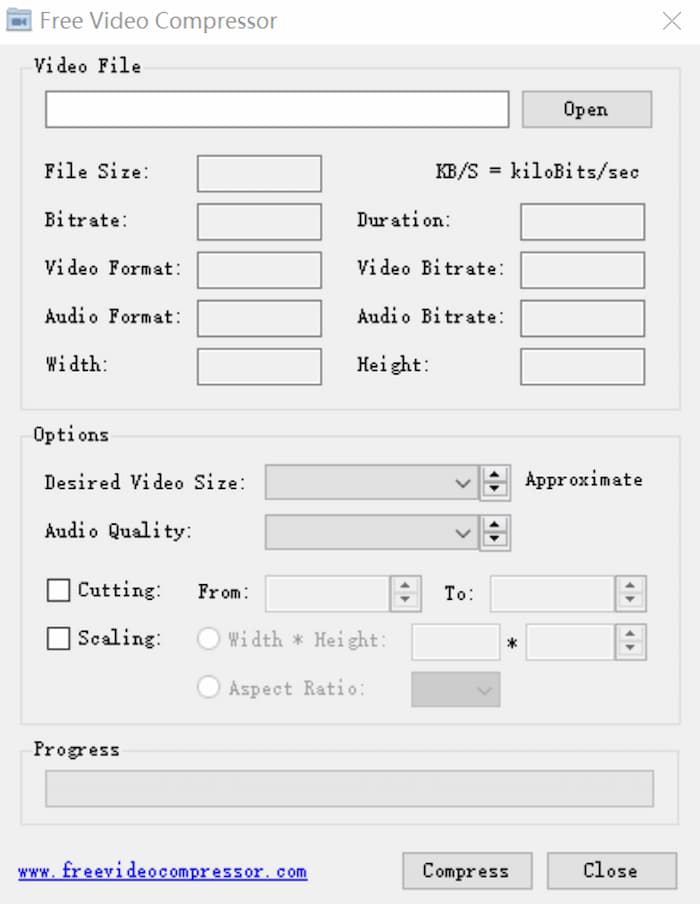
ステップ3: 各種設定を調整
一部の設定を調整する場合は、ファイルサイズ、ビデオ形式、オーディオ形式などのオプションの後ろの四角に理想的なパラメータを入力できます。また、このASF圧縮プログラムで不要な部分をカットすることもできます。
パート3:ASFファイルの圧縮に関するFAQ
1. ASFとは何ですか?
ASF(Advanced System Format)は、Microsoft社によって開発された拡張可能なファイル形式です。これは、同期されたビデオストリームを保存および再生し、これらのビデオをネットワーク上で送信するために特別に設計されました。
2.オンラインでASFをMP4に変換できますか?
はい。ASFファイルをMP4に変換したい場合は、Free Online Video Converterのような人気の動画コンバーターを利用できます。これにより、ASFからMP4への変換を素早く行うことができます。
3.無料のVideoCompressorを使用してMacでPDFを圧縮できますか?
はい。無料のビデオコンプレッサーを使用して、MacでPDFを圧縮できます。このプログラムは無料であるだけでなく、最高の品質を維持することもできます。あなたがする必要があるのはただあなたのPDFファイルを追加して、ウェブサイトに入った後に圧縮ボタンをクリックすることです。
結論
この記事では、ASFファイルを効果的に圧縮するのに役立つ2つの異なるプログラムを共有しています。どちらかを選択して、ASFを小さく圧縮できます。ただし、ソフトウェアをインストールするつもりはないが品質を維持したい場合は、Free VideoCompressorを試してみてください。あなたは自分自身をチェックすることができます。ご質問やご提案がございましたら、ウェブサイトにメッセージを残してください。
-
 Windows / Mac / Onlineで大きなAVIファイルを無料で圧縮する方法
 コンピューターでAVIファイルを圧縮する3つの無料の方法を読んで入手してください。品質を損なうことなく、AVIビデオのファイルサイズを小さくすることができます。 AVIビデオのサイズは想像するほど小さくすることができます。
-
 WhatsApp用に大きなビデオファイルを圧縮および変換する3つの方法
 この記事から、WhatsAppのビデオをオンラインで圧縮する3つの簡単な方法を得ることができます。 WhatsAppでビデオを送信できないのはなぜですか? WhatsAppビデオサイズ制限を修正するために何ができますか?読んで確認するだけです。
-
 GIFを圧縮し、高品質でファイルサイズを縮小するためのチュートリアル
 コンピューターまたは携帯電話でGIFを圧縮する2つの簡単な方法を次に示します。 FVC Free Online Video CompressorとPhotoshopを使用すると、さまざまな面でGIFファイルのサイズを縮小できます。
