


 ビデオコンバーター究極
 スクリーンレコーダー
 ビデオ修復
ビデオ修復Instagramオンラインとデスクトップのビデオを圧縮する2つの方法
Instagramのビデオを圧縮する方法は?何時間も働いていたビデオが大きいサイズでInstagramにアップロードできないことに気付いたとき、あなたは必死でしたか?慌てる必要はありません。あなたはちょうど正しい場所に来ました。この記事では、Instagramアップロード用にビデオを圧縮する2つの最も簡単な方法を紹介します。

パート1:Instagramのビデオを圧縮する必要があるのはなぜですか
T上記のように、大きなビデオファイルはInstagramにアップロードできません。 Instagramのビデオを20MB未満のMP4ファイルに圧縮する必要があります。ビデオフレームレートは、ビットレートとして3500KBPSを使用して、毎秒30フレームである必要があります。ビデオサイズは通常1080ピクセル幅です。 4:5の解像度をお勧めします。さらに、動画は3秒以上60秒未満である必要があります。
パート2:InstagramOnlineのビデオファイルを圧縮する方法
FVC Free Video Compressor は、さまざまな形式の動画を圧縮できるスマートなオンラインツールです。プログラムをダウンロードする必要はありません。圧縮の全工程はウェブページ上で完結します。このツールを使えば、動画を好きなサイズまで小さくできます。
主な機能:
- 1. MKV、FLV、WMV、AVI、TS、MOVなどのさまざまな大きなビデオを圧縮します。
- 2.初心者が設定をカスタマイズするための使いやすいインターフェース
- 3. 30倍速い速度で作業し、出力に透かしを残さない
- 4.品質を損なうことなく4KUltraHDビデオを処理します
このツールを使用してInstagramのビデオファイルをオンラインで圧縮する手順は次のとおりです。
ステップ1: ブラウザーで FVC Free Video Compressor を開きます。
中央にある Add Files to Compress ボタンをクリックします。初めてこのツールを使う場合は、fvc-launcher というファイルをダウンロードして実行してから先に進んでください。その後、もう一度 Add Files to Compress ボタンをクリックします。そうすると、Instagram 用に圧縮したい動画ファイルを選択できます。

ステップ2: Instagram 用に圧縮したい動画の設定をカスタマイズします。
サイズ: パーセンテージバーをドラッグして調整できます。Instagram 用に動画を圧縮する場合は、出力サイズが 20MB 未満になるようにしてください。出力サイズの変更は、同時に出力ビットレートにも影響します。
フォーマット: 現在、MP4、MKV、AVI、FLV など 12 種類の形式に変換できます。Instagram 用に動画を圧縮する場合は、MP4 形式を選択してください。
解像度: 320×240、480×360 など、より低い解像度に下げることができます。または元の解像度を維持し、ビットレートだけを下げて Instagram 用に動画を圧縮することも可能です。

ステップ3: 圧縮を開始し、ツールが処理を完了するのを待ちます。
紫色の Compress ボタンをクリックし、出力動画を保存したい保存先を選択します。処理中はブラウザーやウェブページを閉じないでください。閉じてしまうと、最初から改めて Instagram 用に動画を圧縮し直す必要があります。処理速度は大きくお使いのハードウェア性能に左右されます。
パート3:デスクトップでInstagramのビデオファイルを圧縮する方法
サイズだけでなく、動画の長さも 3~60 秒である必要があります。ただし、このオンラインツールはウェブページ上で動作するため、機能は比較的シンプルです。オンラインツールでは動画のトリミングには対応していません。圧縮だけでなく編集も行いたい場合は、どのツールを使えばよいのでしょうか。Aiseesoft Video Converter Ultimate が最適な選択肢と言えるでしょう。
主な機能:
- 1. WMA、MP4、AVI、MOV、WMV、MP3、FLACなどを含む1,000以上のフォーマットと互換性があります。
- 2.高度なハードウェアアクセラレーションテクノロジーにより、前例のない速度が保証されます
- 3.ビデオクリップをトリミングして、一連のフィルターと基本的な効果でマージします。
- 4. 3D Makerツールを使用すると、3Dメガネで素晴らしい3Dビデオを楽しむことができます。
- 5.ほぼプロフェッショナルな分割画面ビデオを作成します
- 6.ビデオを強化するための組み込みの4つの究極の方法
無料ダウンロードWindows 7 以降に対応安全なダウンロード
無料ダウンロードMacOS 10.7 以降に対応安全なダウンロード
Video Converter Ultimateを使用してInstagramのビデオを圧縮する手順:
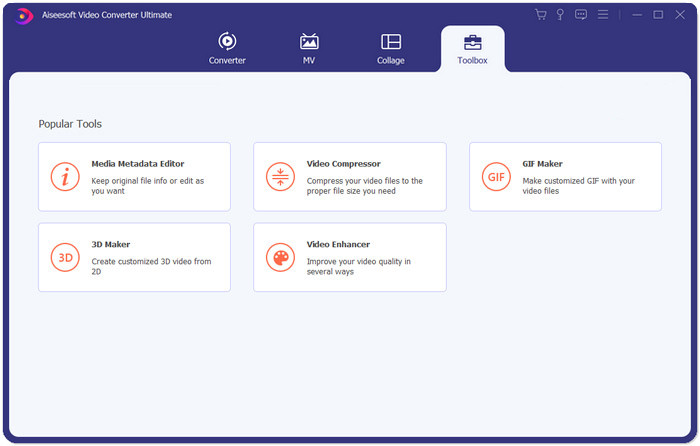
ステップ1: Aiseesoft Video Converter Ultimate をダウンロード・インストールして起動します。Toolbox タブに切り替え、「+」ボタンをクリックして、Instagram 用に圧縮したい動画を追加します。
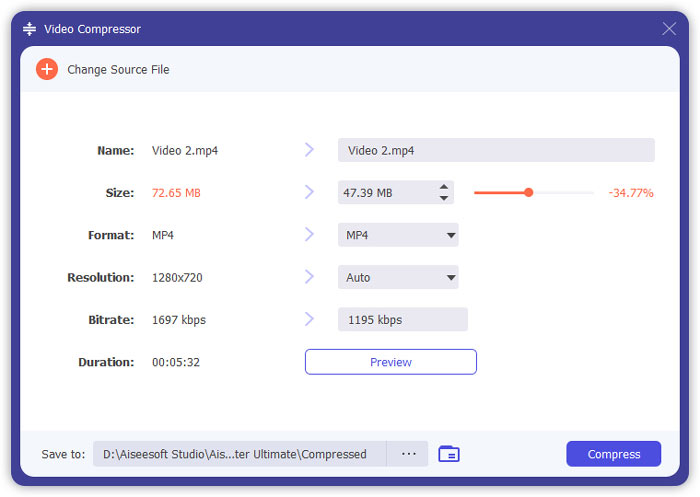
ステップ2: 動画を追加すると、Video Compressor インターフェースが表示されます。サイズバーをドラッグして出力ファイルのサイズを調整し、希望する解像度と出力形式を選択します。
注意: ビットレートは、解像度と出力サイズの組み合わせを変えることで間接的にしか調整できません。
ステップ3: 右下の Compress ボタンをクリックして、Instagram 用の動画圧縮を開始します。
関連情報:
WhatsApp 用に動画をオンラインで圧縮する方法(100MB/500MB/1GB など)
パート4:Instagramに動画をアップロードする際のよくある質問
Instagramのビデオアップロードの要件は何ですか?
フォーマット: MP4
コーデック: H.264
ビットレート: 3500 kbps 未満
フレームレート: 1 秒あたり 30 フレーム未満。
Instagramビデオの最高のアスペクト比はどれくらいですか?
最適なアスペクト比は9:16で、これはほとんどのスマートフォンの標準的な比率でもあります。
Instagramのアップロードにビデオで使用するオーディオ形式は何ですか?
AACオーディオ。
結論
この記事から、Instagram用にビデオを圧縮するための2つの便利なツールがあります。それらはFVCFree VideoCompressorとVideoConverterUltimateです。 Instagram用にビデオを圧縮するときは、ビデオが3〜60秒で20MB未満であることを確認することを忘れないでください。
-
 アップロード用のVimeoビデオサイズを縮小する最良の方法
 この投稿では、Vimeoにファイルをアップロードするためにビデオファイルを圧縮する方法と、ビデオおよびオーディオの圧縮に必要なガイドラインを紹介します。
-
 2つの方法でYouTubeのビデオファイルサイズを推定する方法
 YouTubeビデオは大きくてアップロードが遅いですか?オンラインとコンピューターの2つの方法で、YouTube用にビデオファイルのサイズを小さくするだけです。
-
 Facebookの無料&オンライン用のビデオを圧縮する方法
 Facebookに大きな動画をアップロードすることが禁止されている場合でも、心配する必要はありません。無料のビデオコンプレッサーを使用して、大きなビデオサイズをGBからMBに圧縮するだけです。
