


 ビデオコンバーター究極
 スクリーンレコーダー
 ビデオ修復
ビデオ修復
 安全なダウンロード
VOB 圧縮: オンラインで無料で VOB ファイルのサイズを簡単に削減する方法
VOB ファイルは DVD ディスクに保存されている映画データファイルで、通常は DVD のルートにある VIDEO_TS フォルダー内に保存されています。ただし、VOB ファイルはサイズが非常に大きい場合が多く、小容量のストレージデバイスに保存したり、メールで送信したりするには、VOB のサイズを小さく圧縮する必要があります。そのため、VOB ファイルを圧縮したい場合や、VOB ファイルを MP4 形式に圧縮変換したい場合は、以下を読み進めて最適な解決方法を確認してください。

パート1。VOBファイルを圧縮してMP4オンラインに変換する最も簡単な方法
自分のパソコンにアプリをインストールしたくない場合は、VOB 動画ファイルをアップロードして圧縮してくれるウェブサイトが多数あります。これらのサービスの中には会員登録が必要なものや、動画にウォーターマークが入るものもあります。ここでは、そのような制限がなく、動画ファイルさえあれば完全無料で使える Free Video Compressor をおすすめします。動画をアップロードして、いくつかのオプションを調整するだけで準備完了です。VOB 動画の圧縮だけでなく、MP4、AVI、WMV、MOV など、ほかのさまざまな動画ファイル形式の圧縮にも利用できます。
ステップ 1. オンライン動画圧縮サイトにアクセスします
以下のリンクから、適切な場所にアクセスできます。
ステップ2. ファイルをアップロードする
Add Files to Compress ボタンを探してクリックします。初めてこのツールを利用する場合は、専用ランチャーをインストールする必要があります。その後、パソコンから VOB ファイルを選択し、Open をクリックしてアップロードします。

ステップ 3. 圧縮オプションを調整します
ファイルを小さくするには、ビデオのサイズを変更したり、解像度を微調整したり、ビットレートを調整したり、別のビデオ形式に変換したりできます。たとえば、VOBファイルを圧縮してMP4形式に変換し、サイズを小さくすることができます。ファイルの。

ステップ 4. Compress ボタンをクリックして処理を開始します。ファイルの圧縮が完了すると、ツールが自動的に圧縮後のファイルをパソコンに保存します。

さらに、このオンラインツールを使用して、他のビデオ圧縮の問題を解決できます。次の記事を確認してください。
パート2。VOBファイルを小さくするための2つのオンラインビデオコンプレッサー
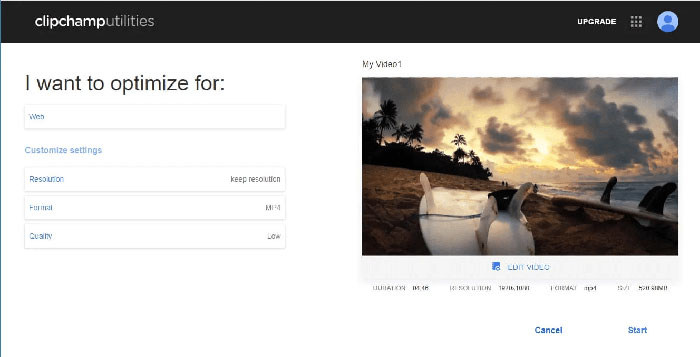
Clipchamp
Clipchampは、ビデオファイルを変換、編集、および圧縮できるWebベースのビデオ編集ツールです。これにより、VOBファイルを圧縮する前に、形式(MP4、MOV、またはAVI)、ビデオファイルサイズなどを選択できます。圧縮が終了したら、ファイルをコンピューターにダウンロードするか、他のユーザーと共有することができます。 Clipchampの無料バージョンは、最初と最後のフレームで圧縮したビデオに透かしを入れることに注意してください。透かしを消したい場合は、サービスを購入する必要があります。
クリデオ
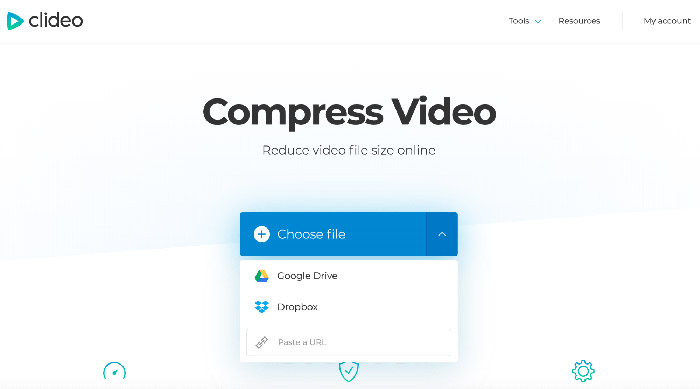
Clideoは、ビデオのサイズを簡単に縮小できるもう1つのオンラインビデオ編集アプリです。コンピューター、Googleドライブ、Dropbox、またはURLからVOBファイルをアップロードすると、Clideoがすべての圧縮パラメーターを自動的に構成します。ただし、500MBまでのファイルは無料です。ファイルが大きい場合は、月額$6の料金でClideoProにアップグレードする必要があります。
パート3。VOB圧縮のFAQ
MacでVOBファイルを圧縮する方法は?
上記のオンラインツールはどのオペレーティングシステムでも動作するため、いずれかのオペレーティングシステムを使用して、MacでVOBファイルを小さくすることができます。
電子メール用にVOBビデオを圧縮するにはどうすればよいですか?
メール送信用に動画を変換・圧縮する方法はいくつかあります。詳しくは、メール用に動画を圧縮する方法 をご覧ください。
品質を損なうことなくVOBをMP4に変換するにはどうすればよいですか?
Free Online Video Converter のようなオンライン VOB から MP4 への変換ツールを使うこともできます。これを使えば、画質を損なうことなく VOB ファイルを MP4 にすばやく変換できます。また、簡単に MP4 を VOB に変換 することも可能です。
結論
これらは、VOBファイル圧縮のトップピックでした。上記のプラットフォームのいずれかを使用して、満足のいくVOBファイルサイズを取得できることを願っています。どのプラットフォームが好きで、その理由は何ですか?以下のコメントセクションであなたの意見を自由に共有してください。
-
 Windows、Mac、iPhone、AndroidでMOVファイルを圧縮する方法
 この記事では、携帯電話またはコンピューターでQuickTimeMOVビデオを圧縮する方法について詳しく説明します。 MOVビデオが大きすぎて送信、共有、保存できない場合は、ここで4つの実行可能なソリューションを入手できます。
-
 品質を損なうことなく、AVIファイルを圧縮してファイルサイズを小さくする
 コンピューターでAVIファイルを圧縮する3つの無料の方法を読んで入手してください。品質を損なうことなく、AVIビデオのファイルサイズを小さくすることができます。 AVIビデオのサイズは想像するほど小さくすることができます。
-
 GIF圧縮–アニメーションGIFを小さなファイルサイズに圧縮する方法
 コンピューターまたは携帯電話でGIFを圧縮する2つの簡単な方法を次に示します。 FVC Free Online Video CompressorとPhotoshopを使用すると、さまざまな面でGIFファイルのサイズを縮小できます。
