


 ビデオコンバーター究極
 スクリーンレコーダー
 ビデオ修復
ビデオ修復WMVファイルをオンラインで圧縮する2つの無料の方法
YouTube、Facebook、Google Video などのプラットフォームで WMV ファイルを共有またはアップロードするには、WMV を圧縮してファイルサイズを小さくする必要があります。WMV ファイルの圧縮方法はご存じですか?

もちろん、元の画質と音質を保ったまま WMV を圧縮したいと思うはずです。そのニーズに応えるために、本記事では 2 つの簡単な方法で無料で MKV ファイルをオンライン圧縮する方法をご紹介します。
パート1。WMVファイルをオンラインで自由に圧縮する方法
市場には、MKV ファイルを簡単に圧縮できる多くの動画圧縮・編集ツールがあります。ここでは、使いやすい Free Video Compressor を強くおすすめします。これを使えば MKV ファイルのサイズを簡単に削減できます。
この無料オンライン WMV 圧縮ツールは、WMV、AVI、MP4、FLV、MKV、MOV など、よく使われるあらゆる形式の動画を圧縮できます。一般的な動画だけでなく、4K UHD や 1080p・720p の HD 動画の圧縮にも対応しています。また、一度に 2 本以上の MKV ファイルを圧縮できるバッチ圧縮機能も搭載されています。以下の手順に従って、MKV を無料でオンライン圧縮できます。
ステップ 1. ブラウザでこの無料オンライン WMV ファイル圧縮ツールの公式サイトにアクセスします。Chrome、Safari、IE、Firefox など、主要なブラウザすべてに対応しています。

ステップ 2. Add Files to Compress ボタンをクリックして、WMV ファイルを圧縮するための小さなランチャーをインストールします。その後、ポップアップウィンドウから圧縮したい WMV ファイルを選択してアップロードできます。

ステップ 3. WMV 動画の解像度、フレームレート、ビットレートを自由に調整できます。同時に、圧縮後のファイルの出力形式を別の形式に変更することも可能です。そのあと、Compress ボタンをクリックするだけで、WMV を無料でオンライン圧縮し始めることができます。

他のオンラインMKV圧縮ツールと比較して、この無料のビデオコンプレッサーはより速いMKV圧縮速度を提供できます。さらに重要なことに、出力ビデオに透かしが追加されることはありません。
パート2。Clideoを使用してWMVファイルをオンラインで圧縮する方法
先ほどご紹介した Free Video Compressor のほかに、人気の Clideo を利用して MKV ファイルのサイズを小さくすることもできます。WMV、MP4、MOV、VOB、AVI など多くの動画形式に対応しており、シンプルで分かりやすいインターフェース設計により、快適に動画を圧縮できます。
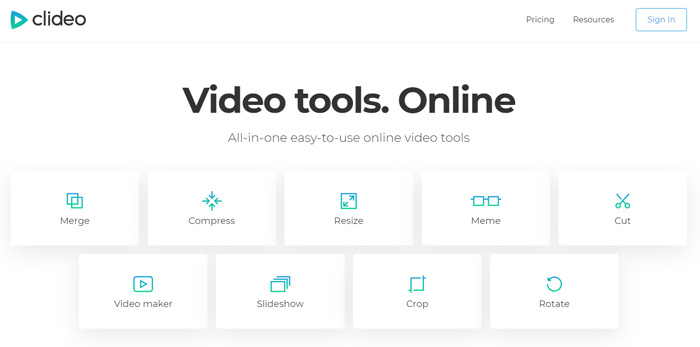
ステップ 1. ブラウザを開いて Clideo の公式サイトにアクセスします。サイトに入ったら、Compress オプションを選択します。
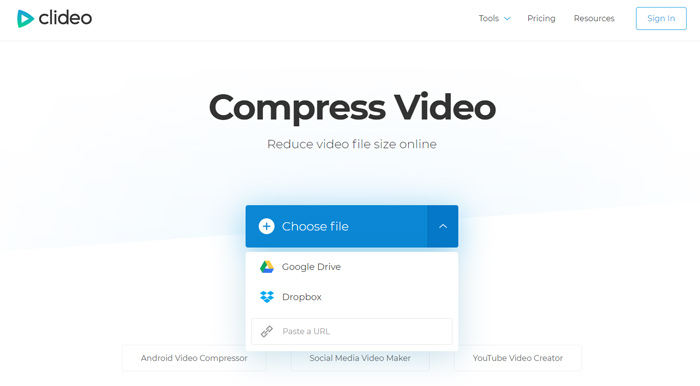
ステップ 2. Compress Video ページに入ったら、Choose file ボタンをクリックして WMV 動画をアップロードします。ローカルハードディスクからだけでなく、Dropbox、Google Drive、または URL 経由で MKV ファイルを追加することも可能です。アップロードの完了にはかなり時間がかかる場合があります。
ステップ 3. この無料オンライン WMV 圧縮ツールは、WMV ファイルを自動的に圧縮してくれます。圧縮結果をその場でプレビューすることができます。さらに編集するにはサインインが必要です。完了したら、Download ボタンをクリックして、圧縮済みの WMV ファイルをパソコンに保存します。
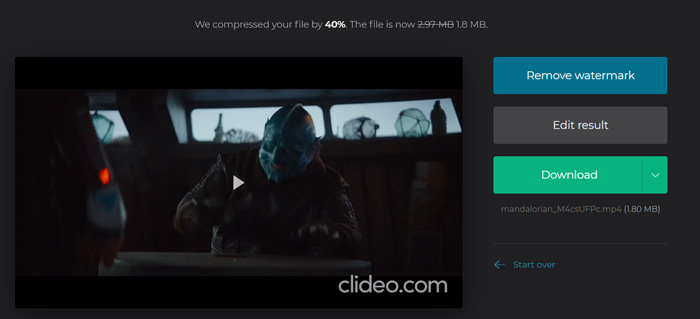
Clideoは、圧縮されたWMVファイルに透かしを挿入します。透かしを削除するには、FacebookまたはGoogleアカウントでサインインする必要があります。
パート3。WMVファイルの圧縮に関するFAQ
質問1.WMV形式とはどういう意味ですか?
Windows Media Video(WMV)は、Microsoftによって開発された一連のビデオコーデックと対応するビデオコーディング形式です。これは、ASFコンテナ形式であるAdvanced SystemsFormatのビデオ拡張機能です。 WMVは、主にWindowsにビデオを保存するために使用されます。
質問2.オンラインでWMVをMP4に無料で変換するにはどうすればよいですか?
WMV ファイルを無料で MP4 に変換するには、人気の動画変換ソフト Free Online Video Converter を利用できます。このツールを使えば、画質を落とすことなくWMV から MP4 への変換が可能です。
質問3.WMVはMP4よりも優れていますか?
MP4と比較して、WMVの最大の利点はファイルサイズが小さいことです。一般に、1つのWMVファイルは同様のMP4ファイルよりも小さいです。そのため、WMVファイルはマシン上のリソースのコストが少なくなり、ネットワーク、電子メール、またはソーシャルメディアプラットフォームでより適切に共有できます。しかし、WMVがMP4よりも優れていると単純に言うことはできません。 MP4形式は、より多くのデバイス、メディアプレーヤー、およびエディターでサポートできます。
質問4.WMVはまだ使用されていますか?
前述のように、WMV形式はMicrosoftによって設計され、Windowsで広く使用されています。 MP4よりも優れた圧縮で小さなファイルサイズを取ります。そのため、これまで、WMVはオンラインビデオストリーミングで依然として人気があります。
-
 WhatsApp用に大きなビデオファイルを圧縮および変換する3つの方法
 この記事から、WhatsAppのビデオをオンラインで圧縮する3つの簡単な方法を得ることができます。 WhatsAppでビデオを送信できないのはなぜですか? WhatsAppビデオサイズ制限を修正するために何ができますか?読んで確認するだけです。
-
 GIFを圧縮し、高品質でファイルサイズを縮小するためのチュートリアル
 コンピューターまたは携帯電話でGIFを圧縮する2つの簡単な方法を次に示します。 FVC Free Online Video CompressorとPhotoshopを使用すると、さまざまな面でGIFファイルのサイズを縮小できます。
-
 Windows / Mac / OnlineでMP4ファイルを組み合わせるトップ6の方法
 プロジェクトの生のMP4ファイルをマージしたいですか?この投稿では、Windows、Mac、およびオンラインでMP4ビデオを簡単に組み合わせるのに役立つ上位6つの方法を集めています。
