


 ビデオコンバーター究極
 スクリーンレコーダー
 ビデオ修復
ビデオ修復
 安全なダウンロード
SonyCamcorderのMXFビデオファイルを元の4K品質とマージする方法
Q:「CanonXF100カメラの代わりにSonyX70を注文しました。 Canon XF100を使用すると、Canon XFユーティリティを使用して、すべてのMXFファイルを高速でマージできます。 Sony X70で作成されたMXFファイルをマージするための同様のソフトウェアはありますか?」
4Kモードを使用してSonyXDCAM(Sony X70を含む)、Canon XF305、Panasonic AG-HPX500Mなどのプロ仕様のカメラでビデオを撮影すると、ビデオファイルはMXF形式で高品質で保存されます。ただし、ほとんどのビデオジョイナーはMXFファイルをサポートしていません。知っておくべき最も頻繁に使用されるMXFコンバイナーは次のとおりです。

パート1:MXFファイルを無料でオンラインでマージする方法
サイズ制限なしで複数の大きなMXFファイルを単純に結合したい場合は、FVC Free Online Merger を検討する価値があります。複数の形式の動画をアップロードできるうえ、透かし(ウォーターマーク)なしで印象的な動画を作成できます。
- 1.MXFビデオファイルをサイズ制限なしでオンラインで並べて配置します。
- 2.複数のMXFビデオファイルを1080p解像度のMP4形式にマージします。
- 3.さまざまなプリセットを使用して解像度設定を構成および調整します。
- 4.プライバシーを保護して、アップロードされたMXFを24時間以内に削除します。
ステップ1: FVC Free Online Merger にアクセスし、Upload Videos to Merge ボタンをクリックしてブラウザ用プラグインをインストールし、結合したいMXFファイルを選択します。

ステップ2: 希望する順番で他のMXFファイルを追加するには、Plusアイコン をクリックします。その後、YouTubeにスムーズにアップロード・再生できるようにするために、出力形式として MP4 を選択します。高画質を保ちたい場合は、1920*1080P の解像度を選びます。

ステップ3: その後、結合した動画を保存する保存先パスを設定し、右下の Merge Now ボタンをクリックすると、MXFファイルの結合が自動的に開始されます。

パート2:元の品質なしでMXFファイルを結合する方法
映画やテレビ番組を作成するためにMXF動画のオリジナルの4K画質を維持したい場合は、FVC Video Converter Ultimate を使うと、MXFのほか、MKV、MP4などの動画ファイルをまとめて結合できます。必要な部分だけをトリミングしたり、ファイルを圧縮したり、別の動画形式に変換したりすることも可能です。さらに、1080Pまたは4K解像度でMXFファイルを結合することもできます。
- 1. MXF、MKV、MP4などのさまざまなビデオ形式を組み合わせます。
- 2.解像度を上げたり、ビデオノイズを除去したりするための4つの方法を提供します。
- 3.ビデオの解像度、ビットレート、フレームレート、およびその他のパラメーターを微調整します。
- 4.結合されたビデオをソーシャルメディアサイト用の別のビデオ形式に変換します。
無料ダウンロードWindows 7 以降に対応安全なダウンロード
無料ダウンロードMacOS 10.7 以降に対応安全なダウンロード
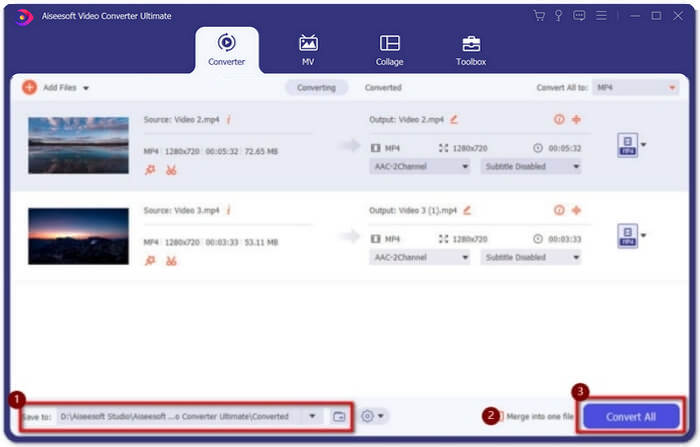
ステップ1: Video Converter Ultimate をダウンロードして起動します。Add Files ボタンをクリックして、結合したいすべてのMXFファイルを選択します。ファイルをソフトにドラッグ&ドロップして追加することもできます。順番を調整したい場合は、動画をドラッグして、正しい順番の位置にドロップします。

ステップ2: 続いて、Convert All to ボタンをクリックし、動画の一覧から MXF format を探します。オリジナルの高画質を保つには、4K または Same as Source を選択します。さらに、必要に応じて動画の解像度をアップスケールすることもできます。

ステップ3: 希望する保存先を選んだら、Merge into one file にチェックを入れ、Convert All ボタンをクリックしてMXFファイルを結合します。動画の結合が完了したら、コンピューターに保存したり、SNSなどのソーシャルメディアサイトに共有したりできます。
パート3:MXFビデオファイルをマージするためのFAQ
1. MXFとは何ですか?
MXFは、プロのオーディオおよびビデオメディア形式であるMaterial ExchangeFormatの略語です。プロのカメラで4Kモードで撮影されたビデオは、常にMXF形式であるため、映画やテレビ業界でビデオを作成および編集するためによく使用されます。
2. YouTubeのMXFビデオをマージする場合、どの形式を選択する必要がありますか?
MXFはYouTubeには大きすぎるため、MXFファイルをMP4にマージして、小さいサイズで比較的高品質を維持することをお勧めします。さらに、ほとんどのデバイスとプレーヤーはMP4ビデオの再生をサポートしています。
3. QuickTimeプレーヤーでMXFビデオファイルを再生できますか?
はい、可能です。一般的な形式ではありませんが、MacのQuickTimeやWindowsのZoom Playerなど、MXF動画の再生に対応しているプレーヤーもあります。もしMXF動画を再生できない場合は、MXFファイルを変換して、MP4やAVIなど一般的な形式にしてみてください。
結論
プロのカメラで撮影されたMXFビデオファイルを組み合わせるには、記事から最も頻繁に使用されるMXFジョイナーを見つけることができます。これらのマージされたビデオのみをYouTubeにアップロードする場合は、無料のオンラインジョイナーを使用するのが最善の選択です。これは、MXFファイルを小さいサイズのMP4にマージするのに役立つためです。ただし、プロの映画やテレビを作成したい場合は、元の4K品質を維持するために究極のビデオコンバーターを選択する必要があります。
-
 6つの最高のAVI合併:WindowsとMacでAVIビデオファイルを結合する方法
 DVD用のAVIビデオに参加したい場合は、無料のオンラインツールやデスクトッププログラムなど、上位6つのAVIジョイナーの機能について記事から学ぶことができます。
-
 PremiereProと無料オンラインでMXFを圧縮する方法
 より小さなファイルサイズでMXFを圧縮する方法は? Adobe Premiere ProでMXFファイルを圧縮する方法は?この投稿では、MXFファイルを圧縮する2つの方法を共有しています。
-
 M2TSファイルを無料で結合する方法
 ビデオカメラでキャプチャしたM2TS / MTSファイルを無料でマージしたいですか?この投稿では、2つのM2TSファイルを再エンコードせずに1つに結合する効率的な方法を共有しています。
