


 ビデオコンバーター究極
 スクリーンレコーダー
 ビデオ修復
ビデオ修復
 安全なダウンロード
携帯電話から1つのファイルに3GPビデオをマージする方法
旅行中にスマートフォンで複数のビデオを撮影する場合は、3GPファイルを1つのビデオにマージすることをお勧めします。ビデオクリップを組み合わせるための最良の方法は何ですか?単に3GPビデオに参加する場合でも、スマートフォンファイルを使用してムービーを作成する場合でも、この記事から最も頻繁に使用される2つの方法について詳しく知ることができます。

パート1:無料で3GPオンラインをマージする方法
編集せずに3GPファイルを結合したい場合は、3GP動画を無料でオンライン結合できる便利なツールがあれば十分です。FVC Free Online Video Mergerは、シンプルなインターフェースを備えた最高の3GP動画結合ツールの1つです。数やサイズの制限なく3GPファイルを結合できます。さらに、解像度や動画形式も調整できます。
ステップ1: 任意のWebブラウザーでFree Online Video Mergerにアクセスします。Upload Videos to Mergeボタンをクリックして、1つの3GPファイルをオンライン動画結合ツールに読み込みます。オンライン動画結合インターフェースに移動します。
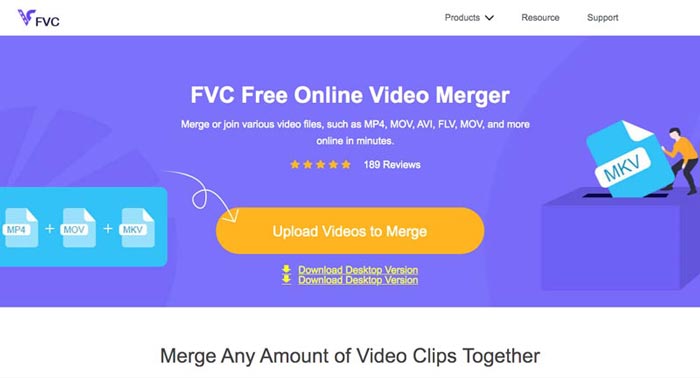
ステップ2: 結合したい3GPファイルをさらにアップロードします。その後、ResolutionおよびFormat欄をクリックして、動画の解像度と形式を変更できます。3GPファイルをMP4やMKVなどの一般的な動画ファイルに結合することも可能です。
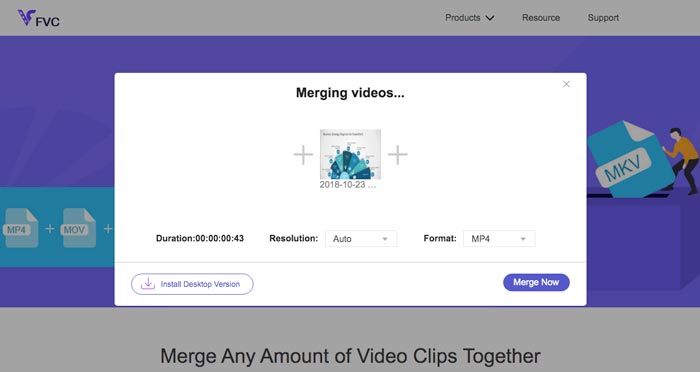
ステップ3: 出力動画に満足したら、Merge Nowボタンをクリックして結合処理を開始します。結合が完了すると、結合された動画はハードドライブに保存されます。
これは、3GPファイルをオンラインで無料で参加させる簡単な方法です。ただし、ビデオファイルをさらに編集したい場合は、より専門的なツールが必要です。
パート2。3GPビデオをムービーに組み合わせる方法
魅力的なフィルターで3GP動画を1本の映画にまとめたい場合でも、単に複数の3GPファイルを1つに結合したい場合でも、Video Converter Ultimateは検討すべき多機能な動画コンバーターです。動画クリップの分割や結合、動画テーマの選択、ウォーターマークの追加に加えて、3GP動画をソーシャルメディア用の別の動画形式に直接変換することもできます。
- 1.必要な部分を切り取るか、複数の3GPを1つに結合できるようにします。
- 2.トリム、分割、トリミング、回転などの基本的なビデオ編集機能を提供します。
- 3. 3GPビデオクリップを、さまざまなフィルター、テーマ、音楽ファイルなどを使用してムービーに結合します。
- 4.字幕、オーディオトラック、3D効果、透かし、 ビデオを圧縮する、 もっと。
無料ダウンロードWindows 7 以降に対応安全なダウンロード
無料ダウンロードMacOS 10.7 以降に対応安全なダウンロード
方法1:複数の3GPビデオを直接組み合わせる方法
ステップ1: 公式サイトからVideo Converter Ultimateをダウンロードして起動します。Converter画面を選択し、Add Filesボタンをクリックして結合したい3GPファイルを追加します。3GP動画をプログラムにドラッグ&ドロップすることもできます。

ステップ2: 3GPファイルを読み込んだら、出力ファイルの形式を選択します。ハサミのアイコンをクリックして、必要な部分だけを切り出せます。さらに、動画の回転/トリミング、フィルターの適用、ウォーターマークの追加、出力動画のオーディオトラックの調整なども行えます。

ステップ3: 画面下部で、結合後の3GPファイルを保存する出力先フォルダーを選択します。その後、Merge into One Fileボックスにチェックを入れ、Convert Allをクリックして3GPファイルの結合を開始します。

方法2:3GPファイルをムービーに結合する方法
ステップ1: 3GPファイルを1本の映画として結合したい場合は、MVメニューを選択するとMV作成画面に入ります。ウィンドウ左下のAddボタンをクリックして、3GP動画や画像を読み込みます。
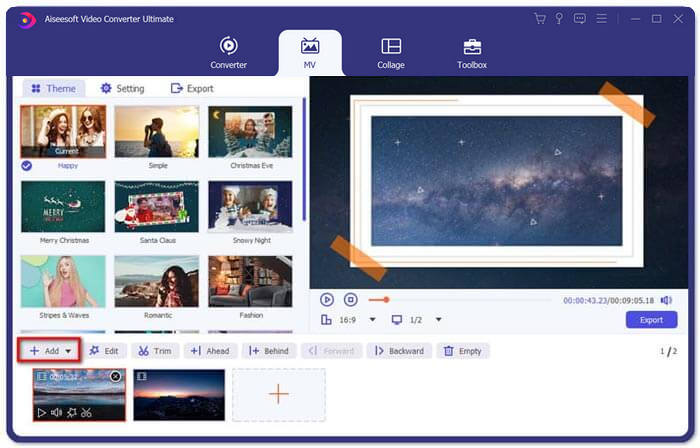
ステップ2: その後、Editボタンをクリックして動画エフェクトを適用できます。さらに、MVムービー用のテーマを選ぶことも可能です。左側のセクションでThemeタブをクリックし、お好みのテーマを選択してください。
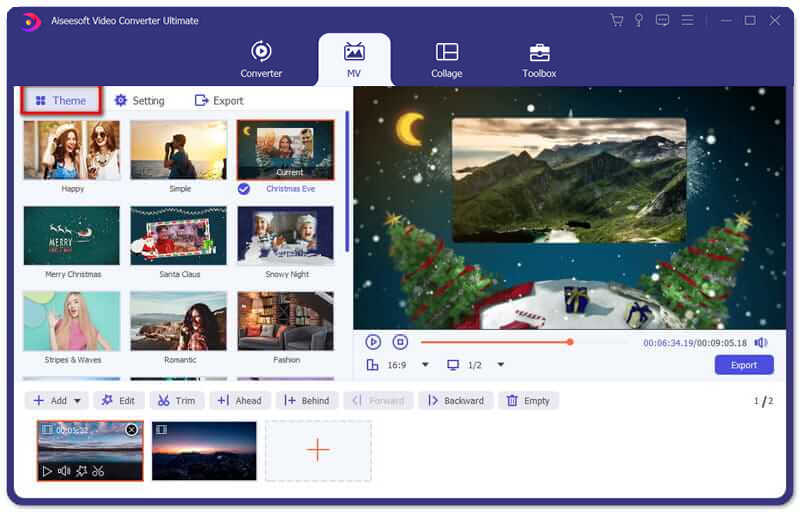
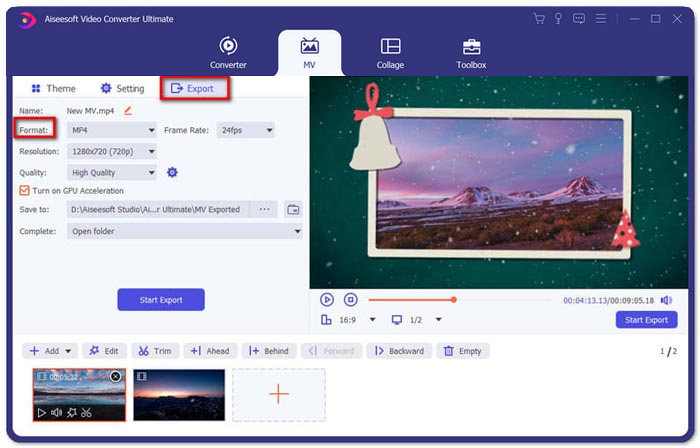
ステップ3: 結合された3GPファイルの仕上がりに満足したら、Exportボタンをクリックして動画ファイルを保存します。デフォルトの出力形式はMP4です。もちろん、必要に応じて、任意の動画形式を選択することもできます。
パート3。3GPをマージする方法に関するFAQ
1. 3GPフォーマットとは何ですか?
3GPは、データストレージを節約するために設計されたマルチメディアファイル形式です。モバイルデバイスで広く使用されています。携帯電話で写真を撮ったり、ビデオを撮ったりするとき、通常、ファイルは3GP形式で保存されます。通常、3GPは3G携帯電話で使用され、一部の2Gおよび4G電話でも再生できます。
2.スマートフォンで3GPファイルをマージするにはどうすればよいですか?
iPhoneまたはAndroidフォンで3GPファイルをマージする場合は、Androidフォンの場合はVideo Merger、iPhoneの場合はVivaVideoを使用するか、他のアプリケーションをダウンロードしてビデオを結合できます。ただし、3GPファイルをムービーとして結合する必要がある場合でも、プロのビデオマージを使用する必要があります。
3. 3GPビデオをオーディオファイルと組み合わせることができますか?
はい。ただし、オーディオファイルを3GPビデオの背景として使用することはできません。 2つのファイルを結合する必要がある場合でも、オーディオを3GPビデオの背景として使用する場合でも、プロの3GPコンバイナーを選択する必要があります。
結論
モバイル端末上で複数の3GP動画ファイルを結合して1つの動画にしたい場合は、この記事で紹介した2つの効率的な方法を利用できます。Free Online Video Joinerを使えば、3GPファイルをオンラインで無料結合できます。動画を編集したり、特殊効果を加えたりしたい場合には、Video Converter Ultimateが理想的なツールとなるでしょう。3GPファイルの結合についてご不明な点がありましたら、いつでもお気軽にお問い合わせください。
-
 Windows / MacでFLVを3GPに変換する3つの無料の方法
 スマートフォンやタブレットでFLVファイルを開くことができませんか?心配しないでください!ここでは、モバイルでの再生品質を損なうことなくFLVを3GPに変換する3つの方法を共有します。
-
 MP4を3GPに手間をかけずに変換する3つの方法
 MP4を3GPにすばやく簡単に変換したいですか?ここでは、3つのMP4から3GPへのコンバーターを共有して、さまざまな携帯電話で再生できるようにMP4を3GPに変更します。
-
 あなたが知っておくべきコンピュータとモバイルのための3つの最高の無料3GPプレーヤー
 ビデオコーデックのインストールや変換を行わずに3GPムービーを簡単に再生したい場合は、この記事でWindows、Mac、Android、およびiPhoneの3つの最高の3GPプレーヤーについて詳しく知ることができます。
