


 ビデオコンバーター究極
 スクリーンレコーダー
 ビデオ修復
ビデオ修復
 安全なダウンロード
Windows、Mac、オンライン、および電話でのピッチチェンジャーについてのレビュー
多くの場合、ピッチチェンジャーを使えば、元の音程をすばやく上げ下げできます。ほとんどのプロデューサーは、ピッチシフターを使ってメロディックな効果を加え、 raw の状態よりも曲をさらに良く聴こえるようにします。一方で、ピッチを変えるためのツール一式を購入すると多くのお金がかかるうえ、使い方を覚えるのにも時間がかかります。高価で理解しにくいのです。そのようなセットにお金を使う代わりに、手持ちの動画や音声のピッチを変えられるソフトウェアを試してみてはいかがでしょうか。
このレビューでは、莫大な費用をかけずにオーディオピッチを変更するために使用できる最高のアプリとプログラムを4つ集めました。私たちが何について話しているのかを知るために、この記事を読み続けてください。

パート1。デスクトップ、オンライン、およびモバイルデバイスで利用可能な上位4つのピッチチェンジャー
Video Converter Ultimate –WindowsおよびMacで最高のビデオピッチチェンジャー
無料ダウンロードWindows 7 以降に対応安全なダウンロード
無料ダウンロードMacOS 10.7 以降に対応安全なダウンロード
対応プログラム:Windows と Mac
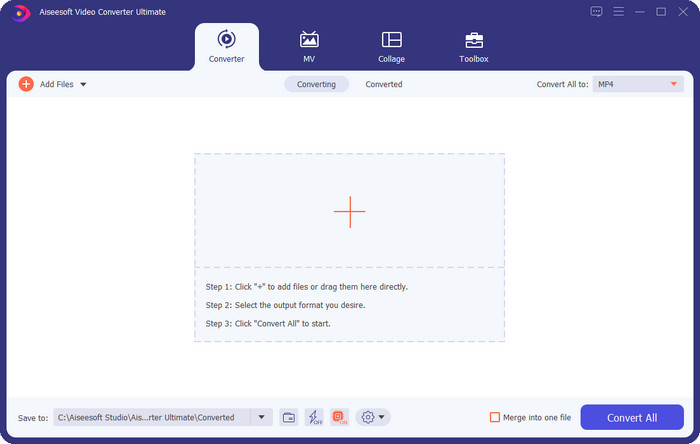
まず最初に紹介するのは、Windows と Mac の両方で使える最高の動画用ピッチチェンジャーです。Video Converter Ultimate は、動画の再生スピードを上げたり下げたりすることで、音声のピッチを自在に操作できる強力なツールです。同様のことができるほかのデスクトップソフトとは違い、このツールはとてもシンプルで、使い方を覚えるのにもそれほど時間がかかりません。録音したオリジナルよりも良い音にするために、1 分もかからずピッチを調整できます。
ピッチを変更する機能に加えて、ツールボックスの下にあるボリュームブースターを使用して、オーディオボリュームを最大の可能性まで拡張することもできます。この機能では、スライダーを使用して、ビデオのオーディオの振幅またはゲインをすばやく増減できます。あなたはこの種のことをしたいプロデューサーではありませんが、WindowsとmacOSで利用できるこの究極のツールの助けを借りて、それでも楽しく、すばやく実行できます。したがって、この究極のツールを使用したい場合は、パート2で、このツールの使用方法と、1分以内に完了するための詳細な手順を示します。
Vocal Remover.org
対応プログラム:オンライン
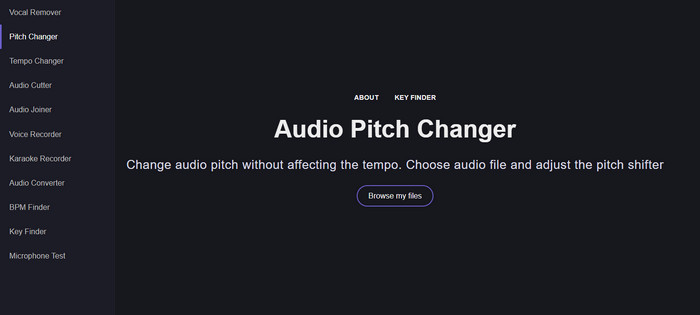
オンラインで使えるピッチチェンジャーが必要なら、Vocal Remover.org がこの作業に最適なツールです。最初に紹介したツールとは異なり、こちらは音声の強化に特化しています。このツールを使えば、音声のピッチを簡単に変えられるだけでなく、その曲がどのキーを使っているかも判別できます。さらに、音声の半音数を選ぶのに役立つインジケーターも用意されています。スライダーを動かして、一段階ずつ、あるいは自分で細かく調整することも可能です。すでに利用している多くのユーザーは、このツールを気に入っており、ピッチ変更の仕上がりにも満足しています。
ツールはこれで正常に動作しますが、ここでアップロードできるのは限られたオーディオ形式のファイルのみであり、ビデオ形式はサポートされていません。ファイルのアップロードは、いくつかのオーディオ形式しかサポートしていないため、ツールにとって少し難しいかもしれません。これは誰にとっても問題になる可能性がありますが、それでもこれはWeb上でアクセスできる最高のオンラインツールの1つであると考えています。ただし、合併症やその他の問題を回避するために、正しいWebサイトにアクセスするようにしてください。また、インターネットが強力な場合にツールが最適に機能するため、安定したインターネット接続を確保することを忘れないでください。
アップテンポ:ピッチ、スピードチェンジャー
対応プログラム:Android
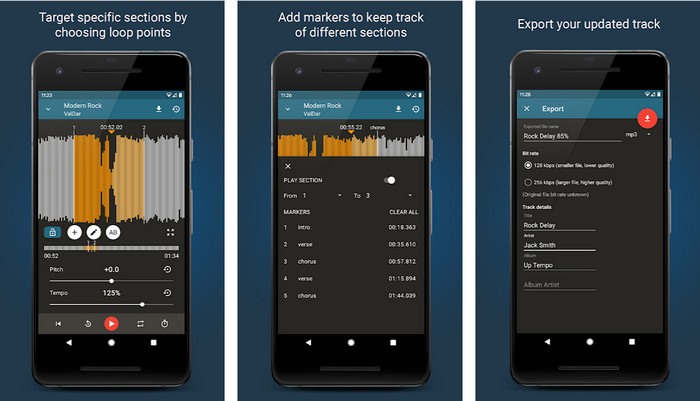
デスクトップ環境が手元になくても作業できるように、Android ユーザー向けのオーディオ用ピッチチェンジャーをダウンロードできます。Up Tempo: Pitch, Speed Changer を使えば、再生速度とピッチの変更作業を、誰でも素早く簡単に行えるようになります。GUI には波形表示があり、どの部分を強調・変更したいかを視覚的に確認できます。オンラインツールと同様に音楽ファイルの処理が可能で、必要なときにすぐ役立つアプリです。
このアプリは無料でダウンロードできますが、このアプリを使用する場合は考慮しなければならないことがいくつかあります。ほとんどのユーザーは、アプリが携帯電話にダウンロードされた新しいオーディオファイルを検出できないことを経験しています。この問題が発生した場合は、このアプリのオーディオファイルがサポートされていないか、バグが発生している可能性があります。それでも、Androidスマートフォンをお持ちの場合は、このアプリをダウンロードして、問題を解決するためのアプリかどうかを確認してください。
TimePitch-Pitch、Speed Changer 4+
対応プログラム:iOS
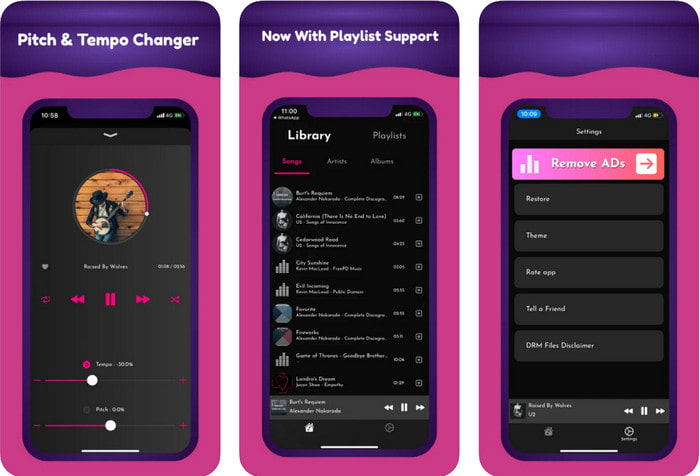
iOS ユーザーであれば、このピッチチェンジャーアプリが問題解決の手段になることをぜひ知っておきましょう。TimePitch-Pitch, Speed Changer 4+ は、音楽プレーヤー/ライブラリ/ピッチチェンジャーとして iOS デバイス上で利用できるアプリです。このアプリはほかと少し異なり、再生中の音声のピッチをリアルタイムで変更できるのが特徴です。つまり、調整してもその変更がファイルに保存されることはありません。しかし、これはアプリの強みとも言えます。処理が終わるのを待つ必要がなく、つまみを調整するだけで、好みに合わせてすぐにピッチを変えられるからです。
ただし、これもその弱点である可能性があります。他のデバイスでファイルを転送する場合、このアプリを使用して変更したピッチはレシーバーには適用されません。また、iTunesまたはApple Musicで音楽を購入した場合、このアプリを使用してピッチを変更することはできないことを覚えておく必要があります。なんで?保護されたファイルは、このようなサードパーティのアプリがファイルにアクセスすることを許可しないためです。音楽ファイルのアップロードに関係なく、このアプリはすべてのiOSデバイスで最適に動作するため、この記事に含めます。
パート2。究極のピッチチェンジャーソフトウェアを使用してビデオのピッチを変更する方法
以下の手順に従って、デスクトップで使用できるこのミュージックピッチとスピードチェンジャーの使用方法を確認してください。したがって、究極のソフトウェアの使用に関するシンプルで効果的なチュートリアルが必要な場合は、以下の詳細を読み続けてください。
ステップ1. デスクトップにこの究極のソフトウェアを入手するため、ダウンロードボタンをクリックし、Windows 版か Mac 版かを選択します。ダウンロードが完了するまでお待ちください。完了したら、ダウンロードしたファイルをクリックしてインストールします。セットアップとインストールがすべて終わったら、ソフトウェアを起動して、この究極ツールの使用を開始します。
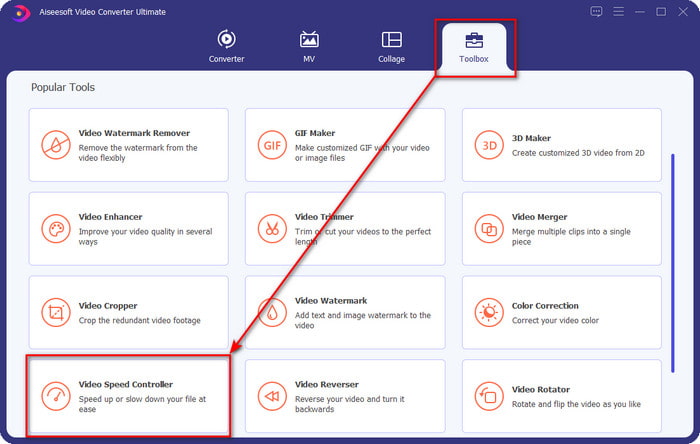
ステップ2. ツールボックス メニューを開き、その中から 動画スピードコントローラー を探してクリックし、起動します。画面を下にスクロールすると、下部付近に機能が表示されています。
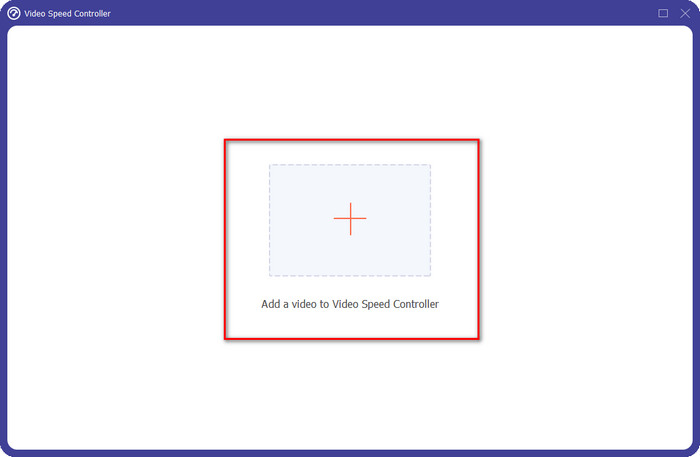
ステップ3. 新しい小さなウィンドウが画面に表示されるので、+ ボタンをクリックし、ピッチを変更したい動画ファイルを指定してから、開く をクリックして動画ファイルを読み込みます。
ステップ4. ここでは音声の再生速度を変更できるようになります。スピードを変えると、それに伴って音声のピッチも変化するのが分かるはずです。プレビュー画面で、自動的に映像と音声のプレビューを確認できます。
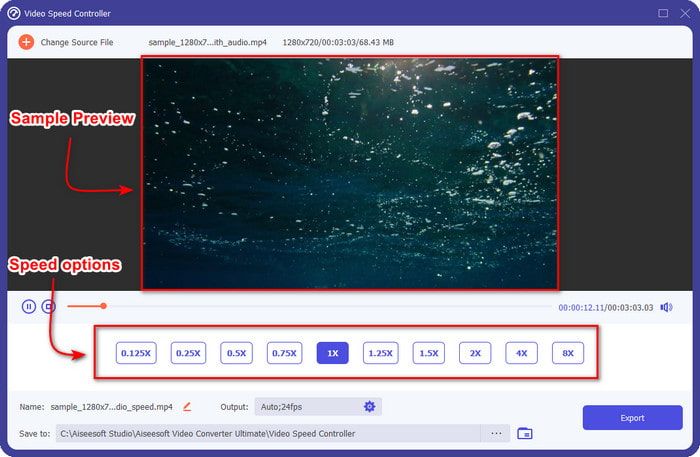
ビデオのプレビューは2倍速でしか再生できません。 4xと8xでは、競合を避けるためにビデオをプレビューすることはできませんが、ビデオとオーディオの品質を低下させることはありません。
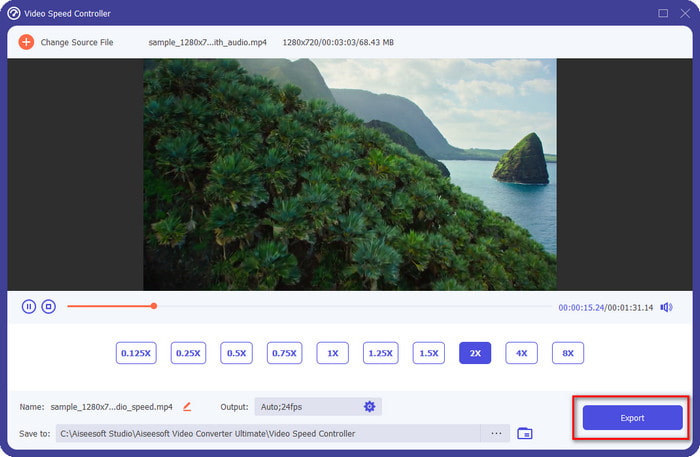
ステップ5. ピッチの仕上がりに満足したら、書き出し ボタンをクリックします。簡単ですよね? このようなソフトウェアを使えば、さまざまな動画・音声の問題を数分で手軽に処理できます。
関連記事:
パート3。ピッチチェンジャーに関するFAQ
ピッチとは?
それは、それらがより高いかより低いかにかかわらず、範囲内でそれらを測定することによって、あなたの音と共鳴する品質を評価します。周波数に似た音波ですが、同じではありません。
人間のピッチはどれくらい高く聞こえますか?
Hzが低いほど、意識的に聞こえますが、Hzが高くなったときにしか聞こえない人もいます。研究者によると、誰もが8000 Hzを聞くことができ、12,000 Hzを聞くことができれば、耳は50歳未満の人と同じくらい良いです。40歳未満でも15,000 Hzを聞くことができますが、30歳未満の場合は16,000 Hzで、まだ聞くことができます。 25歳以下の場合でも17,000Hzが聞こえ、20歳未満の場合は20,000Hzが聞こえます。年をとるほど、聞こえるピッチの効果が低下することがあります。したがって、私たちが言及する周波数が聞こえない場合は、問題があるかどうかを確認するために医師の診察を受ける必要があります。
ピッチ範囲はどのように計算できますか?
ピッチ範囲はオクターブを使用して計算します。これにより、歌手と楽器は、それが曲の正しいピッチであるかどうかを判断できます。振動により、音波が蓄積する高周波数と低周波数に気付くことができます。
結論
上で紹介した動画・音声用のピッチチェンジャーを使えば、手元にあるサウンドのピッチを簡単に調整できるようになりました。専用のハードウェアを購入する代わりに、これらのソフトウェアを活用しましょう。機能や特徴はそれぞれ異なりますが、どれも独自の長所があります。パソコンをお使いなら、デスクトップには必ず Video Converter Ultimate をダウンロードしておくべきです。このツールはピッチ変更だけでなく、動画や音声をさらに良くするさまざまな“魔法”のような処理も行えます。このツールがどんな魔法をかけてくれるのか知りたいですか? それなら、上のダウンロードボタンをクリックして、今すぐ入手してください。
-
 iPhoneでビデオを高速化する3つの方法[実証済み]
 iPhoneを使用しているため、ビデオの再生速度を調整するのに問題がありますか?これはあなたの問題を解決するのに役立つ優れた記事です。
-
 Windows Media Player |ビデオをスピードアップする方法を学ぶ[実証済み]
 Windows Media Playerを使用してビデオクリップの速度を落としたいのですが、その方法に問題がありますか?この記事は読むのに理想的であり、Windows MediaPlayerを使用してビデオを高速化する方法についてのあなたの視点を啓発することができます。
-
 スローモーションビデオを通常の速度に変更する方法[簡単な手順]
 インターネットからダウンロードした、または誤ってスローモーションで録画したスローモーションビデオを元に戻す方法を知りたいですか? Mac、Windows、iOS、Androidでスローモーションビデオを通常の速度に変換する方法を学びます。
