


 비디오 컨버터 궁극
 스크린 레코더
 비디오 수리
데스크탑과 휴대폰에서 사용할 수 있는 7가지 최고의 볼륨 부스터 앱 알아보기
Isn't it irritating if the volume of the video is so low that even if you make your volume adjust it to the highest nothing changes? There are several reasons why the audio volume became low. Instead of stressing out on the video why don't you try to use a booster to make your audio loud and clearer. So today is your lucky day, as we present different volume boosters you can choose on. All of the tools presented in here have been used by the writer of this article. To state the facts about the tools depending on the platform you are currently using. And to proceed let's start our walkthrough to the different sound boosters you can use on Windows, Mac, iPhones and Android.

1부. Windows PC, Mac 및 온라인을 위한 최고의 볼륨 부스터 4
1.비디오 컨버터 궁극
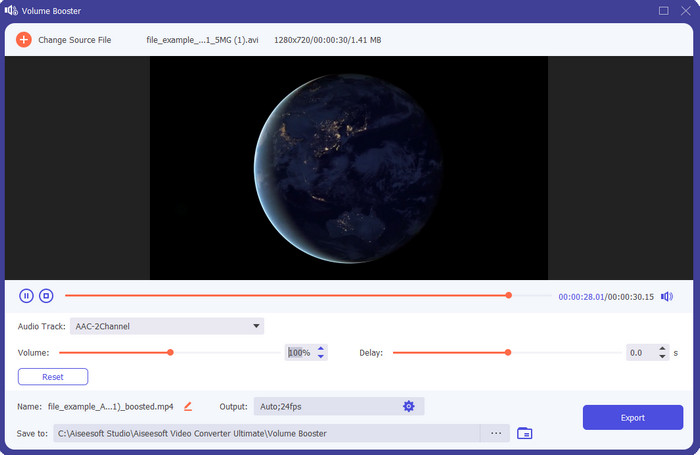
If you're looking for the best volume booster app then the Video Converter Ultimate must be it. This tool can make your audio better in quality without damaging your speakers. So, if you adjust the audio volume with this tool then don't expect crackling on your speakers. Moreover, if you have a problem with low quality audio you can use this tool to enhance it. Even if you are not a pro you can still manage to do the audio boost with this tool. And not only that, this software has a lot of tool features you may like to use if you downloaded this tool. Unlike any audio booster on the list, this tool provides a lot of enhancer to make your audio better in sound. Also, if you have an audio delay problem then you can also use this. It is frankly the phenomenal tool in this list if we were about to compare all of the tools. So, if you want to experience a full blast 8 or 16 D audio then download this tool right now.
Free DownloadFor Windows 7 or laterSecure Download
Free DownloadFor MacOS 10.7 or laterSecure Download
장점
- 이퀄라이저와 사전 설정을 자동으로 조정하여 작업을 더 쉽고 더 좋게 만듭니다.
- 오디오의 최종 출력은 청력이나 스피커를 손상시키지 않고 이전보다 훨씬 좋아졌습니다.
- 부스팅 경험이 없는 사용자도 할 수 있다는 점은 매우 직관적입니다.
단점
- 데스크톱에서만 사용할 수 있으며 전화 버전은 없습니다.
- 액세스하기 전에 구입하지만 그렇게 비싸지 않습니다.
2.VLC 미디어 플레이어
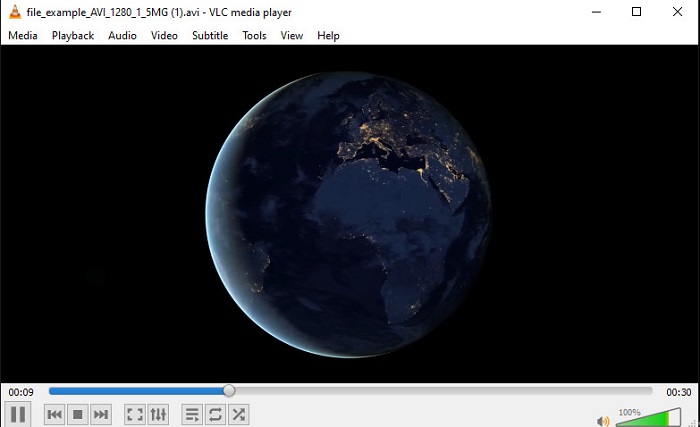
VLC Media Player is one of the best media players you can download on the web. This tool already has a built-in free volume booster on its interface and the audio can go up to 125% percent if you want. However, this desktop tool doesn't monitor how strong your speaker can handle. Which means if you abuse playing your audio into the max level there is a chance that the speaker can go mild crackle in the long run especially to the built-in speakers. But this tool is the only app presented here that has a booster and a player at one. So, if you want to watch and do the boosting of audio at one go then try to use this tool. Although it raises the volume it can't guarantee you to have a great audio quality because you only increase the audio.
장점
- 오디오 부스터 내장.
- 오디오를 최대 125%로 증폭하여 소리를 더 크게 만드십시오.
- PC 또는 Mac에서 무료로 다운로드할 수 있습니다.
단점
- 이 도구에는 오디오 품질을 향상시키는 내장 이퀄라이저가 없습니다.
- 오디오가 얼마나 커야 하는지는 모니터링하지 않습니다.
관련 항목:
How to Fix VLC Won't Play MKV Files
3. 붐 3D
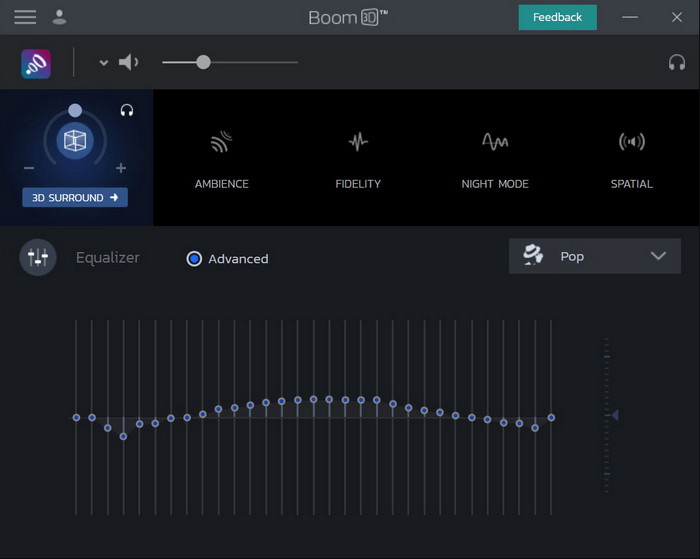
Boom 3D is the most advanced in the line of audio enhancing. This volume booster Windows 10 and Mac specialized a lot of enhancers for you to use on. Also, you can adjust the equalizers and preset manually unlike the Video Converter Ultimate this tool already did it for you automatically. Although the tool looks impressive, there are still disadvantages if you try to use this tool. Especially if you are a beginner, this tool needs to be set-up or in other words the tool is a lot to be handled by the beginner. Nevertheless, studying how to use this tool will take a lot of your time but it will be worth your time.
장점
- 이퀄라이저 및 사전 설정을 수동으로 무시합니다.
- 도구에 액세스하는 데 인터넷이 필요하지 않습니다.
- 좋은 음질의 오디오를 원하는 프로가 사용하기 좋습니다.
단점
- 이퀄라이저와 프리셋이 무엇인지 모르는 초보자에게는 최고의 선택이 아닙니다.
- 이 도구를 사용하는 방법을 연구하는 데 많은 시간이 필요합니다.
4. 볼륨 부스터
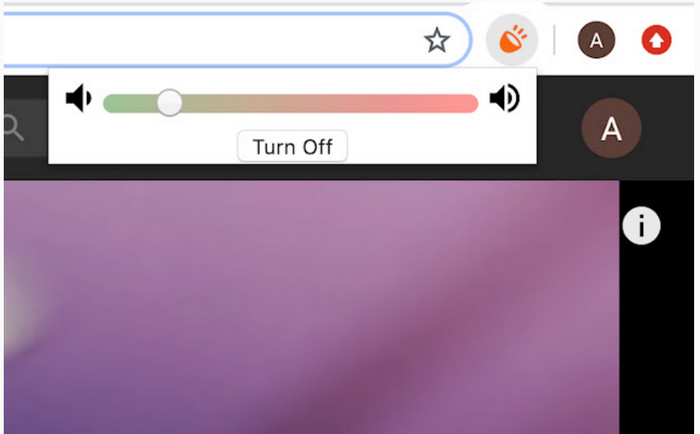
Volume Booster is a volume booster Chromeextension you can easily access if you have the internet. This tool can be used by anyone for free and also the tool is safe because it is from chrome. And if you try to use this tool expect to have a great boost to the audio you were about to listen to. However, you can't use this chrome extension outside the chrome itself. So, if you want to listen to the audio that has been saved to your drive then you can't use this to enhance your audio. Not only that, when we try to make the audio max there are some crackles, we heard so to avoid this make sure you set it too barely minimum.
장점
- 이 도구는 크롬의 확장이기 때문에 안전합니다.
- 사용자 친화적.
단점
- 크롬 외부에서는 사용할 수 없습니다.
- 최대로 돌리면 오디오가 약간 깨지는 소리가 들립니다.
- 이퀄라이저를 지원하지 않습니다.
2부. iPhone 및 Android용 상위 3개 볼륨 부스터 앱
1. 볼륨 부스터 - 이퀄라이저 FX
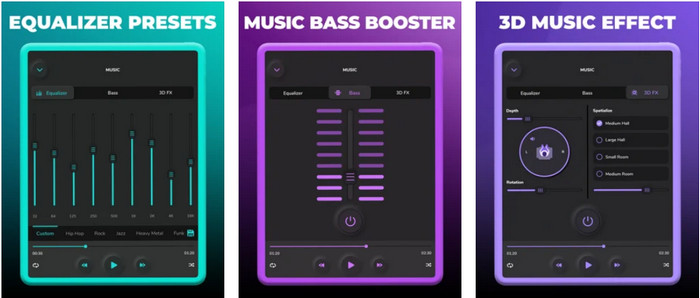
Volume Booster – Equalizer FX pushes the maximum audio limit of your iPhone to make a loud and better audio. This iPhone volume booster has been used by a lot of iOS users to make their own equalizing of audio. And the app already receives a fair rating of 3.9 stars. It is not either bad or any more than good. Also, this tool can't do audio boost on online streaming and the ads are killing this app. Moreover, crashes are still happening in this tool just like the bugs and more. However, if you want a bass boost on an iPhone then this is a must to try.
장점
- iPhone 사용자에게 좋은 부스터입니다.
- 기본적인 이퀄라이징 및 오디오 조정을 수행할 수 있습니다.
단점
- 대부분의 경우 도구가 충돌합니다.
- 오디오 부스팅을 사용할 수 있는 위치에 제한이 있습니다.
2.AmpMe – 스피커 및 음악 동기화
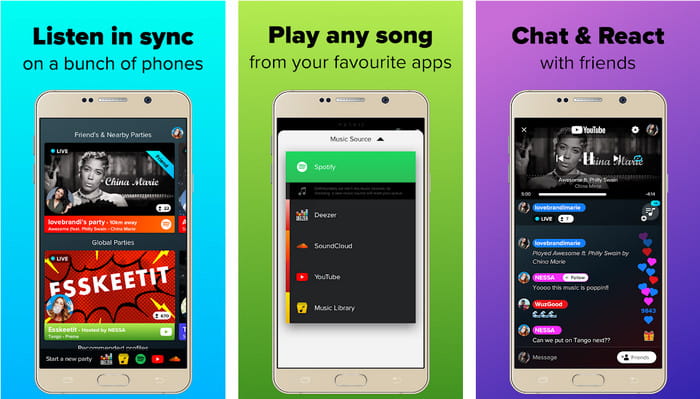
AmpMe - Speaker & Music Sync is a great downloadable audio volume booster for Android devices. This is more than just a booster because you can be the host and play your playlist or join a live party with the app. To make it simpler with this app you can interact with the others while listening and chatting at the same time. Although the tool is impressive there are still some bugs and crashes you will experience while using this tool. Also, some users have a hard time adding music to their playlist which is annoying. And the tool is a bit hard to manage, especially if you don't know the functions of it. But the overall is great to be used by the Android users.
장점
- AmpMe로 나만의 DJ가 되어 같은 앱으로 근처에 있는 다른 사람들과 공유할 수 있습니다.
- 동시에 듣고 채팅하십시오.
- 고품질 오디오를 생성합니다.
단점
- 더 싸게 가고 싶다면 구독료가 너무 많이 지불됩니다.
- 계정을 삭제해도 구독 취소가 어렵습니다.
- 가끔 라이브 파티에 참여하면 앱이 자동으로 연결 해제됩니다.
3.볼륨 부스터 GOODEV
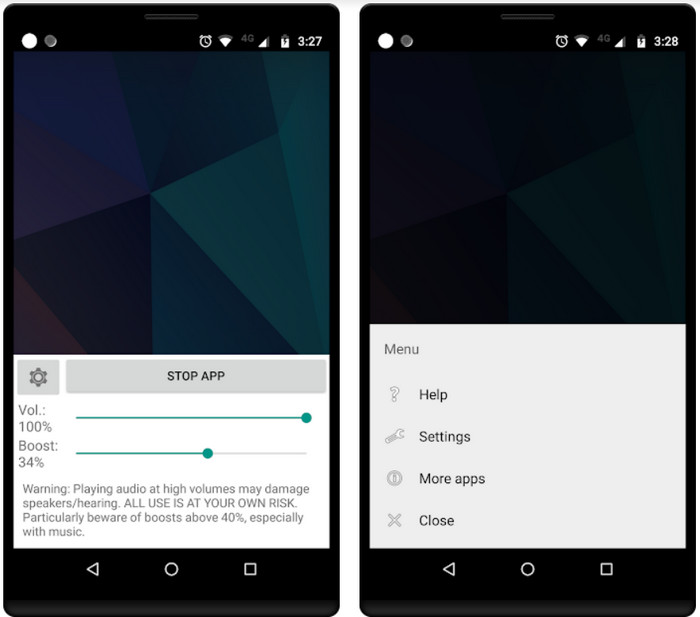
Volume Booster GOODEV has a simple and easy to manage interface. This volume booster has already received a great rating of 4.4 stars from its user. Also, a lot on the review said that this tool is the best for its job. But now there are some crashes happening when you use this tool and most of the time the tool itself doesn't boost your audio anymore even when you launch it. So, to re-activate it you must restart your phone or re-open the app in this way to fix it.
장점
- Android 휴대전화에 쉽게 다운로드할 수 있는 이해하기 쉬운 오디오 부스터입니다.
- 사용자 친화적.
단점
- 광고가 아무데도 표시되지 않습니다.
- 대부분의 경우 앱은 알 수 없는 이유 없이 자체적으로 충돌합니다.
- 이 앱의 이전 버전은 업데이트된 버전보다 훨씬 좋습니다.
3부. 어느 것이 최고의 볼륨 부스터인가
다음은 다른 도구에 없는 도구와 사용할 수 있는 도구 기능을 비교하기 위해 제공되는 비교 차트입니다.
| 도구 기능 / s | 비디오 컨버터 궁극 | VLC 미디어 플레이어 | 붐 3D | 볼륨 부스터 | 볼륨 부스터 – 이퀄라이저 FX | AmpMe – 스피커 및 음악 동기화 | 볼륨 부스터 GOODEV |
| 오디오 부스터 |  | | | | | | |
| 오디오 인핸서 | |  | | | | | |
| 오디오 및 비디오 동기화 기능 | | | | | | | |
| 사용자 친화적 | | | | | | | |
| 지원되는 플랫폼 | 데스크탑 기반 도구 | 데스크탑 기반 도구 | 데스크탑 기반 도구 | 크롬 확장 도구 | iOS 다운로드 기반 도구 | Android 다운로드 기반 도구 | Android 다운로드 기반 도구 |
| 가격 범위 | 1개월: $25.00 평생 라이센스: $55.20 다중 사용자 라이선스 수명/5 PC: $119.00 | 무료 다운로드 | $11.99 및 $23.99 | 비어 있는 | 3 ~ 20 $ | 항목당 $0.99 – $99.99 | 비어 있는 |
4부. 볼륨 부스터에 대한 FAQ
오디오 볼륨을 높이면 청력이 손상됩니까?
사실 맞아요. 특히 이어폰이나 헤드셋을 사용하는 경우 오디오 볼륨을 최대로 설정한 다음 볼륨 부스터를 추가하십시오. 그러면 장기적으로는 청력이 서서히 파괴될 것으로 예상하십시오. 따라서 이것을 피하기 위해 할 수 있습니다. 중간 또는 낮음으로 제한하고 최대로 가지 않는 것이 좋습니다.
스피커에서 오디오 부스팅의 다른 단점은 무엇입니까?
소리가 작을 때 오디오를 훨씬 더 잘 듣기 위해 오디오 부스터를 사용합니다. 그러나 스피커가 할 수 있는 Hertz 제한도 있다는 사실을 거의 알지 못했습니다. 헤르츠가 높을수록 더 커질 수 있지만 일부 내장 스피커에서는 매우 큰 소리를 처리할 수 없습니다. 따라서 스피커가 딱딱 소리를 내며 스피커에서 오디오를 처리할 수 없게 될 가능성이 있습니다.
스피커의 저음과 고음의 차이점은 무엇입니까?
이 두 가지는 가장 잘 알려진 내장형 스피커이지만 스피커에 내장된 자체 목적이 있습니다. 저음의 경우 낮은 주파수의 오디오는 처리할 수 있고 높은 주파수는 처리할 수 없으며 음악의 붐을 느끼게 하는 데에도 특화되어 있습니다. 고음은 저음이 처리할 수 없는 고음 주파수에 중점을 둡니다.
결론
To end, you can not listen to your poor-quality audio if you boost it with the help of the volume booster on PC, Mac, online, and mobile devices. The tools presented in here are great to be used by anyone who wants to experience a new height in music. But there is a tool that helps its customers to make their audio boosting simpler and better. So, instead of learning how to adjust the equalizer and preset the Video Converter Ultimate already did it for you. And to know how brilliant this tool is then try it for yourself and download it on your storage.
-
 컴퓨터 / 전화에서 무료로 오디오 및 음악을 비디오에 추가하는 방법
 이 기사는 무료로 비디오에 오디오를 추가하는 4 가지 쉬운 방법을 보여줍니다. 비디오에 어떤 오디오 트랙을 추가하든 여기에서 만족스러운 결과를 얻을 수 있습니다.
-
 Unbiased Cinch Review 오디오 레코더 및 최상의 대안
 Cinch Audio Recorder는 스트리밍 사이트에서 음악을 다운로드하는 가장 좋은 방법입니다. 편향되지 않은 리뷰와 기사에서 가장 좋은 대안에 대해 자세히 알아보십시오.
-
 VLC 플레이어로 오디오를 녹음하는 방법에 대한 실행 가능한 방법
 기사를 통해 VLC 플레이어 및 기타 실용적인 도구로 오디오를 녹음하는 가장 좋은 방법을 배우십시오.
