


 비디오 컨버터 궁극
 스크린 레코더
 비디오 수리
Android에서 유용한 애플리케이션을 사용하여 Android에서 비디오 속도 높이기 [2025]
요즘 휴대폰은 우리가 매일 사용하는 가장 다재다능한 기술입니다. 이 기기는 많은 장비를 갖추지 않아도, 소통하고 녹화하며, 자르기·트리밍·재생 속도 높이기 등 여러 가지 편집을 할 수 있도록 도와줍니다. 그래서 오늘은 다운로드 가능한 서드파티 앱의 도움으로 Android에서 동영상을 빠르게 재생하는 방법에 대해 알아보겠습니다. 추가로, 기본적으로 Android 휴대폰에는 동영상 재생 속도를 높여서 더 빠르게 시청할 수 있게 해 주는 내장 기능이 없습니다. 만약 이런 기능을 원한다면, 믿고 사용할 수 있는 여러 앱을 정리해 둔 이 글을 계속 읽어보세요.

1부. Android에서 비디오 속도를 높이는 방법
1. 필모라고
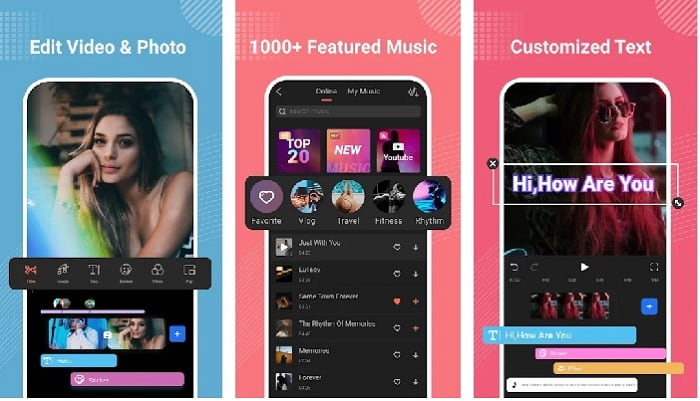
Filmora는 데스크톱 버전에서 제공하는 기능과 거의 비슷한 기능을 Android에서도 경험할 수 있도록 앱을 개발했습니다. Filmora Go는 멋진 영상을 만들 때 사용할 수 있는 최고의 무료 동영상 편집기 중 하나입니다. 게다가 이 도구는 동영상 편집 경험이 거의 없어도 활용할 수 있을 정도로 다양한 기능을 제공합니다. 다만, 무료 버전에서는 사용할 수 있는 기능이 제한되어 있습니다. 예를 들어 Android에서 동영상 재생 속도를 높이는 기능은 무료이지만 사용에 한계가 있습니다. 툴 자체는 완벽해 보이지만, 사용자 리뷰를 보면 해결되기를 바라는 몇 가지 문제가 언급되어 있습니다.
장점
- Android 기기에서 사용할 수 있는 무료이지만 강력한 동영상 편집기입니다.
- 이 도구는 우리가 본 최고의 리뷰 중 하나를 받았으며 별 4.6개를 받았습니다.
- 이 도구는 이미 데스크탑에서 최고의 편집자 중 하나로 명성을 쌓았습니다.
단점
- 파일 손실이 때때로 여기에서 발생합니다.
- 편집을 해도 파일 내보내기가 엉망으로 나오는 경우가 있습니다.
- 대부분의 경우 오디오와 비디오가 동기화되지 않습니다.
2. 하이퍼 타임랩스
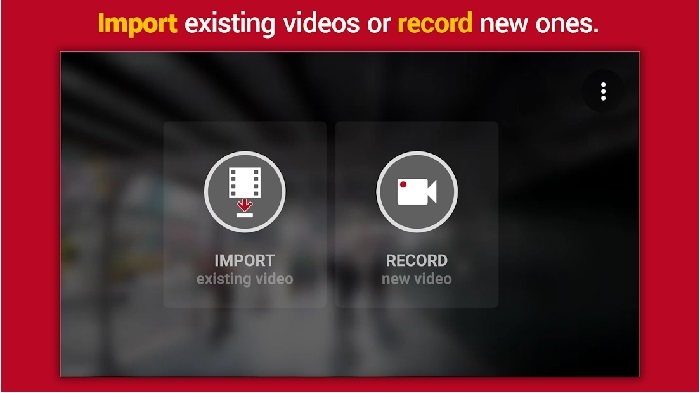
Hyper Timelapse는 Android에서 동영상 재생 속도를 높일 수 있는 무료 앱 중 하나입니다. 이 앱은 이미 별점 4.1점을 기록해 상당히 좋은 편입니다. 하지만 리뷰를 읽어보면 불만이 많아 보는 것이 힘들 정도입니다. 실제로 사용해 보니, 인터페이스는 그리 나쁘지 않고 속도 조절 기능도 뛰어나지만, 내보내기(Export)를 하면 앱이 자주 다운되었습니다. 또, 타임랩스 기능을 써 보니 시간이 지날수록 영상 파일 크기가 매우 빠르게 커졌습니다. 기본적으로 이 앱에서는 긴 타임랩스 영상을 찍기 어렵습니다.
장점
- 앱은 초보자라도 사용하기 매우 간단합니다.
- 시간 경과가 내장되어 있습니다.
- 도구의 인터페이스가 좋지 않습니다.
단점
- 이 도구에서 여전히 충돌 및 버그가 발생하고 있습니다.
- 매번 충돌하기 때문에 최종 출력을 저장하지 않습니다.
3. 경과
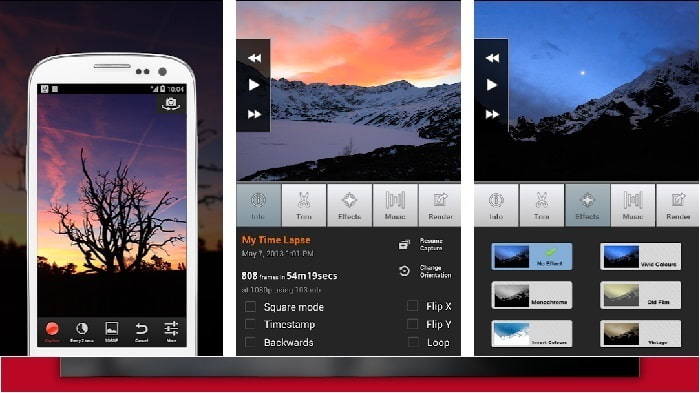
Android에서 동영상 재생 속도를 높일 수 있는 앱을 찾고 있다면 Lapse It을 사용해 보세요. 이 도구는 위에서 소개한 두 앱의 장점을 합쳐, 타임랩스와 스톱 모션 촬영, 그리고 편집 기능까지 모두 제공합니다. 설명만 들으면 Android에서 사용하기에 꽤 좋아 보이지만, 이 글에서 소개한 앱 중 별점이 가장 낮습니다. 앱 평점은 3.5점에 그치며, 리뷰 댓글을 보면 ‘쓸모없다’는 평가도 많습니다. 반면에, 한때는 근사한 영상을 만들기 위한 필수 앱이었지만 지금은 이 앱보다 좋은 앱들이 많이 나왔다는 의견도 있습니다.
장점
- 많은 사용자가 사용하고 싶어하는 독특하고 강력한 기능이 있습니다.
- 이 앱은 Android에서 최고의 렌더링을 제공할 수 있습니다.
- 비디오 사용자 정의는 Android에서 이 앱을 사용하여 쉽게 수행할 수 있습니다.
단점
- 업데이트 후에도 여전히 크래시 및 버그가 발생하기 때문에 도구가 S 클래스에서 D로 변경되었습니다.
- 실행 방법에 대한 지침이 명확하지 않습니다.
- 모든 비디오 엔딩에는 항상 팝업 광고가 있습니다.
2부. 보다 전문적인 속도 컨트롤러를 원하십니까? Video Converter Ultimate를 사용해 보세요!
Video Converter Ultimate는 놀라운 결과물을 얻고 싶을 때 사용하기 좋은 가장 독특한 도구입니다. 이 툴을 이용하면 동영상 재생 속도를 높이는 작업을 매우 쉽게 할 수 있습니다. 또한 이 도구의 전반적인 기능은 앞에서 소개한 Android용 도구들보다 훨씬 뛰어납니다. 다만, 이 소프트웨어는 Android 기기에서는 지원되지 않기 때문에 사용할 수 없습니다. 휴대폰에서 원격으로 활용할 수는 있더라도, 이 도구를 사용하는 동안에는 멈춤, 다운, 버그와 같은 문제를 겪지 않게 됩니다. 따라서 Android에서 동영상 재생 속도를 높이는 방법을 배우고 싶다면 아래 단계를 따라 해 보세요.
1단계. 먼저 이 도구를 다운로드합니다. 다운로드가 완료되면 설치를 진행하고, 간단한 설정을 마친 뒤 ‘마침’을 클릭해 다음 단계로 넘어갑니다.
Free DownloadFor Windows 7 or laterSecure Download
Free DownloadFor MacOS 10.7 or laterSecure Download
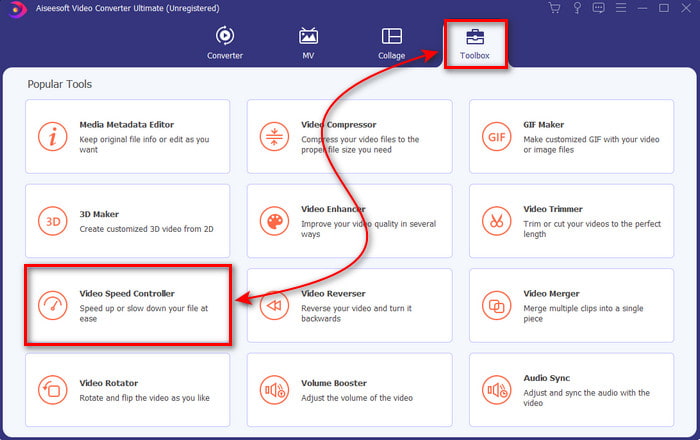
2단계. 다음으로 ‘도구 상자(Toolbox)’로 이동해 ‘Video Speed Controller(비디오 속도 컨트롤러)’를 찾은 뒤, 클릭하여 실행합니다.
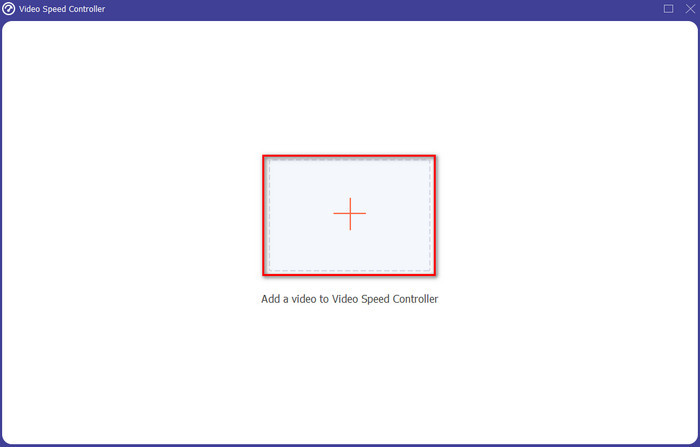
3단계. 새로운 인터페이스가 나타나면, + 버튼을 클릭해 파일을 추가합니다. 버튼을 누르면 폴더 창이 열리니, 재생 속도를 높이고 싶은 파일을 선택한 뒤 ‘열기(Open)’를 클릭합니다.
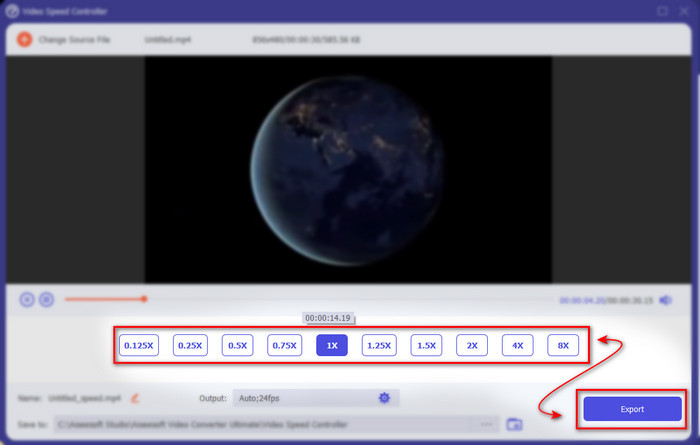
4단계. 또 다른 인터페이스가 나타나면, 작은 상자들에 표시된 옵션 중에서 원하는 속도를 선택합니다. 속도 설정 후 내보낼 준비가 되었다면 ‘내보내기(Export)’ 버튼을 클릭합니다.
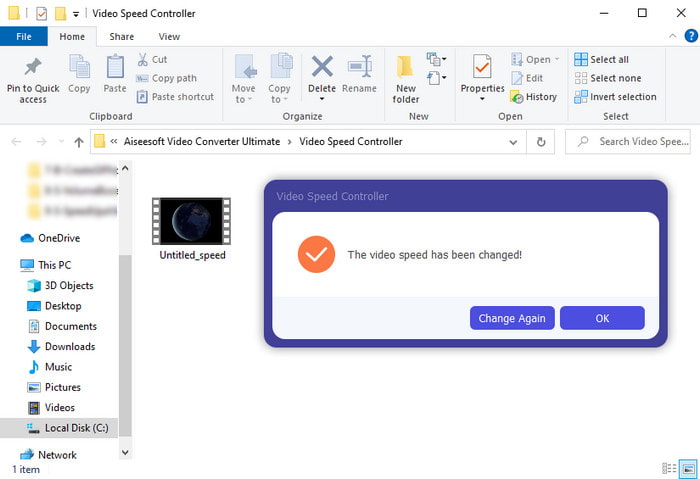
5단계. 잠시만 기다리면, 편집이 끝난 후 방금 만든 빠른 재생 파일이 들어 있는 폴더가 표시됩니다. 해당 동영상 파일을 클릭해 빠른 재생 버전을 시청해 보세요.
3부. Android에서 비디오 속도 향상에 대한 FAQ
내 비디오의 속도를 높이면 품질이 손상됩니까?
비디오 속도를 높이려는 경우 비디오 품질에는 변화가 없습니다. 그러나 사용 중인 앱이 고품질 비디오 출력을 지원하지 않는 경우 비디오 출력이 자동으로 줄어들 것으로 예상하십시오.
슬로우 모션으로 동영상을 볼 수 있습니까?
물론 가능합니다! 5대 슬로 모션 동영상 플레이어의 도움을 받으면 됩니다. 새 글로 이동하려면 이 링크를 클릭하세요.
내 비디오 속도를 높여야 하는 이유는 무엇입니까?
동영상을 2배속 이상으로 재생해야 하는 이유는 매우 다양합니다. 그 이유가 궁금하다면, 2배속 동영상이 무엇인지 다루는 이 글을 읽어 보세요.
결론
정리하자면, 여기에서 소개한 모든 도구는 Android 휴대폰에서 사용하기 좋지만, 그중에서도 특히 눈에 띄는 도구가 하나 있습니다. 바로 Video Converter Ultimate입니다. 이 소프트웨어를 사용하면 버그나 문제 없이 작업할 수 있습니다. 다만, 이 도구는 Android 휴대폰에서는 사용할 수 없으므로, 사용해 보고 싶다면 지금 바로 데스크톱에 다운로드하여 이 뛰어난 소프트웨어의 모든 기능을 즐겨 보세요.
-
 iPad 2025에서 MKV 파일을 재생하는 방법
 iPad 2에서 MKV 파일을 재생하는 방법은 무엇입니까? iPad Pro / Air / 2에서 재생하기 위해 MKV를 MP4로 변환 할 수 있습니까? 이 게시물은 iPad에서 MKV를 재생하는 2 가지 쉬운 방법을 공유합니다.
-
 [해결됨] VLC가 DVD를 재생하지 않음, 해결 방법
 VLC에서 DVD를 재생할 수 있습니까? VLC에서 DVD를 재생하지 않는 이유는 무엇입니까? VLC에서 Windows 10에서 DVD를 재생하려면 어떻게해야합니까? 이 게시물은 DVD가 재생되지 않는 VLC 문제를 해결하는 3 가지 팁을 공유합니다.
-
 [해결됨] Chromebook 2025에서 MP4 파일 재생
 Chromebook에서 동영상을 재생할 수 있습니까? Chromebook에서 USB의 MP4 파일을 재생하는 방법은 무엇입니까? 이 게시물은 Chromebook에서 MP4를 재생하는 3 가지 방법을 공유합니다.
