


 비디오 컨버터 궁극
 스크린 레코더
 비디오 수리
 안전한 다운로드
최고로 빠른 변환기를 사용하여 HEIC를 SVG로 놀랍게 변환
HEIC files are image formats with small file sizes while maintaining high-quality resolutions. But if you are writing a website or creating a logo for your page, you might want to think to use another image format. An image format that is the best for websites is an SVG image file. So, in this article, you will know the best tools to help you convert HEIC to SVG image format.

1부. HEIC 대 SVG
HEIC is an image format Apple developed. Because of its high-quality resolution and does not take up much space on devices, it is one of the most common image formats nowadays. In addition to that, you can natively open HEIC images using iPhone, Mac, and other Apple devices. However, if you use a Windows device, you cannot view HEIC images. Unlike any other format, the SVG image format stores images as vectors.
이러한 이미지 형식은 품질을 잃지 않고 확장 및 축소할 수 있습니다. 또한 SVG 이미지는 일반적으로 전문 웹사이트, 로고, 아이콘 및 인포그래픽에 사용됩니다. 또한 모든 웹 브라우저는 SVG 파일을 지원합니다. 따라서 SVG 파일을 여는 것은 어렵지 않습니다.
2부. 최고의 온라인 변환기를 사용하여 HEIC를 SVG로 손쉽게 변환
많은 온라인 변환기가 HEIC를 SVG로 변환할 수 있습니다. 그러나 모든 변환기가 사용하기 쉽고 안전한 것은 아닙니다. 따라서 이 부분에서는 사용자 친화적이고 안전한 최고의 변환기를 알게 될 것입니다. 따라서 HEIC를 SVG로 쉽게 변환하는 방법을 배우므로 편안히 앉아 휴식을 취하십시오.
Aconvert.com
Aconvert.com은 인터넷에서 사용할 수 있는 가장 인기 있는 온라인 변환기 중 하나입니다. 이 도구를 사용하면 품질에 대한 걱정 없이 HEIC를 SVG로 변환할 수 있습니다. 빠른 변환 프로세스를 통해 HEIC 파일을 SVG로 쉽게 변환할 수 있습니다. 그러나 웹 기반 응용 프로그램이므로 방해가 될 수 있는 광고가 포함되어 있습니다. 그럼에도 불구하고 많은 사람들이 이 온라인 변환기를 첫 번째 선택 항목으로 사용합니다.
Step 1. On your browser, search Aconvert.com. Then, click the Choose Files button on the software’s main interface. Your computer files will appear, then you will select your HEIC image, then click Open to upload it.
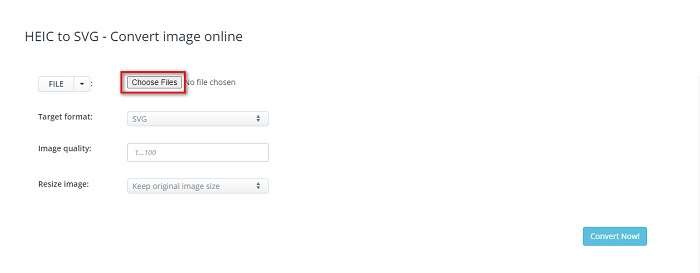
Step 2. After uploading your HEIC file, click the up-down button to select the output format that you want. And then click the Convert Now button.
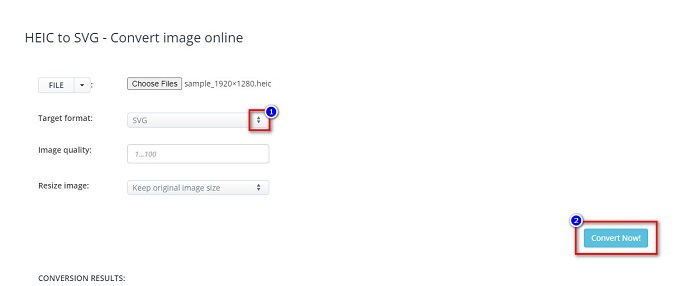
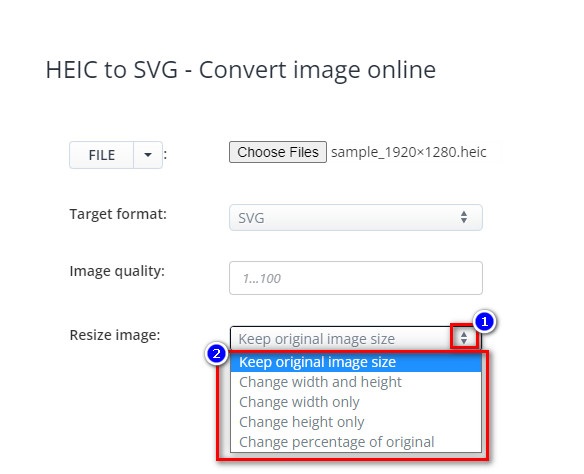
You can resize your image by clicking the up-down button beside Resize Image.
Step 3. Finally, click the Save icon to download your SVG image.

장점
- HEIC를 SVG로 빠르게 변환할 수 있습니다.
- 이미지 크기를 조정하고 품질을 조정할 수 있습니다.
- Google, Safari, Firefox 및 Edge와 같은 거의 모든 웹 브라우저에서 액세스할 수 있습니다.
단점
- 광고가 포함되어 있습니다.
FreeConvert.com
FreeConvert.com is another online tool that can convert a HEIC image to an SVG image. This converter has a simple user interface, making it a beginner-friendly tool. Also, you can adjust the background color and color count of your image by using its advanced features. But when your internet connection is slow, you may experience having a slow conversion process.
Step 1. First, search FreeConvert.com on your browser. And on the software’s main interface, click the Choose Files button. When your computer files appear, select your HEIC image.

Step 2. Next, click the drop-down button beside Output, then select the output image file you want.
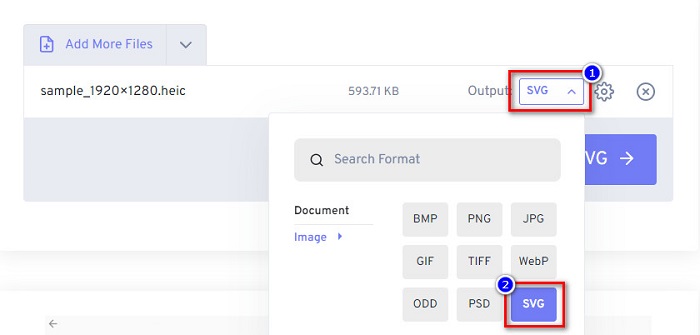
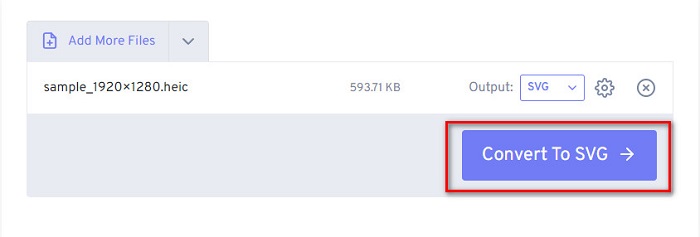
Step 3. Lastly, click the Convert to SVG button, wait for your file to finish converting, and click the Download button.
장점
- 사용하는 것이 안전합니다.
- HEIC를 SVG로 빠르게 변환할 수 있습니다.
- 간단한 사용자 인터페이스가 있습니다.
단점
- 성가신 광고가 포함되어 있습니다.
엠컨버터
사용할 가치가 있는 또 다른 온라인 변환기는 MConverter입니다. 이 온라인 HEIC-SVG 변환기에는 간단한 소프트웨어 인터페이스가 있습니다. 이 도구는 사용하기에 안전하기 때문에 데이터에 대해 걱정할 필요가 없습니다. 또한 HEIC, SVG, BMP, GIF, PNG 등 다양한 이미지 형식을 지원하지만 파일 크기가 200MB 미만인 이미지만 변환할 수 있습니다.
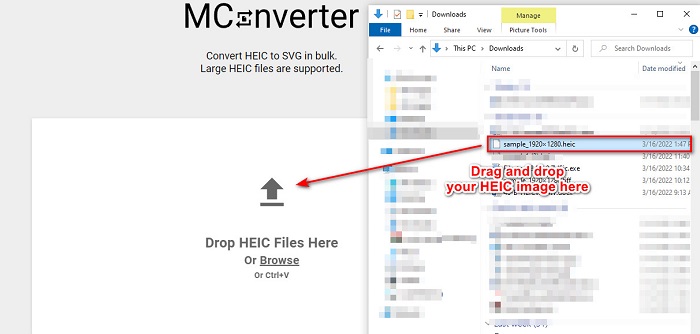
Step 1. On your browser, search MConverter. Then, drag and drop your HEIC image on the software's main interface.
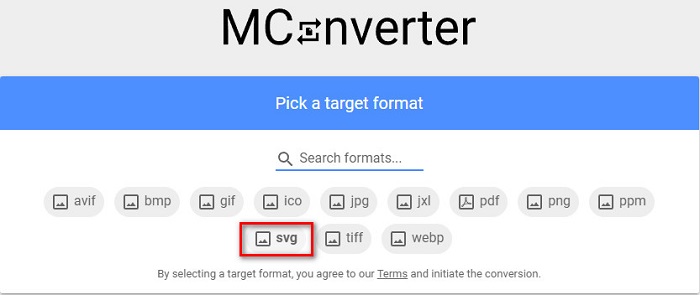
Step 2. On the next interface, click the SVG image format as your output. Then your image will begin to convert.
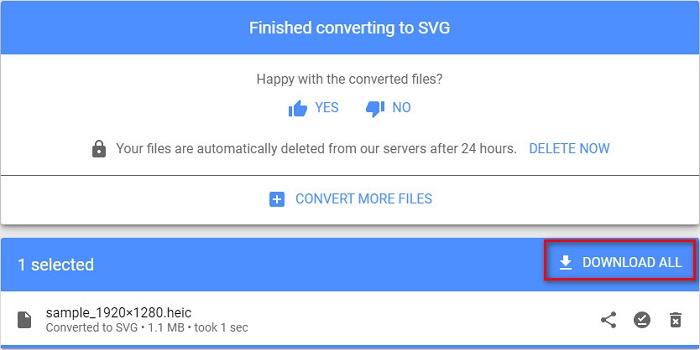
Step 3. And then, click the Download All button to download your SVG image.
장점
- 사용하기 쉬운 소프트웨어 인터페이스가 있습니다.
- HEIC, SVG, BMP, JPG, PNG 등 다양한 파일 형식을 지원합니다.
- 사용하는 것이 안전합니다.
단점
- 불쾌감을 주는 광고가 포함되어 있습니다.
3부. 권장 사항: 최고의 HEIC 변환기로 HEIC 파일 변환
위에서 언급한 도구는 정말 놀랍습니다. 그러나 웹 기반이 아니고 변환 속도가 빠른 변환기를 찾고 있다면 이 응용 프로그램을 다운로드하는 것이 좋습니다. Aiseesfoft HEIC 변환기는 오프라인 HEIC 변환기입니다. HEIC 이미지를 JPG 및 PNG와 같은 가장 표준적인 이미지 형식으로 변환할 수 있습니다. 따라서 Windows에서 HEIC 이미지를 보는 방법을 찾고 있다면 이 변환기가 가장 좋습니다. 또한 HEIC 파일을 JPG 및 PNG 이미지로 일괄 변환할 수 있는 기능이 있습니다.
더 놀라운 것은 변환할 때 다른 변환기가 할 수 없는 EXIF 데이터를 유지한다는 것입니다. 이 변환기를 사용하여 이미지 품질을 조정할 수도 있습니다.
Features of Aiseesoft HEIC Converter:
- HEIC를 PNG 및 JPG 형식으로 변환할 수 있습니다.
- 초고속 변환 프로세스가 있습니다.
- 파일의 EXIF 데이터를 유지할 수 있습니다.
- Windows 및 Mac을 포함한 모든 크로스 미디어 플랫폼에서 다운로드할 수 있습니다.
4부. HEIC를 SVG로 변환하는 방법에 대한 FAQ
HEIC와 SVG 중 어느 것이 더 나은 이미지 형식입니까?
HEIC와 SVG는 모두 고품질 해상도와 작은 파일 크기를 가지고 있습니다. 그러나 HEIC는 Apple 장치 이외의 다른 장치와 호환되지 않습니다. 거의 모든 장치 및 이미지 편집 응용 프로그램과 호환되는 SVG와 달리.
SVG는 무손실 파일입니까?
네. SVG 이미지는 무손실 파일 압축을 사용하므로 압축할 때 데이터가 손실되지 않습니다.
SVG 파일을 사용할 때의 단점은 무엇입니까?
SVG는 벡터화된 이미지 형식입니다. 즉, 픽셀화되지 않고 대신 이미지를 벡터로 사용합니다. 그러나 픽셀 대신 점과 경로에 의존하기 때문에 이미지의 세부 사항을 묘사하지 않습니다.
결론
Indeed, all of the information above is factual and reliable. All the online HEIC to SVG converters will help you to easily convert HEIC to SVG image format. However, not all the converters shown have the same features; it is now in your hands on what to choose. But, if you are looking for a converter that can convert HEIC to JPG or PNG offline and free, then Aiseesoft HEIC Converter is the best tool for you. So, download it now, and enjoy its unique features.
-
 2022년에 개선된 상위 4가지 방법을 사용하여 HEIC를 PDF로 변환
 최고의 HEIC-PDF 변환기에 대한 자세한 내용을 보려면 이 2022를 다운로드할 수 있습니다. 이 문서에 대한 리뷰를 제공했기 때문에 이 기사를 읽을 수 있습니다.
-
 2022년 최고의 HEIC to JPG 변환기 5개 선정
 HEIC to JPC 변환기를 사용하면 이미지 형식을 휴대용 JPG로 쉽게 변경할 수 있습니다. 이 5가지 도구가 무엇인지 알고 싶으십니까? 이 기사를 읽으십시오.
-
 알아야 할 최고의 무료 및 유료 HEIC 변환기 [2022년 업데이트됨]
 HEIC 변환기가 무엇인지 알고 싶습니까? 그렇다면 HEIC 형식을 변경하는 데 사용할 수 있는 상위 5개 무료 및 유료 HEIC 변환기를 포함합니다.
