


 비디오 컨버터 궁극
 스크린 레코더
 비디오 수리
 안전한 다운로드
오디오 품질과 접근성을 유지하기 위해 Caf에서 MP3로 원활한 변환
Caf를 MP3로 변환하는 것은 향상된 호환성과 접근성을 위해 필수적입니다. Caf 파일을 MP3로 변환하면 다양한 플랫폼에서 원활하게 재생되어 호환성 문제가 제거됩니다. 또한 MP3 파일은 크기가 작아 저장, 전송 및 공유가 더 쉽습니다. 스마트폰, 컴퓨터 또는 차량 내 시스템에서 오디오 컬렉션을 즐기고 싶을 때 Caf를 MP3로 변환하면 좋아하는 음악, 팟캐스트 또는 녹음에 더 유연하고 편리하게 액세스할 수 있습니다.
By utilizing a Caf to MP3 converter, you can easily transform your Caf files into the popular MP3 format, which ensures broader accessibility, smaller file sizes, and seamless sharing of your audio collection. That said, find out the tools you can use to help you change your files from Caf to MP3.

1 부. CAF 란 무엇이며 CAF를 MP3로 변환하는 이유
Caf 또는 Core Audio Format은 Apple Inc.에서 도입한 오디오 파일 형식입니다. 일반적으로 macOS 및 iOS 플랫폼에서 사용됩니다. Caf 파일은 종종 사운드 편집, 믹싱 및 녹음과 같은 전문 오디오 응용 프로그램에서 생성되고 활용됩니다. Caf를 MP3로 변환하면 몇 가지 강력한 이유와 이점이 제공됩니다. Caf 파일을 MP3 형식으로 변환하는 것을 고려할 수 있는 몇 가지 주요 이유는 다음과 같습니다.
Enhanced Compatibility: MP3 is one of the most widely supported audio formats across various devices, media players, and operating systems. By converting your Caf files to MP3, you ensure compatibility and eliminate any playback issues or limitations you might encounter with Caf files.
Accessibility: Converting Caf to MP3 enables greater accessibility to your audio content. MP3 files can be streamed on multiple devices, including smartphones, tablets, laptops, desktop computers, portable music players, and even in-car audio systems. This versatility allows you to enjoy your favorite music, podcasts, or recordings anytime, anywhere.
Smaller File Size: MP3 files are typically compressed, resulting in significantly smaller file sizes compared to Caf files. This compression helps save storage space on your devices without compromising the audio quality noticeably. It also makes it easier to transfer or share your audio files with others via email, messaging apps, or online platforms.
파트 2. CAF를 MP3 오프라인으로 변환
Video Converter Ultimate is a highly efficient software that enables the conversion of various file formats to diverse audio formats such as Caf and MP3. The software provides a batch conversion functionality enabling the user to convert multiple audio files simultaneously.
또한 사용자는 샘플 속도 및 비트 전송률을 포함하여 출력 기술을 사용자 정의할 수 있는 프로그램 기능을 통해 원하는 노래의 품질을 최적화할 수 있습니다. Caf에서 MP3로 또는 그 반대로 오디오 파일을 일괄 변환하려는 개인을 위해 아래에 간결한 가이드를 제공했습니다. Caf를 MP3로 변경하는 방법은 아래 지침을 참조하십시오.
Step 1. Select the appropriate Free Download icon below to launch the program on your device. Ensure to follow the on-screen instructions to activate the program in the following step. Once installed, its interface can be mastered. This tool works as a Caf to MP3 Mac and Windows converter.
무료 다운로드Windows 7 이상용안전한 다운로드
무료 다운로드MacOS 10.7 이상용안전한 다운로드
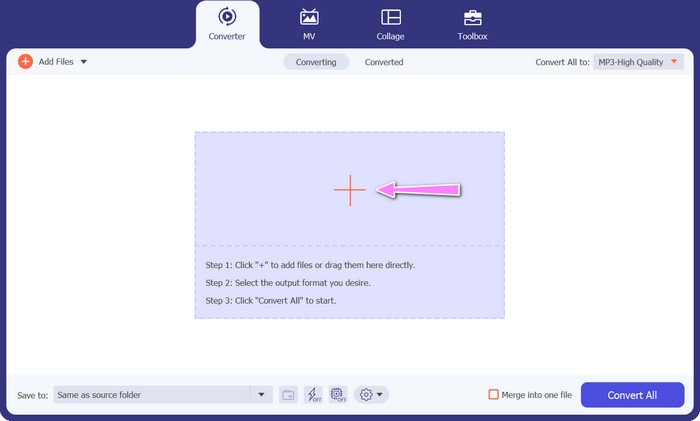
Step 2. Click the Add button on the primary interface to import the audio file you wish to edit. You will then be taken to a thumbnail of the imported file. You can submit a folder to convert multiple files at once. Choose the location within your directory that contains all the required audio files.
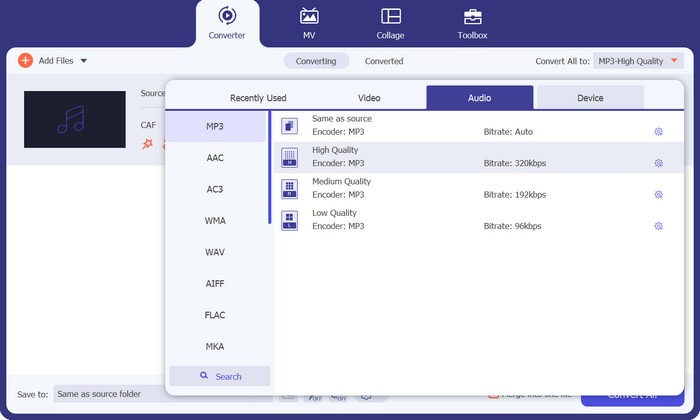
Step 3. You can now alter the output format by clicking the Converter All to button located at the top of the program's window. Choose MP3 from the pane labeled Audio. In the meantime, you can alter the output file's sample rate and bitrate to achieve the desired quality.
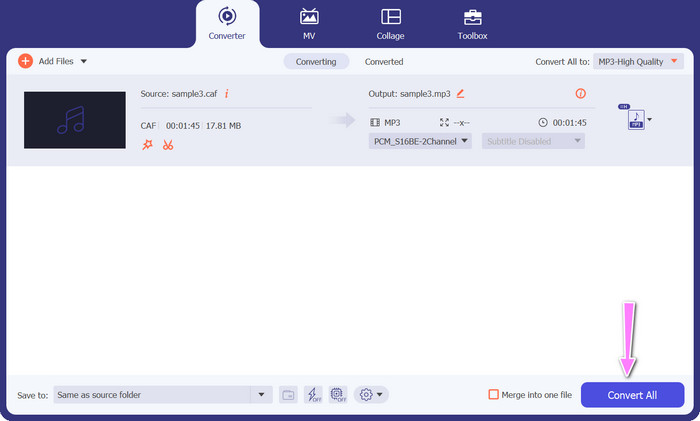
Step 4. Click the Convert All button below to initiate the conversion procedure as the final step. The program will then automatically open the output folder for you to verify the new file format.
장점
- Caf를 MP3 오디오 파일 형식으로 일괄 변환할 수 있습니다.
- 이 프로그램은 Windows 및 Mac OS 모두에서 잘 작동합니다.
단점
- 무료 평가판 사용 후 유료 구독료가 필요합니다.
파트 3. 온라인에서 CAF를 MP3로 변환
You can also utilize the Free MP3 Audio Converter Online, which is another option. This is a web-based application that works in conjunction with the internet, as its name suggests. Consequently, you do not need to have an app that converts Caf to MP3. Everything is reachable, and you need only your browser to get things done. In terms of features, this Caf to MP3 free converter does not fall short in any way. In addition, you can upload a large number of files, convert them in bulk, or adjust the profile of a video or audio clip. By following the techniques outlined here, you will get knowledge on the best online Caf to MP3 converter.
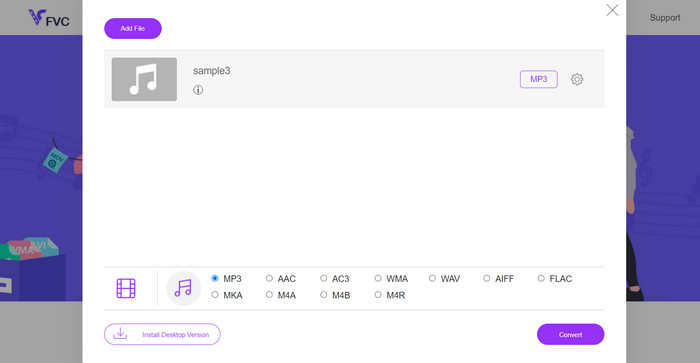
Step 1. Simply to the main website of the Free MP3 Audio Converter Online by clicking the link located above. You can submit your audio file by going to the main screen and selecting the Add Files to Convert option.
Step 2. On the screen will appear a glimpse of the original file that you selected. You may select the output format you want by going below the panel where you initially were.
Step 3. To change the file format from Caf to MP3, click the Convert button. You will need to do the same procedure from the beginning if you want to convert another file.
장점
- 사용자는 하루에 무제한 전환을 즐길 수 있습니다.
- 이 Caf to MP3 변환기 온라인은 거의 모든 웹 브라우저에서 작동합니다.
단점
- 변환 속도는 사용 가능한 인터넷 대역폭에 비례합니다.
추가 읽을거리:
MP3 to AAC Conversion: How to Improve Your Audio Quality
MP3 Player Download – 10 Best Free MP3 Music Players of 2023
파트 4. CAF를 MP3로 변환에 대한 FAQ
내 Caf 파일을 MP3로 변환한 후 메타데이터를 유지할 수 있습니까?
Caf에서 MP3로 변환하는 동안 메타데이터 보존은 사용 중인 특정 변환기 또는 소프트웨어에 따라 다릅니다. 일부 변환 도구에는 아티스트 이름, 앨범 제목, 트랙 번호 등과 같은 메타데이터를 유지하는 기능이 있습니다. 그러나 모든 변환기가 메타데이터 보존을 지원하는 것은 아닙니다.
Caf 파일을 변환할 수 있는 다른 오디오 형식이 있습니까?
예, MP3 외에도 특정 요구 사항에 따라 Caf 파일을 변환할 수 있는 몇 가지 다른 오디오 형식이 있습니다. 일반적인 대체 형식으로는 WAV, FLAC(무료 무손실 오디오 코덱), AAC 및 OGG(Ogg Vorbis)가 있습니다.
Caf에서 MP3로 변환하려면 비용을 지불해야 합니까?
무료 및 유료 Caf to MP3 변환 옵션이 모두 있습니다. 많은 온라인 변환기는 무료 서비스를 제공하므로 비용 없이 Caf 파일을 MP3로 변환할 수 있습니다. 그러나 일부 고급 소프트웨어 또는 프리미엄 온라인 서비스는 추가 기능 또는 더 빠른 변환 속도를 위해 구매 또는 구독이 필요할 수 있습니다.
결론
With Caf to MP3 conversion, you can unlock the full potential of your audio collection and enjoy seamless playback anytime, anywhere. It lets you enjoy your favorite music, podcasts, or recordings on a wide range of devices and platforms.
-
 Mac 및 PC에서 AIFF를 MP3로 변환하는 최고의 4가지 방법
 AIFF 파일이 너무 커서 저장하기 어려우신가요? 따라서 AIFF를 MP3 형식으로 변환하여 문제를 해결하는 방법을 설명하므로 계속 읽어야 합니다.
-
 AMR을 MP3로 변환하는 방법 알아보기 [온라인 및 오프라인]
 .amr 파일을 데스크탑에서 재생할 수 없어 어려움을 겪고 계십니까? 그런 다음 이 기사를 읽고 AMR을 MP3 형식으로 변환하는 방법을 배우십시오.
-
 Breze에서 MP3 Effortlessy에 앨범 아트를 추가하는 방법에 대한 안내
 MP3에 앨범 아트를 추가하는 방법을 알고 싶습니까? 그렇다면 파일의 앨범 아트 편집에 대한 전체 세부 정보와 자습서를 읽으십시오.
