


 비디오 컨버터 궁극
 스크린 레코더
 비디오 수리
 안전한 다운로드
VOB를 MP3로 변환하고 오디오 컬렉션 증폭
세계화된 음악 산업에서는 선호하는 오디오 파일을 다양한 형식으로 변환해 감상할 수 있는 능력이 필수적입니다. 만약 VOB 파일에서 사운드트랙을 추출해 호환성이 뛰어난 MP3 형식으로 변환하고 싶다면, 지금이 바로 알맞은 선택입니다. 이 글에서는 VOB를 MP3로 변환하는 과정 전반을 살펴보며, 그 장점과 방법, 그리고 필요한 도구들을 소개합니다. 또한 오디오 파일을 손쉽게 변환할 수 있도록 단계별 안내를 제공합니다.
오디오 변환의 흥미진진한 여정을 함께 시작하면서 음악 경험을 변화시킬 준비를 하십시오. 계속해서 사운드 컬렉션의 잠재력을 최대한 탐색해 보겠습니다.

1 부. VOB 란?
Video Object의 줄임말인 VOB는 주로 DVD 비디오 파일과 관련된 멀티미디어 컨테이너 형식입니다. VOB 파일은 비디오, 오디오 및 자막 스트림을 DVD에 저장하는 데 선호되는 형식으로서 다재다능함과 호환성으로 유명합니다.
VOB 형식의 주요 목적은 뛰어난 선명도와 충실도로 비디오 콘텐츠를 보존하고 제공하는 것입니다. MPEG-2 압축을 사용하여 압축된 비디오 데이터, 오디오 스트림, 자막 및 탐색 메뉴를 비롯한 다양한 요소의 컨테이너 역할을 합니다. 이러한 구성 요소를 단일 파일로 캡슐화함으로써 VOB는 DVD 플레이어 및 기타 호환 장치에서 원활한 재생 경험을 보장합니다.
다음 섹션에서는 변환 방법론, 추출 기술 및 MP3와 같은 널리 퍼진 오디오 형식으로의 변환을 포함하여 VOB 파일의 다양한 측면을 검토합니다.
파트 2. VOB를 MP3로 변환하는 4가지 훌륭한 방법
1. 비디오 컨버터 궁극
Video Converter Ultimate는 VOB를 MP3로 변환하는 기능을 포함해, 다양한 오디오·비디오 파일 형식 간 변환 옵션을 폭넓게 제공하는 최고의 컨버터 중 하나입니다. 초보자와 숙련 사용자 모두를 위한 프로그램입니다. 다음은 이 도구를 사용해 VOB를 MP3로 변환하는 방법입니다.
1단계. 먼저 아래 다운로드 링크를 통해 프로그램을 내려받습니다. 이 VOB to MP3 변환기는 Mac과 Windows 시스템에서 모두 사용할 수 있습니다. 설치를 마친 후, 컴퓨터에서 프로그램을 실행합니다.
무료 다운로드Windows 7 이상용안전한 다운로드
무료 다운로드MacOS 10.7 이상용안전한 다운로드
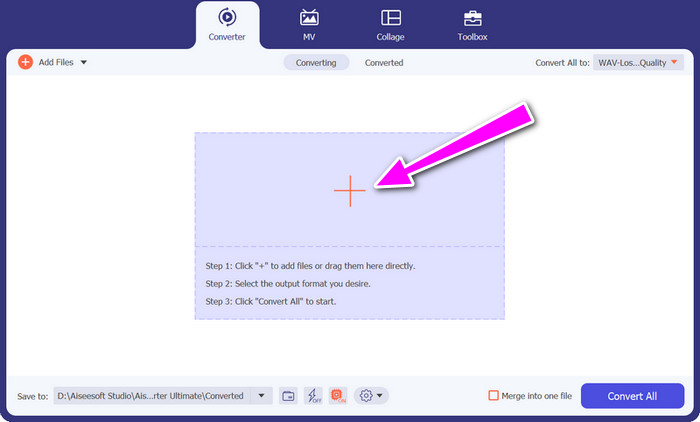
2단계. 도구를 실행한 다음, 플러스(+) 아이콘 버튼을 클릭하여 파일을 추가합니다. 필요에 따라 여러 개의 파일이나 전체 폴더를 가져올 수 있습니다.
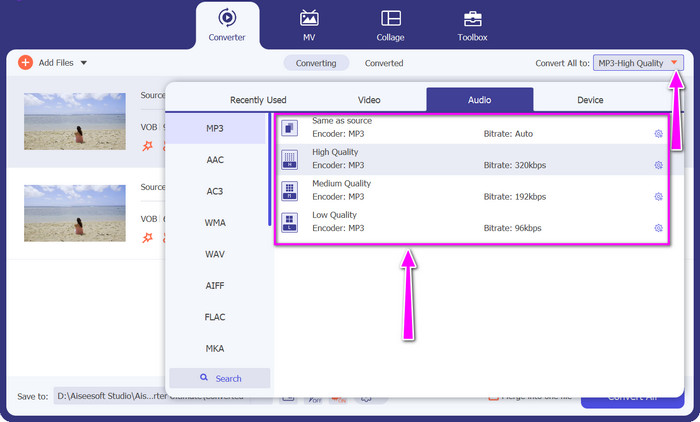
3단계. 이제 프로필(Profile) 드롭다운 목록에서 다양한 형식을 확인할 수 있습니다. 오디오(Audio) 탭을 선택한 뒤, 출력 형식으로 MP3를 고릅니다. 필요하다면 프로필 설정도 함께 조정할 수 있습니다.
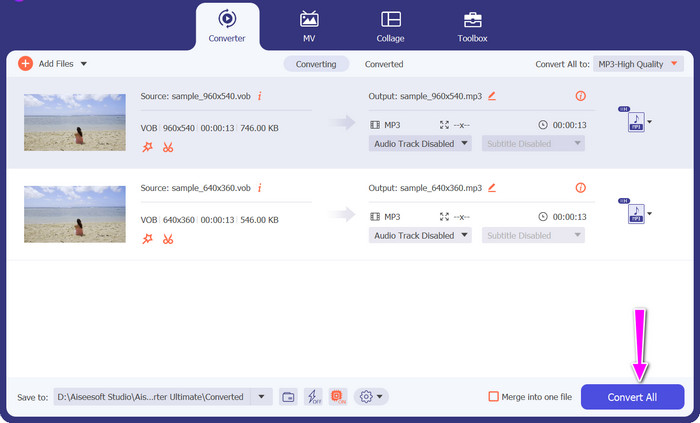
4단계. 모든 설정이 완료되었으면, 이제 VOB 파일을 MP3로 변환할 수 있습니다. 모두 변환(Convert All) 버튼을 클릭해 변환을 시작합니다.
장점
- 고급 기능을 갖춘 강력한 데스크탑 소프트웨어.
- Windows 및 Mac에서 VOB를 MP3로 변환합니다.
- 오디오 설정에 대한 다양한 사용자 지정 옵션을 제공합니다.
단점
- 컴퓨터에 설치해야 합니다.
- 일부 고급 기능은 유료 버전이 필요할 수 있습니다.
2. 핸드 브레이크
HandBrake는 광범위한 형식 호환성으로 잘 알려진 인기 있는 오픈 소스 비디오 변환기입니다. 주로 비디오 변환에 중점을 두고 있지만 VOB 파일에서 오디오 트랙을 추출하여 MP3로 변환하는 것도 지원합니다.
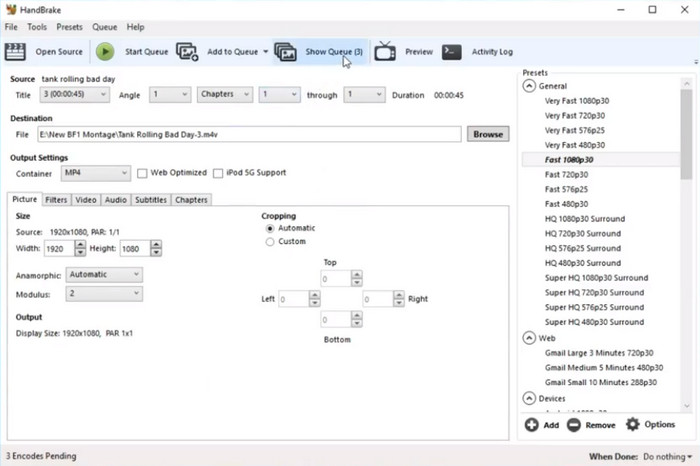
1단계. HandBrake를 실행합니다. 그런 다음 Open Source를 클릭하고 변환할 VOB 파일을 선택합니다.
2단계. 이번에는 원하는 출력 설정을 지정합니다. 오디오 형식으로 MP3를 선택하고, 필요하다면 오디오 세부 설정을 사용자 지정합니다.
3단계. Start 버튼을 눌러 변환을 시작합니다.
장점
- 오픈 소스 소프트웨어는 무료로 사용할 수 있습니다.
- 다양한 비디오 및 오디오 형식을 지원합니다.
- 쉽게 변환할 수 있도록 다양한 사전 설정을 제공합니다.
단점
- 초보자에게는 인터페이스가 복잡할 수 있습니다.
- 비디오에 비해 오디오 변환에 대한 초점이 제한적입니다.
3. 무료 비디오 변환기 온라인
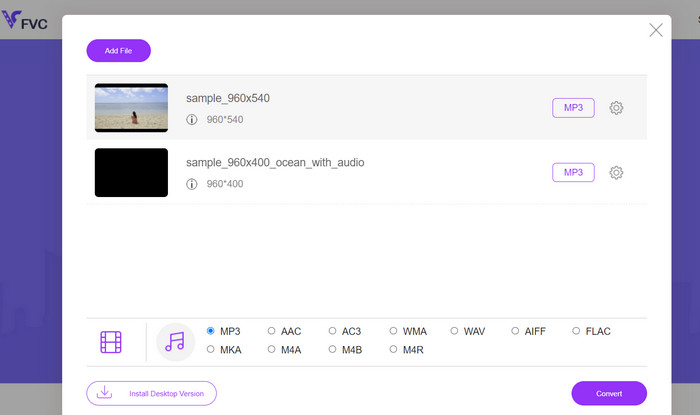
Free Video Converter Online은 별도의 프로그램 설치 없이 VOB를 MP3로 변환할 수 있는 편리한 웹 기반 도구입니다. 인터페이스가 직관적이고 변환 속도도 빠른 편입니다. 이를 염두에 두고, 다음은 온라인에서 무료로 VOB를 MP3로 변환하는 방법입니다.
1단계. Free Video Converter Online 웹사이트에 접속합니다. 그런 다음 Add Files to Convert를 클릭해 변환할 VOB 파일을 업로드합니다.
2단계. 다음으로 최종 출력 형식으로 MP3를 선택하고, 필요하다면 취향에 맞게 사운드 설정을 조정합니다.
3단계. 마지막으로 Convert 버튼을 클릭해 변환을 시작합니다.
장점
- 소프트웨어 설치가 필요하지 않습니다.
- 빠른 변환 속도.
- 인터넷에 연결된 모든 장치에서 액세스할 수 있습니다.
단점
- 인터넷 연결이 필요합니다.
- 데스크톱 소프트웨어에 비해 제한된 사용자 정의 옵션.
4. 잠자르
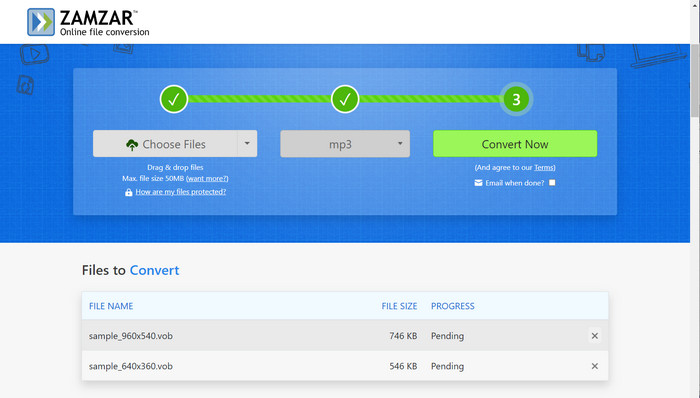
Zamzar는 지원되는 다양한 파일 형식으로 유명합니다. VOB 파일에 비디오, 오디오 또는 자막이 포함되어 있든 이 VOB to MP3 변환기를 사용하면 오디오 트랙을 추출하고 MP3로 정확하게 변환할 수 있습니다. 이러한 다재다능함 덕분에 VOB 파일을 변환하고 결과 MP3 오디오를 다양한 장치 및 플랫폼에서 즐길 수 있습니다.
1단계. 먼저 Zamzar 웹사이트에 접속하여 Add Files를 클릭하고 VOB 파일을 업로드합니다.
2단계. 출력 형식으로 MP3를 선택합니다. 그다음 변환된 파일을 받을 이메일 주소를 입력합니다.
장점
- 다양한 파일 형식을 지원합니다.
- 파일 공유 및 클라우드 스토리지 통합과 같은 추가 기능을 제공합니다.
단점
- 인터넷 연결이 필요합니다.
- 처리 시간은 파일 크기 및 서버 부하에 따라 달라질 수 있습니다.
추가 읽을거리:
VOB를 MP4로 – VOB 파일을 무료로 대량 MP4로 변환하는 3가지 방법
FLV 동영상 파일을 MP3 형식으로 변환하는 4가지 100% 작동 방법
파트 3. VOB에서 MP3로의 FAQ
MP3 파일을 VOB 형식으로 변환할 수 있습니까?
아니요, VOB 형식은 주로 DVD의 비디오 파일에 사용됩니다. MP3 파일은 오디오 전용이며 VOB 형식으로 변환하는 것은 지원되지 않거나 필요하지 않습니다.
여러 VOB 파일을 MP3로 한 번에 변환할 수 있나요?
예, 많은 변환 도구가 일괄 변환을 지원하므로 여러 VOB 파일을 동시에 MP3로 변환하여 시간과 노력을 절약할 수 있습니다.
VOB에서 MP3로 변환하는 동안 파일 크기나 재생 시간에 제한이 있나요?
일부 온라인 변환기는 무료 변환을 위해 파일 크기 또는 기간에 제한을 둘 수 있습니다. 유료 또는 프리미엄 버전은 종종 더 높은 한도 또는 무제한 전환을 제공합니다.
VOB 파일을 MP3로 변환하는 것이 합법적입니까?
VOB 파일을 MP3로 변환하는 합법성은 해당 국가의 저작권법과 변환하는 콘텐츠의 사용 권한에 따라 다릅니다. 저작권이 있는 자료를 변환하기 전에 필요한 권한이 있는지 확인하는 것이 가장 좋습니다.
보호되거나 암호화된 VOB 파일을 MP3로 변환할 수 있습니까?
아니요, 보호되거나 암호화된 VOB 파일은 MP3로 직접 변환할 수 없습니다. 변환하기 전에 VOB 파일의 암호를 해독하거나 보호를 제거해야 합니다.
결론
VOB를 MP3로 변환하면 유연성과 편의성이 크게 향상됩니다. 다양한 도구를 충분히 비교·분석한 뒤, 자신의 요구에 가장 잘 맞는 프로그램을 선택해 보시기를 권장합니다. 이를 통해 널리 사용되는 MP3 형식으로 VOB 파일의 활용도를 최대한 끌어올릴 수 있습니다.
-
 VOB 파일을 온라인 및 무료로 압축하는 방법 [다운로드 없음]
 VOB 파일을 압축하는 방법을 찾고 있습니까? 이 기사에서 VOB 파일 크기를 줄이는 가장 좋은 방법을 알아보십시오.
-
 VOB 파일이란 무엇이며 무료로 VOB 파일을 GIF로 변환하는 방법
 VOB 파일과 리핑 후 공유하는 방법에 대해 더 알고 싶으십니까? 또는 VOB를 GIF로 변환해야 하는 이유는 무엇입니까? 그런 다음 이 기사를 주의 깊게 읽으십시오.
-
 MP4를 MP3 오디오로 변환하는 8 가지 방법 (일괄 변환 및 대형 크기)
 MP4 비디오에서 MP3 오디오를 추출하려면이 기사를 확인하고 8 가지 솔루션을 얻을 수 있습니다. 휴대폰이나 컴퓨터에서 MP4를 MP3로 쉽게 변환하는 온라인 및 오프라인 방법이 있습니다.
