


 비디오 컨버터 궁극
 스크린 레코더
 비디오 수리
'이 비디오를 재생할 수 없습니다 오류 코드 23301' 수정 방법
동영상 스트리밍이나 시청은 이제 우리의 일상생활에서 떼어놓을 수 없는 일부가 되어, 엔터테인먼트와 교육, 그리고 현실로부터의 휴식을 제공합니다. 그러나 이 동영상 파일을 재생할 수 없습니다. 오류 코드 23301와 같은 동영상 오류를 만나면 시청 흐름이 완전히 깨져 버릴 수 있습니다. 이제 걱정은 접어두어도 됩니다. 이 글에서 이 문제가 발생하는 일반적인 원인들을 살펴보고, 끊김 없이 다시 스트리밍을 즐길 수 있도록 도와줄 실질적인 해결 방법들을 소개하겠습니다.

1부. 비디오 품질을 변경할 때 비디오 오류 코드 23301이 나타나는 이유
비디오 오류 코드 23301의 발생은 여러 가지 요인으로 인해 발생합니다. 다음은 비디오에서 비디오 품질을 변경할 때 오류 코드 23301이 나타나는 비디오 파일을 재생할 수 없을 때 찾아야 하는 이유입니다.
네트워크 또는 재생 문제.
오류 코드 23301은 동영상 재생 중 네트워크나 재생 과정에서의 문제로 인해 발생할 수 있습니다. 주된 원인 중 하나는 느리거나 불안정한 인터넷 연결입니다. 네트워크가 필요한 속도로 데이터를 전송하지 못하면, 동영상 재생이 중단되면서 이 동영상 파일을 재생할 수 없습니다 오류 코드 23301이 표시되고, 이로 인해 결국 매우 답답한 시청 경험을 하게 됩니다.
호환성 또는 디코딩 문제.
이 오류는 일반적으로 재생 중인 비디오 파일과 관련된 호환성 또는 디코딩 문제와 관련이 있습니다. 비디오 파일이 플레이어나 플랫폼과 호환되지 않아 디코딩 및 재생이 어려운 파일 형식 호환성 문제가 원인일 수 있습니다. 또한 코덱 문제로 인해 오류가 발생할 수 있으며, 특히 비디오가 플레이어나 시스템에서 지원하지 않는 특정 코덱을 사용하는 경우 더욱 그렇습니다.
백엔드 동영상 서버 문제.
이 비디오 파일을 재생할 수 없습니다. 오류 코드 23301은 시청자를 인증하고 비디오 스트림을 관리하는 비디오 서버의 백엔드 문제로 인해 발생할 수 있습니다. 가능한 원인 중 하나는 인증 실패로, 시청자가 비디오를 시청하는 데 필요한 권한이 있는지 확인하는 데 어려움을 겪어 비디오 서버에서 오류가 표시되는 것입니다.
2부. 2 비디오 오류 코드 23301 수정 방법 [온라인]
온라인에서 비디오 오류 코드 23301을 수정할 수 있는 방법에는 여러 가지가 있습니다. 이 비디오 문제를 해결하기 위해 세 가지 단계별 해결 방법을 제공합니다.
방법 1. 브라우저 캐시 지우기
브라우저 캐시를 지우면 잠재적인 손상, 오래된 데이터 및 충돌을 해결하여 비디오 오류 코드 23301을 포함한 비디오 재생 문제를 해결합니다. 필수 요소를 새로 다운로드하고 최신 데이터와 구성을 가져옵니다.
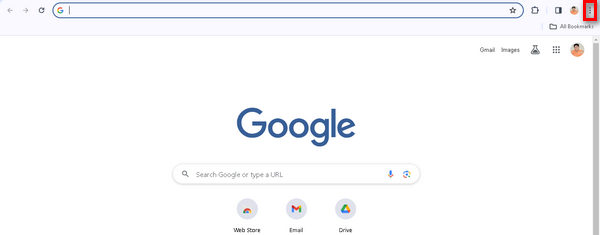
1단계. 브라우저 오른쪽 상단의 점 세 개 아이콘을 클릭합니다.
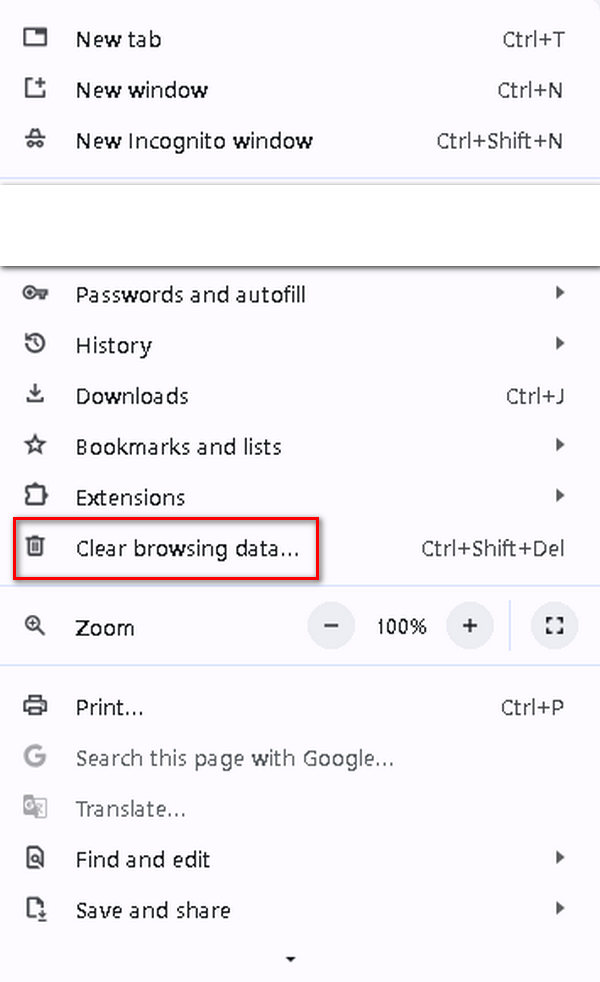
2단계. 그다음 인터넷 사용 기록 삭제를 선택합니다.
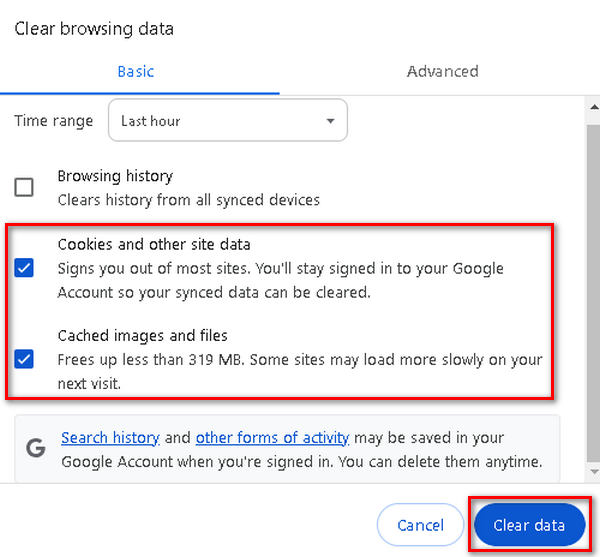
3단계. 쿠키 및 기타 사이트 데이터와 캐시된 이미지 및 파일을 선택한 후, 데이터 삭제를 클릭합니다.
방법 2. 시크릿 모드 사용
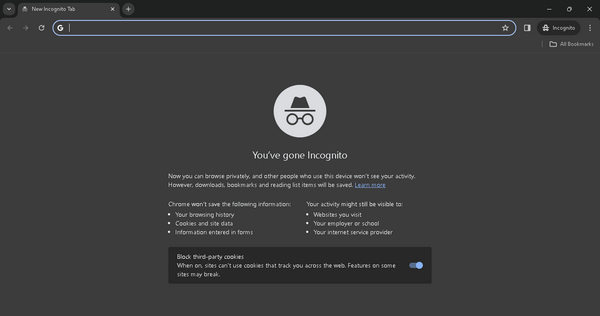
시크릿 모드를 사용하면 캐시된 데이터에 의존하지 않고 새 탐색 세션을 생성하여 비디오 오류 코드 23301을 해결할 수 있으며, 잠재적으로 브라우저 캐시의 손상되거나 오래된 정보와 관련된 문제를 해결할 수 있습니다. 또한 시크릿 모드는 확장 기능을 비활성화하여 브라우저 확장 기능 오작동으로 인한 충돌을 식별하고 해결하는 데 도움이 됩니다. 이 모드의 기본 개인정보 보호 설정은 웹사이트별 개인정보 보호 설정과 사용자의 일반 브라우저 구성 간의 충돌을 방지하여 비디오 재생 문제에 대한 간단한 솔루션을 제공할 수도 있습니다.
1단계. 브라우저 화면 오른쪽 상단의 세 개 점 아이콘을 클릭합니다.
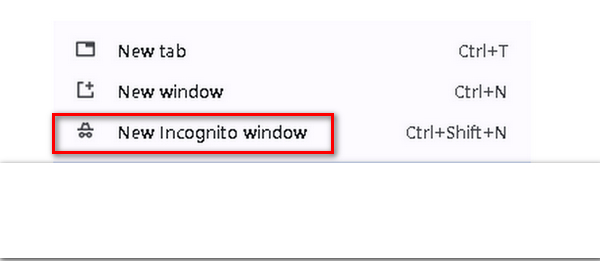
2단계. 드롭다운 메뉴에서 새 시크릿 창을 선택합니다.
3단계. 새 창이 열리면, 이제 이 새로운 브라우저 창에서 오류 코드 23301이 표시되는 동영상을 재생해 볼 수 있습니다.
3부. 재생 중 비디오 오류 코드 23301을 해결하는 방법 [오프라인]
오프라인으로 동영상을 재생하는 도중 '이 동영상 파일을 재생할 수 없습니다. 오류 코드 23301' 메시지가 나타나더라도 너무 걱정할 필요는 없습니다. 동영상 복구 도구를 사용하면 빠르게 문제를 해결할 수 있기 때문입니다. 이 문제를 해결하는 데 사용할 수 있는 최고의 동영상 복구 도구 중 하나가 바로 FVC Video Repair입니다. 이 도구를 사용하면 오류 코드 23301을 포함한 일반적인 동영상 문제들을 복구할 수 있습니다. 사용 방법은 아래 단계들을 참고하세요.
1단계. 먼저 공식 웹사이트에 접속합니다. 프로그램을 다운로드하고 기기에 설치합니다.
Free DownloadWindows 7 이상용안전한 다운로드
무료 다운로드MacOS 10.7 이상용안전한 다운로드
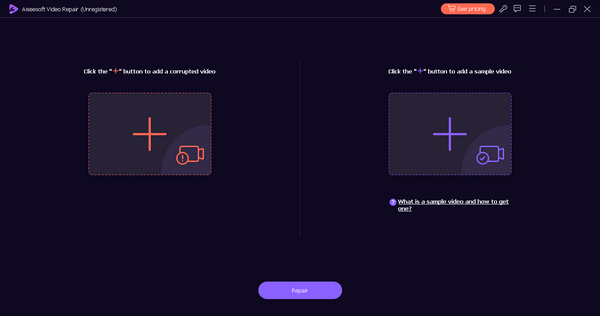
2단계. 다음으로, 오류 코드 23301 메시지가 표시되는 동영상을 빨간색 플러스 버튼을 클릭해 추가합니다. 마찬가지로 파란색 플러스 버튼을 클릭해 샘플 동영상도 추가합니다.
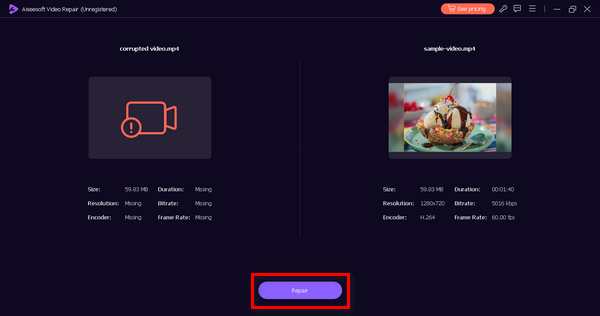
3단계. 그런 다음 복구 버튼을 클릭해 동영상 복구 과정을 시작합니다.
4단계. 마지막으로 미리보기 버튼을 눌러 동영상에 더 이상 오류 코드 메시지가 표시되지 않고 정상적으로 재생되는지 확인합니다. 모두 이상이 없다면 저장 버튼을 눌러 파일을 저장합니다.
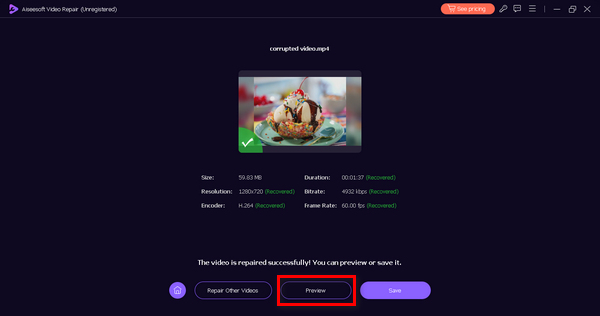
이와 같은 오프라인 방식으로, '이 동영상 파일을 재생할 수 없습니다. 오류 코드 23301' 메시지가 표시되는 동영상을 FVC Video Repair 도구를 사용해 손쉽게 복구할 수 있습니다. 또한 이 도구는 224003, 232404 등 다양한 동영상 재생 오류도 함께 해결할 수 있습니다.
4부. 비디오 오류 코드 23301에 대한 FAQ
오류 코드 224003/102630/232011은 동일합니까?
아니요, 오류 코드 224003, 102630, 232011은 오류 코드 23301과 동일하지 않지만 비디오 재생 문제와 관련이 있습니다. 각 오류 코드는 일반적으로 비디오 재생 프로세스의 다양한 문제를 나타냅니다. 직면한 특정 문제를 진단하고 해결하려면 특정 오류 코드를 참조하는 것이 중요합니다.
비디오 플레이어가 작동하지 않는 이유는 무엇입니까?
인터넷 연결 불량, 오래된 브라우저, 호환되지 않는 브라우저 확장 프로그램, 비디오 플랫폼 자체 문제 등 다양한 이유로 비디오 플레이어가 작동하지 않을 수 있습니다.
Netflix에 오류 코드 23301이 있나요?
예. Netflix에 오류 코드 23301이 발생할 수 있지만 특정 오류 코드는 플랫폼과 디바이스에 따라 다를 수 있습니다.
내 브라우저에서 업데이트를 어떻게 확인할 수 있나요?
브라우저의 업데이트를 확인하려면 일반적으로 브라우저의 설정 메뉴에서 이 옵션을 찾을 수 있습니다. Google Chrome, Mozilla Firefox 및 Microsoft Edge에서는 일반적으로 도움말 또는 정보 아래에 있습니다. 브라우저를 업데이트하면 호환성 문제를 해결하고 전반적인 성능을 향상시킬 수 있습니다.
브라우저 캐시를 지운 후에도 비디오 오류가 지속되면 어떻게 해야 합니까?
브라우저 캐시를 지운 후에도 코드 23301을 포함한 비디오 오류가 지속되면 브라우저 업데이트를 확인하거나 시크릿 모드와 같은 대체 브라우저를 사용해 보세요. 여러 브라우저에서 문제가 지속되는 경우 특정 비디오 플랫폼 또는 서비스의 지원 팀에 문의하여 추가 지원을 받아야 할 수도 있습니다.
결론
이 동영상 파일을 재생할 수 없습니다. 오류 코드 23301은 정말 흥을 깨는 오류입니다. 하지만 이 글에서 소개한 안내를 따르면 오프라인이든 온라인이든 이 문제를 쉽게 해결할 수 있습니다. 이제 이 오류에 대해 이해하게 되었으니, 시청 경험을 망치는 동영상 오류에 더 이상 발목 잡힐 이유가 없습니다.
-
 0xc00d5212 오류 코드는 무엇이며 어떻게 해결합니까?
 오류 코드 0xc00d5212가 발생하는 경우 이 가이드가 도움이 됩니다. 오류를 해결하려면 다음 문제 해결 방법을 따르십시오.
-
 비디오의 0xc10100bf 오류는 무엇이며 해결 방법
 오류 0xc10100bf로 인해 비디오가 재생되지 않고 해결 방법을 찾고 계십니까? 이 글에서는 그것이 무엇인지, 그리고 어떻게 해결하는지 배울 것입니다.
-
 비디오 오류 5 문제를 재생할 수 없는 문제를 쉽게 해결하는 방법
 다운로드한 비디오 중 하나를 재생했지만 비디오를 재생할 수 없음 오류 5 메시지로 인해 중단된 적이 있습니까? 여기에 당신이 알아야 할 모든 것이 있습니다.
