


 비디오 컨버터 궁극
 스크린 레코더
 비디오 수리
 안전한 다운로드
Facebook 무료 및 온라인 용 비디오 압축 방법
How to compress a large video file for Facebook is a question asked by many users.
다른 소셜 미디어 서비스와 마찬가지로 Facebook도 동영상을 업로드하기위한 엄격한 동영상 요구 사항이 있으며 동영상 크기도 그중 하나입니다.
To send the video to Facebook online or via the Messenger app smoothly, you have to reduce video size firstly.
That’s what you will learn from this post, a free way to shrink video file size for Facebook.

1 부. Facebook 비디오 업로드 종
Facebook 용 동영상을 압축하기 전에 동영상 업로드를위한 Facebook의 요구 사항이 무엇인지 확인해 보겠습니다.
Video size: Up to 10 GB for posting and up to 25 MB in the Messenger app as an attachment.
Video resolution: 1080p HD or less.
Video format: All types of video files, but MP4 is recommended.
Video length time: Less than 240 minutes long.
Audio: Stereo AAC audio compression with 128kbps or more is recommended.
To be clear: The video size for Facebook should be less than 10GB. However, if your Internet connection is slow, then a smaller video size with a high resolution is recommended.
2 부. Facebook 용 동영상 크기 압축 해제 방법
The key to compressing a video file size is to find a video compressor tool. Free Online Video Compressor is an easy-to-use video size shrink program online. Without downloading an extra video compressor, it can easily compress a video from 1GB to 15MB, 10MB, even smaller. Even if your video file is larger than 10GB, this freeware can complete the video compression process within simple steps. Besides, it can:
1. Facebook, Instagram, YouTube 등의 동영상 압축
2. 비디오 해상도 조정 (1080p HD, 720p HD, 640p, 480p 등)
3. 워터 마크없이 100% 무료 비디오 크기를 줄입니다.
4. 비디오 형식을 Facebook 지원 유형으로 변환합니다.
Facebook의 비디오 파일 크기를 줄이는 프로세스는 몇 가지 간단한 단계로 수행 할 수 있습니다.
Step 1. Upload a large video online
Open this free online video compressor site via your browser on computer. Click the Add Files to Compress button, and then a pop-up window appears, which requires you to download and install a video launcher. With it, you can compress and download the compressed video file automatically.
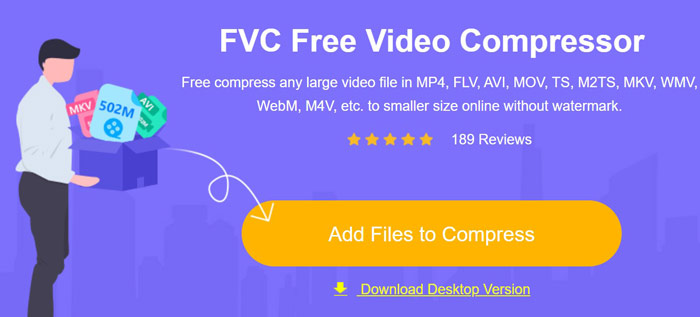
성공적으로 설치 한 후 오픈 소스 창이 나타나고 Facebook 용으로 압축 할 대용량 비디오 파일을 선택하고 업로드하기 만하면됩니다.
Step 2. Adjust settings for video compression
여기에서 압축 설정을 조정하여 더 작은 비디오 파일을 얻을 수 있습니다.
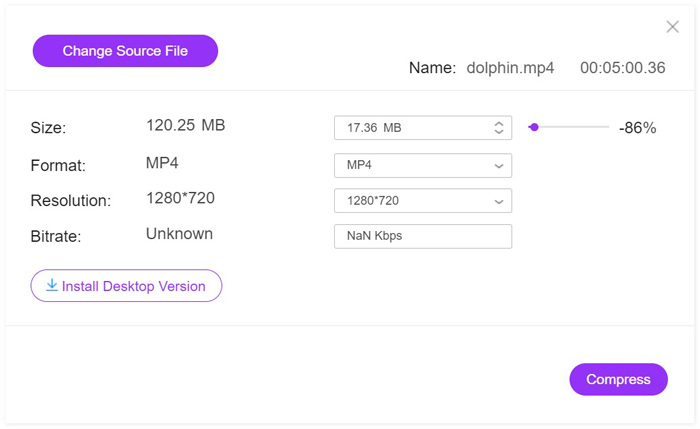
Next to Size, you can click the arrow-down or arrow-up icon to adjust the output video size. Alternatively, just move the slide bar to control the video size. It can help shrink the video size from GBs to MBs like 25, 20, 10, even smaller.
해상도는 1080p HD, 720pHD 등과 같은 고해상도를 지원합니다.
비디오 파일 크기를 조정하는 동안 비디오 파일의 비트 전송률도 이에 따라 변경됩니다.
마지막으로 MP4와는 별개로 비디오 형식으로 비디오를 WMV, MOV, MKV, M4V, FLV, MPG, YouTube 및 Facebook으로 직접 변환 할 수도 있습니다.
Step 3. Compress video for Facebook
After all the settings are made well, just click the Compress button, to select a location to save the compressed video file and start reducing video size.
압축이 완료되면 압축 된 비디오 파일이 저장된 폴더가 자동으로 열립니다.
아주 쉽죠? 무료 온라인 비디오 압축기를 사용하면 비디오 크기를 줄이고 비디오 형식을 변환하며 Facebook에 업로드하기위한 비디오 해상도를 제어 할 수 있습니다.
그러나 비디오 길이 시간이 240 분 이상이면 비디오 크기를 압축하고 비디오 길이를 줄이는 업그레이드 응용 프로그램 인 Video Converter Ultimate를 사용해 볼 수 있습니다.
Free DownloadFor Windows 7 or laterSecure Download
Free DownloadFor MacOS 10.7 or laterSecure Download
Part 3. Facebook의 비디오 파일 크기 줄이기에 대한 FAQ
내 동영상이 Facebook에 게시되지 않는 이유는 무엇입니까?
1.The video file does not meet the requirements that Facebook required.
2.Your browser is not the latest version.
3.Your network connection is weak.
Facebook 동영상 처리에 얼마나 걸리나요?
Facebook에 동영상을 업로드하는 데 소요되는 시간은 동영상 파일 크기와 인터넷 연결에 따라 다릅니다. 파일 크기가 작고 인터넷 연결이 강하면 시간이 짧아집니다.
Facebook에서 비디오 다운로드가 흐릿한 이유는 무엇입니까?
Facebook은 더욱 효율적인 재생을 위해 동영상 업로드를 압축합니다. 그러나 HD 설정에서 비디오를 자동으로 재생하도록 비디오 설정을 변경할 수 있습니다.
결론
Facebook의 엄격한 동영상 업로드 요구 사항으로 인해 파일 크기가 커서 Facebook에 동영상을 업로드 할 때 많은 사용자가 차단 될 수 있습니다. 이 게시물은 비디오 압축기를 사용하여 온라인에서 무료로 비디오 파일 크기를 줄이는 가장 쉬운 방법을 공유합니다. 따라 가면 Facebook에서 쉽게 비디오 크기를 줄일 수 있습니다.
이제 당신 차례입니다.
이 무료 온라인 비디오 압축기를 사용해 보시겠습니까?
아니면 다른 제안이 있습니까?
어쨌든, 아래에 귀하의 의견을 남겨주세요.
-
 Windows 및 Mac에서 DVD의 VOB 비디오에 참여하는 방법
 Windows 및 Mac에서 DVD의 VOB 비디오에 참여하는 방법은 무엇입니까? 다음은 추출된 VOB 파일을 결합하고 DVD에서 직접 병합하는 2가지 효율적인 방법입니다.
-
 최고의 MP4 비디오 편집 소프트웨어
 MP4 비디오 편집을 위해 컴퓨터를 사용하든 휴대폰에서 작업하든 상관없이 여기에서 Windows 및 Mac 용 최고의 MP4 편집기를 포함하여 몇 가지 훌륭한 옵션을 찾을 수 있습니다.
-
 무료로 MP4 비디오를 결합하는 최고의 6 최고의 MP4 비디오 결합 자
 서로 다른 MP4 클립을 연결하는 데 사용할 수있는 많은 MP4 결합자가 있습니다. 이 기사에서는 Windows 10/8/7 및 Mac 용 무료 MP4 결합자를 선택했습니다.
