


 비디오 컨버터 궁극
 스크린 레코더
 비디오 수리
 안전한 다운로드
수정 됨 : Google 드라이브 동영상이 Chrome에서 재생되지 않음
"이 동영상은 지원할 수 없습니다."
“우리는이 비디오를 작업하고 있습니다. 나중에 다시 확인해주세요.”
"이 동영상은 현재 재생되지 않습니다."
이러한 오류 메시지는 Google 드라이브 동영상이 재생되지 않을 때 발생할 수 있습니다. 비디오가 손상되었거나 파일이 너무 커서로드 할 수 없습니다. 그러나 주된 이유는 항상 비디오 형식이 Google 드라이브에서 지원되지 않거나 크롬 비디오 플레이어가 충돌하기 때문입니다. 대체로 그 이유는 Google 드라이브 또는 크롬 때문일 수 있습니다. 따라서이 기사는이 두 가지 측면에서 재생되지 않는 Google 드라이브 비디오를 수정하는 솔루션을 제공합니다.

1 부 : Google 드라이브로 인해 재생되지 않는 Google 드라이브 비디오 문제를 해결하는 방법
Google 드라이브로 인해 Google 드라이브 비디오가 재생되지 않는 주된 이유는 비디오 형식의 제한입니다. Google 드라이브에서 지원하는 모든 비디오 형식 :
- • WebM 파일 (Vp8 비디오 코덱, Vorbis 오디오 코덱)
- • MPEG4, 3GPP 및 MOV 파일 – (h264 및 mpeg4 비디오 코덱, AAC 오디오 코덱)
- • AVI (MJPEG 비디오 코덱 및 PCM 오디오)
- • MPEG-PS (MPEG2 비디오 코덱 및 MP2 오디오)
- • WMV
- • FLV (Adobe – FLV1 비디오 코덱, MP3 오디오 코덱)
- • MTS
- • OGG
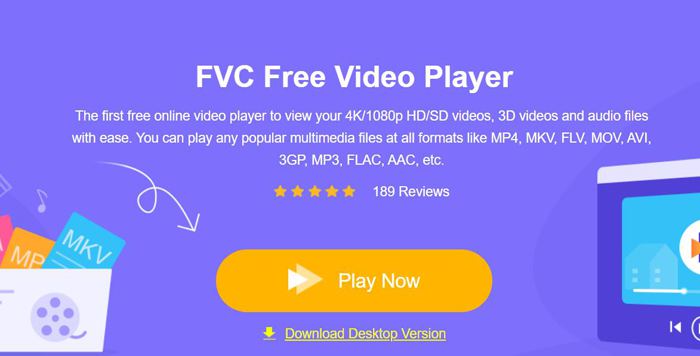
위 목록에 동영상 형식이 포함되어 있지 않다면, 다른 동영상 플레이어를 통해 해당 동영상을 재생해야 합니다. FVC 무료 비디오 플레이어가 가장 좋은 선택이 될 것입니다. 이 플레이어는 어떤 형식의 동영상이든 지원하며, DVD와 Blu-ray 파일도 재생할 수 있습니다. 또한 어떤 소프트웨어나 대용량 동영상을 다운로드하지 않고도, FVC 무료 비디오 플레이어 온라인을 통해 재생 불가한 Google 드라이브 동영상을 바로 무료로 열 수 있습니다.
1단계: 컴퓨터에서 임의의 크롬 브라우저를 열고 FVC 무료 비디오 플레이어 웹사이트로 이동합니다. 지금 재생 버튼을 클릭해 런처를 설치한 뒤, 이 버튼을 다시 클릭하여 비디오 플레이어를 엽니다. 그런 다음 파일 열기 버튼을 클릭해 Google 드라이브에서 원하는 동영상을 선택합니다.
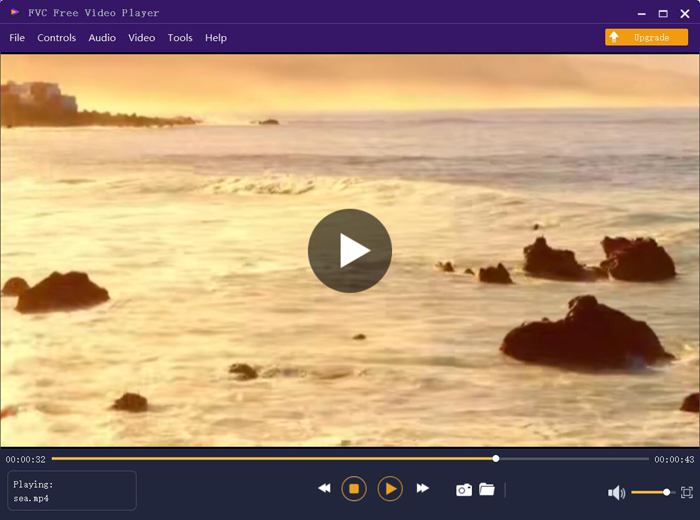
2단계: 그러면 오류나 제한 없이 동영상이 자동으로 재생됩니다. 게다가 볼륨, 재생 속도, 심지어 영상 효과까지 조절하여 시청 경험을 더욱 향상시킬 수 있습니다.
2 부 : Google 드라이브 동영상이 재생되지 않는 문제를 해결하는 5 가지 다른 솔루션
크롬으로 인한 몇 가지 문제도 있으며 다음 5 가지 해결책을 시도하여 Google 드라이브 비디오가 재생되지 않는 문제를 해결할 수 있습니다.
1. Google Chrome 또는 브라우저 플레이어 업데이트
다른 웹 사이트의 동영상도 Google 드라이브로 재생할 수없는 경우 Google Chrome 또는 브라우저의 동영상 플레이어가시기 적절하게 업데이트되지 않았을 가능성이 있습니다. Google Play 스토어로 이동하여 Google Chrome, HTML 5 Video Player 또는 Flash Video Player의 업데이트 정보를 확인할 수 있습니다.
2. 브라우저와 Google 드라이브의 캐시 및 쿠키 삭제
Google 크롬을 장기간 사용하면 브라우저에 많은 정크 파일이 저장되어 있어야 동영상을 재생할 때 버퍼가 발생합니다. 따라서 정기적으로 캐시와 쿠키를 지울 수 있습니다. 자세한 단계는 다음과 같습니다.
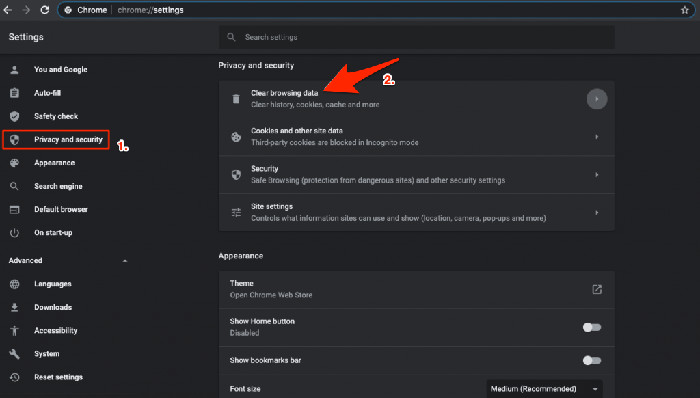
1단계: 오른쪽 상단의 세로 점 3개 아이콘을 클릭한 뒤 설정 옵션을 선택합니다. 그런 다음 왼쪽 패널에서 개인정보 및 보안 옵션을 클릭하면 인터넷 사용 기록 삭제 옵션을 찾을 수 있습니다.
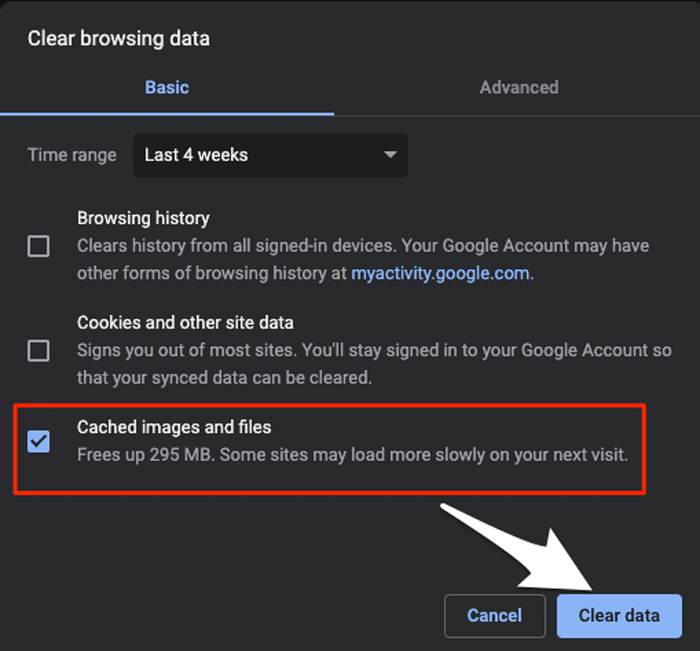
2단계: 창이 나타나면 캐시된 이미지 및 파일 항목을 선택한 뒤 데이터 삭제 버튼을 클릭합니다.
3. 서드파티 쿠키 활성화
Google 드라이브 도움말에는 동영상 재생에 대한 팁이 있습니다. Google 드라이브에서 동영상을 재생하려면 타사 쿠키를 사용 설정해야합니다. 따라서 Google 드라이브 동영상이 재생되지 않는 경우 브라우저의 쿠키를 확인할 수 있습니다.
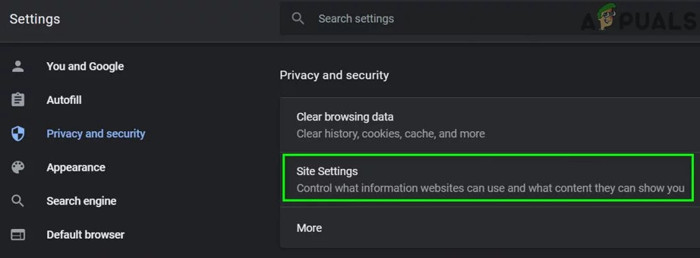
1단계: 해결 방법 2와 마찬가지로 먼저 개인정보 및 보안 옵션으로 이동해야 합니다. 그런 다음 사이트 설정 옵션을 클릭하고 쿠키 및 사이트 데이터 옵션을 선택합니다.
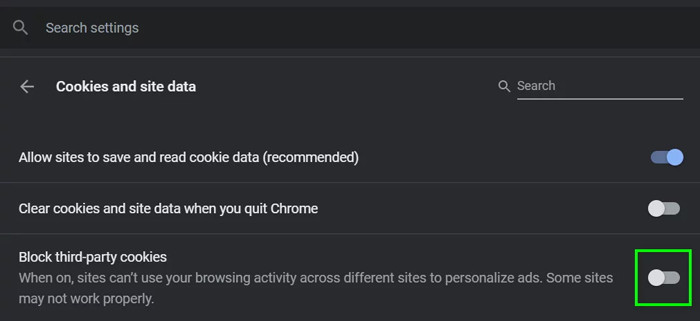
2단계: 서드파티 쿠키 차단 버튼을 끕니다. 이후 크롬과 Google 드라이브를 다시 시작한 뒤 동영상 재생을 시도해 보십시오.
4. 일부 Google 확장 프로그램 비활성화
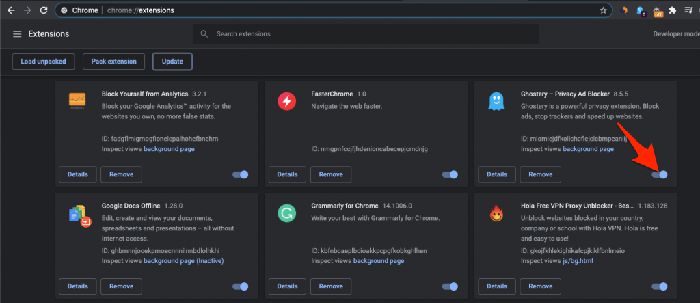
일부 Google 확장 프로그램은 브라우저에 추가 기능을 추가하는 데 사용되지만 일부는 프로그램 처리를 차단합니다. Google 드라이브 동영상이 재생되지 않는 것이이 문제의 원인인지 확인하려면 다음 단계에 따라 모든 확장 프로그램을 닫아야합니다.
단계: Google 확장 프로그램 페이지를 바로 열려면 주소창에 chrome://extensions 를 입력하면 됩니다. 그런 다음 확장 프로그램 토글을 클릭해 모든 확장 기능을 끕니다. 그 후 크롬을 종료했다가 다시 열어 동영상을 재생해 보십시오.
5. 다른 창에서 동영상 열기
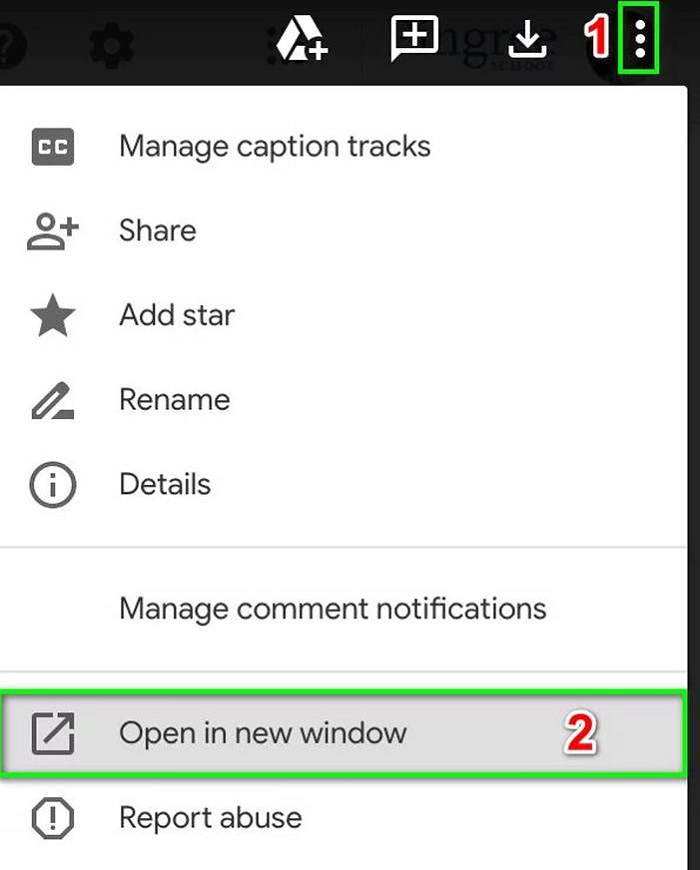
언급 된 솔루션이 작동하지 않는 경우 마지막 방법을 시도 할 수 있습니다. 다른 창에서 비디오를 열면 크롬이 비디오 정보를 다시 획득하고 동시에 네트워크를 새로 고칩니다.
단계: 먼저 Google 드라이브를 열고 재생하려는 동영상을 찾습니다. 그런 다음 오른쪽 상단의 점 3개 아이콘을 클릭하고 새 창에서 열기 옵션을 선택합니다.
파트 3 : Google 드라이브 동영상이 재생되지 않는 FAQ
1. AVI 형식의 Google 드라이브 동영상이 재생되지 않는 이유는 무엇입니까?
Google 드라이브는 AVI 형식을 지원하지만 해당 확장자를 다운로드해야합니다. Google 확장으로 이동하여 검색하고 다운로드하십시오.
2. 재생할 수없는 Google 드라이브 동영상을 다운로드하는 방법은 무엇입니까?
Chrome에서 Google 드라이브를 열고 내 드라이브 옵션을 선택합니다. 다운로드하려는 파일을 선택하고 오른쪽 상단 모서리에있는 점 3 개 아이콘을 클릭합니다. 그런 다음 다운로드 옵션을 선택하십시오.
3. Google 드라이브에서 4K 영화를 재생할 수 있습니까?
안 됩니다. Google 드라이브는 1920x1080p 해상도의 동영상만 지원합니다. 하지만 4K 동영상은 FVC 4K UHD 플레이어를 사용해 온라인으로 재생할 수 있습니다.
결론
Google 드라이브 동영상이 재생되지 않는 데는 여러 가지 이유가 있으며 오류 메시지는 항상 '이 동영상을 지원할 수 없습니다'입니다. 동영상 형식이 Google 드라이브에서 지원되지 않기 때문입니다. 이 경우 다른 전문 비디오 플레이어를 통해 비디오를 재생해야합니다. 또한 타사 소프트웨어를 다운로드하지 않고도 온라인에서 FVC Free Video Player를 사용해 볼 수 있습니다.
-
 Chrome에서 재생되지 않는 동영상을 수정하는 6 개의 검증 된 솔루션
 동영상이 Chrome에서 재생되지 않는 문제를 해결하려면 문제 해결을 읽고 확인 된 솔루션을 하나씩 수행하기 만하면됩니다.
-
 iPad에서 재생되지 않는 비디오를 수정하는 5 100% 작동 솔루션
 동영상이 iPad에서 재생되지 않습니까? 이 문제를 해결하는 데 도움이되는 다섯 가지 솔루션은 다음과 같습니다. 좋아하는 비디오를 핸드셋에서 쉽게 즐길 수 있습니다.
-
 Chromebook 2021에서 MP4 파일 재생
 Chromebook에서 동영상을 재생할 수 있습니까? Chromebook에서 USB의 MP4 파일을 재생하는 방법은 무엇입니까? 이 게시물은 Chromebook에서 MP4를 재생하는 3 가지 방법을 공유합니다.
