


 비디오 컨버터 궁극
 스크린 레코더
 비디오 수리
 안전한 다운로드
ASF 비디오를 녹화하기 위해 모든 플랫폼에서 사용 가능한 최고의 ASF 스트림 레코더
Microsoft는 ASF(Advanced System Format)라고도 하는 ASF 콘텐츠 형식을 개발했습니다. 또한 Mac 사용자도 이 형식을 사용할 수 있습니다. 마찬가지로 ASF는 Windows Media용 독립적 또는 종속적인 여러 오디오·비디오 콘텐츠를 담는 일종의 저장소 형식입니다. ASF 형식을 사용하면 비디오와 오디오 파일을 스트리밍할 수 있습니다. 다만 사용자들은 자신의 필요에 맞는 고급 ASF 스트리밍 레코더를 선택하는 일을 까다롭게 느끼기도 합니다. 아래에서 더 자세히 살펴보면, 여러분이 사용하는 플랫폼을 지원하는 다양한 도구를 확인할 수 있습니다. 아래 목록에는 ASF 파일 형식을 지원하는 최고의 ASF 레코더들이 나와 있습니다. 또한 각 도구의 세부 정보를 꼼꼼히 읽어 보시고, 소프트웨어와 그 고유한 기능을 함께 살펴보겠습니다.

1부. Windows 및 Mac용 최고의 ASF 레코더(제한적 및 무료)
FVC 무료 스크린 레코더
라이브 방송을 녹화하는 용도로 사용할 수 있는 완전 무료 도구가 바로 FVC Free Screen Recorder입니다. 인터넷만 있다면 스트림, 뉴스, 각종 라이브 방송을 나중에 다시 보기용으로 비용 없이 녹화해 두어도 전혀 문제가 되지 않습니다. 웹캠, 마이크 및 기타 하드웨어를 연결해 녹화에 활용할 수도 있습니다. 이 도구는 사용자가 모든 라이브 화면을 MP4 또는 WMV 형식으로 녹화할 수 있도록 해 줍니다. 또 하나 눈에 띄는 점은 설치가 필요 없다는 점입니다. 브라우저만 열어 실행하면, 나머지는 도구가 알아서 처리합니다. 더 자세한 설명을 이어가기 전에, 라이브 ASF 스트림을 이 레코더로 녹화하는 방법을 단계별로 정리했습니다.
1단계. 브라우저를 열고 FVC Free Screen Recorder 공식 사이트에 접속합니다. 링크를 클릭해 앱을 실행하면 됩니다. 화면에 플로팅 바와 빨간 점선이 표시될 것입니다.

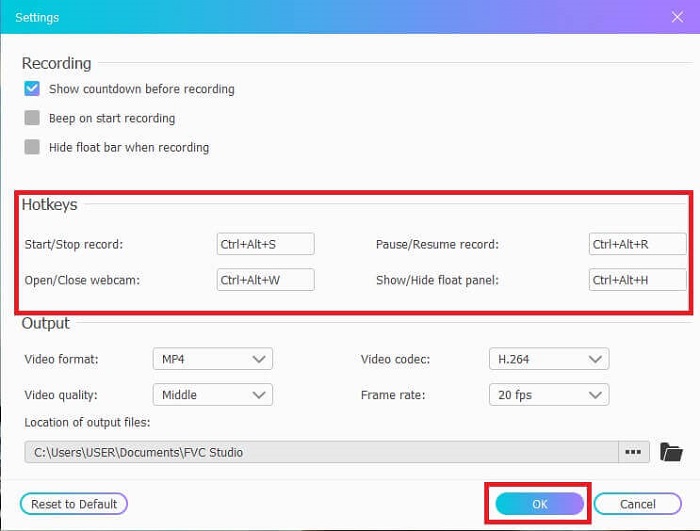
2단계. REC 아래에 있는 Settings 아이콘을 클릭합니다. 필요에 맞게 Hotkeys를 조정할 수 있습니다. 아래의 OK 버튼을 눌러 변경 사항을 저장합니다.
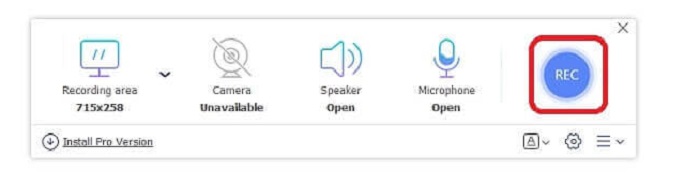
3단계. 필요하다면 프레임 크기를 조정해 화면 비율을 바꿉니다. 소리를 위해 Speaker를 켜고, 목소리를 추가하려면 Mic를, 자신의 모습을 함께 녹화하려면 Webcam을 켭니다. 동그란 REC 버튼을 눌러 ASF 비디오 녹화를 시작합니다.
4단계. 녹화가 시작되기까지 3초 동안 대기합니다. 또한 설정해 둔 컨트롤과 핫키 목록이 함께 표시됩니다.
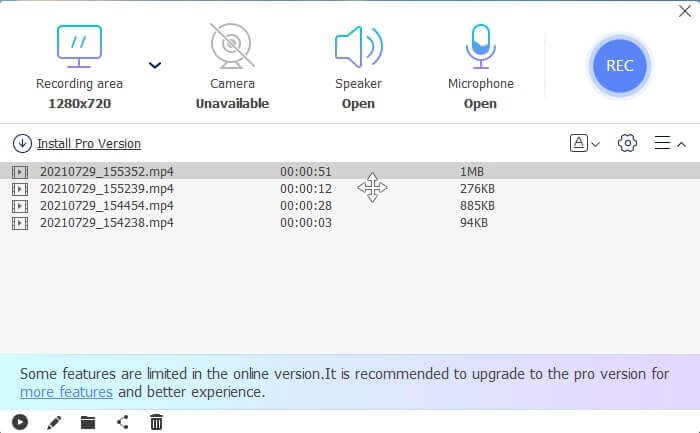
5단계. 녹화를 끝내려면 Square 모양 버튼을 클릭합니다. 가장 위에 있는 비디오 파일을 재생하면 방금 녹화한 영상이 재생됩니다. 영상을 재생한 뒤에는 Pencil 아이콘을 눌러 자르기, 그리기, 슬로 모션 효과 적용 등을 할 수 있습니다. 저장한 후 녹화된 영상을 감상하면 됩니다.
장점
- 온라인 무료 스크린 레코더. 다운로드가 필요하지 않으며 앱을 실행하기만 하면 됩니다.
- 사용자가 도구 자체를 쉽게 조작할 수 있는 사용자 친화적인 인터페이스입니다.
- 압축된 데이터로 인해 스토리지 친화적입니다. 스토리지에 대해 전혀 걱정할 필요가 없습니다.
단점
- 인터넷이 없으면 기록을 선별하는 것이 최선의 선택이 아닙니다. 이 도구는 인터넷에 의존하기 때문입니다.
2부. ASF 비디오를 녹화하는 다른 인기 있는 ASF 레코더(전문가 및 무제한)
1. FVC 스크린 레코더
이 화면 녹화 도구는 사용자 요구에 잘 부합하기 때문에 널리 사용됩니다. FVC Screen Recorder는 사용자 친화적인 인터페이스 덕분에 많은 이들의 선택을 받고 있습니다. 온라인이든 오프라인이든 화면에서 일어나는 모든 동작을 캡처할 수 있는 유료 다운로드형 도구입니다. 사용자가 사용하는 거의 모든 플랫폼을 지원합니다. 이 도구는 스크린캐스트에 필요한 최상급 기능을 제공하므로 ASF 스트림 레코더로 선택하기에 최적입니다. 게다가 예산은 낮게, 영상 품질은 전문가 수준으로 원하는 사용자에게도 잘 어울립니다. 아래 단계를 참고하시면, 이 도구로 화면 녹화하는 일이 얼마나 손쉽게 느껴지는지 알 수 있습니다.
1단계. 사용하는 운영체제가 Windows인지 Mac인지에 맞춰 Free Download 버튼을 클릭해 설치합니다. 자신의 용도에 맞게 preference 설정을 조정합니다. 도구를 실행하면 플로팅 툴바가 나타납니다.
무료 다운로드Windows 7 이상용안전한 다운로드
무료 다운로드macOS 10.7 이상용안전한 다운로드
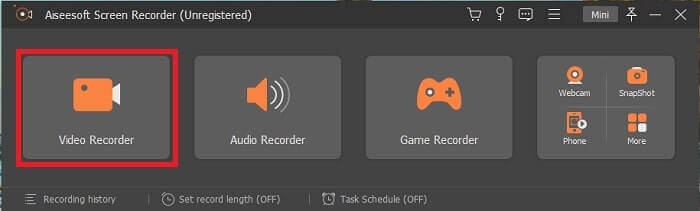
2단계. 화면에 보이는 내용을 녹화하려면 Video Recorder를 클릭합니다.
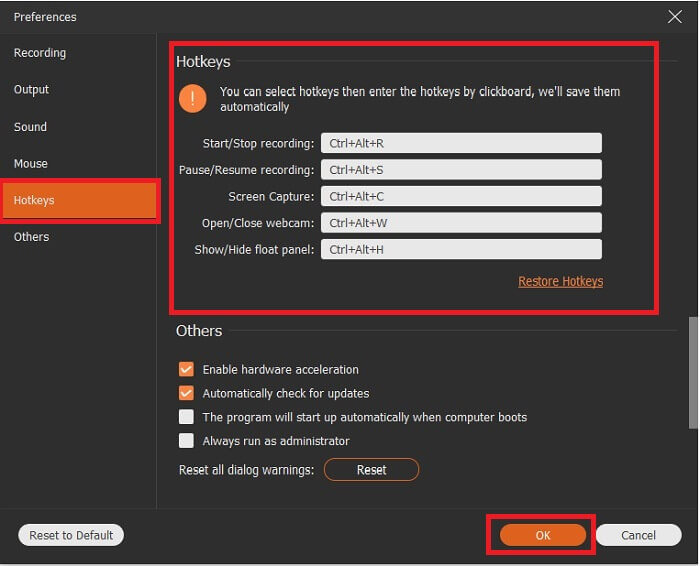
3단계. 이어서 Record setting 버튼을 클릭하면 설정 창이 표시됩니다. 인터페이스에서 Hotkeys를 클릭하고, 선호하는 Hotkeys를 녹화 전에 설정합니다. 조정이 끝나면 반드시 OK를 눌러 저장합니다.
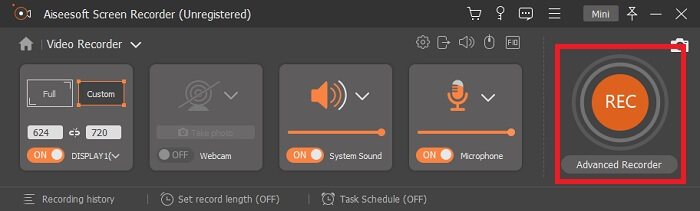
4단계. 화면의 특정 영역만 녹화하려면 Display 아래의 Custom을 클릭합니다. 또한 Speaker를 켜서 시스템 소리를 함께 녹음할 수 있습니다. 이 밖의 기능은 해당 하드웨어가 연결되어 있어야 작동합니다. 목소리를 녹음하려면 Microphone을 켜고, 화면 속 자신의 모습까지 기록하려면 Webcam을 켭니다. 설정을 마쳤다면 디스크 모양의 Rec 버튼을 눌러 녹화를 시작합니다. 3초 카운트다운 후 영상 녹화가 시작됩니다.
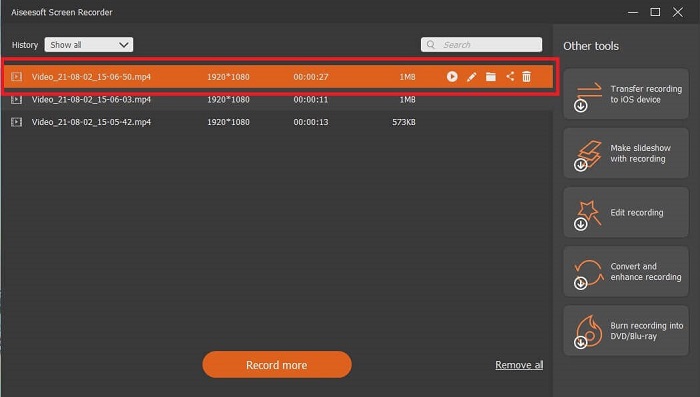
5단계. 녹화를 마치면 빨간색 Square 버튼을 눌러 종료하고, Save와 Next를 차례로 클릭해 진행합니다. Play 버튼을 눌러 방금 녹화한 라이브 스트림을 시청할 수 있습니다.
장점
- 이 도구의 독특한 기능은 잠금 화면 기능이 있어 사용자를 방해하지 않는다는 것입니다.
- 저렴하고 유연합니다. 모든 다른 플랫폼에서 사용할 수 있으므로 플랫폼을 변경하더라도 걱정할 필요가 없습니다.
- 비디오 출력 자체는 다른 스크린 레코더보다 뛰어납니다.
단점
- 비용이 많이 들지만 비싸지 않습니다.
- 다운로드하려면 2.4MB의 저장 공간이 필요합니다.
2. OBS 스튜디오
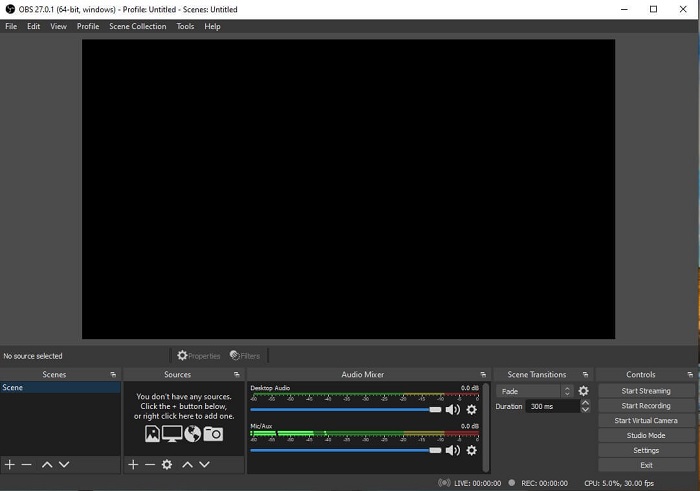
OBS Studio는 다운로드해 사용할 수 있는 무료 프로그램으로, 녹화와 스트리밍을 뛰어난 품질로 수행해 줍니다. 또한 커스텀 전환 효과를 통해 사실상 무제한에 가까운 장면 구성을 전환해 가며 사용할 수 있습니다. 하지만 ASF 레코더로 쓰기에는 프로그램 자체 용량이 다소 큰 편이며, 인터페이스에 표시되는 요소가 너무 많습니다. 오래된 UI로 인해 일부 요소가 다소 불편하고 거슬리게 느껴질 수 있습니다. 세부 옵션이 많아 초보자가 사용하기에는 최선의 선택이라고 보긴 어렵습니다.
장점
- 무료로 다운로드할 수 있습니다.
- VST를 지원하는 직관적인 오디오 믹서.
- 최대 8개의 다른 장면을 모니터링하고 두 번 클릭하여 쉽게 전환할 수 있습니다.
- 거의 모든 작업에 대해 단축키를 설정합니다.
단점
- 다운로드하려면 대용량 파일이 필요합니다.
- 인터페이스에 대한 세부 정보가 너무 많습니다.
3. 프랩
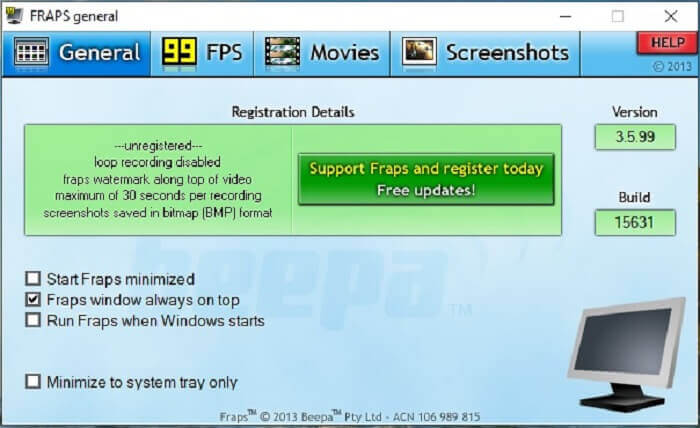
멋진 몽타주 영상과 다양한 동영상을 공유하고 싶다면 Fraps를 활용해 보십시오. 이 도구는 사용자에게 고품질의 영상을 제공합니다. 특히 120fps 지원 덕분에 ASF 스트리밍 분야에서 최고의 선택지 중 하나로 꼽힙니다. 다만 무료 버전은 최대 30초까지만 녹화할 수 있습니다. 또한 Fraps 창을 항상 다른 창 위에 표시하도록 설정해 프로그램이 작동 중임을 쉽게 확인할 수 있습니다. 마지막으로, Windows 시작 시 Fraps를 자동 실행되도록 설정해, 데스크톱을 켜자마자 바로 도구를 사용할 수도 있습니다.
장점
- 120fps 덕분에 고품질 비디오.
- 벤치마킹 소프트웨어는 화면 구석의 fps에 대한 자세한 정보를 제공합니다.
- 영상 시작부터 완성까지 문제 없습니다.
단점
- 무료 버전은 워터마크가 있는 30초 녹화에만 사용할 수 있습니다. 스크린샷은 BMP 형식으로만 사용할 수 있습니다.
- 압축되지 않은 파일 형식으로 인해 동영상을 위한 대용량 저장 공간. 소형 스토리지 데스크탑에는 최선의 선택이 아닙니다.
4. 쉐어엑스
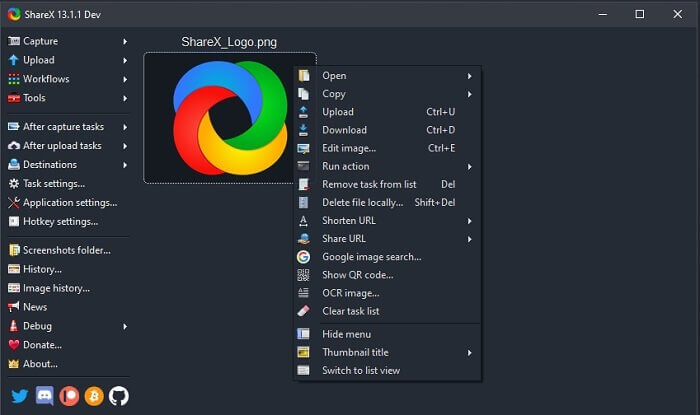
또 다른 유형의 레코더로 ShareX가 있습니다. 화면 캡처, 주석 추가, 업로드 기능이 매우 강력한 도구입니다. 하지만 프로그램 자체가 다소 다루기 어려워, 기능을 익히는 데 시간이 꽤 걸립니다. 이미지는 물론 텍스트와 기타 다양한 형식의 파일을 80개가 넘는 업로드 대상 중에서 골라 전송할 수 있습니다. 그럼에도 불구하고 초보자에게는 친절하지 않은 도구입니다. 영상을 손쉽게 녹화하고 스트리밍하기보다는, 도구 사용법을 익히는 데 더 많은 시간을 써야 할 수도 있습니다.
장점
- 오픈 소스이며 무료입니다.
- 더 나은 ASF 스트림 레코더를 위해 키보드 단축키를 사용자 정의할 수 있습니다.
- 화면 캡처를 수행하고 주석을 달고 쉽게 업로드할 수도 있습니다.
단점
- 새로운 사용자에게는 너무 압도적이며 전문가일지라도 이 도구는 많은 것을 받아들여야 합니다.
- 맬웨어 문제.
3부. 비교 차트
기사를 읽는 것을 좋아하지 않는다면 이 차트가 결정에 도움이 될 것입니다.
| 풍모 | FVC 무료 스크린 레코더 | FVC 스크린 레코더 | OBS 스튜디오 | 프랩 | 쉐어엑스 |
| 비디오/오디오 화면 녹화 |  | | | | |
| 단축키 가용성 | | | | | |
| 잠금 화면 기능 |  | | | | |
| 녹음 중 편집 도구 | | | | | |
| 맬웨어 안전 | | | | | 실행 파일이 있습니다. 어떤 경우에는 컴퓨터가 손상될 수 있습니다. 그러나 다운로드하는 것이 안전합니다. |
| 사용 가능한 운영 체제 | 모든 플랫폼에서 | 모든 플랫폼에서 | 모든 플랫폼에서 | Windows XP, 2003, Vista 및 Windows 7 | 윈도우 |
| 파일 크기 | 런처용 몇 kb 온라인 다운로드 없음 | 2.1MB | 85.8MB | 2.4MB | 7.84MB 최신. |
| 도구의 복잡성 | 사용하기 쉽고 매우 직관적인 설정. | 사용하기 쉽고 매우 직관적인 설정. | 복잡하지만 배우기 어렵지 않습니다. | 포인트 도구에 간단하지만 많은 일이 있습니다. | 작동하기 쉽지만 매우 정확하지는 않습니다. |
| 사용 가능한 출력 형식 | ASF 및 MP4 | WMV, MP4, MOV, F4V, TS, AVI, WMA, MP3, M4A, AAC, PNG, JPG / JPEG, BMP, GIF, TIFF | FLV 및 MKV | AVI 형식 | MP4, WebM, MKV, AVI |
| 가격 범위 | 무료 오픈 소스 온라인 | 1개월 동안: $25.00 1년 동안: $31.20 평생 라이센스: $55.20 | 무료로 다운로드할 수 있는 도구 | 무료이며 $37에 등록할 수도 있습니다. | 영구 계획 $59.99 연간 계획 $39.99/년 월간 요금제 $7.99/월 |
파트 4. ASF 레코더에 대한 FAQ
ASF 파일에는 무엇이 있습니까?
이것은 ASF 파일의 헤더, 데이터 및 단순 색인의 3개 섹션으로 나뉩니다.
ASF 파일에 저장된 다른 확장 데이터는 무엇입니까?
.WMA와 같은 파일 확장자는 오디오 손실 파일 형식입니다. .mp3 오디오 형식보다 더 나은 품질의 사운드를 생성합니다. 다른 하나는 .WMV로, 일반적으로 창에 대량의 비디오 출력을 저장하는 데 사용됩니다. 또한 Windows 태블릿, Lumia 또는 Windows PC를 사용하는 경우 고품질 비디오를 제공하고 데이터를 위한 작은 디스크 공간을 절약하므로 이러한 유형의 형식을 사용하는 것이 좋습니다.
VLC는 이러한 유형의 형식을 지원합니까?
네, VLC 미디어 플레이어는 이 형식을 지원합니다. 인코딩과 디코딩을 모두 처리할 수 있기 때문입니다. 그 밖에 Windows에서 사용할 수 있는 미디어 플레이어로는 GOM Player, Media PlayerLite, PotPlayer 등이 있습니다. Mac에서는 QuickTime이 이에 해당합니다.
결론
최종 분석에서 위의 목록에서 귀하의 필요에 맞는 최상의 ASF 레코더를 선택하십시오. 일부는 무료이고 일부는 비용이 듭니다. 그러나 그들은 당신에게 스크린캐스트 레코더에서 보고 싶은 최고의 오디오-비디오 출력을 제공할 것입니다.
ASF 스크린캐스트 레코더를 무엇으로 선택해야 할지 확신이 서지 않는다면, 다음 조언을 참고하십시오. 녹화 작업과 가장 잘 맞는 도구는 FVC Screen Recorder입니다. 아래는 목록에 있는 다른 도구 대신 FVC Screen Recorder를 선택해야 하는 이유입니다. 사용자 친화적이고, 제공하는 기능이 더 다양하며, 예산 부담도 적기 때문입니다. 망설일 필요가 없습니다. FVC는 여러 도구 가운데서도 가장 뛰어난 선택입니다.
-
 데뷔 스크린 레코더 – 최고의 리뷰 및 최고의 대안
 NCH Debut 비디오 캡처 및 스크린 레코더는 마우스 움직임을 포함하여 컴퓨터 화면으로 보내는 모든 비디오를 캡처 할 수있는 훌륭한 도구입니다.
-
 화면 비디오 캡처를위한 최고의 무료 웹 실행 레코더 4 개
 한 푼도 지불하지 않고 데스크탑에서 화면상의 활동을 기록하는 가장 좋은 방법을 찾고 계십니까? 다음은 가장 자주 사용되는 4 가지 무료 웹 실행 레코더입니다.
-
 Unbiased Cinch Review 오디오 레코더 및 최상의 대안
 Cinch Audio Recorder는 스트리밍 사이트에서 음악을 다운로드하는 가장 좋은 방법입니다. 편향되지 않은 리뷰와 기사에서 가장 좋은 대안에 대해 자세히 알아보십시오.
