


 비디오 컨버터 궁극
 스크린 레코더
 비디오 수리
 안전한 다운로드
Mac/Windows용으로 설계된 최고의 8가지 AI 오디오 강화 도구
In a music or audio listening scenario, background noise can be your enemy to fully enjoy and appreciate every detail of what you’re listening to. Whether you are someone who listens to music or produces music, dealing with that pesky one unnecessary noise is what everyone has to deal with. Thanks to AI, it is now possible to instantly fix those inconsistencies and enhance them further by using AI audio enhancers. These so-called enhancers tend to simplify the process, letting them do the job of removing noise and enhancing at the same time. FVC carefully picked the industry-grade free AI audio enhancers for you to get your hands on to experience the capability of AI in enhancing audio. In this review, we’ll take a look at some of their key features, operating systems, price plans, what the tool is best for, to tips to use the tool. So be sure to keep scrolling, as this review will be your guide to amplify the finest details of your audio.

1부. AI 오디오 인핸서 비교표
| AI 오디오 인핸서 | 운영 체제 | 가격 | 다음에 가장 적합 |
| FVC가 선택한 AI 오디오 인핸서 | 윈도우 7/8/10/11 macOS X 10.12 이상 | 무료 플랜 라이센스($14.50/월) | 이 도구는 압축기, 소음 감소, 볼륨 부스터, 오디오 동기화 및 비디오 강화 기능을 포함한 다용도 오디오 강화 도구를 찾는 모든 사람에게 가장 적합합니다. |
| 설명 | 윈도우 10/11 macOS 하이 시에라 | 무료 플랜 크리에이터 플랜($12-$15/월) 프로 플랜($24-$30/월) | 이 도구는 사용자 음성의 AI 복제를 통해 소음을 제거하고 오디오를 조정할 수 있으므로 팟캐스트 진행자 및 음악 제작자에게 가장 적합합니다. |
| 신경 사랑 | 웹 기반 도구 | 스타터 플랜(무료 5크레딧) 구독 플랜($30/월) 일회성 크레딧($57) | 이 도구는 가입이 필요 없고 소프트웨어를 다운로드해야 하는 웹 기반 도구를 찾는 사람들에게 도움이 될 것입니다. 이 도구는 오디오를 도구 인터페이스에 업로드하는 것만으로 즉시 오디오를 향상시키고 음성을 향상시키며 보컬을 제거합니다. |
| 오포닉 | 모바일 앱 사용 가능 웹 기반 도구 | 무료(2시간/월) 반복 크레딧($11/월) 일회성 크레딧($12) | 이 모바일 및 웹 기반 도구는 불필요한 주파수를 제거하고, 필러 단어를 잘라내고, 음성 간의 전반적인 품질 균형을 조정하여 더 나은 오디오를 만들기 위한 도구이므로 팟캐스터, 학교 기반 프로젝트 및 오디오북과 같은 곳에서 가장 잘 사용됩니다. AI 덕분에 배경 음악도 볼 수 있습니다. |
| 아우도 스튜디오 | 웹 기반 도구 | 스타터 플랜 크리에이터 플랜($12/월) 일회성 결제($20) | 이 웹 기반 도구는 팟캐스터 및 콘텐츠 제작자와 같은 사용자가 배경 소음을 제거하고 볼륨 레벨 조정 및 소음/에코 클리너와 같은 기능에 최신 AI를 통합하여 오디오를 더욱 명확하고 명확하게 만드는 데 도움이 됩니다. |
| 크럼플팝 | 윈도우 7/8/10/11 macOS 10.15.7 이상 | 보다 전략적인 계획 프로 플랜($29/월) 일회성 결제($599) | 이 AI 통합 도구는 Adobe Premier, DaVinci Resolve, Final Cut Pro 등과 같은 전문 소프트웨어에 대한 광범위한 배경 지식을 가진 사용자를 위해 설계되었습니다. 여기에는 업계 수준의 AI 오디오 향상 기능이 포함되어 있어 방해가 되는 소음을 효과적으로 제거하고 남기지 않을 뿐만 아니라 혁신적인 AI를 통해 눈에 띄는 음성 향상 기능을 제공하므로 모든 작업이 번거롭지 않지만 결과는 보장됩니다. |
| 울리다 | 웹 기반 도구 | 무료 플랜 크리에이터 플랜($15/월) 프로페셔널 플랜($30/월) | 이 웹 기반 도구인 AI 오디오 향상기는 오디오를 향상하고 편집하는 데 탁월한 역할을 하기 때문에 팟캐스터와 제작자에게 도움이 될 것입니다. 또한, 단어의 채우기, 반복 등의 소음을 인식하고 이를 제거하고 오디오를 향상시키는 작업을 수행합니다. |
| 오디오 변경 | 웹 기반 도구 | 비어 있는 | 이 도구는 보컬 제거, 소음 감소, 다양한 효과를 통한 향상된 오디오와 같은 다양한 기능을 포함하는 무료 AI 오디오 향상 도구를 찾고 있는 오디오 편집자, 팟캐스터 및 창의적인 개인을 위한 것입니다. 서라운드 사운드 효과를 위한 사전 설정 모음입니다. |
2부. FVC가 선택한 AI 오디오 인핸서
FVC-picked AI audio enhancer is an all-in-one solution software extending its features to both video and audio enhancement tasks. This software, as an audio enhancer, is a powerful tool that can separate unnecessary noise from your audio is also possible thanks to its advanced AI that analyzes and separates noise from your needed audio. Additionally, users can also use the tool to adjust the loudness of their audio to ensure clarity in audio as well as audio synced to adjust your audio syncing magically to your video projects easily.
주요 기능
• 초보자 친화적인 인터페이스.
• 다목적 비디오 및 오디오 향상 도구.
• 오디오 업로드에는 크기 제한이 없습니다.
• AI 통합 소프트웨어.
• 오디오 내보내기 속도가 빨라졌습니다.
도구 사용 방법
Step 1. Install the FVC-picked AI Audio Enhancer software through their official website.
Free DownloadFor Windows 7 or laterSecure Download
Free DownloadFor MacOS 10.7 or laterSecure Download
Step 2. Launch the software from your computer, and in the main interface, click and head over to the Toolbox section.
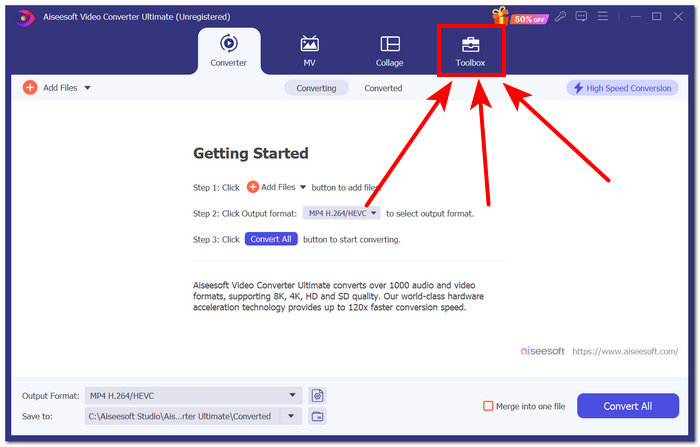
Step 3. Find the audio features in the Toolbox area and select the ones that best suit your needs.
Note: IIf you want to change the file size of your audio, choose Audio Compressor.
If you want to eliminate unnecessary noise from your audio, choose Noise Remover.
If you want to adjust your audio/video volume, choose Volume Booster.
If you want to fix the audio delay in your video, choose Audio Sync.
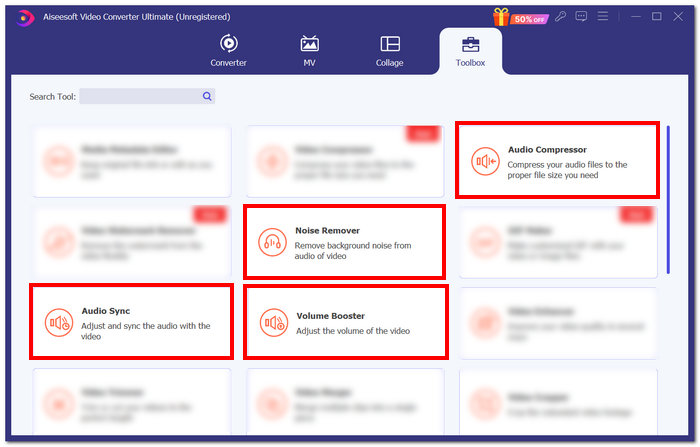
Step 4. After choosing a specific feature, proceed to upload your audio in the tool and just follow what the tool wants you to do. Once you have successfully followed the necessary task in enhancing your audio, you may click on the Export button situated on the lower-right of your screen to have it downloaded to your computer.
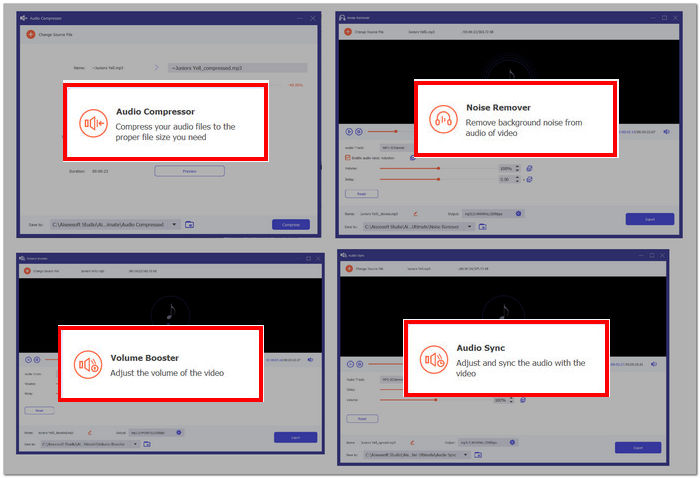
FVC가 선택한 AI 오디오 강화 장치는 비디오 및 오디오 강화 장치를 다루는 다용도 도구를 찾는 모든 사람에게 완벽한 도구 역할을 합니다. 또한 오디오 향상 기능이 향상 및 노이즈 제거 모두에서 업계 표준을 정확하게 충족한다는 점은 주목할 가치가 있습니다.
3부. 설명
Descript는 고급 AI를 사용하여 오디오 향상 기능을 제공하여 유망한 스튜디오급 결과를 즉시 생성하는 소프트웨어입니다. 이 소프트웨어는 불필요한 소음을 제거할 뿐만 아니라 음성 톤의 AI 복제를 위해 사용자의 음성을 분석하여 오류를 수정하고 말더듬 및 반복되는 단어를 제거하여 더욱 스튜디오 품질을 완성하는 데 특화되어 있습니다. 또한 Descript는 주로 사용자의 음성을 분리하여 소음을 제거하고 보다 선명한 오디오 품질을 제공하는 간단한 오디오 복원 기능이 있는 간단한 인터페이스를 제공합니다.
주요 기능
• 스튜디오 품질의 소음 제거기.
• AI 텍스트 오디오 편집.
• 음성톤 복제.
• 필러 단어 제거기.
• 간소화된 팟캐스팅 프로세스.
도구 사용 방법
Step 1. Go to the Descript official website and create an account.
Step 2. You may import the audio file you wish to enhance using a web browser tool after making an account. To import your audio, just click the Media icon above the tool and select Add Files.
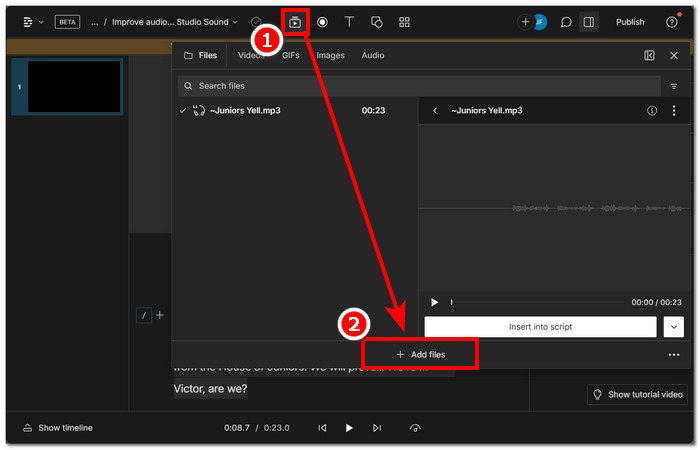
Step 3. Click the Action button and choose the desired action you would like the AI to take with your audio. Next, to improve the audio quality, turn on Studio Sound in the tool's right corner.
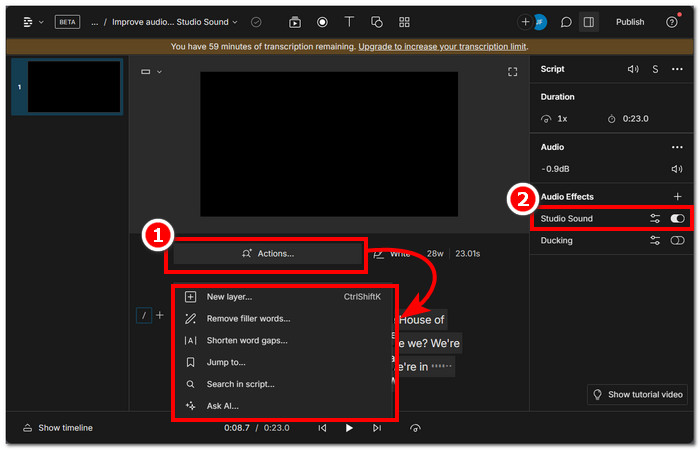
Step 4. Click the Publish button in the tool's upper-right corner after choosing the desired task, and Download your audio.

설명 오디오 효과 설정에서 스튜디오 사운드를 활성화하면 사용자가 도구를 사용할 때마다 스튜디오 품질의 오디오를 내보낼 수 있습니다. 또한 AI 텍스트 명령은 사용자가 AI에 특정 명령을 제공하여 오디오 길이에 관계없이 오디오를 정확하게 향상시킬 수 있는 강력한 기능입니다. 텍스트를 복사하여 깨끗하고 들을 수 있는 출력을 보장합니다.
4부. 신경 사랑
Neural Love는 사용자가 도구에 업로드할 수 있는 모든 오디오를 직접적으로 향상하고 확장하는 AI 웹 기반 도구입니다. 이 도구는 선명하고 깨끗한 오디오 품질을 달성하기 위해 오디오를 최대 48kHz까지 증폭시킵니다. 또한 이 도구에는 배경 소음 제거 기능도 있습니다. AI 덕분에 오디오의 전반적인 음성을 향상시킬 뿐만 아니라 오디오에서 원치 않는 음성을 제거하여 보컬과 배경 음악의 차이를 구별할 수 있습니다.
주요 기능
• 오디오 소음을 줄입니다.
• 오디오 AI 업스케일러.
• 보컬 제거제.
• 고급 오디오 처리.
• 오디오 부분을 분리합니다.
도구 사용 방법
Step 1. Go to the Neural Love official website.
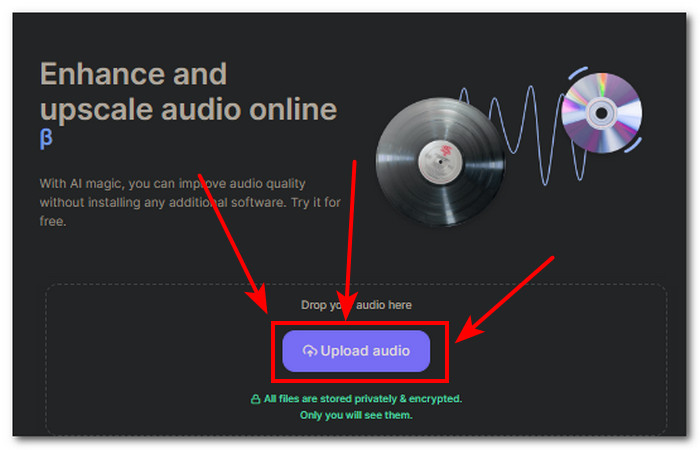
Step 2. Upload the audio you want to enhance in the Upload audio field located in the tool interface.
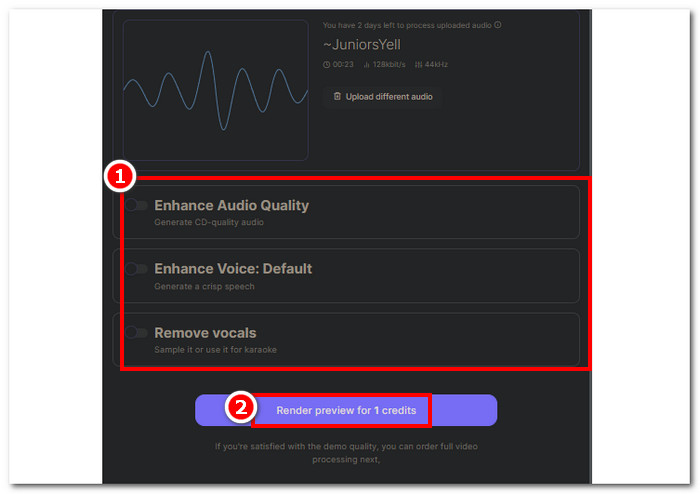
Step 3. Once your audio is uploaded to the tool, you may now choose which audio enhancement features you want to do with your audio.
크레딧당 하나의 작업만 수행할 수 있습니다. 다른 기능을 사용하려면 오디오를 다시 업로드하고 다른 작업을 선택하는 것이 좋습니다.
Step 4. Click on the Download button to save your enhanced audio on your computer.
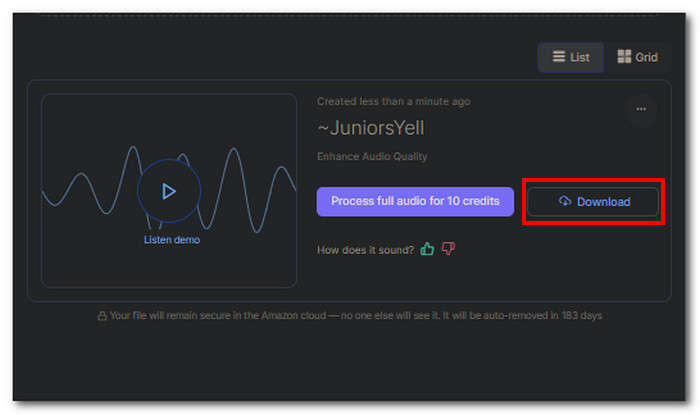
Neural Love는 사용자 측 도구의 속도와 효율성을 충족하는 데 완벽한 간단한 웹 기반 도구임이 밝혀졌습니다. 결과적으로, 이 도구는 인터페이스가 간단하고, 5개의 무료 크레딧만 제공하기 때문에 사용자에게 해당 기능에 대한 100% 무료 액세스를 제공하지 않으며, 일단 사용한 후에는 계속 사용하려면 해당 크레딧을 구입해야 합니다. 도구를 사용합니다.
5부. 오디오닉
오디오 보컬과 배경 음악 사이의 균형을 만들고, 원치 않는 노이즈를 제거하여 선명도를 강조하고, 사용자가 사용자에게 더 많은 제어권을 부여하여 오디오 출력을 변경하고 향상시킴으로써 AI가 소음으로 간주하는 잡음과 빠르게 변화하는 잡음을 제거하는 것 중에서 자유롭게 선택할 수 있습니다. 이 도구는 기본적으로 모든 종류의 사운드를 향상시키는 측면에서 간단하면서도 최고의 정밀도를 적절하게 수행할 수 있는 모든 기본 기능을 갖추고 있습니다.
주요 기능
• 음향 소음 및 반향 감소.
• 스마트 음성 및 음악 레벨러.
• 원치 않는 주파수를 필터링합니다.
• 자동 필러 단어 제거.
• 볼륨 부스터.
도구 사용 방법
Step 1. Head over to the Auphonic official website.
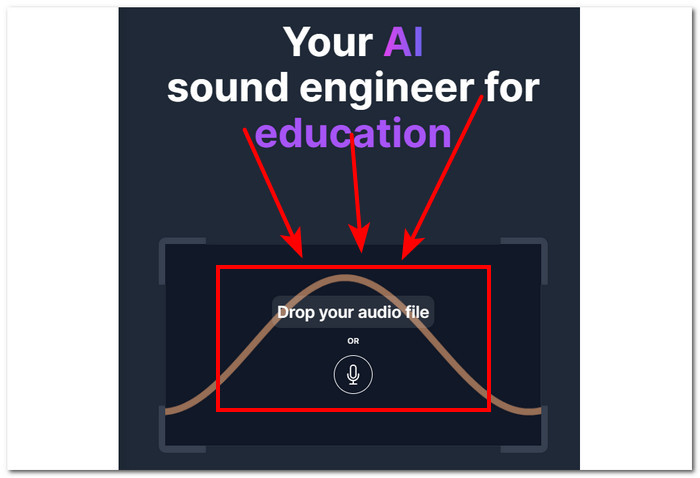
Step 2. Once you are on their official website, upload your audio by clicking on the drop your audio file field in the interface of the tool.
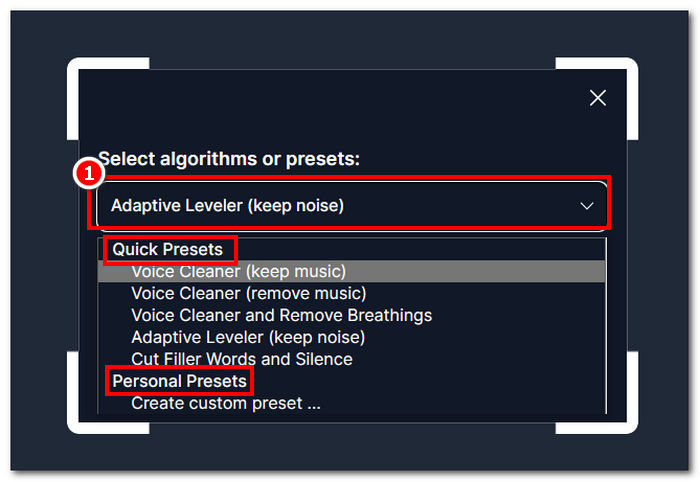
Step 3. Select a preset on what kind of audio enhancement you want to make with your audio.
Note: You can select from the Quick Preset or Personal Preset if you have a more specific need for adjustment to your audio.
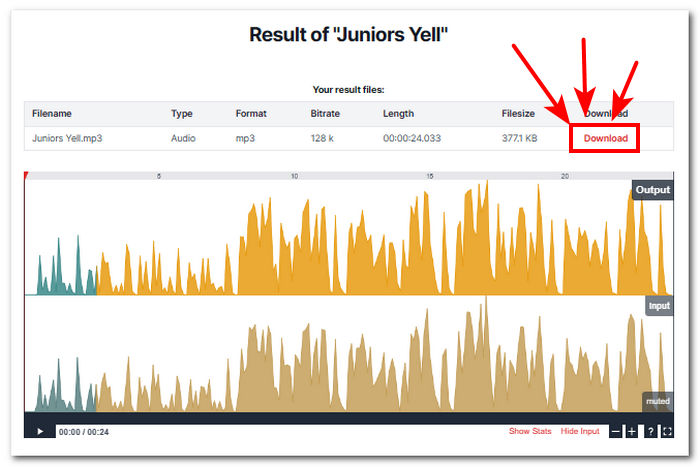
Step 4. The tool will automatically process your audio, and it will show you a preview of it. Once you are satisfied with the result, you can click on the Download button to save it on your computer.
Auponic의 강력한 오디오 인핸서는 원치 않는 소음을 차단하고 전체 오디오 출력을 분석하여 보다 선명하고 선명한 오디오를 제공하는 AI 기능 측면에서 전문가 수준의 도구로 간주됩니다. 이 소프트웨어는 컴퓨터와 모바일 장치 모두에서 사용할 수 있으므로 다재다능한 도구가 됩니다. 따라서 여전히 한 달에 2시간 분량의 오디오만 제한되어 있습니다.
6부. Audo Studio
This tool is a free AI audio enhancer online that lets users have access to it through their website. With its intuitive website interface, its audio enhancement functionalities prove to be a perfect tool for both entry-level to professional projects. This tool helps in clearing out some of the most difficult noises that other tools have struggled to remove. This is packed with audio enhancement features, letting users have control in enhancing the audio, background noise removal, increasing volume, and echo reducer all in one go.
주요 기능
• 오디오 AI 강화기.
• 원치 않는 소음 제거제.
• 리버브 감소기.
• 즉각적인 볼륨 레벨러.
• 초고속 향상기.
도구 사용 방법
Step 1. First, visit the Audo Studio website, and in their main interface, upload or drop your audio files in the provided field.
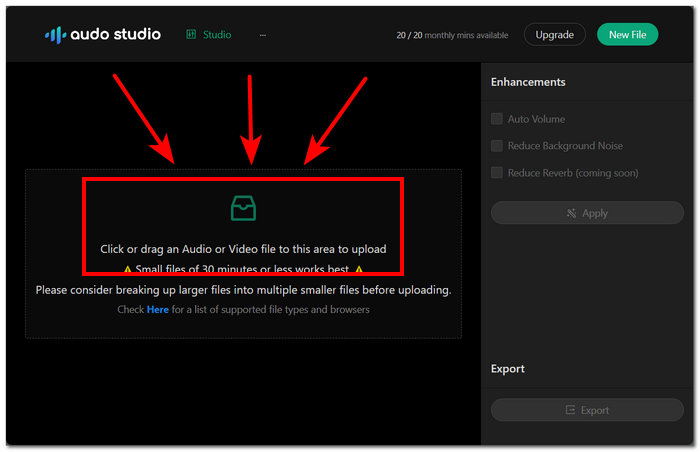
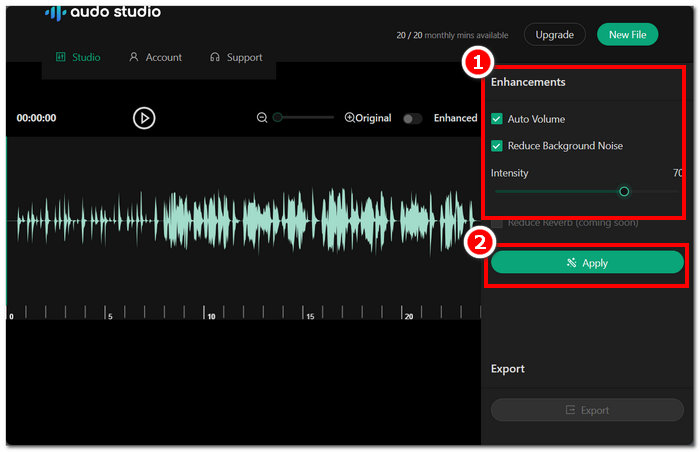
Step 2. You will be able to see the enhancement settings on the right side of your tool settings. Make adjustments by enabling the Auto Volume and Reduce Background Noise settings.
Step 3. Once you are satisfied with the enhancement settings click Apply to save changes in your current audio file.
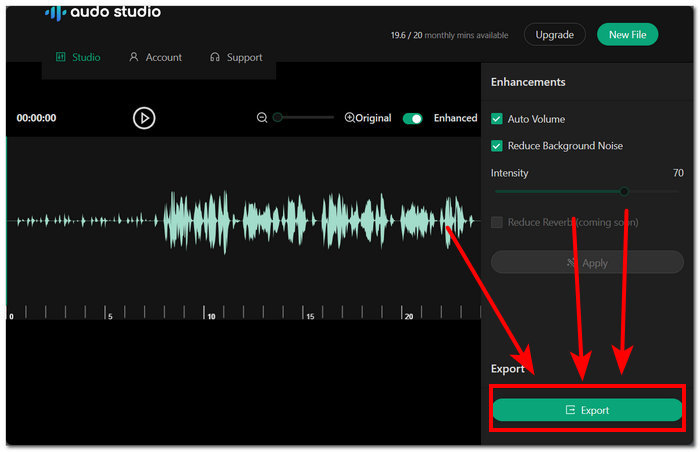
Step 4. To download your now enhanced audio, kindly click on the Export button located in the lower part of your screen.
Audo Studio는 매우 간단한 인터페이스와 탐색하기 쉬운 아이콘을 갖추고 있어 오디오 파일을 향상할 수 있습니다. 학교 기반 프로젝트 및 팟캐스트와 같은 프로젝트에 적합한 초고속 강화 기능을 갖추고 있습니다. 결과적으로 이 도구는 오디오 강화를 위한 매우 안정적인 도구인 것처럼 보일 수 있습니다. 그러나 무료 플랜은 매달 20분의 오디오 파일로 제한됩니다. 즉, 이 도구를 사용하려면 20분 제한을 새로 고치거나 제작자 플랜을 이용하려면 한 달 더 기다려야 한다는 의미입니다.
7부. 크럼플팝
CrumplePop은 최첨단 오디오 강화 기능이 뛰어나고 오디오 보컬에 더 많은 볼륨을 제공하여 배경 소음을 제거하는 AI 통합 플러그인 도구입니다. 고급 AI를 완벽하게 활용하여 오디오 데이터를 분석하고 에코, 바람, 잡음 및 피드백 소리를 인식하여 결함을 정확하게 제거하고 나중에 나머지 오디오를 향상시켜 선명도와 전문적인 마무리 결과를 얻을 수 있습니다.
주요 기능
• 즉각적인 소음 제거.
• 혁신적인 AI 통합 도구.
• 오디오 음성 강화 장치.
• 다른 편집 소프트웨어를 지원합니다.
도구 사용 팁
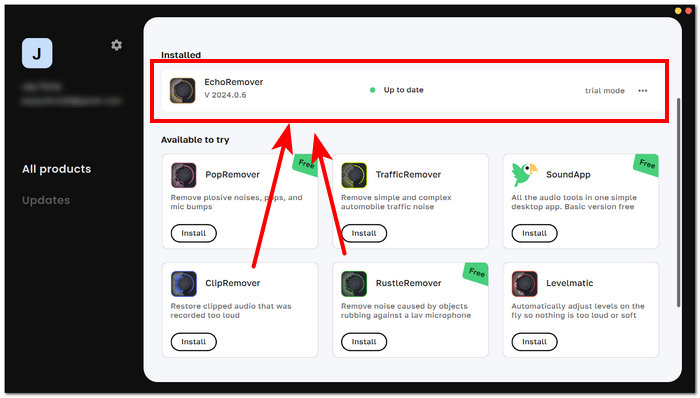
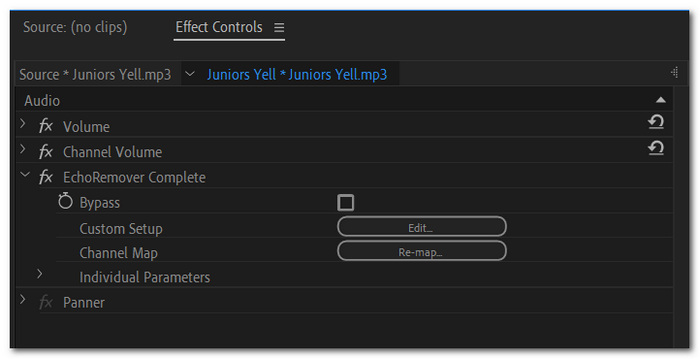
Step 1. First, download and open the CrumplePop software from your computer. Once you’re in the software's main interface, you can select the specific audio enhancer plugins to apply to your audio.
Step 2. Go to your preferred video editing software, in this case, Adobe Premiere, and load the audio you want to apply the plugins. Once in the software, go to Effects > Audio Effects > VST3 > EchoRemover Complete
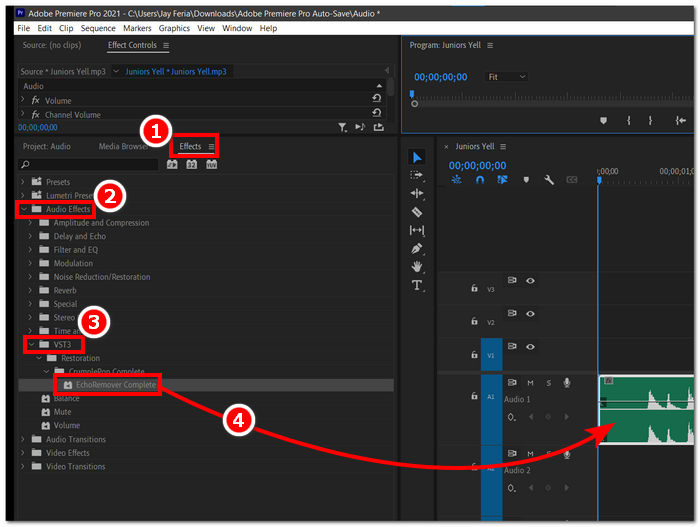
Step 3. Drag the EchorRemover Complete to your audio, and feel free to tweak the settings based on your liking.
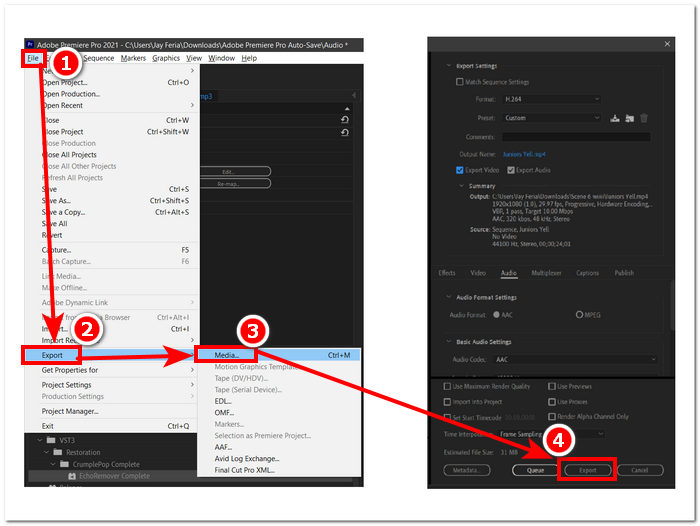
Step 4. Once satisfied, export your audio by going to File > Export > Media and finally click on Export to download your audio to your computer.
배경 소음을 제거하고 오디오 강화 기능을 갖춘 도구 기능의 응집력에도 불구하고 상대적으로 비용이 많이 들고 전문가용으로 제작되었습니다. 다운로드 링크를 받기 전에 사용자가 이메일을 입력해야 하기 때문에 개인을 시작하는 데 적합하지 않으며, 서두르고 기능을 즉시 사용해야 하는 사람에게는 적합하지 않으므로 여전히 훌륭한 도구입니다.
8부. 울림
오디오 파일을 인터페이스로 끌어다 놓기만 하면 AI 인스턴트 오디오 강화 기능이 울려퍼집니다. 모든 사람이 스스로 오디오를 조정하고 변경할 수 있도록 간단하면서도 탐색하기 쉬운 인터페이스가 있습니다. 이 도구는 필러 사운드, 잡음, 인식할 수 없는 오디오 등 가장 일반적인 소음을 제거하는 기능을 제공합니다. AI는 개선이 필요한 오디오를 인식하고 자동으로 향상시킬 수 있습니다. 또한 도구가 오디오를 처리할 때 오디오의 무음을 건너뛰므로 이를 일시 중지로 인식하고 제거하므로 사용자가 그럴 필요가 없습니다.
주요 기능
• 오디오 미리보기가 가능합니다.
• 고급 AI 필러 인식.
• AI 팟캐스터 편집자.
• 자동으로 무음을 건너뜁니다.
• 시간을 절약하고 효율적인 프로세스.
도구 사용 방법
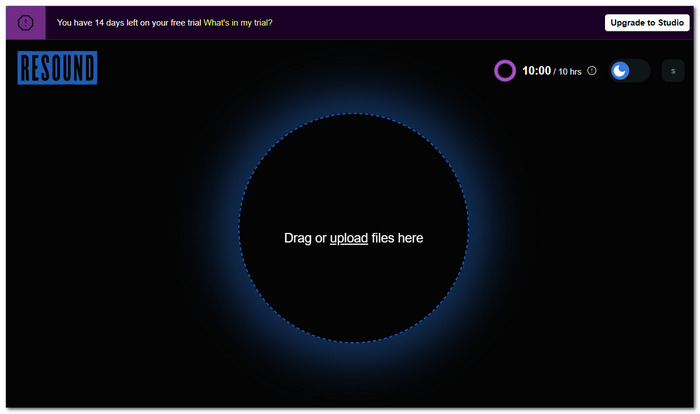
Step 1. To use the Resound tool, go to their official website and upload your audio in the field provided by the tool.
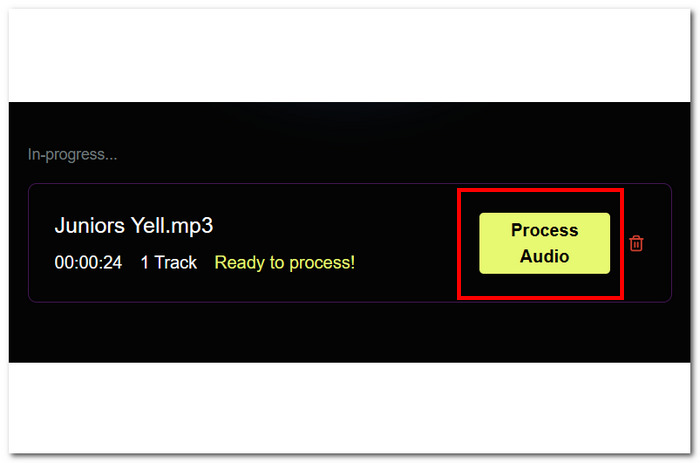
Step 2. Once your audio is in the tool click on the Process Audio located in the right part of your screen.
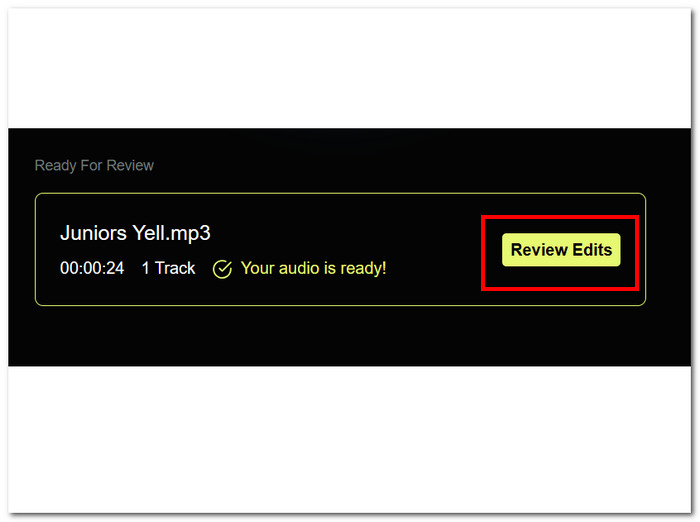
Step 3. After the tool processes your video, proceed to click on Review Edits to be able to make changes to your current audio.
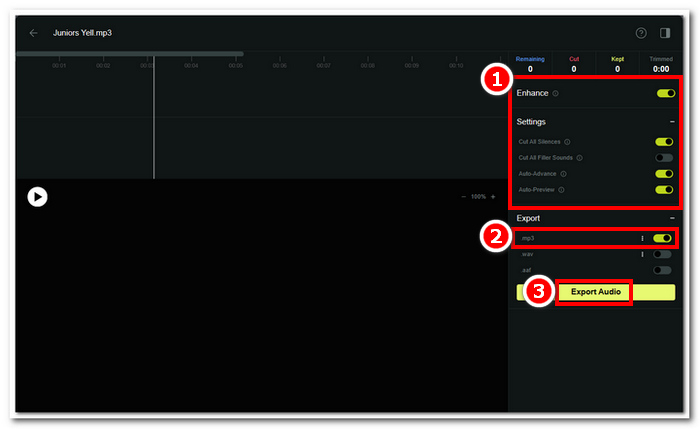
Step 4. Adjust the enhanced setting until you are happy with it, and once you are done making changes you might want to choose MP3 as your export format, then click on the Export Audio to save it on your computer.
오디오 향상에 사용할 수 있는 가장 간단한 인터페이스 중 하나임에도 불구하고 무료 평가판을 사용하는 데 14일 밖에 걸리지 않았습니다. 반면, 이 도구를 눈에 띄게 만드는 한 가지 기능은 이전 작업을 저장하여 원할 때마다 다시 편집하고 내보낼 수 있다는 것입니다. Resound는 오디오의 모든 묵음을 제거하는 데 효과적이지만, 약간의 일시 중지가 있는 경우 오디오의 다음 단어를 포함하는 경우가 있습니다.
9부. 오디오 변경
Audioalter is a free AI audio enhancer composed of all sorts of web-based tools for audio enhancement and background noise remover. This web-based tool not only offers the use of audio effects but also presets to have a variety of audio styles to use for personal use, projects, and podcasts. Not only that, it allows some of the basic tasks in audio editing, like adjusting audio reverb, minimizing echo, cutting MP3, fading, and even fine-tuning. Audioalter has the most features and effects offered in this list, targeting all kinds of sound enhancement tasks to unleash the user's creativity by experimenting with the various effects available.
주요 기능
• 오디오 파일 변환기.
• 리버브, 피치 및 에코 편집기.
• 오디오 트리밍 도구.
• AI 소음 감소.
• 오디오 효과 컬렉션.
• 무제한 다운로드.
도구 사용 방법
Step 1. Visit Audioalter's official website to access all the preset effects and other tools available on the website.
Step 2. Once you are on the website, choose among the features offered and click on it.
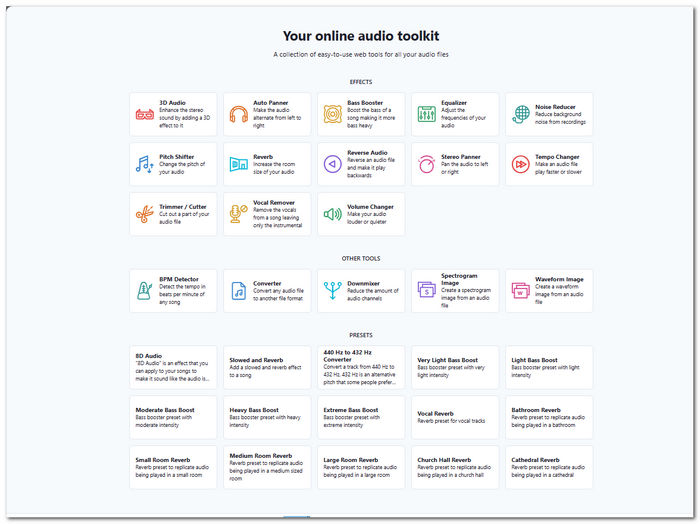
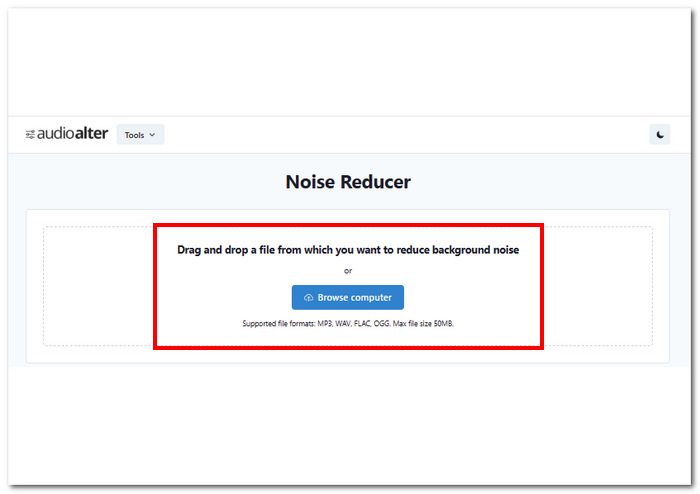
Step 3. Browse your computer folder and upload the audio you want to enhance or use a preset on it through the provided field in the tool’s interface.
Step 4. Once you have uploaded your audio file, it will begin processing it, and once done, you may be able to save it on your computer by clicking on the Download button located on the right side of your screen.
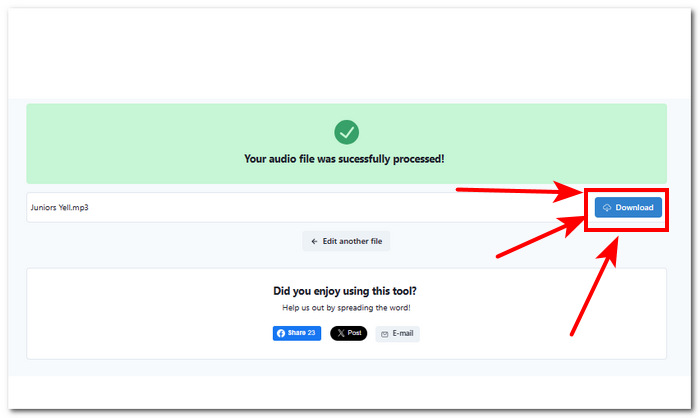
결론적으로 Audioalter는 오디오 문제를 처리할 때 자동적이고 원활한 프로세스를 제공합니다. 여기에는 변경, 스타일 변경, 심지어 일부 부분 제거도 포함됩니다. 안타깝게도 이 도구를 사용하면 사용자는 최대 50MB의 오디오 파일만 업로드할 수 있지만 파일 크기를 보상하기 위해 무제한 다운로드를 제공합니다. 또한 이 도구는 사용자 인터페이스, 기능 액세스 및 아우디 파일 크레딧에 대한 가입이나 비용 지불이 필요 없는 편리함을 위해 사용할 수 있는 탁월한 온라인 도구입니다.
10부. 최고의 AI 오디오 인핸서에 관한 FAQ
오디오 강화 장치는 어떻게 작동하나요?
오디오 향상기는 오디오 파일의 품질을 향상시키는 데 사용됩니다. 여기에는 오디오 주파수를 특정 범위로 조정하여 오디오를 선명하게 만들고 불필요한 소음을 제거하는 사용이 포함됩니다. 오디오 볼륨 조정을 사용하면 오디오 균형을 맞추기 위해 더 많은 서라운드 사운드를 생성하는 데 도움이 되므로 오디오 향상 프로세스에서도 중요한 역할을 합니다.
오디오를 더 선명하게 만드는 AI는 무엇입니까?
딥러닝은 오디오 품질 개선에 가장 많이 사용되는 AI라고 합니다. AI 알고리즘은 명확하고 큰 결과를 만들기 위해 오디오 패턴을 식별, 분석 및 학습합니다.
AI가 내 오디오를 고칠 수 있나요?
예, 오디오 AI 강화기는 오디오 문제를 해결하고 저장할 수 있습니다. FVC가 선택한 소프트웨어나 CrumplePop과 같은 소프트웨어 도구나 Audioalter 및 Resound와 같은 웹 기반 도구를 사용하면 소음을 제거하고, 오디오 주파수의 균형을 맞추고, 품질을 향상시킬 수 있으며, 이는 오디오를 수정하거나 저장하는 데 충분합니다. .
AI 오디오 인핸서를 무료로 사용할 수 있나요?
예, 인터넷에는 Neural Love, Audo Studio 및 Auphonic과 같은 AI 오디오 향상기의 무료 서비스를 제공하는 많은 AI 오디오 도구와 소프트웨어가 있습니다. 이러한 도구는 고객이 서비스를 먼저 사용해 볼 수 있도록 무료 및 유료 요금제를 제공합니다. 목록에 없는 무료 AI 오디오 강화 장치를 사용할 때 리뷰를 읽어 보십시오. 일부는 장치에 해를 끼치거나 더 악화될 수 있습니다.
오디오 품질을 향상시키는 것은 무엇입니까?
오디오 품질을 향상시키는 것은 마이크, 헤드폰, 팝 필터 및 오디오 녹음에 필요한 기타 도구와 같은 올바른 장비를 사용하는 것입니다. 올바른 도구를 사용하면 녹음에서 바로 고품질 오디오를 얻을 수 있으며, 위에 나열된 AI 오디오 인핸서와 페어링하면 오디오 품질을 높이고 배경 소음을 개선하여 더 나은 오디오를 얻을 수 있습니다.
결론
In conclusion, The top 8 AI audio enhancer tools listed in this guide share the same range in terms of functionalities to enhance and amplify audio sound and remove and reduce audio noise and echo. For users like music enthusiasts, content creators, and podcasters, these tools offer the best quality of tools they can utilize to unleash their creativity. Additionally, it is also important to choose the right tool based on your audio needs and preferences, as at the end of the day, what matters most is you get your project done with the help of the tools that save you time and give you a hassle-free experience.
-
 ChatGPT란 무엇이며 콘텐츠 생성에 어떻게 도움이 됩니까?
 ChatGPT와 같은 AI 도구는 콘텐츠 작업을 수행하는 데 도움이 될 수 있습니다. 따라서 AI 도구에 대한 이 기사 리뷰를 살펴보고 그것이 당신을 어디로 데려갈 수 있는지 알아보십시오.
-
 Topaz Video AI로 비디오를 향상하는 방법 - 2024년 가이드
 비디오를 향상시킬 수 있는 방법을 찾고 계십니까? 이 기사에서는 단계별 가이드를 통해 Topaz Video AI를 사용하여 비디오 품질을 높이는 방법을 알아봅니다.
-
 눈에 띄게 텍스트를 생성하기 위해 가장 많이 사용되는 6가지 무료 AI 작성자
 AI 글쓰기 생성기를 원하지만 무엇을 사용해야 할지 알고 싶으십니까? 그렇다면 이를 위해 수집된 6가지 최고의 AI 도구를 확인해야 합니다. 지금 이 게시물을 읽어보세요!
