


 비디오 컨버터 궁극
 스크린 레코더
 비디오 수리
 안전한 다운로드
품질 손실없이 TS 파일을 FLV 형식으로 변환하는 방법
이 가이드는 TS를 FLV로 변환하는 방법에 초점을 맞추고 있습니다. 일반적으로 동영상 형식은 자주 쓰이는 형식과 그 외 형식의 두 가지로 나눌 수 있습니다. FLV는 인터넷용으로 개발된 대표적인 동영상 형식 중 하나이며, TS는 후자에 속합니다. TS는 Video Transport Stream의 약자로, MPEG-2 비디오 데이터를 저장하는 데 사용됩니다. 주로 DVD에서 자주 볼 수 있습니다. 자, 이제 본격적으로 살펴보겠습니다.

파트 1 : 데스크탑에서 TS를 FLV로 변환하는 3 가지 쉬운 방법
방법 1 : 무료 FLV 변환기를 사용하여 TS를 FLV로 변환
이름에서 알 수 있듯이, FVC Free FLV Converter는 TS를 FLV로 변환할 때 필요한 바로 그 FLV 변환기입니다. 이를 이용해 파일을 시청하거나 소셜 미디어에 공유할 수 있습니다. 완전 무료이며 워터마크나 기타 제한이 없습니다. 유료 소프트웨어에서나 볼 수 있는 기능을 제공하기도 합니다.
최고의 FLV 변환기의 주요 기능
- 1. FLV와 다른 비디오 형식 간에 쉽게 변환할 수 있습니다.
- 2. 변환하는 동안 비디오 및 오디오 품질을 보호합니다.
- 3. 동시에 여러 TS 비디오 파일을 일괄 처리합니다.
무료 다운로드Windows 7 이상용안전한 다운로드
무료 다운로드MacOS 10.7 이상용안전한 다운로드
무료로 TS 파일을 FLV로 변환하는 방법
1단계: TS 파일 불러오기
컴퓨터에 설치 한 후 최고의 FLV 변환기를 실행하십시오. 그런 다음 파일 추가 버튼을 클릭하여 DVD 또는 컴퓨터에서 모든 TS 파일을 가져옵니다. 그러면 라이브러리 영역에 비디오가 나타납니다.

2단계: 출력 형식 설정
동영상을 편집해야 한다면 편집(Edit) 버튼을 클릭해 동영상 편집 창을 여십시오. 편집이 필요 없다면, 아래쪽으로 가서 출력 형식(Output format) 옵션을 클릭해 펼칩니다. 그런 다음 일반 비디오(General Video) 탭에서 FLV를 검색한 뒤 선택합니다.

3단계: TS를 FLV로 변환하기
다음으로, 찾아보기(Browse) 버튼을 눌러 FLV 출력 파일을 저장할 특정 폴더를 지정합니다. 마지막으로, 오른쪽 하단에 있는 변환(Convert) 버튼을 클릭해 TS를 FLV로 변환하기 시작합니다.

방법 2 : VLC로 TS를 FLV로 변환하는 방법
VLC는 오픈 소스 프로젝트이기 때문에 TS를 무료로 FLV로 변환하는 또 다른 방법입니다. PC, Mac 및 Linux에서 사용할 수 있습니다. 비용은 분명히 있습니다. 출력 품질이 그다지 좋지 않으며 절차가 복잡합니다. 괜찮다면 아래 단계를 수행하십시오.
1단계: VLC를 실행하고, 미디어(Media) 메뉴를 클릭한 뒤 변환/저장(Convert/Save)을 선택합니다. 미디어 열기 대화 상자가 나타납니다.
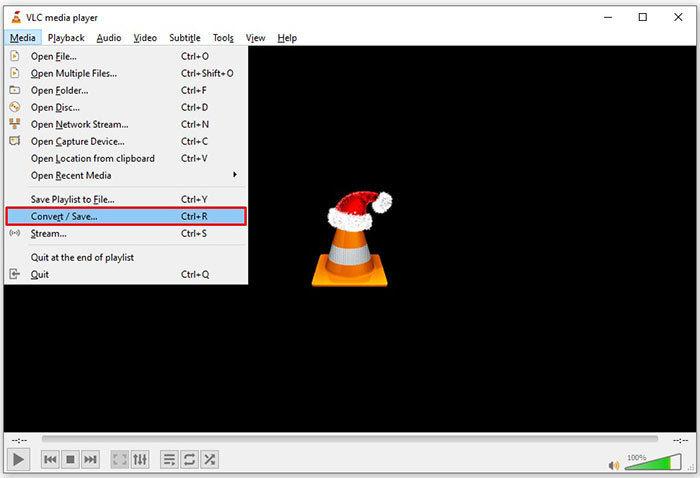
2단계: 추가(Add) 버튼을 눌러 TS 파일을 VLC에 추가합니다. 변환/저장(Convert/Save) 버튼을 눌러 다음 단계로 진행합니다.
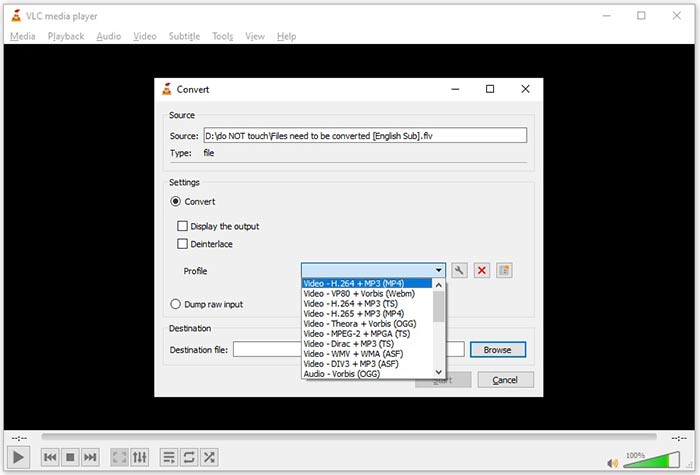
3단계: 프로필(Profile) 옵션을 열고 출력 형식을 선택합니다. 프로필(Profile)에서 FLV를 찾을 수 없다면, 프로필 편집(Profile Edit) 버튼을 클릭하고, 프로필 이름(Profile Name) 상자에 FLV를 입력한 뒤, FLV를 선택하고 생성(Create)을 클릭합니다. 그런 다음 프로필(Profile)에서 FLV를 선택합니다.
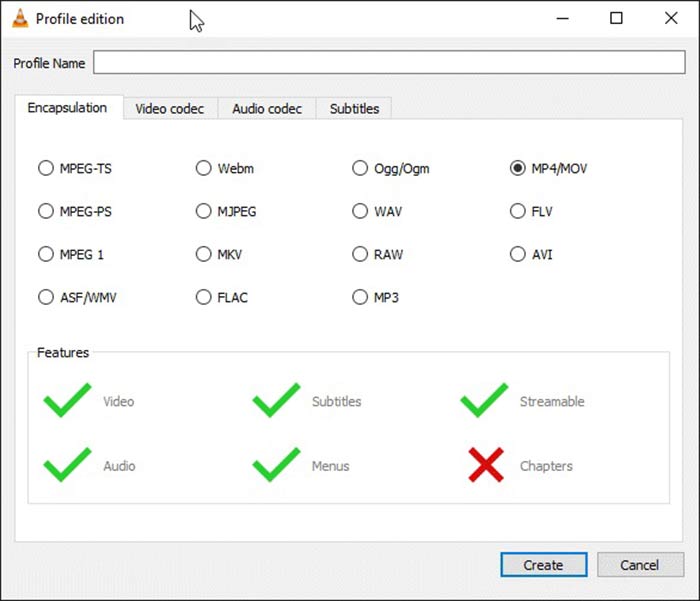
4단계: 찾아보기(Browse) 버튼을 눌러 저장 위치 폴더를 지정한 뒤, 시작(Start) 버튼을 클릭합니다.
방법 3 : FormatFactory를 통해 TS를 FLV로 변환하는 방법
FormatFactory는 PC 용 무료 파일 변환 프로그램입니다. 그것은 당신이 페니를 지불하지 않고 TS 파일을 FLV로 변환 할 수 있습니다. 그러나 손실 변환 만 지원합니다. 이는 비디오 품질이 낮아짐을 의미합니다. 또한 Mac 또는 Linux에서는 사용할 수 없습니다.
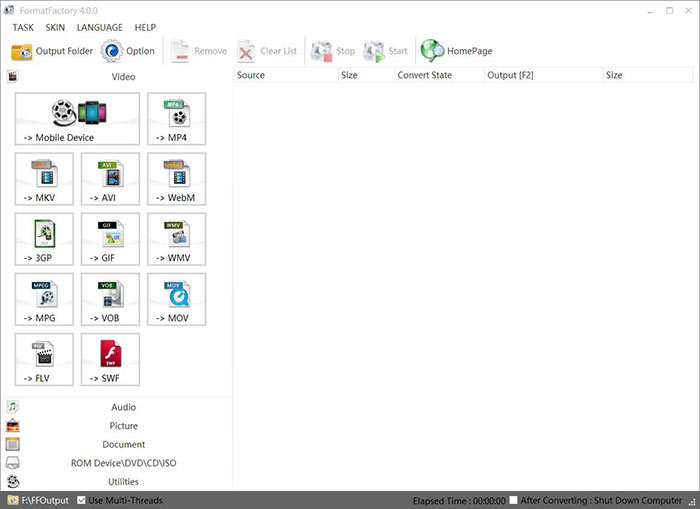
1단계: 무료 TS to FLV 변환기를 실행하고, 비디오(Video) 섹션으로 이동해 FLV를 선택합니다.
2단계: 파일 추가(Add File) 버튼을 클릭해 컴퓨터에서 TS 동영상 파일을 불러옵니다. 확인(OK)을 눌러 완료합니다.
3단계: 다음으로 시작(Start) 버튼을 클릭해 PC에서 TS를 FLV로 변환하기 시작합니다. 이 무료 프로그램은 속도가 매우 느려 변환에 다소 시간이 걸립니다. 완료되면 출력(Output) 섹션 아래에 표시된 디렉터리로 가서 FLV 파일을 찾을 수 있습니다.
2 부 : TS를 FLV 온라인으로 변환하는 방법
VLC와 기타 동영상 변환 소프트웨어는 모두 하드 디스크에 설치해야 합니다. 이는 내부 저장 공간을 차지합니다. 별도의 소프트웨어 설치 없이 TS를 FLV로 변환할 수 있는지 궁금할 수 있습니다. 그 답은 FVC Free Online Video Converter입니다. 이 도구는 온라인에서 작동하며 무료입니다. 부가 기능은 제공하지 않지만, 동영상 변환에 대한 기본적인 요구를 충족하기에는 충분합니다.
1단계: 웹 브라우저에서 https://www.free-videoconverter.net/free-online-video-converter/를 연 뒤, Add Files to Convert 버튼을 클릭해 런처를 다운로드합니다.

2단계: 다운로드가 완료되면 런처가 나타납니다. Add File 버튼을 클릭해 TS 파일을 업로드합니다. 이 웹 앱은 일괄 변환을 지원합니다. 화면 아래로 이동해 하단에서 FLV를 선택합니다.

3단계: 준비가 되면 Convert 버튼을 클릭해 TS를 FLV로 변환하는 작업을 시작합니다. 이 앱은 속도가 빠르지만, 실제 소요 시간은 인터넷 연결 속도에 따라 달라집니다. 변환이 완료될 때까지 기다린 후 FLV 출력 파일을 다운로드하십시오.
놓치지 마세요:
3 부 : TS를 FLV로 변환하는 방법에 대한 FAQ
TS를 다른 형식으로 변환 할 수없는 이유는 무엇입니까?
TS는 DVD 용 비디오 파일 형식입니다. 대부분의 상업용 DVD는 암호화되어 저작권으로 보호됩니다. 또한 적절한 비디오 변환 소프트웨어가없는 경우 TS 파일을 변환 할 수 없습니다.
Windows Media Player에서 TS를 열 수 있습니까?
Windows Media Player는 DVD 또는 TS 파일을 열 수 없으므로 WMP에서 TS를 재생할 수 없습니다. 또는 VLC와 같은 타사 비디오 플레이어를 사용할 수 있습니다. 또는 WMP 용 추가 코덱 패키지를 설치해야합니다.
TS 파일을 보는 방법?
VLC와 같은 TS 파일을 지원하는 미디어 플레이어는 거의 없습니다. PC 및 Mac의 내장 미디어 플레이어, Windows Media Player 및 QuickTime Player는 TS와 호환되지 않습니다. TS 파일을 보는 또 다른 방법은 DVD에 굽는 것입니다.
결론
이제 온라인으로 공유하거나 디지털 장치에서 재생하기 위해 TS 파일을 FLV 비디오로 변환하는 방법을 4 가지 이상 배워야합니다. DVD 영화의 비디오 형식으로 TS는 컴퓨터 나 모바일 장치에서 널리 사용되지 않습니다. 대부분의 미디어 플레이어는 열 수 없습니다. FVC 무료 FLV 변환기; 그러나 TS를 FLV로 쉽게 변경할 수 있습니다. 추가 질문? 이 게시물 아래에 적어 주시면 회신 해 드리겠습니다.
-
 Mac / Windows에서 비디오 _TS 파일 / 폴더를 DVD로 쉽게 굽는 3 단계
 TS 파일을 DVD 디스크로 변환하고 구우려면 어떻게합니까? 이 단계별 가이드는 DVD 플레이어 또는 TV에서 TS 파일을 볼 수 있도록 Windows / Mac에서 TS 파일 및 폴더를 DVD로 복사하는 방법을 보여줍니다.
-
 Windows / Mac에서 TS를 AVI / MKV / MOV / WMV로 변환하는 6 가지 쉬운 방법
 TS 파일을 AVI / MKV / MOV / WMV로 빠르게 변환하고 싶으십니까? 이 기사는 완전한 가이드와 함께 온라인 및 오프라인 비디오 변환기를 보여줍니다. 여기에서 최고의 무료 TS 변환기를 얻을 수 있습니다.
-
 TS 비디오 파일 압축 – TS 파일을 더 작은 크기로 압축하는 방법
 장치에 고화질 TS 비디오 파일을 저장하려면이 문서에서 TS 비디오 파일을 더 작은 크기로 압축하는 방법에 대해 자세히 알아보십시오.
