


 비디오 컨버터 궁극
 스크린 레코더
 비디오 수리
비교할 수 없는 2가지 접근 방식으로 MTV를 FLV로 변환하는 방법

1 부분. MTV를 FLV 오프라인으로 변환하는 방법
Video Converter Ultimate is one of the best MTV to FLV converters. You can change your video format from MTV to FLV in just a few clicks. It allows you to edit and compress MTV videos with the help of this software. This MTV-to-FLV converter is available for use on both Windows and Mac computers, and it is completely free. You can easily convert MTV files to FLV format by downloading and installing the converter app, then importing the videos you want to be converted. For a more in-depth explanation, please refer to the following guide.
Step 1: To start downloading the software, click the Free Download button below this step. After you click it, prepare to install it after a while.
Free DownloadFor Windows 7 or laterSecure Download
Free DownloadFor MacOS 10.7 or laterSecure Download
Step 2: After installing the software on your computer, run the software and a window will pop on your screen. The software displays the Converter interface on your screen, ready to import a file.
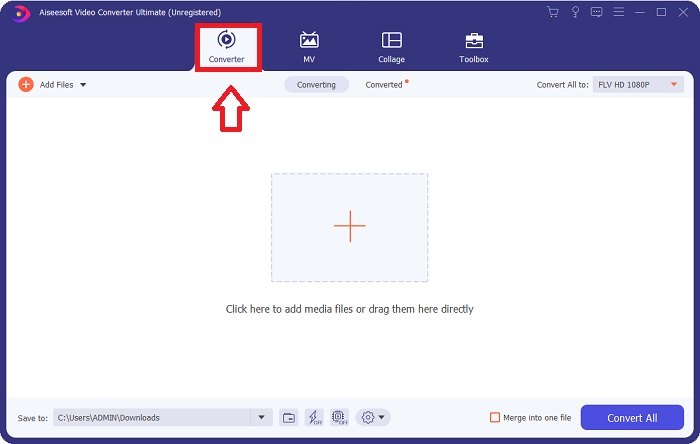
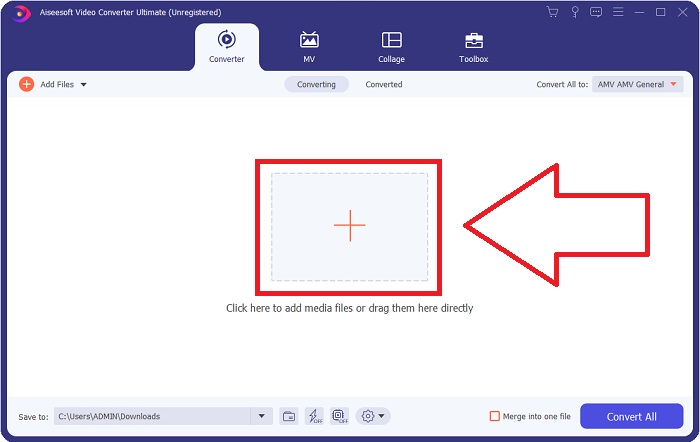
Step 3: To import a file to the software, you must click the + button in the middle of the software's window, or you can simply drag any video files.
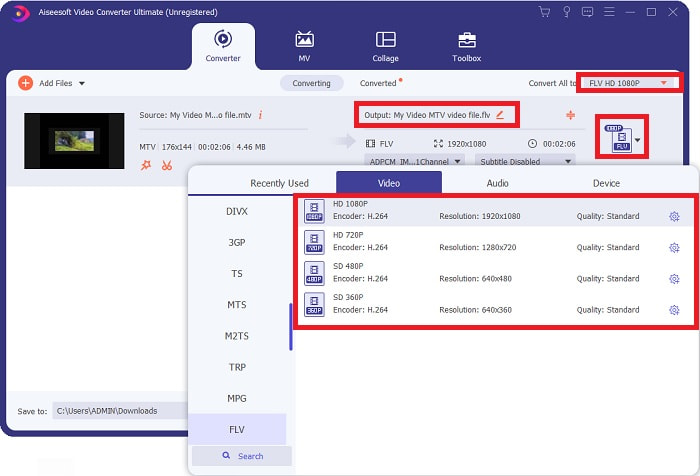
Step 4: It's time for you to choose the FLV video format, located at the right corner of the window near the video output. Click it and navigate the FLV video format and determine which quality you prefer.
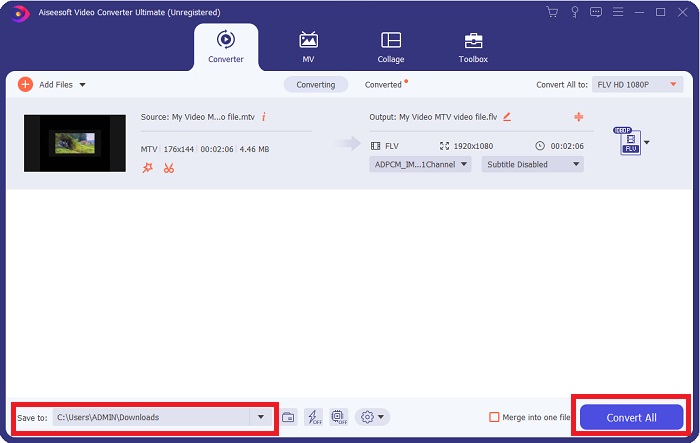
Step 5: You can now convert your file by clicking the Convert All button located at the bottom right corner of the window. And browse the location where you will transfer the converted file by clicking the drop down button near the Save to.
2 부분. MTV를 FLV 온라인으로 변환하는 방법
Here's a free online tool for you to learn about that can convert MTV to FLV. The Free Video Converter Online can convert video and audio formats such as MP4, WMV, and ASF to various formats. You can restore your high-definition videos to popular file types in just a few clicks while maintaining their original visual quality. Converting multiple videos or audio files at once does not compromise quality. Here are the steps you need to take:
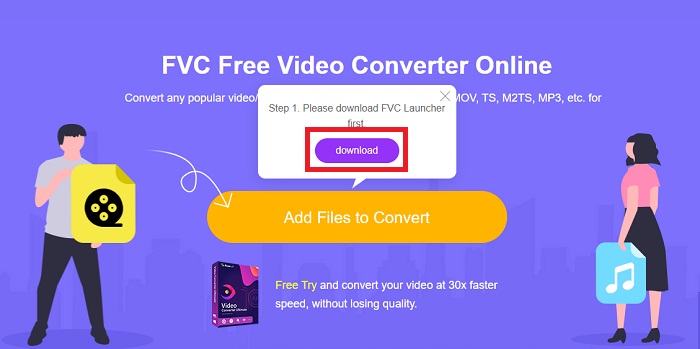
Step 1: Gain access to the main webpage of Free Video Converter Online by clicking this link. After that, you must click the Add Files to Convert button displayed on the main screen to download the launcher that will allow you to operate this online tool. After downloading, click it again to import files from your computer.
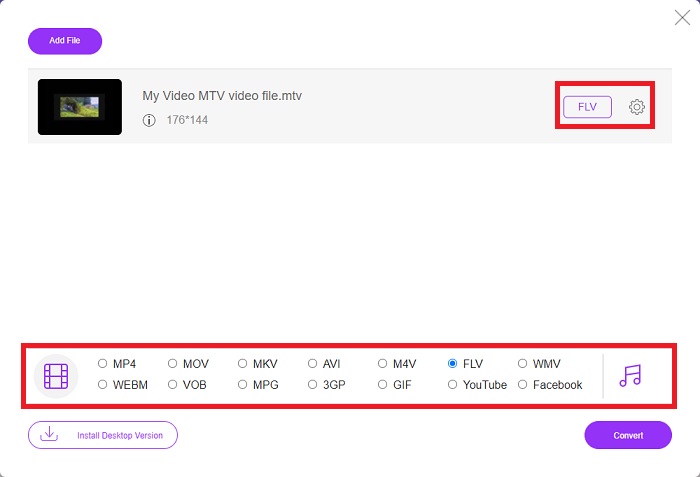
Step 2: Choose the FLV video format from the video format selection located at the bottom part of the window. If you want to know all the specifications of the output video, click the gear icon. Adjust it to your preferred settings and once you finish adjusting, click OK.
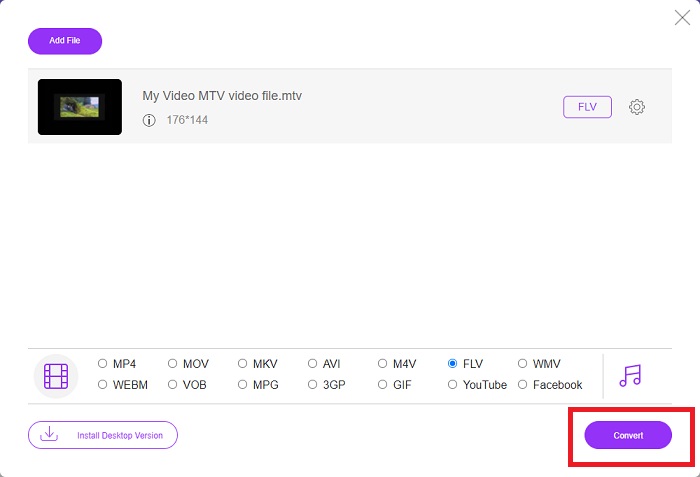
Step 3: Now that you are satisfied with all the adjustments, you can convert your MTV video format to FLV by clicking the Convert button.
관련 항목:
3부. MTV 및 FLV에 대한 확장된 지식
일부 중국 휴대용 MP4 비디오 플레이어는 MTV 형식의 MTV 및 FLV 비디오 파일에 대한 방대한 지식을 사용하여 비디오를 저장합니다. 초당 12프레임의 속도로 MP3 오디오와 수많은 이미지를 결합합니다. MTV 파일과 AMV 파일 간에는 몇 가지 유사점이 있지만 형식이 약간 다릅니다. 몇몇 저렴한 중국 휴대용 MP4 플레이어는 MP4 비디오를 저장하거나 재생하지 않습니다. 반면에 MTV 비디오가 표시됩니다. 저해상도(128x128픽셀) 및 소형 형식의 비디오는 MTV의 표준입니다(1분의 비디오는 대략 24MB의 데이터임). 미디어 플레이어는 많은 저장 공간이나 처리 능력이 필요하지 않습니다. 많은 MTV 비디오를 저장하고 재생합니다. MTV 형식은 중국의 휴대용 미디어 플레이어도 사용하는 AMV 형식과 비슷하지만 형식이 충분히 다르기 때문에 모든 AMV 호환 장치나 미디어 플레이어에서 MTV 파일을 재생할 수 있는 것은 아닙니다.
그러나 Adobe Systems의 Flash 비디오 형식은 YouTube, Hulu, Vevo 및 기타 여러 스트리밍 비디오 서비스의 온라인 비디오에 사용할 수 있습니다. iOS를 제외한 거의 모든 운영 체제는 Adobe Flash Player(브라우저 플러그인 포함) 및 타사 소프트웨어를 사용하여 FLV 파일을 읽고 볼 수 있습니다. FLV는 오픈 소스 소프트웨어 및 특정 브라우저를 통해 iPhone 및 Android 장치에서 재생할 수 있습니다. Flash는 여전히 iOS에서 문제를 일으키고 있습니다. Android 버전 Jellybean 사용자는 FLV 파일을 사용할 수 있습니다. FLV 플레이어 프로그램만 FLV 확장자를 가진 파일을 볼 수 있습니다. FLV 비디오 화면 녹화는 화면 캡처 및 녹화 소프트웨어를 사용하여 가능합니다.
| 파일 확장자 | MTV | FLV |
| 파일 형식 | 중국어 MP4/MTV 플레이어 | 플래시 비디오 파일 |
| 개발자 | 로버트 W. 피트만 | Adobe 시스템 |
| 장점 | MTV 형식의 가장 중요한 장점 중 하나는 전 세계 대부분의 컴퓨터에서 재생할 수 있다는 것입니다. | FLV 형식은 인터넷에서 널리 사용됩니다. 수천 개의 웹사이트가 이를 활용합니다. 다른 비디오 파일 확장자보다 훨씬 더 많은 기능을 제공하고 대부분의 다른 비디오 형식보다 훨씬 작은 파일을 생성합니다. FLV 비디오는 적절한 품질을 표시하고 빠르게 로드하는 데 좋습니다. |
| 단점 | 열악한 사운드 향상 기능으로 인해 사진 해상도가 제한되고 전체 화면 및 전체 모션 비디오를 표시할 수 없습니다. | 플래시 파일 파일을 온라인으로 재생하려면 플래시 플러그인이 설치되어 있어야 합니다. |
| 지원/개방하는 프로그램 | ◆ VLC 미디어 플레이어 ◆ AVS 미디어 플레이어 | ◆ VLC 미디어 플레이어 ◆ 어도비 플래시 플레이어 |
4부. MTV를 FLV로 변환하는 방법에 대한 FAQ
Mac에서 MTV를 FLV로 어떻게 변환합니까?
위에서 언급한 Video Converter Ultimate를 사용하여 MTV 파일을 FLV로 변환할 수 있습니다. 먼저 Mac에서 소프트웨어를 다운로드한 다음 설치 후 실행해야 합니다. 그런 다음 프로그램에 파일을 추가하고 원하는 FLV 형식을 선택합니다. 마지막으로 모두 변환 버튼을 클릭하여 MTV에서 FLV로 변환을 시작합니다.
.MTV 파일 여는 방법? .
일부 MTV 파일은 플랫폼 간 VideoLAN 또는 VLC 미디어 플레이어 또는 Windows 전용 Online Media Technologies AVS 미디어 플레이어에서 재생되지 않을 수 있습니다. 예를 들어, 일부 MTV 파일의 오디오 부분은 VLC를 통해서만 재생할 수 있습니다. MTV 비디오는 FFmpeg, AnyMP4 비디오 변환기 또는 Online Media Technologies의 AVS 비디오 변환기, 모든 플랫폼 간 응용 프로그램(Windows)을 사용하여 AVI 또는 MP4로 변환할 수 있습니다.
VLC가 비디오를 FLV로 변환할 수 있습니까?
VLC 미디어 플레이어를 사용하여 비디오를 재생합니다. 미디어 탭의 드롭다운 메뉴에서 변환/저장 옵션을 선택합니다. 시스템의 .flv 비디오 파일은 미디어 열기 페이지에서 '추가' 버튼을 클릭하여 추가할 수 있습니다.
결론
Given all the points stated in this entire article, there are two recommended converters you should consider using, its Free Video Converter Online and the Video Converter Ultimate. As stated above, these two have shown their full potential, and it's better than another converter available online.
-
 [온라인 및 무료] MTV를 AVI로 손쉽게 변환하는 3가지 방법
 MTV와 같은 비디오 형식에 대해 들어본 적이 있습니까? 이 형식에 대해 모든 것을 알지 못하고 MTV 비디오를 AVI로 변환하려는 경우 이 기사를 주의 깊게 읽고 이 문제에 대해 자세히 알아보세요.
-
 무료로 AVI를 FLV로 변환하는 데 도움이되는 구체적인 가이드
 AVI를 FLV로 변환하려면 강력한 비디오 변환기가 필요합니다. 다행히도이 단일 기사에서 두 가지 및 단계별 가이드를 배울 수 있습니다.
-
 PC / Mac에서 WMV 파일을 FLV로 변환하는 가장 쉬운 2 가지 방법
 WMV를 FLV로 어떻게 변환 할 수 있습니까? 첫째, 권장 사항을 읽고 가장 좋아하는 방법을 찾은 다음 가이드를 따라 작업을 신속하게 수행해야합니다.
