


 비디오 컨버터 궁극
 스크린 레코더
 비디오 수리
 안전한 다운로드
시도해야 할 5가지 놀라운 사진 크기 조정 앱
다른 사람들은 무손실로 압축해 주는 도구를 찾지 못해 사진 크기 조절을 어려워합니다. 또한 많은 사람은 이미지 품질을 향상시키기 위해 사진의 크기를 변경합니다. 이미지 크기를 조정하면 품질에 영향을 주긴 하지만, 기기 저장 공간이 부족하다면 가장 좋은 선택입니다. 게다가 이미지 크기 조절은 흐릿한 사진을 선명하게 만드는 데에도 좋은 방법입니다. 좋은 소식은, 온라인·오프라인은 물론 안드로이드와 아이폰에서도 품질 저하 없이 이미지를 리사이즈할 수 있는 앱들이 있다는 점입니다. 이 글을 끝까지 읽고 최고의 사진 크기 조절 앱 다섯 가지를 확인해 보세요.

1부. Photo Resizer 앱 무료 온라인
많은 사람들이 온라인 사진 리사이저를 사용하기를 원합니다. 기기에 아무 것도 다운로드할 필요가 없기 때문입니다. 장치의 저장 공간을 절약하려면 온라인 도구가 최선의 선택입니다. 또한 많은 사용자가 권장하는 도구인 FVC Free Image Upscaler와 마찬가지로 온라인 응용 프로그램을 무료로 사용할 수 있는 경우가 많습니다.
FVC Free Image Upscaler는 Google, Firefox, Safari를 포함한 모든 웹 브라우저에서 사용할 수 있는 온라인 리사이즈 앱입니다. 이 뛰어난 앱은 이미지를 2배, 4배, 6배, 8배까지 확대할 수 있습니다. 또한 PNG, JPG, JPEG, BMP 등 거의 모든 이미지 형식을 지원합니다. 이 도구의 또 다른 장점은 직관적인 사용자 인터페이스로, 초보자도 쉽게 사용할 수 있다는 점입니다. 더 나아가 FVC Free Image Upscaler는 AI(인공지능) 기술을 사용하여 이미지의 흐릿한 부분을 자동으로 인식하고 즉시 개선합니다. 원하는 배율을 선택해 이미지를 확대할 수 있을 뿐 아니라, 강력한 AI 보정 기능으로도 잘 알려져 있습니다. 온라인 애플리케이션이기 때문에 기기에 아무것도 설치할 필요가 없어 저장 공간도 절약됩니다. 지금 바로 이 최고의 무료 사진 리사이즈 앱을 사용해 보세요.
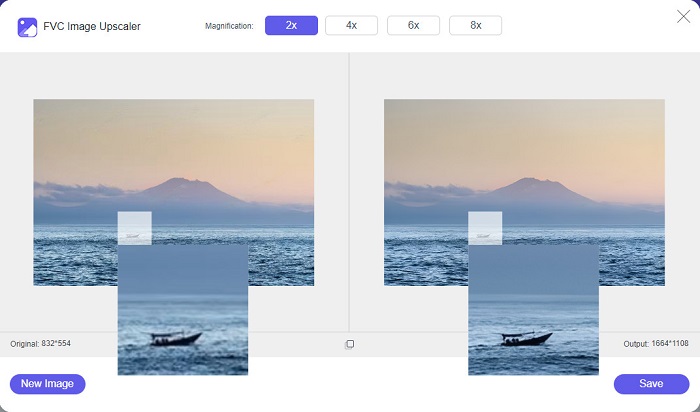
장점
- 빠른 업스케일링 프로세스가 있습니다.
- 계정에 로그인할 필요가 없습니다.
- 사용하기 쉬운 소프트웨어 인터페이스가 있습니다.
- Windows 또는 Mac 장치에서 액세스할 수 있습니다.
단점
- 인터넷에 의존하는 도구입니다.
2부. 컴퓨터를 위한 최고의 사진 크기 조정 앱
이미지 리사이저 또는 업스케일러를 찾고 있다면 컴퓨터에서 많은 앱을 사용할 수 있습니다. 그러나 다운로드 가능한 모든 응용 프로그램을 무료로 사용할 수 있는 것은 아닙니다. 종종 PC용 소프트웨어 응용 프로그램은 무료가 아닙니다. 다행히 컴퓨터에 무료로 다운로드할 수 있는 앱을 찾았습니다. 이 섹션을 읽고 Windows PC용 최고의 무료 사진 크기 조정 앱에 대해 자세히 알아보세요.
PNGOUTWin은 Windows 컴퓨터에 무료로 다운로드할 수 있는 오프라인 사진 크기 조절 프로그램입니다. 이 사진 리사이저 앱은 PNG, JPG 같은 표준 이미지 형식을 지원합니다. 또한 압축하고 싶은 이미지를 업로드하면 자동으로 크기를 줄여 줍니다. 사용법은 간단하지만, 기능을 파악하는 데는 다소 시간이 걸릴 수 있습니다. 그러나 여러 번 사용하다 보면 곧 익숙해질 것입니다. 일괄 리사이즈 기능을 제공하여 여러 이미지를 한 번에 크기 조절하고 하나의 폴더에 저장할 수 있습니다.
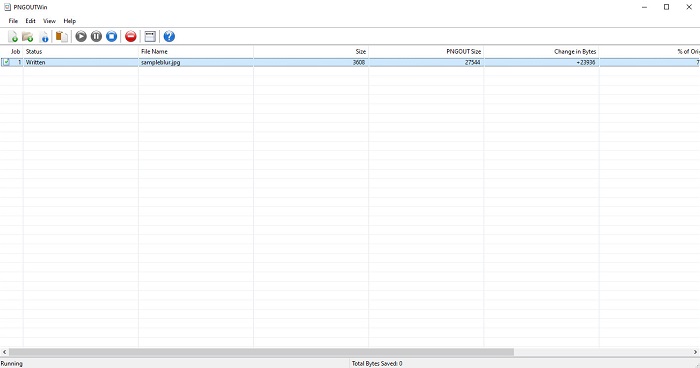
장점
- 무료로 다운로드할 수 있습니다.
- 안전하고 사용하기 쉽습니다.
- 일괄 업스케일링 프로세스를 제공합니다.
단점
- Windows 장치에서만 사용할 수 있습니다.
- 확대된 이미지는 미리 볼 수 없습니다.
3 부분. Android에서 사진 크기를 조정하는 최고의 앱
요즘 많은 사람들이 안드로이드 폰을 사용합니다. 갤러리에 낮은 품질의 이미지가 있는 경우 사진 크기 조정 앱으로 이미지를 향상시킬 수 있습니다. 다행히도 PlayStore에서 낮은 품질의 이미지를 향상시키는 데 도움이 되는 무료 사진 크기 조정 앱이 많이 있습니다.
Photo & Picture Resizer는 PlayStore에서 사진 크기 조절 앱을 검색하면 가장 먼저 나오는 앱입니다. 안드로이드 기기에 다운로드할 수 있는 최고의 사진 리사이즈 앱 중 하나입니다. 또한 두 개 이상의 이미지를 동시에 압축할 수 있는 일괄 업스케일 기능을 제공합니다. 게다가 미리 설정된 다양한 크기 프리셋 중에서 원하는 이미지 크기를 선택할 수 있습니다. 추가로, 이미지의 파일 크기와 해상도도 변경할 수 있습니다. Photo & Picture Resizer 앱은 동영상 압축 기능도 지원합니다. 단점은, 고급 편집 기능을 사용하려면 유료 프리미엄 버전을 구매해야 한다는 점입니다.
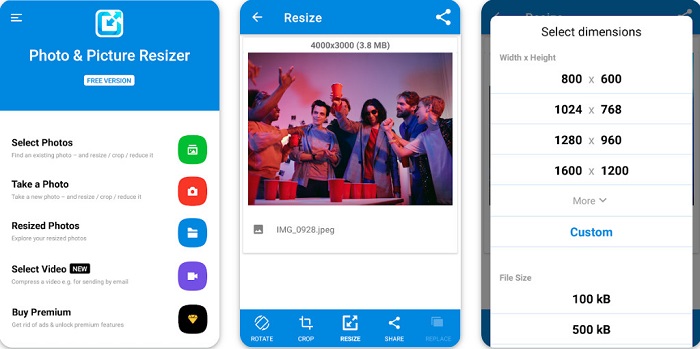
장점
- 무료이며 안전하게 다운로드할 수 있습니다.
- 빠른 크기 조정 프로세스가 있습니다.
- 출력을 다른 소셜 미디어 플랫폼으로 내보낼 수 있습니다.
단점
- 특별한 기능을 사용하려면 프리미엄 버전을 구입하세요.
- 성가신 광고가 포함되어 있습니다.
4부. iPhone용 최고의 사진 크기 조정 앱
요즘 많은 사람들이 아이폰을 사용하고 있는데, 알고 계셨나요? iPhone에서 많은 무료 사진 크기 조정 앱을 다운로드하여 이미지 크기를 조정하거나 개선할 수 있습니다. 그리고 사용하는 것이 가장 좋은 방법을 알고 싶다면 이 부분을 모두 읽으십시오.
레미니
Remini는 아이폰용 최고의 사진 크기 조절 앱입니다. Remini는 AppStore에서 무료로 다운로드할 수 있고, 안전하게 사용할 수 있습니다. 또한 AI(인공지능) 기술을 활용해 이미지를 자동으로 리사이즈하고 보정해 줍니다. 이 앱은 기기에 저장하기 전에 이미지에 어떤 변화가 생겼는지 미리 확인할 수 있도록 해 줍니다. 또한 결과물을 Facebook, Instagram, TikTok 같은 인기 소셜 미디어 플랫폼에 바로 내보낼 수 있습니다. Pro 버전에서는 이미지를 더 세밀하게 개선할 수 있는 추가 편집 기능도 제공됩니다. 사진을 더욱 또렷하고 선명하게 만들고 싶다면, 이 앱이 바로 찾고 있던 도구일 수 있습니다.
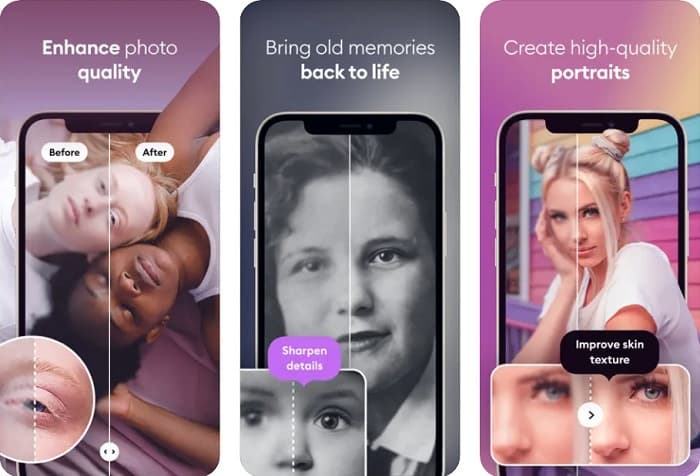
장점
- iPhone용 이미지 형식을 지원합니다.
- 간단한 사용자 인터페이스가 있습니다.
- 저해상도 이미지를 수정할 수 있습니다.
단점
- 이미지를 향상시키려면 앱을 구매해야 합니다.
이미지 크기 조정
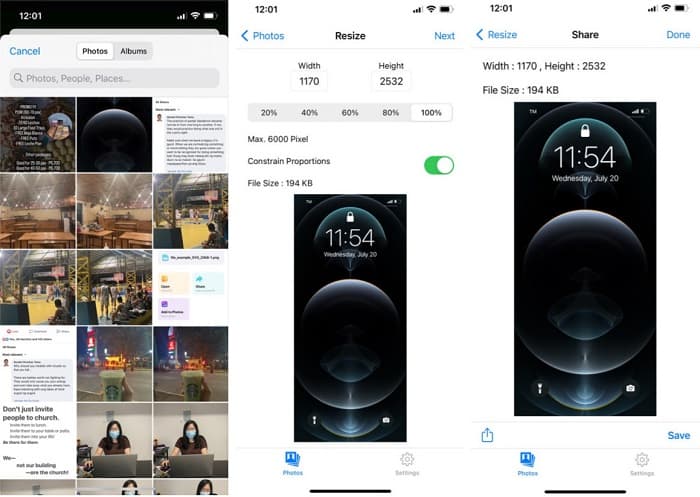
이미지를 리사이즈할 수 있는 또 다른 좋은 앱은 Image Resize입니다. Image Resize 역시 아이폰에서 무료로 다운로드할 수 있습니다. 이 앱은 원하는 비율(%)을 선택해 그에 맞춰 이미지를 리사이즈할 수 있습니다. 또한 이미지의 가로와 세로 길이를 직접 조절할 수 있습니다. 이 앱의 뛰어난 점은 매우 빠른 리사이즈 속도로, 많은 사용자가 매우 편리하다고 평가합니다.
장점
- HEIC, Exif 및 PNG 이미지를 지원합니다.
- 사용자 친화적인 앱입니다.
단점
- 이미지 프레임의 크기만 조정할 수 있지만 향상되지는 않습니다.
관련 항목:
Windows와 Mac에서 손쉽게 이미지 품질을 개선하는 방법
이미지 해상도를 높이는 방법 [품질을 개선하는 5가지 방법]
5부. 최고의 사진 크기 조정 앱에 대한 FAQ
품질을 잃지 않고 사진 크기를 조정할 수 있습니까?
이미지 크기를 조정한다고 해서 반드시 이미지 품질이 저하되는 것은 아닙니다. 이미지 크기에 영향을 주지만 대부분의 경우 앱은 품질을 잃지 않고 이미지 크기를 조정할 수 있습니다.
Adobe Photoshop을 사용하여 이미지 크기를 조정할 수 있습니까?
네. Adobe Photoshop은 사진 편집 기능이 매우 뛰어난 애플리케이션이며, 그 안에 이미지 크기를 조절하는 기능도 포함되어 있습니다. 이를 사용하려면, Adobe Photoshop을 열고 크기를 변경할 이미지를 선택한 뒤, 상단 메뉴 바 > 이미지(Image) > 이미지 크기(Image Size)를 선택해 이미지 크기 대화 상자를 열어 원하는 크기로 조정하면 됩니다.
Adobe Photoshop은 어떤 이미지 형식을 지원합니까?
Adobe Photoshop은 JPG, JPEG, PNG, GIF, TIFF 등과 같은 거의 모든 알려진 이미지 형식을 지원합니다.
결론
이제 최고의 사진 크기 조절 앱을 알게 되었으니, 그중에서 원하는 것을 선택해 보세요. 온라인, 오프라인, 안드로이드, 아이폰용 앱들이 각각 있어 어떤 기기를 사용하느냐에 따라 달라집니다. 하지만 기기에 아무것도 설치하고 싶지 않다면, 지금 바로 FVC Free Image Upscaler를 사용해 보세요.
-
 Top Enhancers로 iPhone 사진 해상도 향상
 iPhone 사진 해상도를 개선하고 싶으십니까? 이 기사에서는 사용할 수 있는 최고의 도구와 알아야 할 기타 트릭을 다룹니다!
-
 오래된 사진 복원 온라인 및 오프라인 [쉬운 단계]
 오래된 사진을 복원하고 싶으십니까? 이 도구를 사용하면 오래된 사진 복원 프로세스를 알 수 있습니다. 가장 간단한 방법을 배우려면 이 게시물을 읽으십시오.
-
 반드시 사용해야 하는 모든 웹 브라우저를 위한 상위 7가지 픽셀 인핸서
 사용할 최고의 픽셀 인핸서를 알고 싶다면 이 게시물을 확인하는 것이 좋습니다. 이 기사에서는 모든 웹 브라우저를 위한 7가지 최고의 사진 픽셀 인핸서를 나열합니다.
