


 비디오 컨버터 궁극
 스크린 레코더
 비디오 수리
 안전한 다운로드
Pond5 워터마크를 제거하는 가장 좋은 방법 [쉬운 단계]
Pond5는 다양한 비디오 클립, 사운드 트랙, 음향 효과, 3D 모델 등을 포함하는 온라인 플랫폼입니다. Pond5는 뉴욕에 본사를 둔 회사로 고품질의 비디오 및 오디오 파일을 제공하는 유명한 웹사이트입니다. 또한 콘텐츠 제작자가 자신의 비디오, 음악, 일러스트레이션을 업로드하여 온라인으로 판매할 수 있는 스톡 푸티지 서비스입니다. 따라서 온라인에서 고품질 스톡 영상을 찾고 있다면 Pond5가 바로 당신입니다. 그러나 이 플랫폼의 많은 초심자 사용자는 무료 미리 보기 버전을 사용하여 시작합니다.
무료 미리보기에는 동영상, 오디오 또는 이미지에 워터마크가 삽입되어 있어 제품의 외형을 망가뜨릴 수 있습니다. 이 글에서는 이미지에서 Pond5 워터마크를 제거하는 방법을 알려 드립니다.

1부. Pond5가 이미지에 워터마크를 배치하는 이유
워터마크는 비디오, 오디오 또는 이미지 내에 배치된 로고, 텍스트 또는 이미지입니다. 워터마크를 중첩하여 침해를 일으키기 어렵게 하고 출력물이 복사되는 것을 방지합니다. 사용자에게 유료 미디어를 제공하는 많은 회사에서는 무료 미리 보기를 허용하지만 워터마크가 포함된 미디어를 포함합니다. Pond5는 그런 회사입니다. 소비자가 워터마크가 없는 제품을 구매하도록 유도하는 것이 Pond5의 전술입니다.
또한 Pond5는 제품에 워터마크를 표시하여 해당 제품을 사용하지 않은 다른 사용자가 제품을 다운로드하여 자신의 제품으로 사용하는 것을 방지합니다. 그러나 Pond5 이미지가 있고 이미지에서 성가신 워터마크를 제거하려면 이 게시물을 계속 읽으십시오.
2 부분. 이미지에서 온라인으로 Pond5 워터마크를 제거하는 방법
많은 사람들이 이미지에서 Pond5 워터마크를 제거하는 방법을 찾고 있습니다. 그러나 다른 사람들은 Pond5의 사운드 클립이나 효과음에도 워터마크(사운드 워터마크)가 포함되어 있다는 사실을 모릅니다. 그래서 먼저 Pond5 사운드 워터마크를 제거하는 방법을 알려드리겠습니다.
오디오 또는 다운로드한 사운드 효과에서 사운드 워터마크를 제거하는 소프트웨어 응용 프로그램은 거의 없습니다. 많은 사람들이 Adobe Audition을 사용하여 Pond5 사운드 워터마크를 제거합니다. 사운드 워터마크를 제거하려면 MP3 파일을 프로젝트로 가져와야 합니다.
Adobe Audition을 사용하여 사운드 워터마크를 제거하는 단계는 다음과 같습니다.
1단계. 키보드에서 Ctrl+A를 눌러 오디오 파일을 전체 선택합니다.
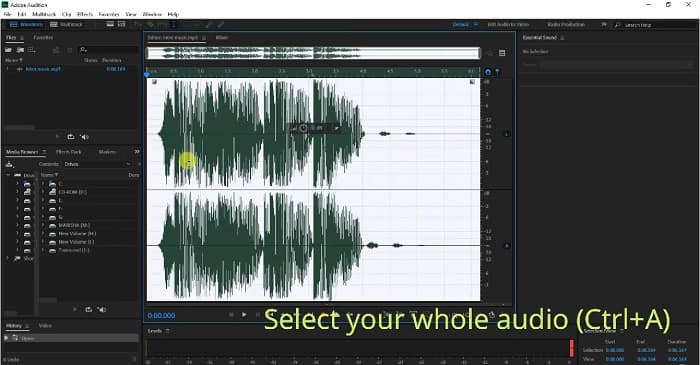
2단계. 그런 다음 Effects 버튼을 클릭하고, Stereo Imagery>Center Channel Extractor로 이동합니다.
3단계. 새로운 탭이 표시되며, 여기에서 Presets 옵션을 볼 수 있습니다.
4단계. 다음으로, 음성 워터마크를 제거하기 위해 Vocal Remover 옵션을 선택합니다.
5단계. Apply option을 클릭하기 전에 오디오를 들어 보고 오디오 워터마크가 제거되었는지 확인합니다.
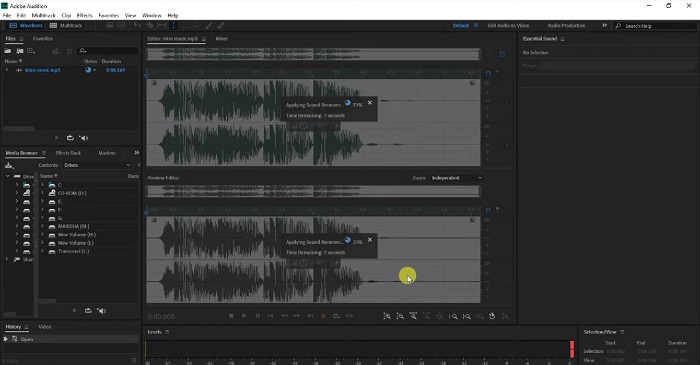
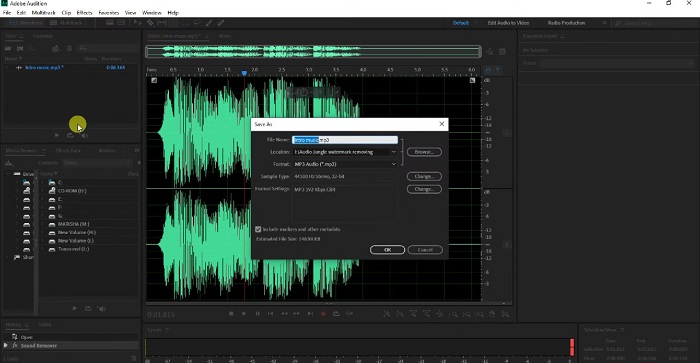
6단계. 마지막으로 File>Save as로 가서 파일을 저장합니다. 그런 다음 File 이름을 입력하고 파일을 저장할 위치를 선택합니다.
3 부분. 이미지에서 온라인으로 Pond5 워터마크를 제거하는 3가지 방법
이 부분에서는 궁극적인 온라인 도구를 사용하여 이미지에서 Pond5 워터마크를 제거하는 Pond5 워터마크 제거 프로세스를 알게 됩니다.
FVC 무료 워터마크 제거제
FVC Free Watermark Remover는 이미지에서 어떤 워터마크(로고, 이미지, 텍스트)든 쉽게 제거할 수 있는, 가장 유명하고 뛰어난 온라인 워터마크 제거 도구 중 하나입니다. 또한 PNG, JPEG, JPG, BMP 등 가장 일반적인 이미지 형식을 지원합니다. 직관적인 사용자 인터페이스를 갖추고 있어 초보자도 사용하기 쉽습니다. 이미지의 워터마크를 제거하기 위해 다양한 선택 도구를 고를 수도 있습니다. 더 나아가 폴리곤 도구(Polygonal tool), 올가미 도구(Lasso tool), 브러시 도구(Brush tool) 등 워터마크 제거에 사용할 수 있는 선택 도구들을 제공합니다. 이 도구 사용에 관심이 있다면 아래의 간단한 가이드를 따라 주세요.
이미지에서 Pond5 워터마크를 제거하는 방법에 대한 단계:
1단계. 브라우저에서 FVC Free Watermark Remover를 검색하거나, 이 링크를 클릭해 바로 웹페이지로 이동합니다.
2단계. 메인 화면에서 Upload Image 버튼을 클릭하여 워터마크를 제거하려는 Pond5 이미지를 업로드합니다.
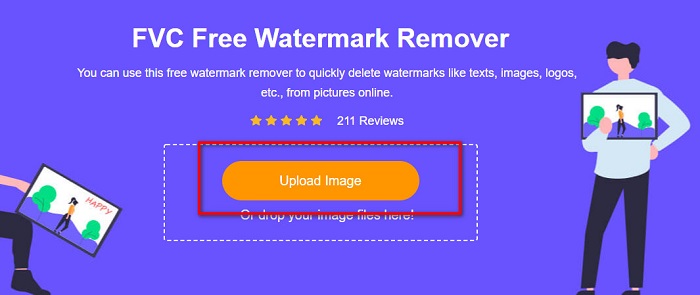
3단계. 이미지를 업로드한 후, 사용하고 싶은 선택 도구를 고릅니다. 여기서는 Polygonal Tool을 사용해 보겠습니다.
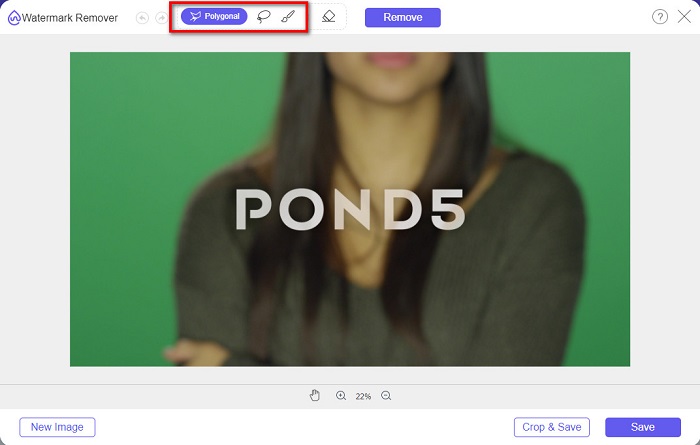
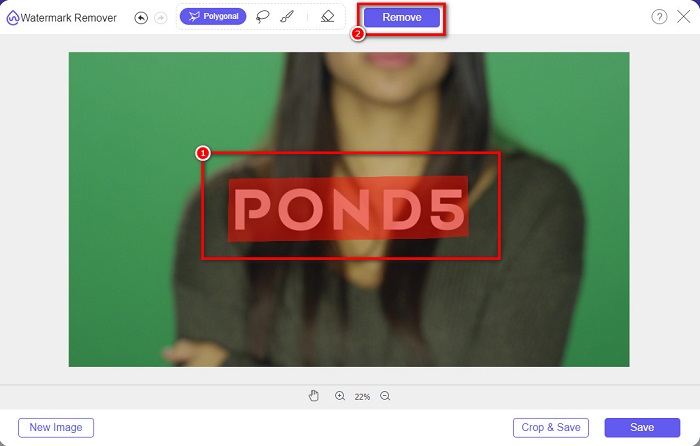
4단계. 그런 다음 이미지 위의 워터마크를 따라가며 표시합니다. 이후 Remove 버튼을 클릭해 워터마크를 제거합니다.
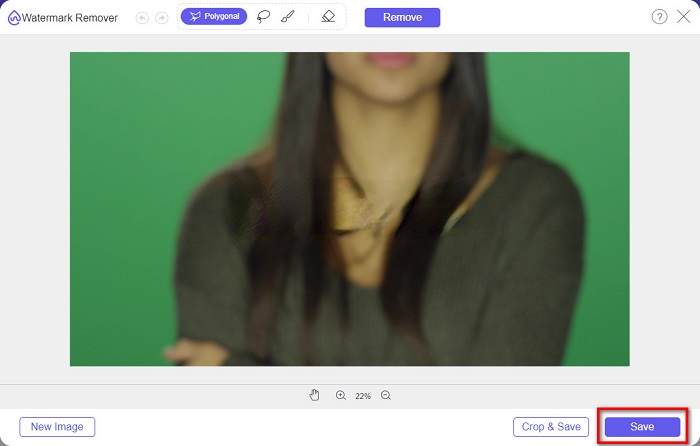
5단계. 마지막으로 Save 버튼을 클릭해 이미지를 기기에 저장합니다. 또한 이 온라인 도구를 사용해 Deviantart 워터마크를 제거하는 것도 간편합니다.
워터마크 리무버.io
Watermark Remover.io는 이미지에서 어떤 워터마크든 제거할 수 있는 온라인 워터마크 제거 도구입니다. 이미지에 Pond5와 같은 텍스트 워터마크가 있다면, 이 도구로 성가신 워터마크를 제거할 수 있습니다. 인터페이스가 단순하며, PNG, JEPG, JPG, WEBP 등 대부분의 표준 이미지 형식을 지원합니다. 단, 인터넷에 의존하는 도구이므로, 이미지를 업로드하거나 저장할 때 네트워크 상태에 따라 문제가 발생할 수 있습니다.
1단계. 브라우저를 열고 검색창에 Watermark Remover.io를 입력해 검색합니다. 메인 화면에서 Upload Image 버튼을 클릭해 Pond5 이미지를 업로드합니다.
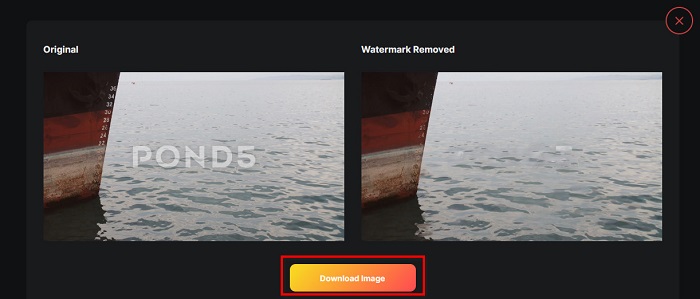
2단계. 이미지를 업로드한 뒤에는 Watermark Remover.io가 자동으로 이미지에서 Pond5 워터마크를 제거합니다.
3단계. Download Image 버튼을 클릭해 이미지를 기기에 저장합니다.
imgkits
imgkits 역시 Pond5 이미지에서 텍스트 워터마크를 제거할 수 있는 온라인 애플리케이션입니다. 이 워터마크 제거 도구의 뛰어난 점은, 이미지 위의 워터마크를 제거하기 위해 사용할 선택 도구를 직접 고를 수 있다는 것입니다. 또한 사용하기 쉬운 인터페이스를 갖추고 있어 초보자도 부담 없이 활용할 수 있습니다. 다만, 제거한 워터마크 부분에 약간의 흐림(블러) 자국이 남는다는 단점이 있습니다.
imgkit을 사용하여 Pond5 워터마크를 제거하는 방법:
1단계. 브라우저에서 imgkits를 검색해 웹페이지로 이동합니다. 그런 다음 메인 화면에서 Upload Image를 클릭해 이미지를 업로드합니다.
2단계. 그런 다음 인터페이스 왼쪽에서 사용할 selection tool을 고르고, 이미지에 있는 Pond5 워터마크를 따라 표시합니다.
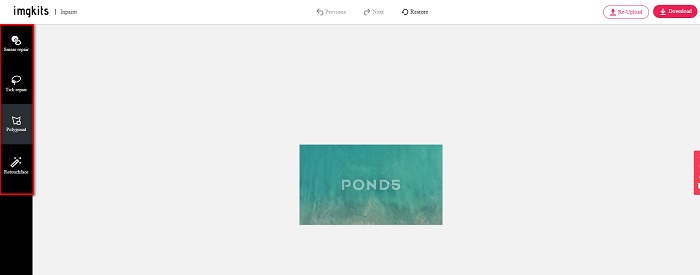
3단계. 마지막으로 Download 버튼을 클릭해 이미지를 저장합니다. Lomotif 워터마크를 제거하는 방법이 궁금하다면 여기에서 확인할 수 있습니다.
4부. Envato Pond5 워터마크 제거에 대한 FAQ
워터마크를 제거하면 워터마크 영역에 흐림이 남습니까?
모든 도구가 제거한 워터마크 부분에 블러 자국을 남기는 것은 아닙니다. 제거한 워터마크 영역에 흐림 효과가 남지 않기를 원한다면, FVC Free Watermark Remover를 사용해 보세요.
After Effects에서 워터마크를 제거할 수 있습니까?
그렇습니다. Adobe After Effects는 이미지나 동영상에서 각종 워터마크를 제거할 수 있는 가장 유명한 편집 앱입니다. 제거하려는 워터마크를 트래킹하고, 워터마크 위에 트래킹 마크를 배치합니다. Layer 패널로 이동해 Null objects를 생성합니다. 그다음 Save Frame as를 클릭합니다. 편집된 이미지를 가져와 Opacity(불투명도)를 조정합니다. 마지막으로 Pick-up whip을 사용해 과정을 마무리합니다.
워터마크를 제거하면 비디오의 파일 크기에 영향을 줍니까?
동영상에서 워터마크를 제거한다고 해서 반드시 파일 용량이 변하는 것은 아닙니다. 하지만 일부 워터마크 제거 도구는 영상 품질에 영향을 줄 수 있습니다. 따라서 영상 품질에 영향을 주지 않고 워터마크를 제거하려면 FVC Video Converter Ultimate을 사용하세요.
결론
적절한 도구만 있으면 이미지에서 Pond5 워터마크를 제거하는 것은 어렵지 않습니다. 위에서 소개한 온라인 도구들은 모두 이미지에서 Pond5 워터마크를 빠르게 제거하는 데 도움이 됩니다. 그러나 쉽고 안전한 온라인 도구를 선호한다면, FVC Free Watermark Remover를 사용해 보세요.
-
 워터마크 제거제를 사용하여 사진에서 관광객을 제거하는 방법
 사진에서 관광객을 제거하는 방법? 사진에서 원하지 않는 것을 제거하는 방법을 배우고 싶다면 이 도구가 도움이 될 것입니다. 자세한 내용은 이 기사를 읽으십시오.
-
 123rf 워터마크 제거제 – 궁극적인 도구에 대한 철저한 검토
 가장 뛰어난 123rf 워터마크 제거제가 무엇인지 알고 싶다면 이 기사를 자세히 읽으십시오. 이 문서에서는 도구에 대한 심층적인 검토를 제공합니다.
-
 졸업 사진에서 워터마크를 제거하는 쉬운 방법
 졸업 사진에서 워터마크를 제거하는 가장 좋은 방법을 알고 싶으십니까? 이 기사를 읽으면 대학원 사진에서 워터마크를 쉽게 제거하는 방법을 알 수 있습니다.
