


 비디오 컨버터 궁극
 스크린 레코더
 비디오 수리
 안전한 다운로드
Windows 및 Mac에서 MP4를 AMV로 쉽게 변환하는 3 가지 효율적인 방법
대용량 영화와 같은 대용량 MP4 동영상을 스마트 폰으로 보내려는 경우 저장 공간이 충분하지 않을 수 있습니다. MP4를 AMV 파일로 변환하려면 고급 압축 알고리즘을 사용하여 훨씬 더 작은 비디오를 얻을 수 있습니다. 비디오를 온라인으로 변환해야하거나 특정 크기로 비디오를 조정하고 편집해야하는 경우 기사에서 가장 효율적인 MP4를 AMV로 변환하는 3 가지 변환기에 대해 자세히 알아볼 수 있습니다.

1 부 : MP4를 AMV 온라인으로 변환하는 방법
간단한 MP4 파일을 손쉽게 AMV로 변환하기만 하면 된다면, FVC Free Online Video Converter는 MP4, AMV, AVI 등 다양한 파일 형식을 지원하는 다기능 온라인 비디오 변환기입니다. 이 도구를 통해 비디오와 오디오 설정을 조절할 수 있으며, 워터마크나 기타 제한 없이 파일을 변환할 수도 있습니다.
- 1. MP4를 AMV로 변환, AVI, MKV 원본 품질의 다른 동영상도 있습니다.
- 2. 프레임 속도, 비디오 품질, 비디오 코덱, 오디오 품질 등을 조정합니다.
- 3. 3 단계 만에 AMV 파일을 변환 할 수있는 쉬운 사용자 인터페이스를 제공합니다.
- 4. 워터 마크없이 파일을 변환하는 것이 안전하고 안정적인 방법입니다.
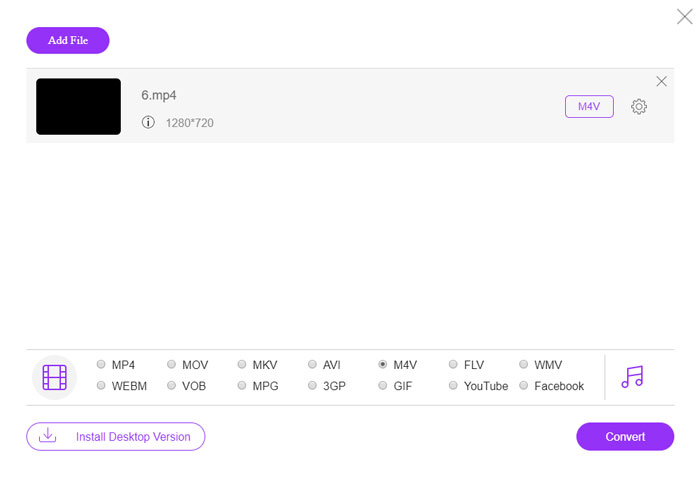
1단계. 어떤 브라우저에서든 온라인 MP4 → AMV 변환기 페이지로 이동한 다음, 처음 사용하는 경우 Add File to Convert 버튼을 클릭해 비디오 변환기를 설치합니다. 그 후 MP4 파일을 프로그램에 불러올 수 있습니다.

2단계. 하단에서 출력 형식으로 AMV를 선택합니다. 물론 원하는 영상을 얻기 위해 비디오 인코더, 비디오 해상도, 비디오 비트레이트, 프레임 레이트 등 비디오 및 오디오 설정을 세부적으로 조절할 수도 있습니다.

3단계. 이후 Convert 버튼을 눌러 MP4를 AMV로 변환하기 시작합니다. 원하는 파일을 얻는 데에는 몇 초 정도가 소요되며, 그다음 변환된 비디오를 스마트폰으로 전송할 수 있습니다.
2 부 : VLC 미디어 플레이어를 사용하여 MP4를 AMV로 변환하는 방법
VLC Media Player는 가장 인기있는 MP4 to AMV 변환기 중 하나입니다. 또한 몇 가지 기본 비디오 변환 및 편집 기능을 제공합니다. 또한 변환 후 출력 AMV 비디오를 미리 볼 수도 있습니다. 아래의 세부 프로세스를 확인하십시오.
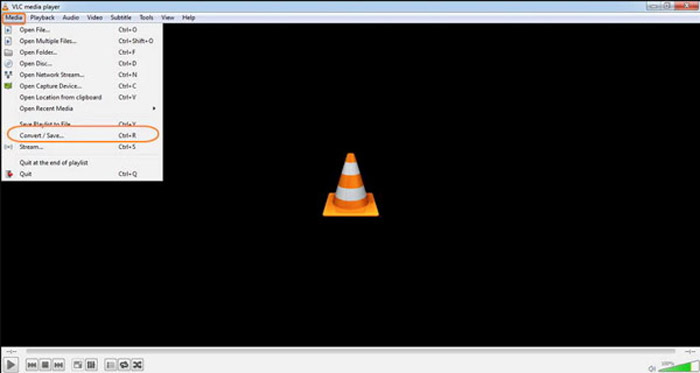
1단계. 컴퓨터에서 VLC 미디어 플레이어를 열고, Media 메뉴로 이동한 뒤 Convert/Save 옵션을 선택합니다. File 탭의 File Selection 목록 오른쪽에 있는 Add 옵션을 클릭해 MP4 파일을 찾아 추가합니다.
2단계. 계속 진행하려면 Convert/Save 버튼을 클릭합니다. Convert 창으로 이동한 뒤, 출력 형식으로 AMV를 선택합니다. Edit Selected Profile 버튼을 눌러 비디오 및 오디오 설정을 세부적으로 조절할 수 있습니다.
3단계. Browse 옵션을 클릭해 출력 파일의 저장 위치와 파일 이름을 선택합니다. 그런 다음 Start 버튼을 클릭해 컴퓨터에서 MP4 파일을 AMV로 변환합니다.
파트 3 : MP4를 AMV로 쉽게 변환하는 가장 좋은 방법
FVC Video Converter Ultimate는 Windows와 Mac에서 모두 사용할 수 있는 올인원 MP4 → AMV 변환기입니다. 단순히 동영상 형식을 변환하는 것뿐 아니라, 다양한 비디오·오디오 파라미터를 조정하고, 자막·오디오 트랙을 추가하며, 변환된 동영상 파일을 손쉽게 편집할 수도 있습니다.
- 1. MP4를 AMV 및 원본 품질의 기타 비디오 형식으로 변환합니다.
- 2. 프레임 속도, 비디오 품질, 비트 전송률, 비디오 코덱 등을 조정합니다.
- 3. 회전, 자르기, 필터 조정 등을위한 다양한 비디오 편집 기능을 제공합니다.
- 4. 70 배 더 빠른 속도로 비디오를 변환하는 고급 하드웨어 가속.
Free DownloadFor Windows 7 or laterSecure Download
Free DownloadFor MacOS 10.7 or laterSecure Download
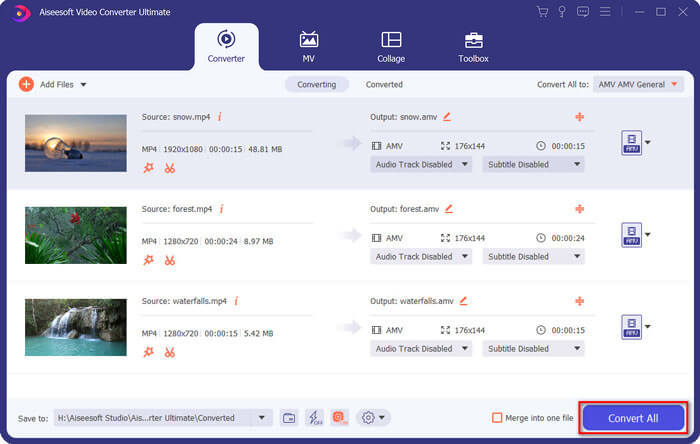
1단계. MP4를 AMV로 변환하는 프로그램을 다운로드해 설치한 후, 컴퓨터에서 실행합니다. Convert 버튼을 선택하고 Add File 옵션을 클릭해 MP4 파일을 불러오거나, 여러 개의 MP4 파일을 직접 이 프로그램 창으로 드래그해 놓습니다.

2단계. 동영상 파일 오른쪽에 있는 형식 아이콘을 클릭한 후 출력 형식으로 AMV를 선택합니다. 또한 Gear 아이콘을 눌러 비디오·오디오 설정을 조절하거나, 필터를 조정하고 영상을 편집할 수도 있습니다.

3단계. 영상 크기 등 출력 AMV 설정에 만족하면 Convert All 버튼을 클릭해 MP4를 AMV로 일괄 변환합니다. 그 후 변환된 AMV 파일을 다른 기기로 옮겨 사용할 수 있습니다.
파트 4 : MP4를 AMV 파일로 변환하는 방법에 대한 FAQ
1. AMV 파일 형식이란 무엇입니까?
AMV 파일은 Anime Music Video 파일로 알려져 있습니다. 일반적으로 중국에서 장치를 재생하는 휴대용 미디어에서 사용됩니다. AMV 비디오 형식은 94x64에서 160x120 사이의 비디오 해상도를 가진 저해상도에 적합합니다. MP4를 AMV로 변환하면 더 많은 동영상을 쉽게 스마트 폰으로 보낼 수 있습니다.
2. 스마트 폰과 컴퓨터에서 AMV 파일을 재생하는 방법은 무엇입니까?
MP4를 AMV 파일로 변환 할 때 스마트 폰이나 컴퓨터에서 비디오 파일을 재생하는 방법은 무엇입니까? 실제로 대부분의 미디어 플레이어에서 작동하는 AVI 형식의 변형으로 간단히 AMV를 사용할 수 있습니다. iOS 장치에서 AMV 파일을 재생해야하는 경우 대신 VLC 미디어 플레이어 또는 다른 미디어 플레이어를 사용할 수 있습니다.
3. AMV와 MP4의 차이점은 무엇입니까?
MP4는 온라인 스트리밍 서비스 및 장치에 사용할 수있는 가장 자주 사용되는 비디오 형식 중 하나입니다. AMV는 가변적 인 양자화 테이블이 아닌 고정 된 양자화 테이블이있는 Motion JPEG의 변형입니다. MP4를 AMV로 변환하면 비디오를 압축하고 특히 비디오를 장치로 전송할 때 더 많은 저장 공간을 절약 할 수 있습니다.
결론
MP4를 AMV로 변환하는 가장 좋은 선택은 무엇입니까? 기사에서 가장 좋은 방법에 대해 자세히 알아보십시오. 추가 소프트웨어없이 온라인으로 비디오를 변환하고 압축해야하는 경우 FVC Free Online Video Converter는 고려할 수있는 최고의 솔루션입니다.
-
 AVI VS MP4 – 어느 것이 더 낫습니까 (품질 / 압축 / 파일 크기…)
 더 나은 비디오 형식, AVI 또는 MP4는 무엇입니까? 자세한 비교를 원하시면이 AVI VS MP4 기사를 확인하십시오. 여러 측면에서 AVI와 MP4의 차이점과 유사점을 알 수 있습니다.
-
 Windows 및 Mac 용 상위 10 개 MP4 플레이어 소프트웨어 (무료 및 유료)
 10 개의 최신 MP4 비디오 플레이어 소프트웨어의 권장 사항에서 최고의 MP4 플레이어를 읽고 얻으십시오. Windows 및 Mac에서 지연없이 원활하게 MP4 비디오 파일을 재생할 수 있습니다.
-
 Mac / Windows 용 MP4를 WMV로 변환하는 방법
 이 게시물은 Mac 또는 Windows에서 MP4 비디오를 WMV 형식으로 변환하는 방법을 공유합니다. 또한 데스크탑 소프트웨어와 웹 기반 온라인 변환기를 포함한 여러 옵션을 제공합니다. 최고의 MP4를 WMV로 변환하는 도구를 알 준비가 되셨습니까?
