


 비디오 컨버터 궁극
 스크린 레코더
 비디오 수리
 안전한 다운로드
DVD 해상도에 대한 포괄적인 고찰 [설명]
DVD를 재생할 때마다 영상 품질이 달라지는 것을 느낀 적이 있나요? 예를 들어, 이전에 재생했던 DVD보다 다른 DVD의 화질이 더 좋아 보일 수 있습니다. 이러한 차이는 주로 DVD의 해상도와 포맷이 서로 같지 않기 때문에 발생합니다. 이 가이드에서는 DVD 해상도가 무엇인지, 왜 중요한지, 그리고 어떻게 변경할 수 있는지 살펴보겠습니다. 또한 DVD와 블루레이의 화질 차이를 설명하고, 최적의 재생을 위해 DVD 해상도를 조정하는 실용적인 팁도 제공할 것입니다. 계속 읽으며 더 자세히 알아보세요.

1부. DVD 해상도란?
해상도는 비디오 이미지의 픽셀 수를 나타내며, 가로 x 세로로 표현됩니다. 일반적으로 스트리밍 플랫폼에서 비디오 해상도를 쉽게 확인할 수 있으며, 해상도에 따라 비디오 품질이 결정됩니다. DVD의 경우에도 마찬가지로, 다양한 해상도가 DVD 비디오 재생 품질에 영향을 미칠 수 있습니다. 다음은 DVD 해상도의 유형입니다.
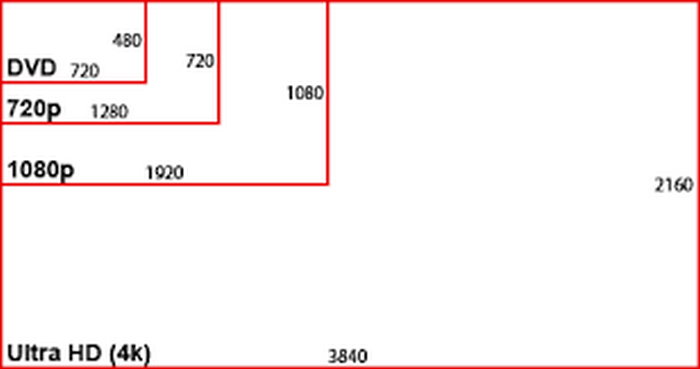
NTSC DVD 해상도: 720 x 480 픽셀로, 480i 또는 480p 형식으로 표시될 수 있습니다. 이 해상도는 표준 화질(SD)에 해당하며, NTSC 텔레비전 시스템과 호환되고 북미 및 일부 아시아 지역에서 일반적으로 사용됩니다.
PAL DVD 해상도: 720 x 576 픽셀입니다. 이 해상도는 576i 및 576p 형식을 지원하며, NTSC DVD보다 약간 더 높은 화질을 제공합니다. 또한 주로 유럽, 호주 및 기타 여러 지역에서 사용됩니다.
참고: NTSC와 PAL DVD 해상도는 모두 4:3과 16:9 화면비를 지원합니다.
마지막으로, 최대 DVD 해상도는 480i/p 또는 576i/p입니다. 즉, DVD는 표준 화질로 제한됩니다.
2부. DVD 화질 vs. 블루레이
블루레이는 고화질(HD) 형식을 재생하도록 설계된 디지털 광 디스크입니다. 품질 측면에서 DVD는 다소 부족합니다. 자세한 내용은 아래 표를 참조하십시오.
이 표를 보면 DVD와 블루레이의 화질에 실제로 차이가 있다는 것을 알 수 있습니다. 해상도 측면에서 DVD는 SD, 즉 표준 화질로 제한되지만, 블루레이는 최대 4K까지 HD 영상을 제공합니다. 또한 블루레이는 DVD 용량보다 더 큰 저장 용량을 자랑합니다. 하지만 호환성 측면에서는 HD가 더 유연하여 DVD 플레이어와 블루레이 플레이어에서 모두 재생할 수 있습니다. 그렇다고 해서 이 비교가 어느 쪽이 무조건 더 낫다는 결론을 내리는 것은 아닙니다. 이는 단지 DVD 해상도에서 어느 정도까지 기대할 수 있는지를 보여주기 위한 것입니다.
3부. DVD 해상도 변경 방법
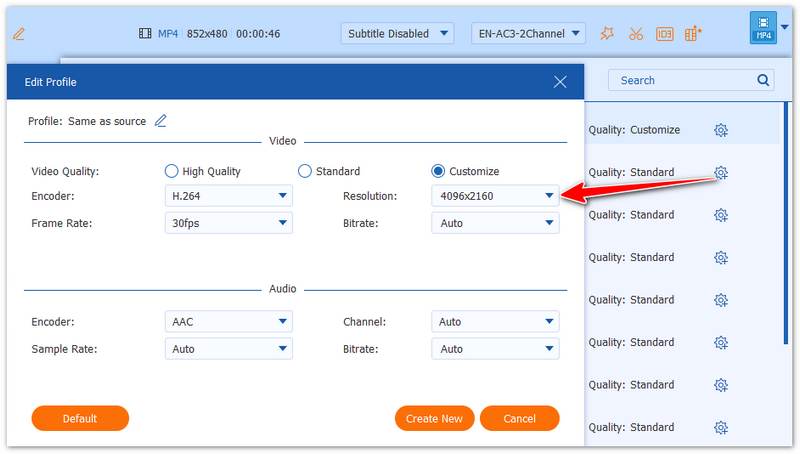
DVD의 해상도가 낮다면, 소스 자체가 하드웨어적으로 제한되어 있기 때문에 직접적으로 해상도를 높일 수는 없습니다. 그러나 AnyMP4 DVD Ripper와 같은 도구로 DVD를 리핑하면 쉽게 화질을 개선할 수 있습니다. 이 소프트웨어는 99개 타이틀 DVD, 자작 DVD, 상업용 DVD, 암호화된 디스크를 포함한 다양한 DVD를 MP4, MOV 등 디지털 형식으로 변환할 수 있으며, 해상도도 최대 4K(4096×2160)까지 조정할 수 있습니다.
1단계. 컴퓨터에 프로그램을 다운로드 및 설치한 뒤, DVD를 삽입합니다.
무료 다운로드(Windows 7 이상용) 보안 다운로드
무료 다운로드(MacOS 10.7 이상용) 보안 다운로드
2단계. “Load DVD”를 클릭하여 DVD를 추가하고 분석합니다.
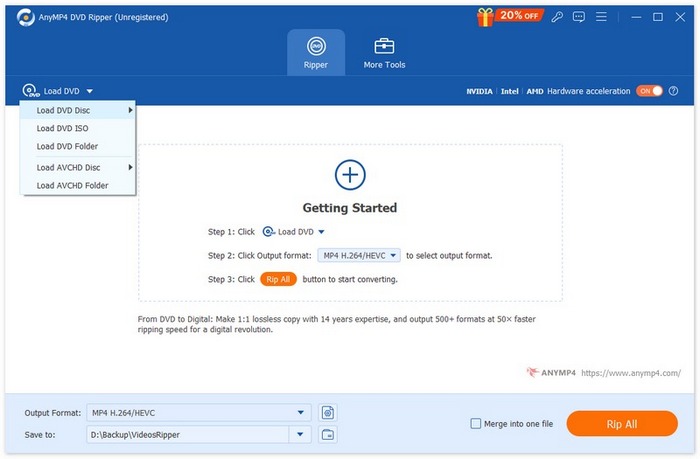
3단계. “Output Format” 드롭다운을 선택하여 원하는 출력 형식을 지정합니다.
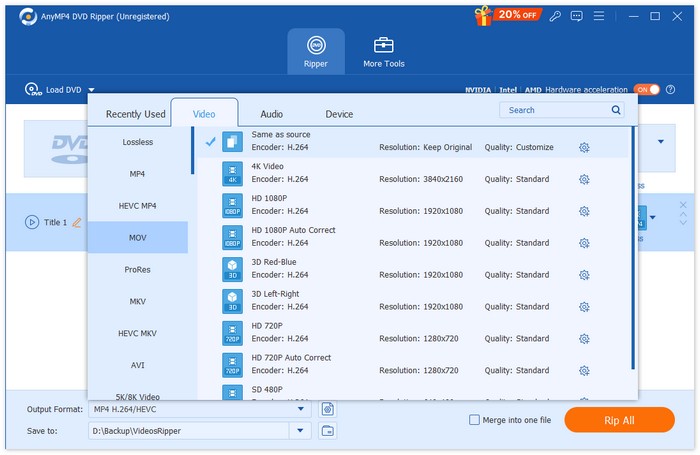
4단계. 선택한 형식 옆의 “Custom Profile” 버튼을 클릭한 뒤, 해상도를 최대 4096×2160까지 조정합니다.
종합적으로 AnyMP4 DVD Ripper는 신뢰성이 높고 다기능이며, 거의 모든 종류의 DVD를 지원합니다. DVD 영상을 더 높은 해상도의 디지털 파일로 업그레이드하기에 안성맞춤입니다. 필요에 따라 다른 DVD 리핑 소프트웨어를 사용해 볼 수도 있습니다.
무료 다운로드(Windows 7 이상용) 보안 다운로드
무료 다운로드(MacOS 10.7 이상용) 보안 다운로드
4부. DVD 해상도에 대한 FAQ
표준 DVD 해상도는 무엇입니까?
표준 DVD 해상도는 지역에 따라 다릅니다. NTSC DVD의 해상도는 720 x 480픽셀입니다. 반면 PAL DVD의 해상도는 720 x 576픽셀입니다. 두 형식 모두 4:3 및 16:9 화면비로 제공됩니다.
DVD 해상도가 비디오 품질에 영향을 미치는 이유는 무엇입니까?
해상도는 이미지를 표시하는 데 사용되는 픽셀 수를 결정하며, 이는 비디오 품질에 직접적인 영향을 미칩니다. 해상도가 높을수록 픽셀 수가 많아지고 일반적으로 화질이 더 좋아집니다. DVD는 표준 화질(SD)로 제한되어 있으며, 이는 블루레이와 같은 고화질 포맷에 비해 화질이 낮습니다.
NTSC와 PAL DVD 해상도의 차이점은 무엇입니까?
NTSC는 주로 북미와 아시아 일부 지역에서 사용되며 해상도는 720 x 480픽셀입니다. 반면 PAL은 유럽, 호주 및 기타 지역에서 일반적으로 사용되며 해상도는 720 x 576픽셀입니다. PAL은 NTSC보다 화질이 약간 더 좋지만, 둘 다 표준 화질(SD)로 제한됩니다.
DVD 해상도는 Blu-ray 해상도와 같습니까?
아니요. DVD 해상도는 블루레이 해상도보다 훨씬 낮습니다. DVD는 480p/576p의 표준 화질로 제한되는 반면, 블루레이 디스크는 최대 1080p의 고화질(HD) 해상도는 물론 4K UHD까지 표시할 수 있습니다. 블루레이는 DVD보다 더 나은 화질, 더 큰 저장 용량, 그리고 뛰어난 오디오를 제공합니다.
결론
결론적으로 DVD 해상도는 720 × 480, 720 × 576과 같은 표준 해상도로 제한되어 있지만, DVD를 디지털 형식으로 변환함으로써 시청 경험을 개선할 수 있습니다. AnyMP4 DVD Ripper를 사용하면 DVD를 손쉽게 리핑하고 출력 해상도를 조정하여 최신 디스플레이에 더 잘 맞출 수 있으므로, 오래된 DVD 콘텐츠를 업그레이드하기에 실용적인 해결책이 됩니다.
무료 다운로드(Windows 7 이상용) 보안 다운로드
무료 다운로드(MacOS 10.7 이상용) 보안 다운로드
-
 최고의 Linux DVD 리퍼 추천 - 어떤 것을 좋아하시나요?
 컴퓨터에 적합한 Linux DVD 리퍼를 찾고 계시다면 저희가 제공하는 6가지 옵션을 참고하실 수 있습니다. 각 옵션의 차이점도 함께 보여드리겠습니다.
-
 NTSC 포맷이란 무엇이며 컴퓨터에서 NTSC DVD를 복사하는 방법
 NTSC 형식이 무엇이고 PAL과 어떻게 다른지 알고 싶으시다면 이 글을 읽어보세요. NTSC의 정의와 NTSC DVD 리핑 방법을 설명합니다.
-
 BUP 형식이란 무엇입니까? BUP 파일을 재생하고 변환하는 방법
 BUP 파일이 무엇인지, 그리고 어떤 플레이어를 사용해서 열 수 있는지 알고 싶으시다면 이 가이드를 읽어보세요. 가장 자세한 설명을 제공해 드리겠습니다.
