


 비디오 컨버터 궁극
 스크린 레코더
 비디오 수리
 안전한 다운로드
새로운 영감을 찾는 데 도움이 되는 정보 - 오래된 DVD 활용법
DVD9 VS DVD5 - 무엇이며 어느 것을 선택해야 할까DVD를 손에 넣으면 곧바로 플레이어에 넣어 재생해 보고 싶어집니다. 하지만 모든 DVD가 동일한 것은 아니라는 점을 알아둘 필요가 있습니다. 겉보기에는 차이가 없어도 DVD는 여러 가지 포맷으로 나뉘며, 그중 우리가 가장 자주 접하는 것이 DVD9과 DVD5입니다. DVD5는 단일 레이어 DVD 포맷으로 호환성이 넓은 반면, DVD9는 더 큰 동영상 파일을 저장하기에 적합한 듀얼 레이어 포맷입니다. 물론 이것은 가장 눈에 띄는 차이점일 뿐입니다. 둘 중 무엇을 선택해야 할지 알고 싶다면, 각 포맷의 장단점과 적합한 사용 환경을 좀 더 자세히 분석해 볼 필요가 있습니다. 이 글에서는 이 두 가지 DVD 포맷을 소개하고 DVD9 VS DVD5 비교 결과를 살펴보겠습니다. 이를 통해 필요할 때 자신의 용도에 가장 잘 맞는 포맷을 선택할 수 있을 것입니다. 또한 두 포맷의 DVD 영상을 마음껏 백업할 수 있도록, 유용한 DVD 리퍼 프로그램도 함께 추천하겠습니다.

1부. DVD5와 DVD9란 무엇인가
비교하기에 앞서, 먼저 두 가지 일반적인 DVD 저장 형식인 DVD9와 DVD5에 대해 알아보겠습니다.
• DVD5란 무엇인가
DVD5는 단층 케이크에 비유할 수 있는 단층 포맷입니다. 4.7GB의 저장 공간을 제공하며, 짧은 영상을 저장하는 데 주로 사용됩니다. DVD5는 호환성이 가장 뛰어난 디스크 포맷으로 거의 모든 DVD 플레이어, 게임 콘솔, 컴퓨터에서 재생할 수 있습니다. 하지만 DVD5에 여러 영상을 담으려면 어려울 수 있으며, 저장 공간이 상대적으로 작기 때문에 영상 크기를 압축해야 할 수도 있습니다. 이는 영상의 화질과 시청 경험에 영향을 미칩니다.
• DVD9란 무엇인가
DVD9는 최대 8.5GB의 메모리 용량을 가진 이중 레이어 디스크 포맷입니다. 따라서 긴 비디오나 대용량 데이터 파일을 저장하는 데 자주 사용됩니다. 이중 레이어 구조로 인해 DVD9 디스크에 데이터를 기록하려면 이중 레이어 버너가 필요할 수 있습니다. DVD9는 대부분의 최신 플레이어와 호환되지만, 많은 구형 플레이어에 이중 레이어가 없기 때문에 DVD5만큼 적용 범위가 넓지는 않습니다.
2부. DVD9 대 DVD5
이제 DVD9와 DVD5의 의미를 간략하게 이해했으니, 핵심적인 내용인 DVD9와 DVD5에 대해 알아보겠습니다. 두 제품의 차이점을 여러 관점에서 살펴보겠습니다.
• 기본적 자연
먼저, 가장 눈에 띄는 차이점은 두 디스크의 특성입니다. DVD5는 단면 1레이어 디스크이고, DVD9는 단면 2레이어 디스크입니다. DVD9에 파일을 구우려면 전용 2레이어 버너가 필요합니다.
• 형식
두 종류의 디스크는 서로 다른 파일 형식을 지원합니다. DVD5는 현재 DVD+R/RW와 DVD-R/RW 형식을 지원합니다. 반면 DVD9는 DVD+R 및 DVD-R과 호환됩니다.
• 용량
DVD5는 4.7GB의 저장 용량을 가지고 있어 짧은 영상을 저장하는 데 적합합니다. DVD9는 8.5GB의 저장 용량을 가지고 있어 DVD5의 거의 두 배에 달하며, 긴 영상이나 대용량 데이터 파일을 저장하는 데 적합합니다.
• 재생 기능
두 제품 사이에는 재생 기능 면에서 큰 차이가 없으며, 두 제품 모두 DVD-ROM과 DVD 버너와 함께 사용할 수 있습니다.
• 가격
DVD5는 비교적 저렴하지만, DVD9는 일반적으로 매우 비쌉니다.
이러한 세부 사항을 비교해 보면 DVD5와 DVD9 중 어느 것이 더 나은지 판단하기 어렵습니다. 구체적인 선택은 당시의 필요에 따라 달라집니다. 따라서 두 가지가 적합한 시나리오를 살펴보고, 각 시나리오에서 어느 것이 더 실용적인지 논의해 보겠습니다.
3부. DVD5 또는 DVD9
• DVD5 사용 사례
DVD5는 저장 공간이 적기 때문에 고화질의 장편 영화나 시리즈를 저장하기에는 적합하지 않습니다. 짧은 영상 모음, 소프트웨어 설치 패키지, 음악 앨범, 뮤직비디오 등을 저장하는 데에는 DVD5가 더 알맞습니다. 또한 듀얼 레이어 굽기 기능이 없는 굽는 장치를 사용하거나, 듀얼 레이어를 읽지 못하는 구형 무료 DVD 플레이어를 사용하고 있다면 DVD5가 더 나은 선택입니다. 그뿐만 아니라 디스크를 널리 배포해야 하는 경우, DVD5의 높은 호환성과 저렴한 비용 역시 반드시 선택해야 할 이유가 됩니다.
• DVD9 사용 사례
장편 시리즈나 고해상도 영화를 저장하려면 DVD5의 저장 공간이 부족할 수 있습니다. DVD5에 맞게 비디오를 압축해야 하는 경우 파일 품질이 저하될 수 있습니다. 따라서 DVD9를 권장합니다. 대용량 데이터 아카이브를 생성해야 하는 경우에도 DVD9가 더 적합한 선택입니다. 단, DVD9의 내용을 읽으려면 이중 레이어 읽기 기능이 있는 DVD 플레이어가 필요합니다.
4부. 보너스: DVD5 및 DVD9를 백업하는 최고의 DVD 리퍼
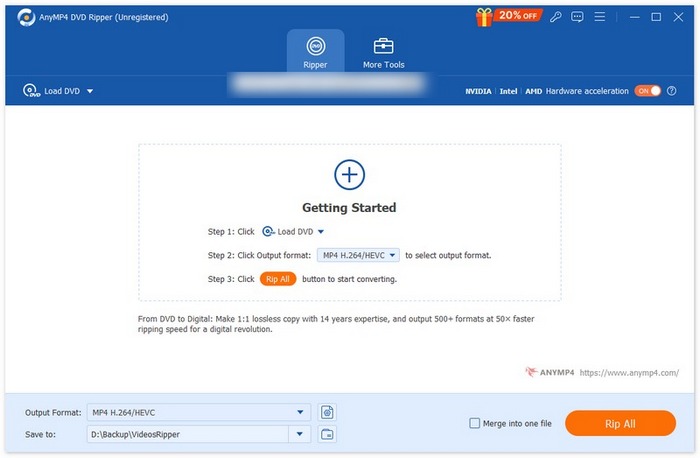
AnyMP4 DVD 리퍼
DVD는 고화질 영화를 저장할 수 있을 만큼의 용량을 가진 안정적인 외장 저장 매체입니다. 그러나 DVD 콘텐츠를 시청하려면 일반적으로 광학 드라이브가 있는 컴퓨터나 전용 DVD 플레이어가 필요합니다. 그런데 최근의 많은 노트북에는 내장 드라이브가 더 이상 포함되지 않고, 독립형 DVD 플레이어는 부피가 크고 휴대성이 떨어집니다. 물리 디스크에 의존하지 않고 DVD 영화를 더 편리하게 감상하고, 디스크 손상으로 인한 콘텐츠 손실을 방지하기 위해 AnyMP4 DVD Ripper 사용을 권장합니다.
AnyMP4 DVD Ripper를 사용하면 DVD 디스크, DVD 폴더, ISO 파일을 리핑하여 컴퓨터, 스마트폰, 태블릿 또는 미디어 플레이어에서 쉽게 재생할 수 있는 디지털 비디오·오디오 파일로 변환할 수 있습니다. 이 소프트웨어는 MP4, MKV, AVI, MOV, WMV를 포함한 500개 이상의 포맷과 MP3, FLAC 등의 다양한 오디오 포맷으로 DVD를 리핑하는 것을 지원하여, 사실상 모든 기기와 플랫폼에서 동영상 호환이 가능하도록 해줍니다. 또한 ISO 또는 DVD 폴더 형식으로의 무손실 1:1 백업 기능을 제공해, 원본 메뉴, 챕터, 자막, 다중 오디오 트랙을 그대로 보존합니다.
리핑 전에 동영상을 자르기(트림), 크롭, 병합, 보정할 수 있고, 자막과 오디오 트랙을 추가하거나 조정하며, 워터마크까지 넣을 수 있어 DVD 콘텐츠를 자유롭게 커스터마이즈할 수 있습니다. 이 도구는 하드웨어 가속을 활용해 고품질을 유지하면서도 빠른 리핑 속도를 제공합니다.
무료 다운로드(Windows 7 이상용) 보안 다운로드
무료 다운로드(MacOS 10.7 이상용) 보안 다운로드
5부. DVD9 대 DVD5 FAQ
DVD5 플레이어에서 DVD9를 재생할 수 있나요?
플레이어가 구형 모델인 경우 DVD5만 재생할 수 있으며 DVD9는 호환되지 않을 수 있습니다. 하지만 듀얼 레이어 읽기 기능을 갖춘 최신 플레이어인 경우 DVD5와 DVD9를 모두 재생할 수 있습니다.
DVD9와 DVD5에 비디오를 얼마나 오랫동안 보관할 수 있나요?
DVD5는 표준 화질 비디오 2시간 또는 고화질 비디오 1시간을 저장할 수 있는 반면, DVD9는 일반 비디오 최대 4시간 또는 고화질 비디오 2시간까지 저장할 수 있습니다.
Windows 컴퓨터에 무료 DVD 플레이어가 있나요?
Windows Media Player에서 DVD를 재생할 수 있습니다. VLC Media Player 역시 좋은 선택입니다.
결론
이 글에서는 DVD9 VS DVD5를 분석해 보았습니다. 여기에서 두 포맷의 개념과 차이점을 확인할 수 있습니다. 일반적으로 DVD5는 호환성이 더 넓고 가격이 저렴하지만, 용량이 적어 비교적 작은 동영상 파일만 저장할 수 있습니다. DVD9는 듀얼 레이어 읽기 기능을 갖춘 플레이어가 필요하고 가격도 비싸지만, 용량이 훨씬 커서 고화질 장편 영상을 저장하기에 적합합니다. 보유한 파일의 종류와 용량을 기준으로 어떤 포맷을 선택할지 결정하면 됩니다.
-
 Android DVD 플레이어 – Android 모바일에서 DVD 비디오를 재생하는 방법
 Android 모바일에서 DVD 파일을 재생하는 방법은 무엇입니까? Android DVD 플레이어가 있습니까? 이 기사에서는 외부 드라이버를 사용하거나 사용하지 않고 Android 모바일에서 DVD 비디오를 재생하는 3가지 방법에 대해 알아봅니다.
-
 PC에서 DVD 비디오를 재생하는 DVDFab 플레이어에 대한 최고의 3 대안
 DVDFab 플레이어를 살 가치가 있습니까? 4K 동영상을 재생할 수 있습니까? 유료 버전은 어떻습니까? 이 기사에서는 기능을 자세히 소개하고 선택할 수 있는 DVDFab 플레이어에 대한 3가지 최상의 대안이 있습니다.
-
 재생 가능한 형식을 디지털화하기 위해 VLC로 DVD를 추출하고 기록하는 프로세스
 VLC는 DVD 녹화를 포함하여 다양한 오디오-비디오 압축 파일 형식을 지원합니다. 더 많은 토론과 세부 사항을 끝까지 볼 수 있도록 계속 진행하십시오.
