


 비디오 컨버터 궁극
 스크린 레코더
 비디오 수리
 안전한 다운로드
최고의 OGG 보이스 레코더는 모든 플랫폼에서 OGG를 녹음하는 데 도움이 됩니다.
OGG is the best audio file format rather than the MP3. This open-source audio format is preserved by Xiph.org. This type of format is used by the gaming industry as their audio format. Because it sounds better and it compresses a file a lot smaller. However, users tend to find it hard because some of the recorders don't support this format because the standard audio format is the MP3. The list below are the best OGG recorders that support this format. To dig into more detailed steps & information. Read carefully to understand the features of the different tools that will suit your demand as a user and maybe in the future as their customer.

1부. PC 및 Mac 사용자를 위한 최고의 OGG 레코더 소프트웨어
아래 목록에는 단계 및 정보와 함께 모든 다른 기능에서 사용할 수 있는 최고의 OGG 레코더가 있습니다.
FVC 무료 오디오 레코더

A tool that specialized in recording an audio format. FVC Free Audio Recorder is known as the best online tool you may search over the web. This open-source tool can help you to record audio recordings that you may need anywhere with an internet connection. Also, it is a good choice to be your OGG recorder. To provide more comprehensive details about this amazing tool, continue reading and follow the steps on how to do the audio recording.
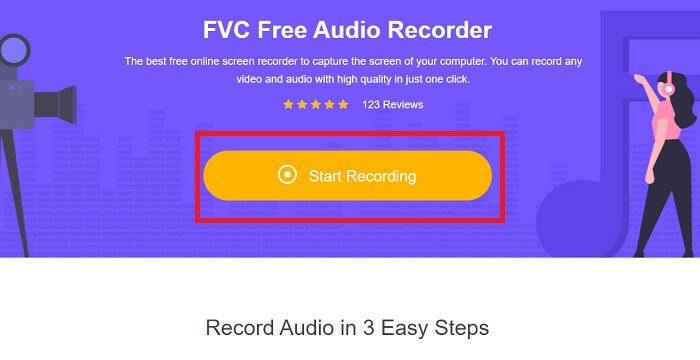
Step 1. Click this link to proceed to the webpage of the tool. Click the Start Recording and launch the tool.
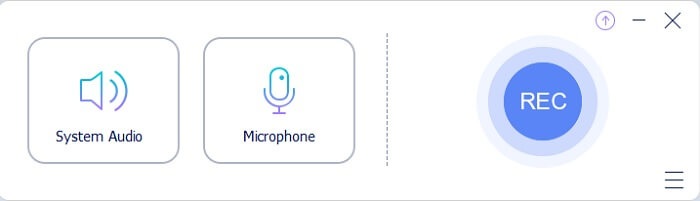
Step 2. A floating toolbar like this will appear on the display.
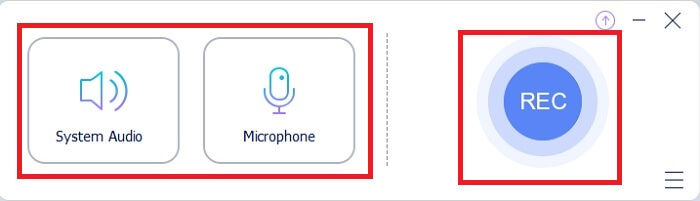
Step 3. Turn On the Speaker to add the system sound and Mic to add your voice. Click the Round button to start recording.
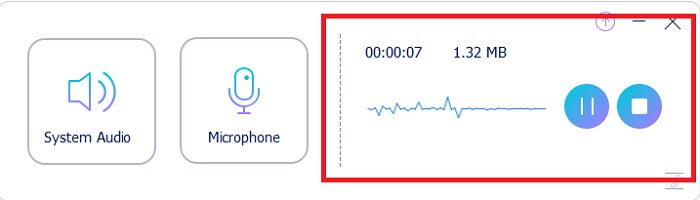
Step 4. After clicking the record button. You encounter this display which means it has already started.
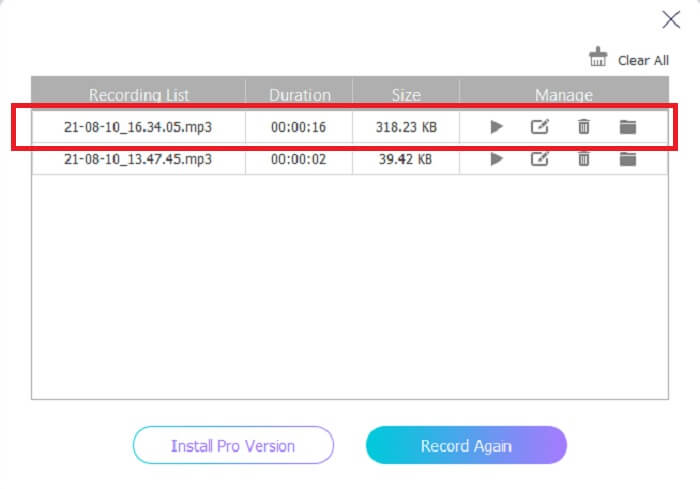
Step 5. If recording is finished, click the Stop button and it automatically saves into your device.The history list of your recording in your screen. Enjoy the recording output at its finest.
장점
- on-point 지침으로 인해 사용자 친화적입니다.
- 그것은 또한 저장 친화적 인 압축 오디오 형식을 생성합니다.
- 오픈 소스이므로 도구를 사용하려는 모든 사람이 사용할 수 있습니다.
단점
- 사용하기 전에 인터넷 연결이 필요합니다.
- 프리미엄처럼 노이즈 캔슬링 기능이 없습니다.
2부. 모든 운영 체제용 기타 유용한 OGG 레코더
1. FVC 스크린 레코더
If you think that the tool above is a smart tool, To give you a more specific example, if Galileo Galilei is the father of modern science, then this tool is the father of the modern recording system. FVC Screen Recorder is the best recorder whether it is an audio or video format. It gives you the one-of-the-best output and yet you will never break a sweat to use the tool itself. Unlike the other tools, this tool is a program to give the user the best experience you can ever imagine. So now, if you are one of the users who finds it hard to record your audio. Then follow these simple steps provided below and follow the steps thoroughly.
Step 1. Download the tool according to your operating system specification. This will only take a few seconds to be downloaded then installed. Change the Preference based on your wants and click Finish to proceed.
무료 다운로드Windows 7 이상용안전한 다운로드
무료 다운로드macOS 10.7 이상용안전한 다운로드
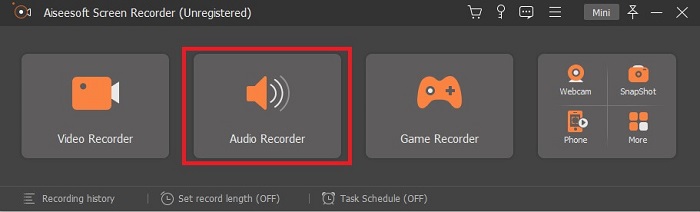
Step 2. In the toolbar click the Audio Recorder.
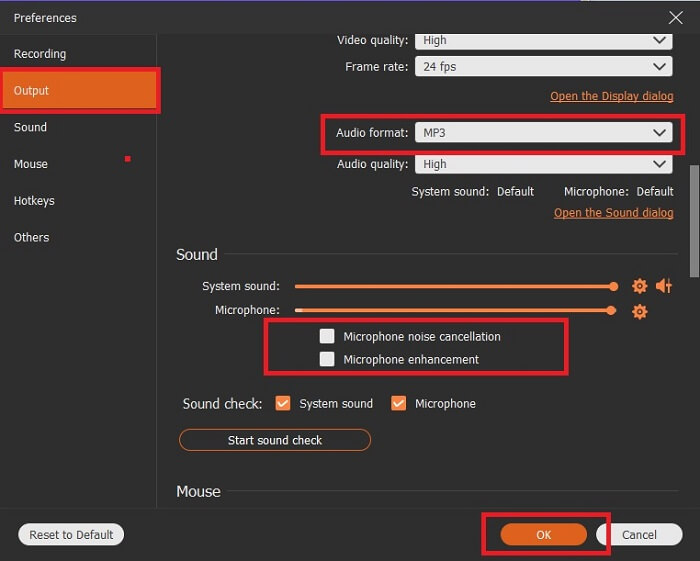
Step 3. Find the Gear icon to adjust the other options. Proceed to the Output to change it to MP3, WMAformat or whatever format you want. By scrolling down the wheel mouse. Other options you may use while recording it include Noise cancelling and Microphone enhancement. Click the OK to proceed.
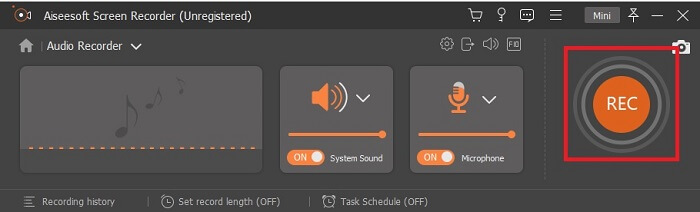
Step 4. After adjusting the settings. In the toolbar, open your Speaker and Microphone to add the audio output to your recording. After all, click the Round-shape button to start recording.
Step 5. If you want to end the recording, click the Square button to Stop. Click Save and Next to proceed. Then play your OGG voice recorder on any media platform.
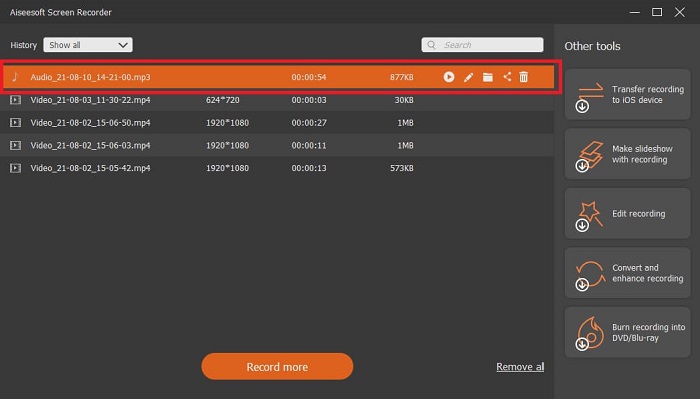
장점
- 이 도구를 사용하면 맑고 깨끗한 오디오로 언제 어디서나 녹음할 수 있습니다.
- 이미 이 도구를 사용하고 있는 사용자에게 훌륭한 경험을 제공합니다.
- 올인원 녹음.
단점
- 사용한 만큼만 지불합니다.
- 2.4MB의 저장 공간이 필요합니다.
2. Screencast-O-Matic
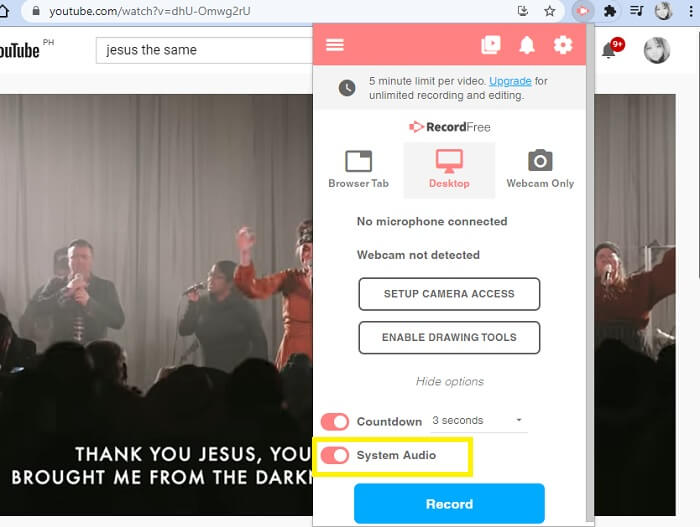
작업을 수행할 또 다른 최고의 화면 녹화 도구입니다. Screencast-O-Matic은 웹에서 찾을 수 있는 최고의 도구 중 하나입니다. 그것은 당신의 녹음을 쉽고 효율적으로 만듭니다. 또한 온라인 웹사이트를 방문하는 경우 온라인 도구가 있지만 프로세스가 온라인 도구 자체를 완료하는 데 1-2분 정도 걸립니다. 따라서 줄을 서서 기다리는 팬이 아니라면 이것이 최선의 선택이 아닙니다. 그러나 기다리는 것을 좋아한다면 끝까지 기다릴 가치가 있습니다.
장점
- Camtasia보다 사용하기 쉽습니다.
- 안전 암호를 사용하여 개인이 아닌 조직으로 작업하십시오.
- 매우 매력적이며 괜찮은 녹음기입니다.
단점
- 도구 인터페이스는 포인트이지만 단색이므로 사용하기에 덜 흥미롭게 만드는 색상이 밋밋할 것으로 예상됩니다.
- 무료 버전에서는 최대 15분까지만 녹화할 수 있습니다.
3. 쉐어엑스
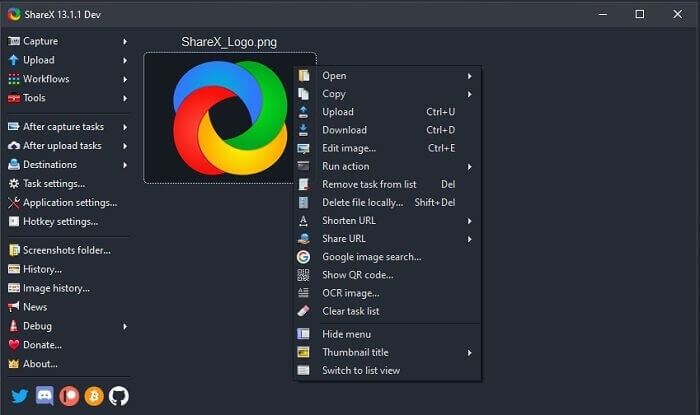
One of the tools you may encounter on the web if you’re searching for a screen recorder. It is only available for Windows OS only. It only means that if you’re a Mac user or Linux then this tool will not work on your OS because it doesn’t support those programs. Share can easily be placed at the top 20 best screen recorders that are available over the web. Because it supports over 80 destinations you may transfer the final output.
장점
- 사용자 정의 도구.
- 필요한 경우 자체 편집 도구를 제공합니다.
- 녹음을 쉽게 하려면 단축키를 변경하세요.
단점
- 이 도구를 처음 접하는 사람에게는 압도적입니다. 이 도구를 사용하는 법을 배우는 것은 골치 아픈 일입니다.
- Mac 사용자는 사용할 수 없습니다.
3부. 비교 차트
| 특징 | FVC 무료 오디오 레코더 | FVC 스크린 레코더 | Screencast-O-Matic | 쉐어엑스 |
| 오디오 녹음 |  | | | |
| 노이즈 캔슬링 |  | | | |
| 마이크 향상 | | | | |
| 도구의 복잡성 | 온-포인트 온라인 녹음 지시. | 도구에 이미 목적과 수행 방법이 표시되어 있으므로 사용하기 쉽습니다. | 세부 사항이 적은 사용하기 쉬운 도구입니다. | 도구의 복잡성은 새로운 사용자에게 어렵습니다. |
| 사용 가능한 플랫폼 | 모든 운영 체제. | 모든 운영 체제. | Windows PC, Mac 및 Chromebook. | Windows 7 SP1 이상. |
| 사용 가능한 오디오 형식 | MP3 및 OGG | MP3, WMA, AAC, M4A, FLAC, OGG, Opus 등. | 오디오를 별도로 녹음할 수 없습니다. | MP3 및 WAV |
| 가격 범위 | 무료 온라인 도구 | 1개월 동안: $25.00 1년 동안: $31.20 평생 라이센스: $55.20 | 무료 버전이 있습니다. 프리미엄 솔로용. 디럭스 $1.65/월 수상 $4.00/월 팀 계획을 위해. 팀 디럭스 또는 팀 프리미어를 설정할 수 있습니다. | 무료 및 오픈 소스 프로그램. |
파트 4. OGG 레코더에 대한 FAQ
녹음기로 OGG 파일을 만드는 방법은 무엇입니까?
위의 목록과 같은 오디오 레코더를 사용하십시오. 자세한 내용은 위의 기사에서 OGG용 오디오 출력 형식으로 녹음하는 방법에 대한 정보 및 단계를 참조하십시오.
가장 좋은 오디오 형식은 무엇입니까? MP3 또는 OGG?
OGG는 최고의 오디오 파일 형식입니다. 그러나 MP3는 OGG보다 표준적이기 때문에 사용자가 사용하는 경향이 있습니다. 그럼에도 불구하고 OGG에는 아티스트 이름 및 트랙 데이터와 같이 저장 공간이 적고 최상의 오디오 출력을 제공하는 메타데이터가 포함되어 있습니다.
내 미디어 플레이어에서 내 OGG 형식을 재생할 수 없는 이유는 무엇입니까?
Some of the media players don't support this type of format. So, you may use FVC Free Online Video Converter as your converter. This will allow the user to convert the OGG file into MP3 or another audio format you may like so that it can be played. Or you may use FVC Free Video Player or other OGG players to play this type of format, because this tool plays almost all the different types of audio-video format.
결론
토론이 끝나면 이제 읽고 요구 사항에 맞는 도구를 선택하는 것만으로 새로운 지식을 얻은 것입니다. 이 문서에는 도구에 대한 단계 및 일부 정보와 함께 다양한 선택 항목이 나열되어 있습니다. 단계를 따르고 이해할 수 있도록 시간을 내어 읽으십시오. 현명하게 선택해야 합니다.
But to set an example, FVC Screen Recorder fits the demand of the user. As a user you must prioritize your needs and wants in a recorder. For example, if the recorder is easy to use, best for recording audio, available to almost all the platforms, if it is pay-to-use it needs to be cheap yet the quality output is the best. All of the said examples are all here in FVC Screen Recorder. Don’t settle for less because you deserve more.
-
 Snagit 2025 리뷰 – 장점, 단점 및 최고의 대안
 Snagit의 가장 좋은 대안은 무엇입니까? Snagit과 같은 화면 캡처 도구가 있습니까? 이 게시물은 Snagit을 검토하고 화면 캡처를위한 Snagit의 최상의 대안을 공유합니다.
-
 QuickTime 화면 녹화 – Mac 및 PC에서 오디오와 함께 비디오 녹화
 Mac에서 오디오로 화면을 녹음하는 것이 편리합니다. 내장 플레이어 인 QuickTime Player로 할 수 있습니다. 그의 게시물을 읽고 Mac 및 PC에서 사운드로 화면을 캡처하는 방법을 알아 봅니다.
-
 DU Recorder 리뷰 2025: 안전성&가격&기능&사용&등급
 DU Recorder는 iPhone 및 Android 용 화면 및 오디오 레코더입니다. 다운로드 할 가치가 있습니까? 안전 해요? 전체 리뷰를 읽고 앱이 귀하에게 적합한 지 확인하십시오.
