


 비디오 컨버터 궁극
 스크린 레코더
 비디오 수리
온라인 및 오프라인에서 3GP를 AVI로 변환하는 데 사용할 수 있는 최고의 변환기
3GP format is the flexible format that transfers the audio and video streams to the 3rd generation mobile phone using GSM. It matches the 3G connectivity for faster transmission of the file. This format is most commonly used on the old phone version because it is multi-purpose and quickly transferred. However, 3GP files can't be played on your local media player nowadays because this format doesn't allow the new media player to understand the structure of the format. So the best way to watch all the 3GP files on your phone or desktop is to convert. So now, instead of looking on the internet for what best converter you can use, we gather four converters you can choose from. The tools mentioned below are perfect and can convert 3GP to AVI format without any quality loss.

파트 1. Ultimate Converter를 사용하여 3GP를 AVI 오프라인으로 변환
FVC 비디오 컨버터 궁극
Suppose you don't want to break any sweat on converting your 3GP files. In that case, we strongly suggest that you must use the FVC Video Converter Ultimate. This software is one of the best choices in converting the file, and converting the file within a few seconds is speedy. Moreover, a lot of customers who use this experience share the same thought. To sum it up, they clearly stated that this tool helped solve their converting problem within a blink of an eye.
더 설명하자면, 이 도구는 파일 변환에 최고일 뿐만 아니라; 그것은 또한 당신이 시도하고 싶은 가장 진보된 기능을 가지고 있습니다. 편집기, GIF 메이커, 볼륨 부스터, 오디오 및 비디오 동기화, 반전 등이 그 예입니다. 이 도구를 구입하면 앞서 언급한 모든 도구를 얻을 수 있으며 더 많은 도구가 제공됩니다. 이제 품질을 잃지 않고 Mac과 PC에서 3GP를 AVI로 변환하는 단계별 방법을 시도해 보겠습니다.
Step 1. Click the download button and choose whether you are a PC or Mac user, then install it next.
Free DownloadFor Windows 7 or laterSecure Download
Free DownloadFor MacOS 10.7 or laterSecure Download
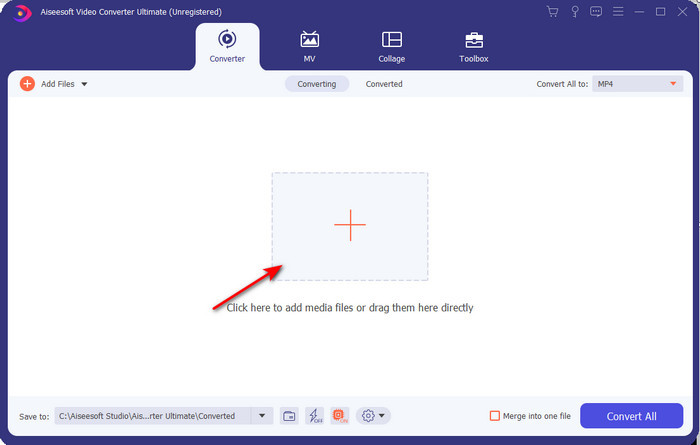
Step 2. Launch the tool, click the + sign in the middle of the interface, select the .3gp file on your folder and click Open. Also, you can do a batch conversion here if you may; click the Add Files to add more.
Step 3. To change the 3GP, click the Convert All to option and choose the AVI format under the Video category.
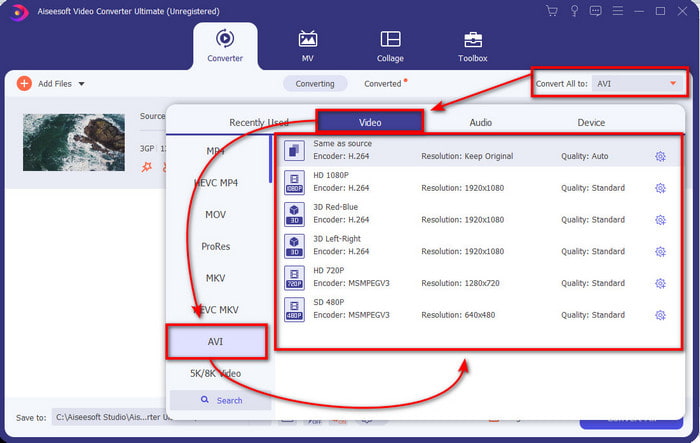
Step 4. To start the conversion process, click Convert All, and the process of converting your 3GP files will begin now.

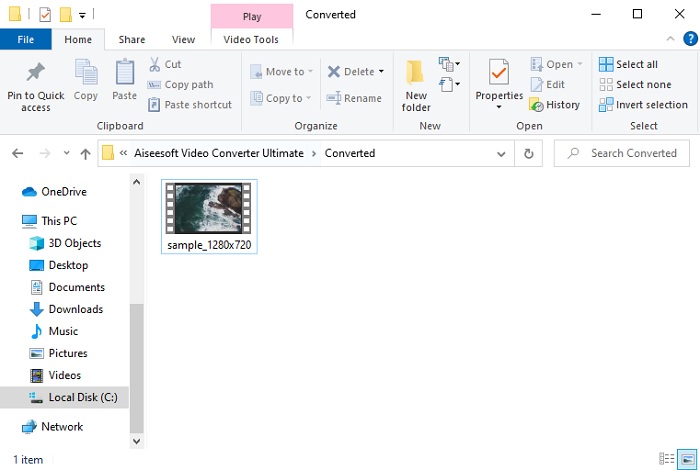
Step 5. After converting, a file folder will show on your screen with the converted 3GP file. Click the newly converted AVI you've made to watch and edit it later if you want.
파트 2. 3GP를 AVI로 변환하는 데 사용할 수 있는 3가지 온라인 변환기
1. FVC 무료 비디오 컨버터 온라인

We ensure that the tool in this list is the best 3GP to AVI converter online, and that is the FVC Free Video Converter Online. All of the features you would like to see on an online converter are here. It is the best online converter, we mention in all of the different aspects. For example, if you want an efficient online converter, safe conversion process, and no ads at all, then this is the web tool for you. Although the web tool looks great and works perfectly fine, it still supports a medium-range format. Advanced features that you might encounter while using the FVC Video Converter Ultimate are not available here. But the advantage of this to the software version is that you are free of charge. Without any more delays, let's proceed to the steps to convert your file into a new version.
Step 1. Hit this link to go to the website.
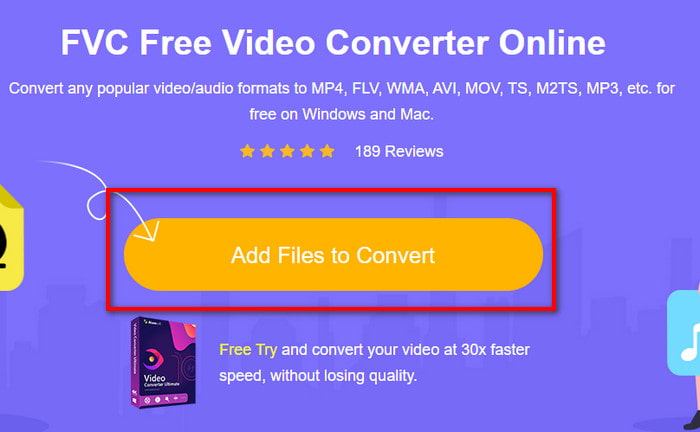
Step 2. Press the Add Files to Convert to launch the online tool, and a folder will show, then search for the .3gp file. If this is your first time using this tool, you will need to download the launcher by clicking the Add Files to Convert and then re-click it to launch.
Step 3. After selecting the file is done, choose the AVI format in the section below.
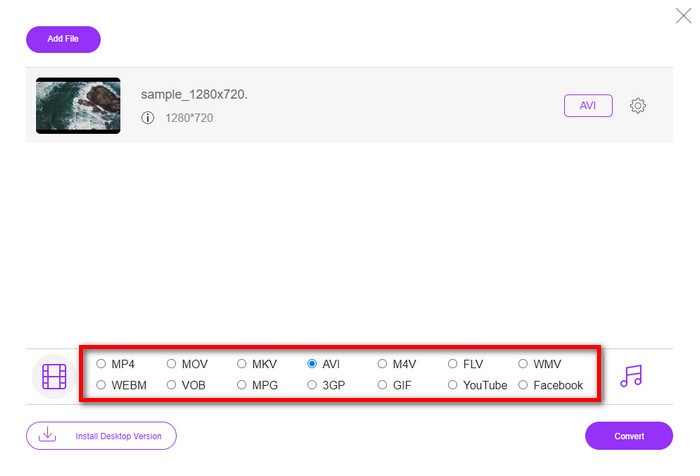
Step 4. If you are now ready to convert the file, click Convert.
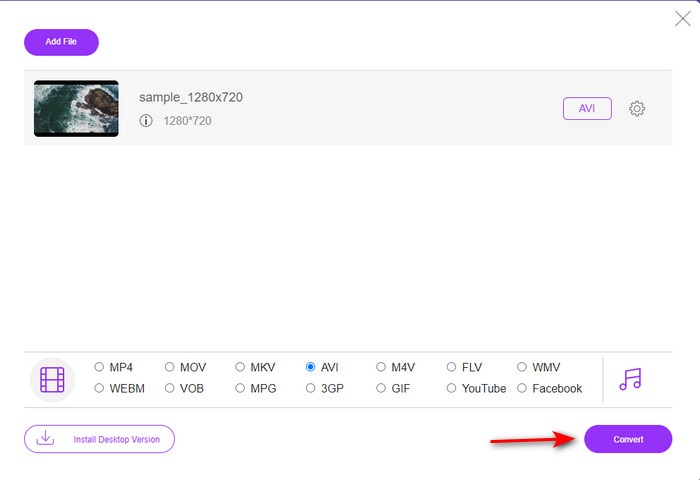
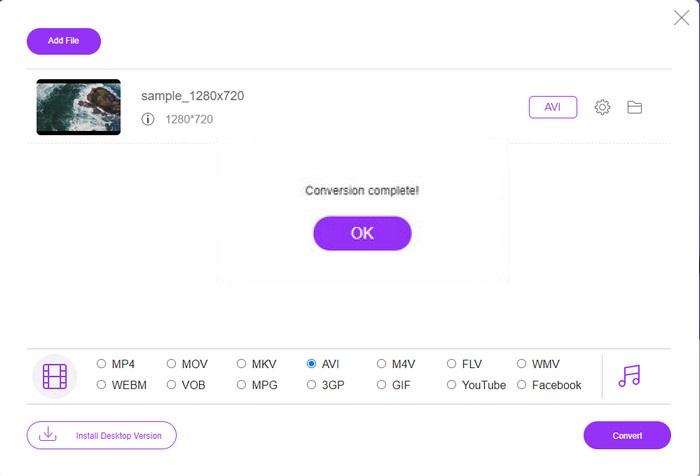
Step 5. After conversion, a folder will show again, but now with the file, you convert earlier.
2. Fconvert.com
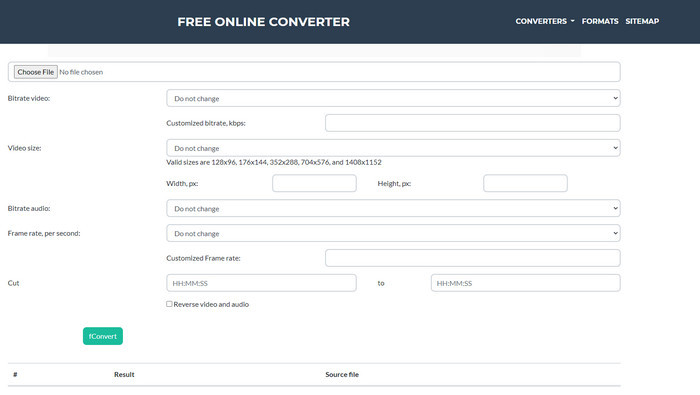
In the line of converting files, Fconvert.com must be on the list because this web tool is one of the fantastic converters you can use for free. This converter can convert almost all of the formats you know and maybe one of your files. However, there is a problem with this tool, and that is the ads. Because every time you click something on the website, an ad will be first before going on what you click. Although ads are killing, this app still looks neat and does perform great in converting format. So if you want to experience how great this tool is, follow these steps below and learn how to convert 3GP to AVI for free.
Step 1. Search the main website of this tool on your browser.
Step 2. Click the AVI under the video, click Choose File, locate the .3gp, then scroll it down and click fConvert.
Step 3. Scroll it under, and then you will see the Result; click the file to download it.
3. 애니컨브
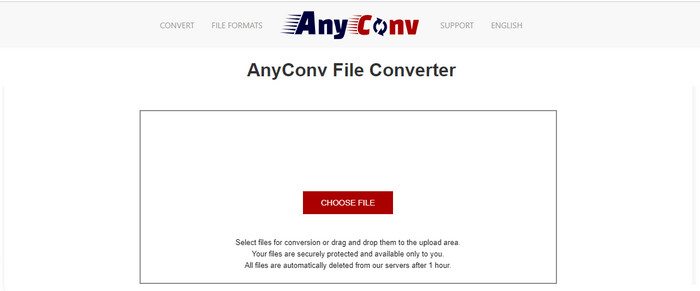
Another tool that specializes in converting formats is Anyconv. This web tool is far different on Fconvert.com because this tool is much better and faster. Also, this tool has fewer ads than the tool before this. Although it has fewer ads, they are more extensive compared to Fconvert.com, but performance-wise, this tool does well performance-wise. Let's test this tool to see if it works on converting 3GP to AVI for free without further delay.
Step 1. Open your search engine and find the Anyconv website.
Step 2. Press Choose File, and a folder will show, insert the .3gp file on the web tool and proceed. To change the format, you must click the drop-down button and find the AVI. To start the conversion process, click Convert.
Step 3. Wait for the process to end, then click Download AVI to download the converted file.
파트 3. 어떤 형식이 가장 좋은가요? 3GP 또는 AVI
3세대 휴대전화를 사용 중이고 고품질 동영상을 저장하고 싶다면 3세대 휴대전화에서 더 빠르게 전송하면 3GP가 적합합니다. 단, AVI 형식을 3세대 휴대폰으로 보내려고 하면 이 형식이 지원되지 않기 때문에 파일이 열리지 않습니다. 그러나 오늘날의 경우 AVI가 훨씬 좋습니다. 이미 3GP에 비해 모든 미디어 플레이어와 편집자로부터 많은 지원을 받았습니다. 오늘날 AVI 형식이 최선의 선택이지만 3GP에 비해 파일 크기가 엄청나고 휴대 전화에 저장하려고 하면 많은 공간을 차지할 것입니다. 또한 두 형식 모두 훌륭하지만 목적과 용도가 다릅니다.
파트 4. 3GP 및 AVI에 대한 FAQ
FFmpeg를 사용하여 3GP를 AVI로 변환할 수 있습니까?
You can use FFmpeg to convert your 3GP file; however, it is difficult to do, but it is manageable if you take your time. The first step is to download the zip file of FFmpeg on your computer then unzip it. The second step is to open your CDM to communicate with the tool. Then locate your file using the command prompt, ffmpeg -i input.3gp -vn -ar 44100 -ac 2 -b:a 192k output.avi copy this code and paste it on the CDM, and click Enter to start the conversion process.
4세대 폰에서 3GP 플레이 가능한가요?
This format is used on 3rd gen phones, and you can still play videos under the 3GP format in some 4th gen phones but not in all. Because, as said earlier, 3GP are for 3rd gen and not in some 4th gen phones. Or you can turn to professional 3GP players to enjoy your videos.
3GP 또는 MP4 중 어떤 형식이 더 좋습니까?
On quality and most supported format, MP4 is much better in this type of area. However, 3GP is much smaller and works better in 3G networks for faster transferring of this file format. Want to convert MP4 to 3GP or vice versa, click here to learn more details.
결론
모든 여정은 끝나야 하며 이제 위에서 언급한 도구를 사용하여 3GP를 AVI로 쉽게 변환할 수 있습니다. 또한 위에 제시된 모든 도구는 FFmpeg를 포함하고 훌륭하게 작동합니다. 그래도 최고의 선택은 항상 FVC Video Converter Ultimate입니다. 이 도구는 온라인 변환기가 변환 및 더 많은 측면에서 할 수 있는 모든 것을 능가합니다. 이제 소프트웨어를 받으려면 다운로드 버튼을 클릭하고 빠르게 변환하십시오.
-
 [온라인 및 무료] MP4를 3GP로 간편하게 변환하는 3가지 방법
 빠르고 쉬운 방법으로 MP4를 3GP로 변환하고 싶습니까? 여기에서는 3 개의 MP4 to 3GP 변환기를 공유하여 다양한 휴대폰에서 재생하기 위해 MP4를 3GP로 변경합니다.
-
 Windows / Mac에서 FLV를 3GP로 변환하는 3 가지 무료 방법
 스마트폰이나 태블릿에서 FLV 파일을 열 수 없습니까? 괜찮아요! 여기에서는 모바일에서 플레이할 때 품질 저하 없이 FLV를 3GP로 변환하는 세 가지 방법을 공유합니다.
-
 MKV를 AVI 형식으로 변환하는 탁월한 선택
 독점적으로 제공되는 쉬운 단계로 MKV 비디오를 변환하는 방법을 마스터하십시오. 방법을 알고 싶습니까? 그런 다음 이 링크를 클릭하여 자세히 알아보세요.
