


 비디오 컨버터 궁극
 스크린 레코더
 비디오 수리
 안전한 다운로드
선명하고 깨끗한 사운드를 위한 최고의 WebM to WAV 변환기 공개
청각적 만남을 더 높은 수준으로 끌어올릴 준비가 되셨습니까? 우리는 당신을 위한 흥미진진한 전망을 가지고 있습니다. 이 담화에서 우리는 WebM 파일을 WAV 형식으로 변환하는 영역에 대해 탐구할 것입니다. 이는 사운드 품질을 높이고 오디오 파일의 가장 훌륭한 측면을 강조하는 최적의 접근 방식입니다.
This guide aims to assist individuals who have an interest in music, podcasts, or content creation to optimize the potential of their audio content fully. Prepare to explore the foremost audio converters, acquire practical insights, and commence a voyage towards the high-quality and distinct auditory output. Let us commence our investigation into the intricacies of converting WebM to WAV format.

1부. WebM을 오프라인에서 WAV로 변환하는 가장 좋은 방법
Video Converter Ultimate is your go-to solution for seamless WAV to WebM conversion. This powerful program software is designed to make your audio transformation a breeze, allowing you to effortlessly convert WAV files into the popular WebM format. With its custom setting feature, users can tailor their output to their preferences. That means adjusting parameters like bitrate, sample rate, and audio channels.
주요 기능
◆ FVC의 고급 변환 알고리즘은 고품질 변환을 보장하여 WAV 파일의 충실도와 선명도를 유지합니다. 그 결과 깨끗한 오디오 품질을 경험할 수 있습니다.
◆ FVC에서 제공하는 일괄 변환 기능을 사용하면 여러 WAV 파일을 WebM으로 동시에 변환할 수 있으므로 시간과 노력을 보다 효율적으로 사용할 수 있습니다.
◆ FVC Video Converter Ultimate는 수용할 수 있는 광범위한 오디오 및 비디오 형식을 자랑하며 변환 요구 사항을 충족하는 적응성과 다용성을 보장합니다.
Step 1. Launch the software
Acquire the tool by hitting the Free Download button below. Ensure to acquire the right installer according to your OS. You can choose between Mac and Windows installers. Afterward, launch the program on your computer.
무료 다운로드Windows 7 이상용안전한 다운로드
무료 다운로드MacOS 10.7 이상용안전한 다운로드
Step 2. Add WebM files
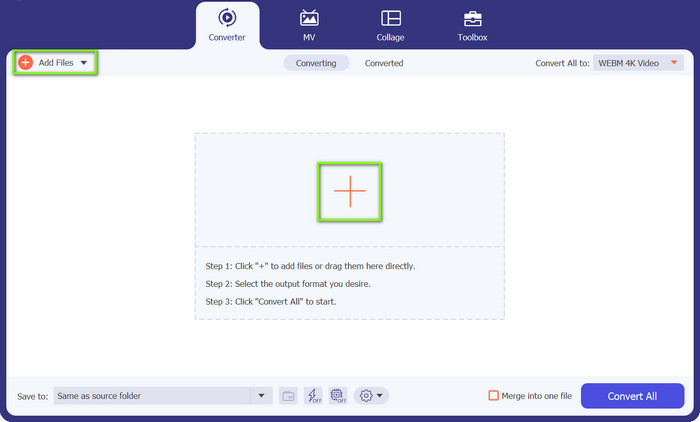
Hit the Plus sign button that you will see from the program's main interface. Next, choose the file that you wish to convert from your computer. Optionally, you can hit the Add Files button at the top left corner to upload a folder of WebM files.
Step 3. Specify an output format
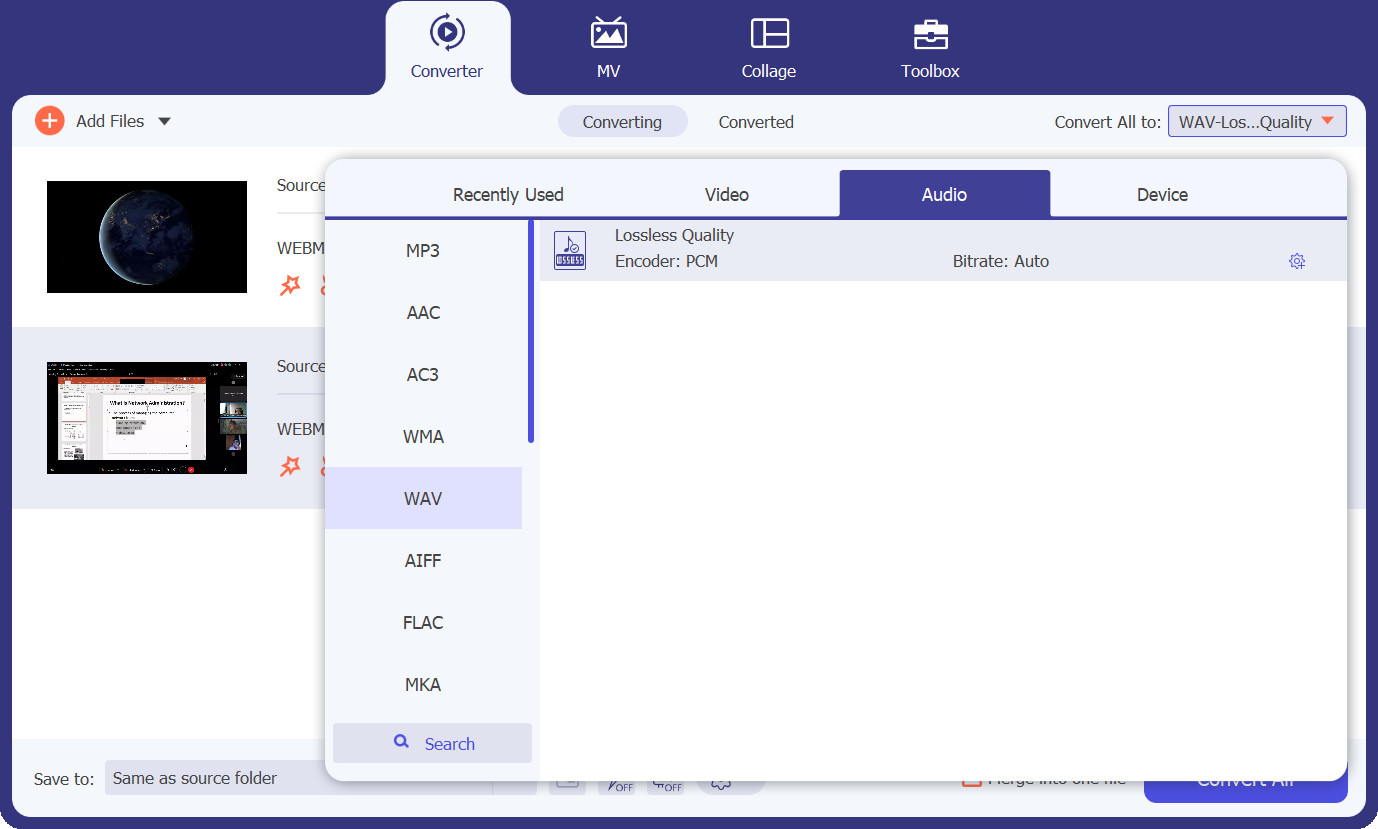
Now, go to the Profile tab and unveil the format options by hitting the drop-down button. After that, you will have three main tabs for conversion. Choose the Audio tab, look for the WAV format, and choose the quality that suits your needs.
Step 4. Commence the conversion
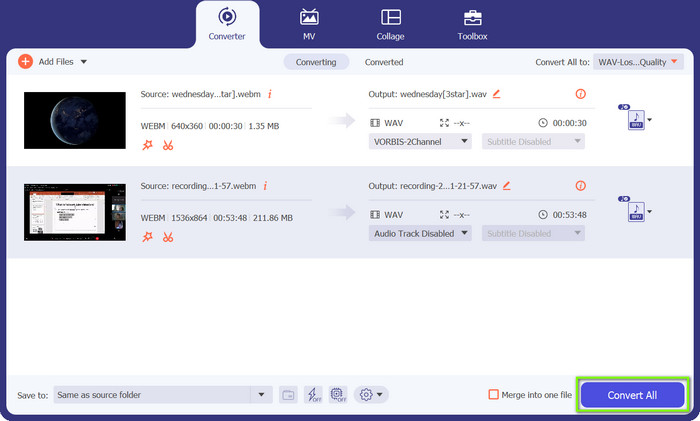
All is set. You may now initialize the conversion process. To do so, hit the Convert All button at the bottom right corner, and the conversion process will commence. You may also do the same procedure to convert WAV to WebM.
2부. 무료로 WebM을 WAV 온라인으로 변환하는 가장 좋은 방법
On the other hand, we have Free Video Converter Online, your hassle-free solution for WAV to WebM conversion right from your web browser. With this online converter, you can quickly and easily transform your WAV files into the popular WebM format without requiring any software installation. Likewise, the tool allows you to customize the parameters of your audio or video files. Check out the key features below to learn more about this WebM to WAV converter.
주요 기능
◆ 온라인 변환기는 변환 프로세스를 용이하게 하는 사용자 친화적인 인터페이스를 자랑하며 기술 숙련도가 제한된 사용자가 복잡하지 않게 만듭니다.
◆ 빠르고 효과적임: Free FVC Video Converter Online은 고품질 출력과 빠른 처리 시간을 유지하면서 WAV 파일을 WebM 형식으로 효율적으로 변환합니다.
◆ 파일의 기밀성과 보호는 가장 중요하며 보장됩니다. 온라인 FVC 비디오 변환기는 변환하는 동안 사용자 데이터의 보호를 보장합니다.
Step 1. Visit the Free FVC Video Converter Online website using your web browser.
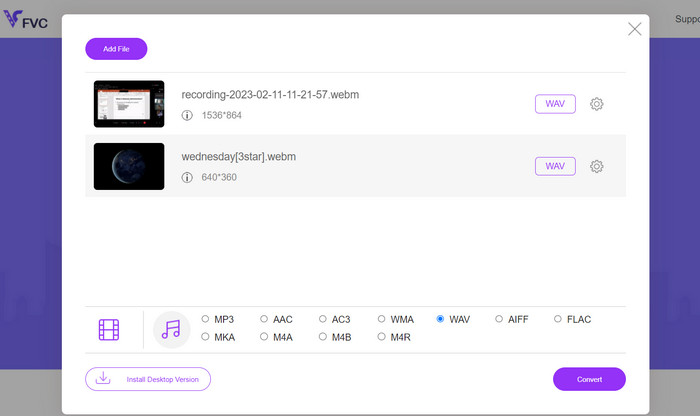
Step 2. Tick on the Add Files to Convert button to upload your WAV file from your local storage. Next, select WAV as the desired output format. Optionally, adjust additional settings such as bitrate, resolution, or audio quality according to your preferences.
Step 3. Smash the Convert button to initialize the process of conversion. Once the conversion is complete, the output files will be downloaded automatically and stored in your computer folder.
파트 3. FFmpeg를 사용하여 WebM을 WAV로 변환
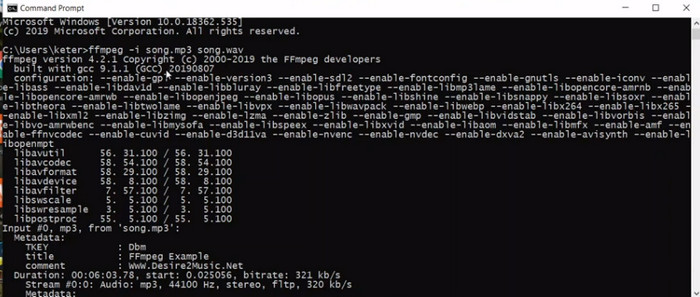
FFmpeg는 WebM을 WAV로 쉽게 변환할 수 있는 다목적 명령줄 도구입니다. 강력한 멀티미디어 프레임워크인 FFmpeg는 오디오 및 비디오 변환, 조작 및 스트리밍을 포함한 광범위한 기능으로 유명합니다. FFmpeg를 사용하면 명령줄 인터페이스를 활용하여 WebM 파일을 고품질의 압축되지 않은 오디오로 알려진 WAV 형식으로 변환하는 등 다양한 작업을 수행할 수 있습니다.
Step 1. Download and install FFmpeg on your system following the official documentation for your specific operating system.
Step 2. Launch a Command Prompt (Windows) or Terminal (macOS/Linux) to access the command-line interface. Execute the Conversion Command: Use the following command structure to convert your WebM file to WAV: ffmpeg -i input.webm output.wav.
Step 3. Replace input.webm with the path and filename of your WebM file and output.wav with the desired filename and location for your converted WAV file.
Step 4. Press Enter to execute the command and initiate the WebM to WAV conversion process. That is how FFmpeg converts WebM to WAV.
추가 읽을거리:
Best WebM to MKV Converters You Must Use to Convert Quickly
FLAC과 WAV를 손쉽게 변환하는 방법 (무료 & 유료)
Part 4. 도입 프로그램 비교
아래 비교표를 통해 귀하의 요구 사항에 가장 적합한 변환기를 결정하려면 특정 요구 사항, 선호 사항 및 기술 전문성 수준을 고려하십시오.
| 측면 | 비디오 컨버터 궁극 | 무료 비디오 변환기 온라인 | FFmpeg |
| 사용자 지정 옵션 | 출력 설정을 사용자 정의할 수 있습니다. | 제한된 사용자 지정 옵션 | 광범위한 사용자 정의 옵션 |
| 변환 속도 | 효율적이고 빠른 변환 | 인터넷 연결에 따라 다름 | 시스템 성능에 따라 다름 |
| 일괄 변환 | 파일 일괄 변환 지원 | 파일 일괄 변환 지원 | 명령 실행에 따라 다름 |
| 플랫폼 간 호환성 | Windows, macOS 및 Linux에서 사용 가능 | 모든 웹 브라우저에서 액세스 가능 | 다양한 플랫폼에서 사용 가능 |
| 오디오 품질 보존 | 고품질 오디오 변환 보장 | 품질은 설정에 따라 다를 수 있습니다. | 오디오 품질 유지 |
5부. WebM을 WAV로 변환에 대한 FAQ
변환하는 동안 오디오 설정을 사용자 정의할 수 있습니까?
Video Converter Ultimate 및 FFmpeg는 광범위한 사용자 지정 옵션을 제공하므로 샘플 속도, 비트 전송률 등과 같은 매개 변수를 조정할 수 있습니다. Free Video Converter Online에는 사용자 지정 옵션이 제한되어 있을 수 있습니다.
WebM을 WAV로 변환하는 데 너무 오래 걸립니까?
변환 시간은 파일 크기, 컴퓨터 또는 인터넷 연결 속도(온라인 도구의 경우), 변환기의 효율성 등 다양한 요인에 따라 달라집니다. 일반적으로 변환 프로세스는 비교적 빠릅니다.
모든 운영 체제에서 WebM을 WAV로 변환할 수 있습니까?
예, FVC Video Converter Ultimate 및 FFmpeg와 같은 변환기는 Windows, macOS 및 Linux를 포함한 여러 운영 체제에서 사용할 수 있으므로 다양한 플랫폼에서 호환성을 보장합니다.
결론
With the right converter at your disposal, you can effortlessly convert WebM to WAV, unlocking improved audio quality, versatility, and compatibility. Enjoy the benefits of pristine audio and explore new possibilities with your converted files.
-
 놓치지 말아야 할 최고의 WMV 변환기 3가지
 WebM 파일을 WMV 파일로 변환하는 방법을 찾고 계십니까? 우리는 오늘 시장에서 몇 가지 유명한 변환기를 시도하고 그 중에서 가장 사용하기 쉽고 사용하기 쉬운 것을 선택했습니다.
-
 몰입형 오디오 재생을 위해 MKV를 WAV로 원활하게 변환
 뛰어난 음질을 제공하는 최고의 MKV to WAV 변환기를 발견하십시오. 편견 없는 리뷰를 읽고 오디오 파일을 손쉽게 변환할 수 있는 완벽한 도구를 찾으십시오.
-
 WAV 플레이어 – Android, iPhone, PC 및 Mac 용 상위 5 개의 WAV 플레이어 앱
 Android 폰에서 WAV 파일을 재생하는 방법은 무엇입니까? 어떤 플레이어가 WAV를 재생할 수 있습니까? 이 게시물은 Android, iPhone, Mac 및 PC 용 최고의 무료 WAV 플레이어 5 개를 공유합니다.
