


 비디오 컨버터 궁극
 스크린 레코더
 비디오 수리
 안전한 다운로드
VOB 압축: 온라인에서 무료로 VOB 파일 크기를 쉽게 줄이는 방법
VOB 파일은 DVD 디스크의 동영상 데이터 파일로, 보통 DVD의 루트에 있는 VIDEO_TS 폴더에 저장됩니다. 하지만 VOB 파일은 용량이 매우 큰 경우가 많기 때문에, 작은 저장 장치에 보관하거나 이메일로 전송하려면 VOB 파일 크기를 줄여야 합니다. 따라서 VOB 파일을 압축하거나 VOB 파일을 MP4 형식으로 압축 변환하고 싶다면, 아래 내용을 계속 읽고 가장 좋은 해결 방법을 확인해 보세요.

1 부분. VOB 파일을 MP4 온라인으로 압축하고 변환하는 가장 쉬운 방법
자신의 컴퓨터에 프로그램을 설치하고 싶지 않다면, 여러 웹사이트에서 VOB 동영상 파일을 업로드하여 온라인으로 압축할 수 있습니다. 이들 서비스 중 일부는 회원 가입을 요구하거나 동영상에 워터마크를 삽입하기도 합니다. 여기서는 영상 파일만 있으면 완전히 무료로 사용할 수 있는 Free Video Compressor를 추천합니다. 동영상을 업로드하고 몇 가지 옵션만 조정하면 바로 사용 가능합니다. VOB 동영상 압축뿐 아니라 MP4, AVI, WMV, MOV는 물론 다양한 희귀 동영상 형식도 함께 압축할 수 있습니다.
1단계. 온라인 동영상 압축 웹사이트로 이동합니다.
아래 링크를 통해 올바른 위치로 이동합니다.
2단계. 파일을 업로드합니다.
Add Files to Compress 버튼을 찾은 뒤 클릭하세요. 이 도구를 처음 사용할 때는 런처를 한 번 설치해야 합니다. 그런 다음 컴퓨터에서 VOB 파일을 선택하고 Open을 눌러 업로드합니다.

3단계. 압축 옵션을 조정합니다.
파일을 더 작게 만들려면 비디오 크기를 변경하거나 해상도를 조정하거나 비트 전송률을 조정하거나 다른 비디오 형식으로 변환하는 등의 작업을 수행할 수 있습니다. 예를 들어 VOB 파일을 압축하고 MP4 형식으로 변환하여 크기를 줄일 수 있습니다. 파일의.

4단계. 이제 Compress 버튼을 클릭하여 압축을 시작합니다. 파일 압축이 완료되면, 도구가 자동으로 압축된 파일을 컴퓨터에 저장합니다.

게다가 이 온라인 도구를 사용하여 다른 비디오 압축 문제를 해결할 수 있습니다. 다음 기사를 확인하십시오.
파트 2. VOB 파일을 더 작게 만들기 위한 두 개의 추가 온라인 비디오 압축기
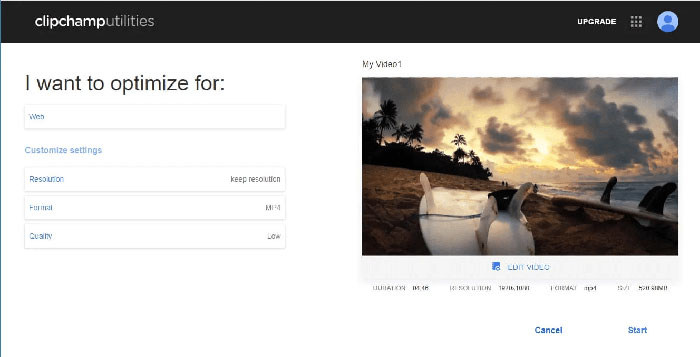
Clipchamp
Clipchamp는 동영상 파일을 변환, 편집 및 압축할 수 있는 웹 기반 동영상 편집 도구입니다. VOB 파일을 압축하기 전에 형식(MP4, MOV 또는 AVI), 비디오 파일 크기 등을 선택할 수 있습니다. 압축이 끝나면 파일을 컴퓨터에 다운로드하거나 다른 사람과 공유할 수 있습니다. Clipchamp 무료 버전은 압축한 동영상의 시작 및 끝 프레임에 워터마크를 표시합니다. 워터마크를 없애고 싶다면 서비스를 구매해야 합니다.
Clideo
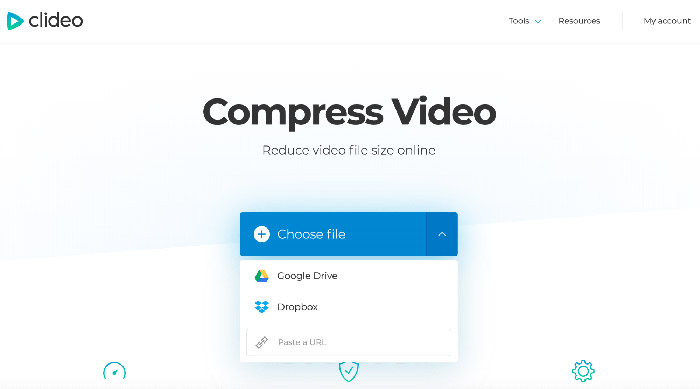
Clideo는 동영상 크기를 쉽게 줄일 수 있는 또 다른 온라인 동영상 편집 앱입니다. 컴퓨터, Google 드라이브, Dropbox 또는 URL을 통해 VOB 파일을 업로드할 수 있습니다. 그러면 Clideo가 모든 압축 매개변수를 자동으로 구성합니다. 그러나 최대 500MB의 파일은 무료입니다. 파일이 더 큰 경우 $6 월 사용료로 Clideo Pro로 업그레이드해야 합니다.
3부. VOB 압축 FAQ
Mac에서 VOB 파일을 압축하는 방법은 무엇입니까?
위에서 언급한 온라인 도구는 모든 운영 체제에서 작동하므로 그 중 하나를 사용하여 Mac에서 VOB 파일을 더 작게 만들 수 있습니다.
이메일용 VOB 비디오를 어떻게 압축합니까?
이메일용 동영상 변환에는 여러 가지 실용적인 방법이 있으며, 더 자세한 내용은 이메일용 동영상 압축 방법을 참고해 보세요.
품질을 잃지 않고 VOB를 MP4로 변환하려면 어떻게 해야 합니까?
Free Online Video Converter와 같은 온라인 VOB–MP4 변환기를 사용해 볼 수 있습니다. 이 도구를 사용하면 VOB 파일을 화질 저하 없이 빠르게 MP4로 변환할 수 있습니다. 또한 손쉽게 MP4를 VOB로 변환하는 기능도 제공합니다.
결론
이것은 VOB 파일 압축에 대한 최고의 선택이었습니다. 위의 플랫폼 중 하나를 사용하여 만족스러운 VOB 파일 크기를 얻을 수 있기를 바랍니다. 어떤 플랫폼이 마음에 들었고 그 이유는 무엇입니까? 아래 의견 섹션에서 자유롭게 의견을 공유하십시오.
-
 Windows, Mac, iPhone 및 Android에서 MOV 파일을 압축하는 방법
 이 문서에서는 휴대폰이나 컴퓨터에서 QuickTime MOV 비디오를 압축하는 방법을 자세히 보여줍니다. MOV 비디오가 너무 커서 보내거나 공유하거나 저장할 수없는 경우 여기에서 4 가지 실행 가능한 솔루션을 얻을 수 있습니다.
-
 품질 저하없이 더 작은 파일 크기를 얻기 위해 AVI 파일 압축
 컴퓨터에서 AVI 파일을 압축하는 3 가지 무료 방법을 읽고 얻으십시오. 품질 저하없이 AVI 비디오의 파일 크기를 줄일 수 있습니다. AVI 비디오 크기는 상상하는만큼 작을 수 있습니다.
-
 GIF 압축 – 애니메이션 GIF를 작은 파일 크기로 압축하는 방법
 다음은 컴퓨터 또는 휴대폰에서 GIF를 압축하는 2 가지 쉬운 방법입니다. FVC Free Online Video Compressor 및 Photoshop을 사용하면 다양한 측면에서 GIF 파일 크기를 줄일 수 있습니다.
